


THE BROADBAND RANT SINK, Rant about anything and everything here!
THE BROADBAND RANT SINK, Rant about anything and everything here!
|
|
 Mar 29 2007, 11:50 PM Mar 29 2007, 11:50 PM
Return to original view | Post
#1
|
 
Junior Member
182 posts Joined: Jan 2007 From: Kepong 
|
5th April?!! Grrr!!
|
|
|
|
|
|
Apr 20 2007, 08:31 AM
Return to original view | Post
#2
|
|
Junior Member
182 posts Joined: Jan 2007 From: Kepong
|
After 20 days of frequent disconnections for around 20-50 mins (ADSL fully lit) are finally over!! Surfing international sites are faster now.
 But will still get the frequent disconnections (ADSL blinking) around 8PM - 12AM though. |
|
|
May 7 2007, 08:32 PM
Return to original view | Post
#3
|
|
Junior Member
182 posts Joined: Jan 2007 From: Kepong
|
Monday, May 07, 2007 ANNOUNCEMENT We regret to inform our customers that TM will be performing system maintenance to upgrade our Multimedia Customer Management and Billing System (MCMB) on Tuesday, 8th May 2007, from 12.00 a.m. till 7.00 a.m. As a result, customers may not be able to reach our Customer Interaction Centre at 1-300-88-9515 and 1-300-88-1515 during this time. Customers may also experience some service interruptions to MCMB Customer Center, MCMB Selfcare, TM’s Online Services including tmnet global roaming, online anti-virus for dial-up and tmnet streamyx, Corporate Roaming, MIPS, Prepaid IMS including tmnet hotspot and HyppTalk, and TM’s micropayment service during the specified time frame. However, all Internet authentication processes will not be affected. The services will be back to normal after the said period. We apologize for any inconvenience caused, whilst at the same time, we would like to assure you that we are upgrading our service to serve you better. Thank You More like upgrading the P2P throttling system.  |
|
|
Jun 19 2007, 05:52 PM
Return to original view | Post
#4
|
|
Junior Member
182 posts Joined: Jan 2007 From: Kepong
|
Testing time...
I dc my modem again and get the IP 60.51.xx.xx. Result= Loading int'l sites = still very slow....and local site too.. CODE Pinging forum.lowyat.net [202.190.197.144] with 32 bytes of data: Reply from 202.190.197.144: bytes=32 time=983ms TTL=55 Reply from 202.190.197.144: bytes=32 time=970ms TTL=55 Reply from 202.190.197.144: bytes=32 time=981ms TTL=55 Reply from 202.190.197.144: bytes=32 time=979ms TTL=55 Ping statistics for 202.190.197.144: Packets: Sent = 4, Received = 4, Lost = 0 (0% loss), Approximate round trip times in milli-seconds: Minimum = 970ms, Maximum = 983ms, Average = 978ms C:\Documents and Settings\Raymond> After rcs and get the ip 60.53.xx.xx CODE Pinging forum.lowyat.net [202.190.197.144] with 32 bytes of data: Reply from 202.190.197.144: bytes=32 time=16ms TTL=55 Reply from 202.190.197.144: bytes=32 time=14ms TTL=55 Reply from 202.190.197.144: bytes=32 time=15ms TTL=55 Reply from 202.190.197.144: bytes=32 time=14ms TTL=55 Ping statistics for 202.190.197.144: Packets: Sent = 4, Received = 4, Lost = 0 (0% loss), Approximate round trip times in milli-seconds: Minimum = 14ms, Maximum = 16ms, Average = 14ms C:\Documents and Settings\Raymond> See the difference.  This post has been edited by reddevils500: Jun 19 2007, 05:52 PM |
|
|
Jul 18 2007, 12:52 AM
Return to original view | Post
#5
|
|
Junior Member
182 posts Joined: Jan 2007 From: Kepong
|
::.. Download Stats ..:::
Download Connection is:: 451 Kbps about 0.5 Mbps (tested with 579 kB) Download Speed is:: 55 kB/s Tested From:: http://testmy.net/ (Server 1) Test Time:: 2007/07/17 - 9:49am Bottom Line:: 8X faster than 56K 1MB Download in 18.62 sec Tested from a 579 kB file and took 10.516 seconds to complete Download Diagnosis:: May need help : running at only 52.69 % of your hosts average (138.105) D-Validation Link:: http://testmy.net/stats/id-ORTKBJP7A User Agent:: Mozilla/5.0 (Windows; U; Windows NT 5.1; en-US; rv:1.8.1.4) Gecko/20070515 Firefox/2.0.0.4 [!] |
|
|
Jul 30 2007, 07:13 PM
Return to original view | Post
#6
|
|
Junior Member
182 posts Joined: Jan 2007 From: Kepong
|
At first I got the ip 60.53 until it suddenly disconnected at 1am something. And gave me a quite slow ip 60.48!
No use to get the different ip between 1am - 8:59am as the ip will remains as 60.48. WHY MUST YOU DO THIS TO ME, TMnutz?!! |
|
|
|
|
|
Aug 30 2007, 03:29 PM
Return to original view | Post
#7
|
|
Junior Member
182 posts Joined: Jan 2007 From: Kepong
|
Your connection is: 667 Kbps or 0.7 Mbps
You downloaded at: 81 kB/s You are running: 12 times faster than 56K and can download 1 megabyte in 12.64 second(s) Member Ident: CompID:555098712713 Test Time:: 2007/08/30 - 12:25am |
|
|
Aug 31 2007, 07:58 PM
Return to original view | Post
#8
|
|
Junior Member
182 posts Joined: Jan 2007 From: Kepong
|
Testing ip 60.48.xx.xx
Mbps 1.0 :::.. Download Stats ..::: Download Connection is:: 444 Kbps about 0.4 Mbps (tested with 579 kB) Download Speed is:: 54 kB/s Tested From:: http://testmy.net/ (Main) Test Time:: 2007/08/31 - 4:54am Bottom Line:: 8X faster than 56K 1MB Download in 18.96 sec Tested from a 579 kB file and took 10.687 seconds to complete Download Diagnosis:: Looks Great : 4.96 % faster than the average for host (net.my) D-Validation Link:: http://testmy.net/stats/id-KSWG7UZ6L avg net.my (423 Kbps) |
|
|
Sep 13 2007, 11:08 AM
Return to original view | Post
#9
|
|
Junior Member
182 posts Joined: Jan 2007 From: Kepong
|
CODE Pinging yahoo.com [216.109.112.135] with 32 bytes of data: Reply from 216.109.112.135: bytes=32 time=3750ms TTL=49 Reply from 216.109.112.135: bytes=32 time=1814ms TTL=48 Reply from 216.109.112.135: bytes=32 time=781ms TTL=48 Reply from 216.109.112.135: bytes=32 time=377ms TTL=48 Ping statistics for 216.109.112.135: Packets: Sent = 4, Received = 4, Lost = 0 (0% loss), Approximate round trip times in milli-seconds: Minimum = 377ms, Maximum = 3750ms, Average = 1680ms Pinging 202.188.0.133 with 32 bytes of data: Reply from 202.188.0.133: bytes=32 time=3813ms TTL=248 Reply from 202.188.0.133: bytes=32 time=2749ms TTL=248 Reply from 202.188.0.133: bytes=32 time=1106ms TTL=248 Reply from 202.188.0.133: bytes=32 time=702ms TTL=248 Ping statistics for 202.188.0.133: Packets: Sent = 4, Received = 4, Lost = 0 (0% loss), Approximate round trip times in milli-seconds: Minimum = 702ms, Maximum = 3813ms, Average = 2092ms DAMN That SLOWMYX screwed up the DNS. Yesterday at 5pm, the pinging was great, around 55ms. Now look at it. |
|
|
Sep 16 2007, 07:08 PM
Return to original view | Post
#10
|
|
Junior Member
182 posts Joined: Jan 2007 From: Kepong
|
CODE Pinging 202.188.0.133 with 32 bytes of data: Reply from 202.188.0.133: bytes=32 time=15ms TTL=248 Reply from 202.188.0.133: bytes=32 time=15ms TTL=248 Reply from 202.188.0.133: bytes=32 time=16ms TTL=248 Reply from 202.188.0.133: bytes=32 time=16ms TTL=248 Ping statistics for 202.188.0.133: Packets: Sent = 4, Received = 4, Lost = 0 (0% loss), Approximate round trip times in milli-seconds: Minimum = 15ms, Maximum = 16ms, Average = 15ms Finally, back to normal after the 4 digits of DOOM. Yesterday it was 2000 - 3000ms. My worst nightmare.  |
|
|
Sep 16 2007, 07:39 PM
Return to original view | Post
#11
|
|
Junior Member
182 posts Joined: Jan 2007 From: Kepong
|
QUOTE(arjen_robben81 @ Sep 16 2007, 07:31 PM) help me to ping this 116.206.123.31 thanks a lot!  CODE Pinging 116.206.123.31 with 32 bytes of data: Reply from 116.206.123.31: bytes=32 time=123ms TTL=50 Reply from 116.206.123.31: bytes=32 time=105ms TTL=50 Reply from 116.206.123.31: bytes=32 time=93ms TTL=50 Reply from 116.206.123.31: bytes=32 time=97ms TTL=50 Ping statistics for 116.206.123.31: Packets: Sent = 4, Received = 4, Lost = 0 (0% loss), Approximate round trip times in milli-seconds: Minimum = 93ms, Maximum = 123ms, Average = 104ms Quite ok.  |
|
|
Sep 19 2007, 02:39 AM
Return to original view | Post
#12
|
|
Junior Member
182 posts Joined: Jan 2007 From: Kepong
|
Mine can load google and yahoo but as slow as snail.
 |
|
|
Sep 24 2007, 11:34 PM
Return to original view | Post
#13
|
|
Junior Member
182 posts Joined: Jan 2007 From: Kepong
|
60.48
:::.. Download Stats ..::: Download Connection is:: 15 Kbps about 0 Mbps (tested with 97 kB) Download Speed is:: 2 kB/s Tested From:: http://testmy.net/ (Main) Test Time:: 2007/09/24 - 8:28am Bottom Line:: 0X faster than 56K 1MB Download in 512 sec Tested from a 97 kB file and took 52.344 seconds to complete Download Diagnosis:: May need help : running at only 3.46 % of your hosts average (net.my) avg net.my (434 Kbps) 60.51 :::.. Download Stats ..::: Download Connection is:: 443 Kbps about 0.4 Mbps (tested with 386 kB) Download Speed is:: 54 kB/s Tested From:: http://testmy.net/ (Main) Test Time:: 2007/09/24 - 8:30am Bottom Line:: 8X faster than 56K 1MB Download in 18.96 sec Tested from a 386 kB file and took 7.14 seconds to complete Download Diagnosis:: Looks Great : 2.07 % faster than the average for host (net.my) avg net.my (434 Kbps) |
|
|
|
|
|
Oct 2 2007, 12:58 PM
Return to original view | Post
#14
|
|
Junior Member
182 posts Joined: Jan 2007 From: Kepong
|
TMNutz SLOWMYX screwed up AGAIN!!
|
|
|
Oct 21 2007, 01:37 PM
Return to original view | Post
#15
|
|
Junior Member
182 posts Joined: Jan 2007 From: Kepong
|
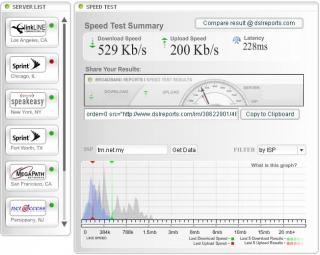
Test on 1mb package |
|
|
Nov 20 2007, 11:11 PM
Return to original view | Post
#16
|
|
Junior Member
182 posts Joined: Jan 2007 From: Kepong
|
CODE Pinging 202.188.0.133 with 32 bytes of data: Reply from 202.188.0.133: bytes=32 time=821ms TTL=248 Reply from 202.188.0.133: bytes=32 time=827ms TTL=248 Reply from 202.188.0.133: bytes=32 time=832ms TTL=248 Reply from 202.188.0.133: bytes=32 time=829ms TTL=248 Ping statistics for 202.188.0.133: Packets: Sent = 4, Received = 4, Lost = 0 (0% loss), Approximate round trip times in milli-seconds: Minimum = 821ms, Maximum = 832ms, Average = 827ms Pinging forum.lowyat.net [202.190.197.145] with 32 bytes of data: Reply from 202.190.197.145: bytes=32 time=810ms TTL=55 Reply from 202.190.197.145: bytes=32 time=813ms TTL=55 Reply from 202.190.197.145: bytes=32 time=822ms TTL=55 Reply from 202.190.197.145: bytes=32 time=830ms TTL=55 Ping statistics for 202.190.197.145: Packets: Sent = 4, Received = 4, Lost = 0 (0% loss), Approximate round trip times in milli-seconds: Minimum = 810ms, Maximum = 830ms, Average = 818ms What the hell TMNut Screamyx!! |
|
|
Dec 9 2007, 01:25 AM
Return to original view | Post
#17
|
|
Junior Member
182 posts Joined: Jan 2007 From: Kepong
|
CODE Pinging 202.188.0.133 with 32 bytes of data: Reply from 202.188.0.133: bytes=32 time=479ms TTL=248 Reply from 202.188.0.133: bytes=32 time=459ms TTL=248 Reply from 202.188.0.133: bytes=32 time=445ms TTL=248 Reply from 202.188.0.133: bytes=32 time=442ms TTL=248 Ping statistics for 202.188.0.133: Packets: Sent = 4, Received = 4, Lost = 0 (0% loss), Approximate round trip times in milli-seconds: Minimum = 442ms, Maximum = 479ms, Average = 456ms Bravo, TMNut! |
|
|
Dec 15 2007, 06:41 PM
Return to original view | Post
#18
|
|
Junior Member
182 posts Joined: Jan 2007 From: Kepong
|
:::.. Download Stats ..:::
Download Connection is:: 446 Kbps about 0.4 Mbps (tested with 386 kB) Download Speed is:: 54 kB/s Tested From:: http://testmy.net/ (Main) Test Time:: 2007/12/15 - 3:39am Bottom Line:: 8X faster than 56K 1MB Download in 18.96 sec Tested from a 386 kB file and took 7.093 seconds to complete Download Diagnosis:: Looks Great : 13.78 % faster than the average for host (39.91) D-Validation Link:: http://testmy.net/stats/id-SYHP5T7Z0 User Agent:: Mozilla/5.0 (Windows; U; Windows NT 5.1; en-US; rv:1.8.1.4) Gecko/20070515 Firefox/2.0.0.4 MEGAUPLOAD 2.0 [!] |
|
|
Dec 24 2007, 09:11 PM
Return to original view | Post
#19
|
|
Junior Member
182 posts Joined: Jan 2007 From: Kepong
|
Slow surfing int'l sites today.
|
|
|
Dec 28 2007, 10:04 PM
Return to original view | Post
#20
|
|
Junior Member
182 posts Joined: Jan 2007 From: Kepong
|
Pinging at 10:00PM
CODE Pinging 202.188.0.133 with 32 bytes of data: Reply from 202.188.0.133: bytes=32 time=89ms TTL=248 Reply from 202.188.0.133: bytes=32 time=87ms TTL=248 Reply from 202.188.0.133: bytes=32 time=89ms TTL=248 Reply from 202.188.0.133: bytes=32 time=83ms TTL=248 Ping statistics for 202.188.0.133: Packets: Sent = 4, Received = 4, Lost = 0 (0% loss), Approximate round trip times in milli-seconds: Minimum = 83ms, Maximum = 89ms, Average = 87ms At 5:00PM, it was around 10ms. At 10:00PM, the signs of lag begin. I predict that, later around 12AM, it will be around 500ms.  This post has been edited by reddevils500: Dec 28 2007, 10:07 PM |
|
Topic ClosedOptions
|
| Change to: |  0.0212sec 0.0212sec
 0.47 0.47
 7 queries 7 queries
 GZIP Disabled GZIP Disabled
Time is now: 7th December 2025 - 08:00 AM |
 Quote
Quote