Welcome Guest ( Log In | Register )

Outline · [ Standard ] · Linear+

 AMD Radeonβ„’ Discussion V15, Radeon Software 20.10.1

views
     
zuozi
post Nov 4 2022, 02:12 PM

Regular
******
Senior Member
1,266 posts

Joined: Oct 2009
Every new hardware release are excited πŸ˜†
When i see the price for top of range damm πŸ™‚

Right now I'm still happy with my current poor man GPU
nitro+6700 XT,
wife nitro+ 6600 XT

The only reason i keep using AMD products for now because of theirs AMD link , yeah the software not perfect always unexpected error πŸ™‚ need to configure my fan curve again and again πŸ˜‚

Gambateh AMD πŸ˜†
zuozi
post Nov 4 2022, 02:19 PM

Regular
******
Senior Member
1,266 posts

Joined: Oct 2009
QUOTE(Acid_RuleZz @ Oct 27 2022, 11:30 AM)
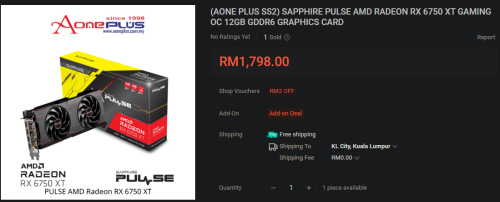
Sapphire Pulse 6750 XT @Rm1.8k - Link
user posted image
Asus Dual 6650 XT @1.5k - Link
user posted image
hmm.gifΒ  hmm.gifΒ  hmm.gif
*
If can go with nitro+ series, the cooler is beefy, rooms temperature 30c , GPU temp 36c 783 RPM at idle, hard to reach over 75c during gaming session, if fps limited 70-80 barely reach 60c under air conditioner 24c

If you go with 6750 need 2x 8pin , even official also fail to represent still saying 1x8pin 1x6 pin...

This post has been edited by zuozi: Nov 4 2022, 02:21 PM
zuozi
post Nov 4 2022, 02:37 PM

Regular
******
Senior Member
1,266 posts

Joined: Oct 2009
QUOTE(Acid_RuleZz @ Nov 4 2022, 02:31 PM)
Yes. I was actually aiming for that. Last week the price was 1.8k now up to 1.9k.
*
The card is included GPU support bracket but the way to secure either like or hate it πŸ˜‚

If you don't need Fancy dlss in 1440p this card is sufficient i mean if you do tinkering your game graphics settings etc for more fps/ quieter/lower heat/πŸ˜†
zuozi
post Jun 29 2023, 09:22 PM

Regular
******
Senior Member
1,266 posts

Joined: Oct 2009
QUOTE(wyh @ Jun 29 2023, 09:15 PM)
does RX6600 a good buy ?

casual gaming, probably 1 hour per day, 1080 monitor saja.
*
Wife using 6600 XT sapphire nitro+ 1080p Howard something game high medium setting playable frame per second around 60 to 80
zuozi
post Jun 29 2023, 09:34 PM

Regular
******
Senior Member
1,266 posts

Joined: Oct 2009
QUOTE(wyh @ Jun 29 2023, 09:26 PM)
haha i'm using rx580 now, and my wife is playing Hogwarts at low with 1080p

can't play last of us , thats why needed a new card.
*
6600 XT should be no issues unless you need 12gb vram can consider 6700 xt used .
zuozi
post Apr 18 2024, 11:50 PM

Regular
******
Senior Member
1,266 posts

Joined: Oct 2009
QUOTE(Maxieos @ Apr 18 2024, 11:09 PM)
Anyone know which graphic card brand and model the fan does not run if idle like below 40-43'c ?
it's quiet or silent and can adjust with MSI burn to turn off the fan even on 50'c ?
For RX 6600 and below.
*
Don't worry as long your is AMD card and driver installed by default the fan setting is configure as zero RPM during idler only spin if watching YouTube or video etc after specific temperature

I have some used RX 580 card for TV steam link purpose also supported not sure if hd 7870 support or not since stock fan already long dead replace with 12 CFM double sided tape DIY thing and no longer use.

My wife and me still using 6600xt and 6750xt nitro series from sapphire but still during idle+current weather +without ac is turned on+room temperature 30c GPU can reach 49c will only started to spin above 50c+ at idler with the help of front intake 3 12 CFM statics pressure fan

Most of then time the fan barely reaching 1k RPM mostly below 900 with the help room temperature 26c with AC turned on can maintain GPU temp around 49c to 59c unless intensive game that can reach up to 65c barely hit 70c

Last year AMD link still available for smart phone for monitoring the GPU temp and fan purpose now they already obsolete no longer available due to blah blah blah reason and i quite like the idea but just sadge

All the AMD setup i use are stock setting didn't sengaja go oc or whatever everything is automatically

The temperature i show only apply to sapphire nitro series i have not sure for other GPU may have slightly different temp different due to different GPU cooler design

zuozi
post Apr 19 2024, 11:07 AM

Regular
******
Senior Member
1,266 posts

Joined: Oct 2009
QUOTE(Maxieos @ Apr 19 2024, 12:38 AM)
Never though will have so many reply so quickly , but the problem is I do not know which RX model or series having this function.
It's more on Pin connector.

Some RX only have  yellow and black as 2 pin , then it's not possible to turn off the fan.Some have 3pin fan and some 4pin.If 4 pin it's possible but also need to check whether the card bios allow to turn off the fan.

zuozi some old card having 3-4pin and more flexible compare to current new gpu.
1024kbps as I know if gpu with 2 pin fan power connector cannot be set.

Just idle , 1080p youtube without fan running where temperature is around 38'c only.
*
I have some left over card no longer use HD 7870 and r7 260 something also from sapphire both using 4pin , Rx 580 extra fan for pulse i have also from sapphire all i just check is 4pin

except the r7 260 i have the fan less than a year already dead because is a very entry level quality build πŸ™‚ so just stick with 12cfm fan and control by motherboard 3 or 4pin depends what i have left over πŸ˜‚

all 2pin also can speed controlled more like old ceiling fan concepts more like light dimmer concept just like old power supply mostly have only 2 pin the fan speed is controlled by this way or old day's 4 pin molex fan with optional controller at the pack of casing PCI slot
So i guess depends the GPU board have the controller or not for the software to control

Temperature part for GPU depends your casing airflow and room temperature only lowest temp card i have probably 6600xt compared to RX 580 and RX 6750
zuozi
post Apr 19 2024, 10:05 PM

Regular
******
Senior Member
1,266 posts

Joined: Oct 2009
QUOTE(Maxieos @ Apr 19 2024, 08:47 PM)
If you understand what i mean , those Mini 2pin is not possible to set to off.Only 3 speed control set by bios or own fan.You can't do anything even you plug out the mini 2 pin into a fan controller , either 30%,50%,100% or 5,12,24 only.Anything lower it'll not run.

So do you know a any fan controller a way to force set a custom fan speed like 20% 500rpm for idle ? I don't mind buying 1 fan speed device controller if can drop to 15% 300rpm.
*
Yes i understand you but the controller i mentioned just example is available they do exit for commerical but probably not available for consumer


zuozi
post Apr 19 2024, 10:13 PM

Regular
******
Senior Member
1,266 posts

Joined: Oct 2009
QUOTE(1024kbps @ Apr 19 2024, 09:56 PM)
2/3 pins fan have minimum start up voltage, some start at 5v, high powered one usually 7v,
and 2/3 pins fan can be controlled via voltage, the only difference between them is 3rd pin is for reporting tachometer/RPM to mobo or other fan controller.

4pin pwm can be controller via voltage and pwm too.
you can have 12v 6000rpm
or 7v 4500 rpm, for example.

to override the gpu fan voltage you can use psu 7v instead of original 12v, so your fan will operate probably 25% lower speed
https://www.aliexpress.com/i/1005004238542471.html

or if you can get one of the speed reducer from nocuta https://www.amazon.sg/dp/B00650P2ZC?flyings...emc_s_m_5_i_atc
sweat.gif  sweat.gif
*
Yes very long long time ago my 3 pin fan only 2 wire use for PSU replacement fan psu can only plug in for 2 pin the speed and airflow just too low so i loop another together leave black wire alone results is much more better than single red wire like you said probably using voltage to operate or trick the speed if you ask me how possibility i don't know but is just work airflow definitely increase a lot more than using just red and black


Change to:
| Lo-Fi Version
0.1079sec    0.76    7 queries    GZIP Disabled
Time is now: 9th December 2025 - 10:05 AM