


AMD Radeon™ Discussion V15, Radeon Software 20.10.1
AMD Radeon™ Discussion V15, Radeon Software 20.10.1
|
|
 Jul 9 2019, 02:12 PM Jul 9 2019, 02:12 PM
Return to original view | Post
#1
|
 
Senior Member
5,542 posts Joined: Dec 2006  
|
i searched 5700 xt in lazada lowest is RM1859, is it reference card will be cheaper than non-reference?
|
|
|
|
|
|
Feb 25 2020, 07:44 AM
Return to original view | Post
#2
|
|
Senior Member
5,542 posts Joined: Dec 2006
|
planning to get the red devil 5700xt since it seems like it has the best cooling and price vs others
what is the power consumption recommended for 5700xt when playing games? currently i only have 550w 80+ gold psu i dont think it is enough to power the card i'm not going to overclock or run water cooling, just plug and play |
|
|
Feb 25 2020, 05:52 PM
Return to original view | IPv6 | Post
#3
|
|
Senior Member
5,542 posts Joined: Dec 2006
|
QUOTE(chocobo7779 @ Feb 25 2020, 01:12 PM) More than enough - in fact I'm running a 5700XT with a Seasonic 550W PSU Wow... No problem even at full load? I checked in power colour website it started 700w    I wonder is the driver stable now? I see a lot of review with driver crashing, wonder if it is fixed now |
|
|
Feb 25 2020, 07:07 PM
Return to original view | IPv6 | Post
#4
|
|
Senior Member
5,542 posts Joined: Dec 2006
|
QUOTE(nrw @ Feb 25 2020, 07:02 PM) Those calculators are silly. Not bad, gonna get it next month thenFirstly they take the absolute maximum of every component at the same time, which you will never achive unless you run specific prime95 and furmark or w/e at the same time. Secondly they take crazy values for fans and (hard)drives. Modern units consume much less. E.G. I've got 10 fans in my case and they suck well short of 10W in total with the silent profile I'm using. The calc would probably tell me something like 50-60W. Thirdly if you have a quality PSU with modern topology it will have no issues with transient loads and can even deal with 110% of the rated 550W for a short time. Not that you ever gonna end up there unless you do crazy stuff. Driver is a lottery lah, with a good card you might have 0 issues. You end up with a bad card try undervolting(/downclocking) and hope all is fine. |
|
|
Feb 26 2020, 07:36 AM
Return to original view | Post
#5
|
|
Senior Member
5,542 posts Joined: Dec 2006
|
nowadays GPU and CPU is really efficient in power consumption, can hold off my psu upgrade for a while i guess
 |
|
|
Apr 21 2020, 07:27 PM
Return to original view | Post
#6
|
|
Senior Member
5,542 posts Joined: Dec 2006
|
my Red Devil 5700 XT fan is running at full speed when i start my PC just now, and there are no heavy application or games running at background, yesterday it is still doing fine running at variable speed
now i restarted still the same, and the Radeon software seems to be unable to detect my fan speed, is it the fan sensor faulty? the PowerColor Devil Zone software also cant detect the fan speed 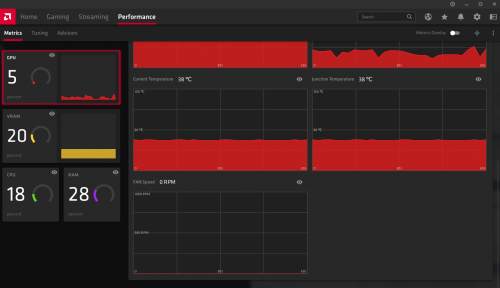 just opened the case and checked, only one of the fan is spinning, and seems like spinning at full speed, the other 2 fan is not spinning, i tried switch to silent mode, shutdown and restart it is still the same, only 1 fan spinning at full speed  This post has been edited by amduser: Apr 21 2020, 07:57 PM |
|
|
|
|
|
Apr 21 2020, 08:21 PM
Return to original view | Post
#7
|
|
Senior Member
5,542 posts Joined: Dec 2006
|
QUOTE(nrw @ Apr 21 2020, 08:14 PM) uninstall all monitoring tools you have including iCUE, motherboards tools. then use ddu to uninstall the gpu & related drivers. then only install gpu install drivers and see if the problem persists. i only enabled Radeon Anti-Lag, previously is running on Radeon Chill, but then i switch back to Radeon Chill still same, i didnt install or do anything to the card, i just bought it last month and plug and play onlythe fan header on your gpu should still be plugged in getting 0 rpm as reading as the reading with it not having a fan plugged in will be different. have you done anything with your card? replaced thermal compound,...? if i change the fan curve to manual in performance > tuning tab, the fan speed is almost 3600 RPM  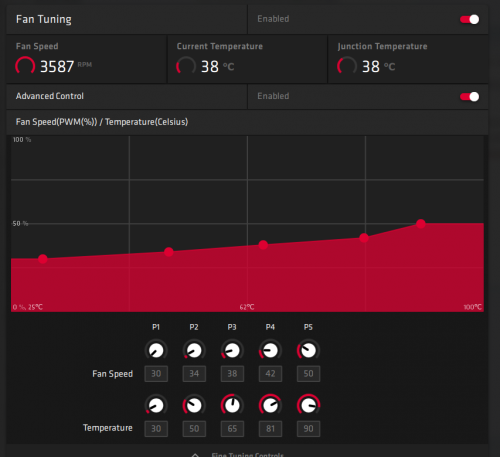 and gpu temperature now is less than 40c, the fan speed should be at 30% but now look like one of the fan is spinning at full speed and the other 2 is not spinning This post has been edited by amduser: Apr 21 2020, 08:21 PM |
|
|
Apr 21 2020, 08:44 PM
Return to original view | Post
#8
|
|
Senior Member
5,542 posts Joined: Dec 2006
|
after i run DDU and reinstall now the fan speed seems to settle down, all 3 fan turned off when not running games, i think this is Radeon bug?
but there seems to be another problem where the other 2 fans that is not spinning, i give it a light push and it start spinning, but it spin quite slow and when i touch it with my finger i can stop it easily, where the 1 fan that is running at 100% just now, when i touch it lightly it almost want to cut my finger away |
|
|
Apr 22 2020, 09:23 AM
Return to original view | Post
#9
|
|
Senior Member
5,542 posts Joined: Dec 2006
|
QUOTE(nrw @ Apr 21 2020, 10:41 PM) well part one fixed by DDU as expected. as I said there's lots of bugs in their software suite. flashy on the outside, crappy inside. the 2 fan seems to me like a hardware issue, lucky the temperature doesn't get very high during gaming at least the cards usually work very well. having no issues with mine under water. for the 2 fans you might want to check if this can be replicated in another system? might have to consider rma if this doesn't change. they certainly have power if they turn. sounds a bit they do not get enough volts to get it spinning.  i dont have another rig that can test and right now is CMO so cannot go out also |
|
|
Apr 27 2020, 11:19 AM
Return to original view | Post
#10
|
|
Senior Member
5,542 posts Joined: Dec 2006
|
QUOTE(EBBattlefield @ Apr 26 2020, 05:01 PM) the 2 fans not spinning might not be getting enough amps to push the motor from static to spinning. custom fan profile doesn't help, set it at 100% only one fan will spin, how do i check if the fan is not getting enough power? maybe too much dirt and dust got into the motors over time. IMO, can circumvent it by just setting custom fan profile. If you want permanent fix, take out the fans and check for wear. i've google around and seems like no one else having this problem |
|
|
Apr 27 2020, 11:48 AM
Return to original view | Post
#11
|
|
Senior Member
5,542 posts Joined: Dec 2006
|
Opened up the cover of my 5700 XT, the two fans that is not working properly is missing a green wire at the connector, is this normal?
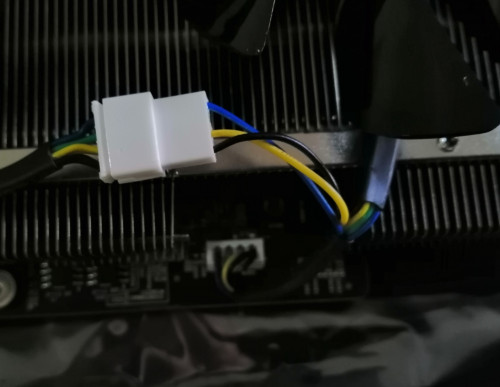 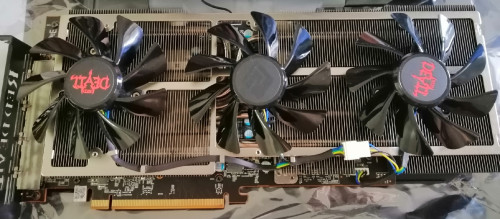 |
|
|
Apr 27 2020, 12:23 PM
Return to original view | Post
#12
|
|
Senior Member
5,542 posts Joined: Dec 2006
|
After dissemble and putting back together, now all the fans spins when i set the fan speed to 100%
i think the problem is at the connector to the other 2 fan, maybe is because the pin of the black cable at the connector there is loosen, i push it back in and reconnect the connector somehow fixed it i assume? the cooling for this card is not bad, even with 1 fan spinning i get <65c when gaming This post has been edited by amduser: Apr 27 2020, 12:24 PM |
|
|
Apr 27 2020, 06:22 PM
Return to original view | Post
#13
|
|
Senior Member
5,542 posts Joined: Dec 2006
|
QUOTE(1024kbps @ Apr 27 2020, 12:49 PM) it's normal for ý cable, black and yellow is negative and positive respectively, blue is pwn signal, green is tachometer for reading the fan rpm. ic....thanks for telling ý splitter omitted the tachometer because it only need to read the fan rpm from one fan, if all fan rpm reading connects together the rpm reading will go hay wired.  QUOTE(EBBattlefield @ Apr 27 2020, 03:53 PM) I was gonna suggest this if you said fan broken. got such cooler for graphic card?   |
|
|
|
|
|
Apr 30 2020, 08:48 PM
Return to original view | Post
#14
|
|
Senior Member
5,542 posts Joined: Dec 2006
|
was playing game halfway just now and all of a sudden the game and window hang and i have to force shutdown
after power up the motherboard is not receiving signal from my 5700 XT because the POST light stay on at VGA, have to power cycle few times now finally can start at first is the fan not spinning and now no signal all of a sudden, i wonder did i get a lemom unit  |
|
|
Jun 1 2020, 01:15 PM
Return to original view | Post
#15
|
|
Senior Member
5,542 posts Joined: Dec 2006
|
QUOTE(MPIK @ May 31 2020, 10:54 AM) Your 5700XT OK already? mine is vacuum noise, different from yoursMine is ASROCK Challenger 5700XT. When running games at high graphics, it have this grinding noise. Is that normal? Also, when I browsing Internet, watching YouTube etc, the fans are not spinning at all. Only while gaming, is started to spin. Is that normal? the noise you have maybe is from the bearing or the fan is grinding something just few days ago my pc failed stopped at POST with VGA LED indicator light up at mobo, tried reseat gpu, and reset bios, then shutdown and restart many times finally can boot to windows again, dont know is because of gpu or mobo, this is second time already at the mean time disabled hardware acceleration for discord and chrome browser to see if this occur again |
|
|
Jun 2 2020, 11:51 AM
Return to original view | Post
#16
|
|
Senior Member
5,542 posts Joined: Dec 2006
|
QUOTE(EBBattlefield @ Jun 1 2020, 03:04 PM) either swap GPU or swap slot to diagnose. now the card seems to work fine, mine got 2 slot but i didnt swap the slot to test, maybe if happen again will try that, hope it wont happen againif microATX 1 x16 only, padan muka..... ayam fed up with bodo mini sized board now, considering my GPU fat as fark usually  |
|
|
Jun 9 2020, 03:37 PM
Return to original view | Post
#17
|
|
Senior Member
5,542 posts Joined: Dec 2006
|
QUOTE(EBBattlefield @ Jun 9 2020, 11:51 AM) how heavy is everything? i got GPU holder to support the weight, CPU is stock ryzen cooler and i dont have other add onI suspect my issue partly due to heavy GPU and CPU cooler flexing the motherboard to death.... already got dead/randomly working SATA ports. GPU also sometimes wont detect all this woudlnt happen so long as I do not disturb their delicate balance, ie. dont take things apart unless very very necessary. as long as unplug 1 SATA port, everything have to retest again!  konspirasi Kak Su minta tukar full AMD system  |
|
|
Jul 24 2021, 12:41 PM
Return to original view | IPv6 | Post
#18
|
|
Senior Member
5,542 posts Joined: Dec 2006
|
havent been updated with the trend since i got my 5700xt, and today i check the price of 6700xt and 5700xt, it is almost double from the time the i bought which is only RM1999
what's happening? |
| Change to: |  0.0399sec 0.0399sec
 0.45 0.45
 7 queries 7 queries
 GZIP Disabled GZIP Disabled
Time is now: 6th December 2025 - 02:33 PM |
 Quote
Quote