Welcome Guest ( Log In | Register )

158 Pages « < 131 132 133 134 135 > » Bottom

Outline · [ Standard ] · Linear+

 AMD Radeon™ Discussion V15, Radeon Software 20.10.1

views
     
TSAcid_RuleZz
post Mar 3 2023, 01:23 AM

ミウ ❤
*******
Senior Member
6,612 posts

Joined: Jan 2003
From: Tomorrow


QUOTE(eddie2020 @ Mar 3 2023, 12:02 AM)
Ok i think will try this..  Do we need to do some fan tuning?

I found out there is some random buzzing sound when the gpu is running hard, not sure its fan sound or what weird sound..
the benchmark did not run max 230w, it go to 185w and the fan did not go to max spin..
*
Slow down mang. laugh.gif

1. If you think the fan is too aggressive, tune it down. If you think the fan is not aggressive enough, turn up the fan curve.
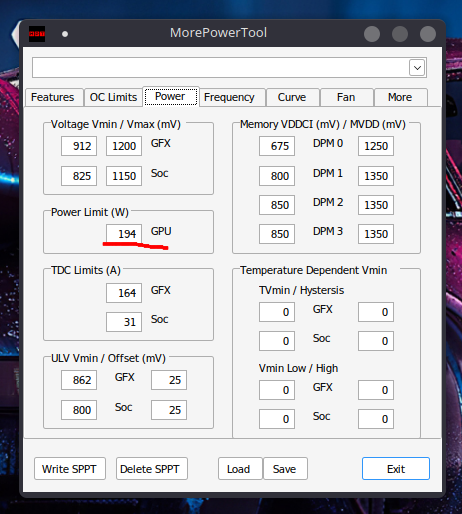
2. The card default power limit is 194w, not 230w. You add +20% more in Radeon Softwre iinm.
3. Buzzing is probably coil whine, check your FPS when that happen. If it only happen at high FPS, limit it globally.
4. Your GPU temp is only 75c, not enough for the fan to max out.
eddie2020
post Mar 3 2023, 02:09 AM

Trusted
*******
Senior Member
3,125 posts

Joined: Jun 2008
From: Mars


QUOTE(Acid_RuleZz @ Mar 3 2023, 01:23 AM)
Slow down mang. laugh.gif

1. If you think the fan is too aggressive, tune it down. If you think the fan is not aggressive enough, turn up the fan curve.
2. The card default power limit is 194w, not 230w. You add +20% more in Radeon Softwre iinm.
3. Buzzing is probably coil whine, check your FPS when that happen. If it only happen at high FPS, limit it globally.
4. Your GPU temp is only 75c, not enough for the fan to max out.
*
The fan its quiet even when benchmarking..what soft3wre to do the tuning?
2. So my case did not even hit 194..
3. I just youtube it and exact same sound.. You are right coil whine.. How limit it? Do you mean undervolt?
4.maybe tomorrow I try again without aircond. It seems furmark seems stressing it more than heaven
TSAcid_RuleZz
post Mar 3 2023, 08:42 AM

ミウ ❤
*******
Senior Member
6,612 posts

Joined: Jan 2003
From: Tomorrow


QUOTE(eddie2020 @ Mar 3 2023, 02:09 AM)
The fan its quiet even when benchmarking..what soft3wre to do the tuning?
2. So my case did not even hit 194..
3. I just youtube it and exact same sound.. You are right coil whine.. How limit it? Do you mean undervolt?
4.maybe tomorrow I try again without aircond. It seems furmark seems stressing it more than heaven
*
1. Radeon Software.
2. What is your system spec and what game you tested? Can you download 3DMark Timespy and run the benchmark?
3. Like I said, check if it happen at high FPS range or not. No, not undervolt.
4. Try Superposition.
babylon52281
post Mar 3 2023, 09:30 AM

Look at all my stars!!
*******
Senior Member
2,681 posts

Joined: Apr 2017
QUOTE(Acid_RuleZz @ Mar 3 2023, 01:23 AM)
Slow down mang. laugh.gif

1. If you think the fan is too aggressive, tune it down. If you think the fan is not aggressive enough, turn up the fan curve.
2. The card default power limit is 194w, not 230w. You add +20% more in Radeon Softwre iinm.
3. Buzzing is probably coil whine, check your FPS when that happen. If it only happen at high FPS, limit it globally.
4. Your GPU temp is only 75c, not enough for the fan to max out.
*
user posted image

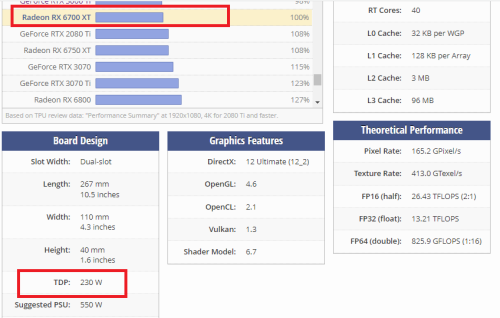
Dude's card still has room to boost further but it looks to be temp limited (hotspot at 95oC). I don't know Radeons as much but Geforce GPU are easier to figure out, as out of the box I could max out its power budget.
TSAcid_RuleZz
post Mar 3 2023, 09:51 AM

ミウ ❤
*******
Senior Member
6,612 posts

Joined: Jan 2003
From: Tomorrow


QUOTE(babylon52281 @ Mar 3 2023, 09:30 AM)
user posted image

Dude's card still has room to boost further but it looks to be temp limited (hotspot at 95oC). I don't know Radeons as much but Geforce GPU are easier to figure out, as out of the box I could max out its power budget.
*
Dude. Directly from 6700 XT Bios

user posted image
babylon52281
post Mar 3 2023, 12:25 PM

Look at all my stars!!
*******
Senior Member
2,681 posts

Joined: Apr 2017
QUOTE(Acid_RuleZz @ Mar 3 2023, 09:51 AM)
Dude. Directly from 6700 XT Bios


*
Hmm... so it was an mistaken entry in TPU database huh. Rare to see an error there but I guess things happen.
eddie2020
post Mar 3 2023, 11:08 PM

Trusted
*******
Senior Member
3,125 posts

Joined: Jun 2008
From: Mars


QUOTE(Acid_RuleZz @ Mar 3 2023, 08:42 AM)
1. Radeon Software.
2. What is your system spec and what game you tested? Can you download 3DMark Timespy and run the benchmark?
3. Like I said, check if it happen at high FPS range or not. No, not undervolt.
4. Try Superposition.
*
1. OK adjusted with Adrenaline
2. Is this from Steam edition? Spec as per my updated signature
3. I guess only during high FPS, i tried undervolt as per video shared yesterday, the sound seems lesser but still there.. i quite sensitive to this type of sound..
4. very big file over 1gb
QUOTE(Acid_RuleZz @ Mar 3 2023, 09:51 AM)
Dude. Directly from 6700 XT Bios

user posted image
*
you using same gpu as me?
TSAcid_RuleZz
post Mar 4 2023, 12:17 AM

ミウ ❤
*******
Senior Member
6,612 posts

Joined: Jan 2003
From: Tomorrow


QUOTE(babylon52281 @ Mar 3 2023, 12:25 PM)
Hmm...  so it was an mistaken entry in TPU database huh. Rare to see an error there but I guess things happen.
*
Not really, you can set +20% power limit from Radeon Setting so that'll increase it to ~230w.


QUOTE(eddie2020 @ Mar 3 2023, 11:08 PM)
1. OK adjusted with Adrenaline
2. Is this from Steam edition?  Spec as per my updated signature
3. I guess only during high FPS, i tried undervolt as per video shared yesterday, the sound seems lesser but still there.. i quite sensitive to this type of sound..
4. very big file over 1gb

you using same gpu as me?
*
Yes from Steam.

If only on high FPS, try limit your FPS globally. I don't know if Radeon Setting can limit globally or not, I use RTSS from MSI Afterburner.
Sometime it will go away after few weeks or months.

Yes, Superposition over 1GB. Timespy over 4GB-5GB iinm.

No I downloaded the BIOS from Techpowerup.
babylon52281
post Mar 4 2023, 12:40 AM

Look at all my stars!!
*******
Senior Member
2,681 posts

Joined: Apr 2017
QUOTE(Acid_RuleZz @ Mar 4 2023, 12:17 AM)
Not really, you can set +20% power limit from Radeon Setting so that'll increase it to ~230w.
Yes from Steam.

If only on high FPS, try limit your FPS globally. I don't know if Radeon Setting can limit globally or not, I use RTSS from MSI Afterburner.
Sometime it will go away after few weeks or months.

Yes, Superposition over 1GB. Timespy over 4GB-5GB iinm.

No I downloaded the BIOS from Techpowerup.
*
TPU database is for out of factory stock, in this case its typically for cards Made By AMD/Nvidia. AIB OC cards may have higher TDP but that would be stated for individual ones. Sendiri OC settings would not appear in TPU list.
eddie2020
post Mar 4 2023, 02:57 AM

Trusted
*******
Senior Member
3,125 posts

Joined: Jun 2008
From: Mars


QUOTE(Acid_RuleZz @ Mar 4 2023, 12:17 AM)
Not really, you can set +20% power limit from Radeon Setting so that'll increase it to ~230w.
Yes from Steam.

If only on high FPS, try limit your FPS globally. I don't know if Radeon Setting can limit globally or not, I use RTSS from MSI Afterburner.
Sometime it will go away after few weeks or months.

Yes, Superposition over 1GB. Timespy over 4GB-5GB iinm.

No I downloaded the BIOS from Techpowerup.
*
OK will try it later. . i think will not run superposition or timespy.. too much space...

I undervolt follow youtube 2400 clock, 1100 mv, 2150 vram.

Can i know what happen if GPU crash?

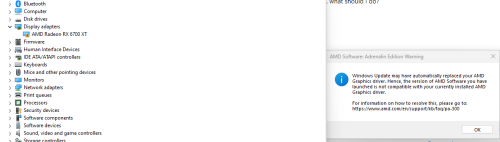
I get some weird issue again as below
I tried run benchmark and everything seems ok but the benchmark after display result it auto closed (heaven benchmark).
Then I run Genshin, cause new patch downloading, i tab out and do other stuff sudden my pc screen black out..
I see the GPU fan running my my monitor show no signal...
I had to force close my pc and now it booted up using intergrated gpu..

Haih, need find way fix.. it seems quite common issue from google result..
not sure its my GPU issue, or window issue or undervolt problem..
user posted image

update : repair and reinstalled the driver, then set my voltage mv1110 , 2150 vram , clock 2450...
play genshin it freeze but sound is still playing then amd pop out error ask me send report... lol..
go back amd software and put auto undervolt to 1175mv it seems so far so good..

This post has been edited by eddie2020: Mar 4 2023, 03:48 AM


Attached thumbnail(s)
Attached Image
TSAcid_RuleZz
post Mar 4 2023, 09:19 AM

ミウ ❤
*******
Senior Member
6,612 posts

Joined: Jan 2003
From: Tomorrow


QUOTE(babylon52281 @ Mar 4 2023, 12:40 AM)
TPU database is for out of factory stock, in this case its typically for cards Made By AMD/Nvidia. AIB OC cards may have higher TDP but that would be stated for individual ones. Sendiri OC settings would not appear in TPU list.
*
All reference RDNA2 listed on TPU have TDP rated above their default BIOS power limit.
Also a reminder, TDP =\= Power Limit\Power Consumption.

| Card | BIOS | TDP | TDC
6950 XT 284w 335w
6900 XT 255w 300w
6800 XT 255w 300w
6800 203w 250w
6700 XT 194w 230w
6600 XT 140w 160w
6600 100w 132w

Maybe the BIOS power limit is only for the GPU core and not total board power. 🤷🏻
Also these GPU will happily consume more power than their rated power limit.

QUOTE(eddie2020 @ Mar 4 2023, 02:57 AM)
OK will try it later. . i think will not run superposition or timespy.. too much space...

-snip-
*
Wait, how are you going to install other games if 1GB is too much space. sweat.gif

Yeah, TDR error usually mean unstable overclock or undervolt/overvolt.
Also I suggest use GPU-Z/HWiNFO instead of Hardware Monitor to monitor your GPU.
eddie2020
post Mar 4 2023, 07:09 PM

Trusted
*******
Senior Member
3,125 posts

Joined: Jun 2008
From: Mars


QUOTE(Acid_RuleZz @ Mar 4 2023, 09:19 AM)
All reference RDNA2 listed on TPU have TDP rated above their default BIOS power limit.
Also a reminder, TDP =\= Power Limit\Power Consumption.

| Card | BIOS | TDP | TDC
6950 XT 284w 335w
6900 XT 255w 300w
6800 XT 255w 300w
6800 203w 250w
6700 XT 194w 230w
6600 XT 140w 160w
6600 100w 132w

Maybe the BIOS power limit is only for the GPU core and not total board power. 🤷🏻
Also these GPU will happily consume more power than their rated power limit.
Wait, how are you going to install other games if 1GB is too much space.  sweat.gif

Yeah, TDR error usually mean unstable overclock or undervolt/overvolt.
Also I suggest use GPU-Z/HWiNFO instead of Hardware Monitor to monitor your GPU.
*
Download too slow for big file...
So these tdr error make us no choice to force shutdown the system using physical button rite?
Maybe I will keep drop by 25 mv to find the safe point.. Gpuz come with furmark but I think I cant see min max using gpuz
TSAcid_RuleZz
post Mar 4 2023, 07:26 PM

ミウ ❤
*******
Senior Member
6,612 posts

Joined: Jan 2003
From: Tomorrow


QUOTE(eddie2020 @ Mar 4 2023, 07:09 PM)
Download too slow for big file...
So these tdr error make us no choice to force shutdown the system using physical button rite?
Maybe I will keep drop by 25 mv to find the safe point.. Gpuz come with furmark but I think I cant see min max using gpuz
*
The system is totally froze for you? Sometime it recovered automatically.
GPU-Z come with Furmark? Use standalone GPU-Z from TechPowerUp.

Remove any overclock/undervolt, just use your card normally for few days if it give any issue at stock setting.


White3N
post Mar 5 2023, 01:50 AM

New Member
*
Junior Member
36 posts

Joined: Jan 2023
Save it for future reference
eddie2020
post Mar 5 2023, 03:10 AM

Trusted
*******
Senior Member
3,125 posts

Joined: Jun 2008
From: Mars


QUOTE(Acid_RuleZz @ Mar 4 2023, 07:26 PM)
The system is totally froze for you? Sometime it recovered automatically.
GPU-Z come with Furmark? Use standalone GPU-Z from TechPowerUp.

Remove any overclock/undervolt, just use your card normally for few days if it give any issue at stock setting.
*
Not total froze but no display signal, in other word i cant shutdown using my mouse and keyboard cause i cant see any.
the sound everything might there..
i tried lower mv to 1120 , 2450 clock and 2150 vram and play like half an hour it get error and said i overclock...
then change to 1140mv 2460 clock 2150 vram play cod 1hour plus then sudden said error but the error from COD not from AMD...
maybe i will revert stock as you said to play a week and see any error..
TSAcid_RuleZz
post Mar 5 2023, 06:02 AM

ミウ ❤
*******
Senior Member
6,612 posts

Joined: Jan 2003
From: Tomorrow


QUOTE(eddie2020 @ Mar 5 2023, 03:10 AM)
maybe i will revert stock as you said to play a  week and see any error..
*
Yes do that.

If you have flickering/black screen issue you can try disabling Multiplane Overlay (MPO), this one is pretty common problem for Radeon from what I see online.
https://www.reddit.com/r/Amd/comments/yvyqc..._mpo_fixed_all/
nightzstar
post Mar 14 2023, 03:13 PM

Col. Samantha Carter
*******
Senior Member
2,702 posts

Joined: Dec 2004
From: P8X-86A


QUOTE(eddie2020 @ Mar 3 2023, 12:02 AM)
Ok i think will try this..  Do we need to do some fan tuning?


I found out there is some random buzzing sound when the gpu is running hard, not sure its fan sound or what weird sound..
the benchmark did not run max 230w, it go to 185w and the fan did not go to max spin..
*
kek rx6000 still got that issue after so long?
eddie2020
post Mar 15 2023, 07:31 PM

Trusted
*******
Senior Member
3,125 posts

Joined: Jun 2008
From: Mars


QUOTE(Acid_RuleZz @ Mar 5 2023, 06:02 AM)
Yes do that.

If you have flickering/black screen issue you can try disabling Multiplane Overlay (MPO), this one is pretty common problem for Radeon from what I see online.
https://www.reddit.com/r/Amd/comments/yvyqc..._mpo_fixed_all/
*
Disabled.. Played more than 10hr.. Yesterday it got error again crashed.. But I think its the game problem.. It said steam verify etc which come form cod.. Other game no issue but didn't play so much as cod..

QUOTE(nightzstar @ Mar 14 2023, 03:13 PM)
kek rx6000 still got that issue after so long?
*
What type of issue you mentioning?
nightzstar
post Mar 15 2023, 07:39 PM

Col. Samantha Carter
*******
Senior Member
2,702 posts

Joined: Dec 2004
From: P8X-86A


QUOTE(eddie2020 @ Mar 15 2023, 07:31 PM)
Disabled.. Played more than 10hr.. Yesterday it got error again crashed.. But I think its the game problem.. It said steam verify etc which come form cod.. Other game no issue but didn't play so much as cod..
What type of issue you mentioning?
*
Your prob just now that you wrote
eddie2020
post Mar 21 2023, 01:14 AM

Trusted
*******
Senior Member
3,125 posts

Joined: Jun 2008
From: Mars


QUOTE(nightzstar @ Mar 15 2023, 07:39 PM)
Your prob just now that you wrote
*
Yea kinda frustrated...
It seems the driver issue or something... i uninstalled AMD Software Adrenalin Edition and installed Pro..
It seems Pro are more outdated, launching MW2 it said the driver not latest..

Play it anyway, and normally each session within 3hour sure crash..
Within 3 days , either sudden close whole game or freeze.. sudden display gone (black screen) happen once.. i need use button to shutdown cause monitor show no signal.
Then just now sudden reboot..


Now uninstall Pro version and install back Adrenalin edition, lets see if it more stable..


This post has been edited by eddie2020: Mar 21 2023, 01:18 AM

158 Pages « < 131 132 133 134 135 > » Top
 

Change to:
| Lo-Fi Version
0.0260sec    0.59    6 queries    GZIP Disabled
Time is now: 7th December 2025 - 09:12 PM