

QUOTE(Ninja @ Jan 14 2008, 10:15 PM)
Great...been waiting for few days... 
Technical Sony PlayStation Portable for Beginners, General PSP Q&A and Homebrew Discussion
|
|
 Jan 14 2008, 10:42 PM Jan 14 2008, 10:42 PM
|
 
Senior Member
690 posts Joined: Sep 2005 From: Temerloh <-> Pendang  
|
QUOTE(Ninja @ Jan 14 2008, 10:15 PM) Great...been waiting for few days... |
|
|
|
|
|
Jan 14 2008, 10:48 PM
|

Senior Member
1,172 posts Joined: May 2006 From: Puchong
|
Its not working. For sum reason got error come out dunno wat "file cannot be open"
|
|
|
Jan 14 2008, 10:50 PM
|
|
Senior Member
690 posts Joined: Sep 2005 From: Temerloh <-> Pendang
|
QUOTE(xXAaronXx @ Jan 14 2008, 10:48 PM) Its not working. For sum reason got error come out dunno wat "file cannot be open" The 3.80_m33.rar? Working for me. Now downloading 3.80 EBOOT from sony's site. |
|
|
Jan 14 2008, 10:52 PM
|

Senior Member
822 posts Joined: Jan 2003
|
anyone upgraded to latest cfw?works?
|
|
|
Jan 14 2008, 10:55 PM
|
 
VIP
1,764 posts Joined: Jan 2003 From: Helghan
|
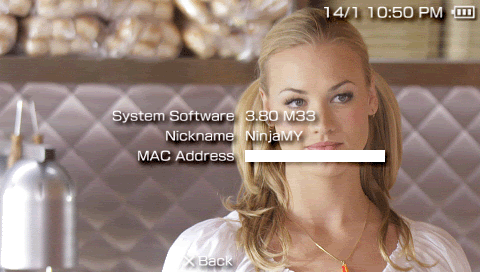
Installed.
    |
|
|
Jan 14 2008, 10:56 PM
|
|
Senior Member
690 posts Joined: Sep 2005 From: Temerloh <-> Pendang
|
QUOTE(maxguy @ Jan 14 2008, 10:52 PM) anyone upgraded to latest cfw?works? Going to..charging the battery atm. |
|
|
|
|
|
Jan 14 2008, 10:57 PM
|
|
Senior Member
822 posts Joined: Jan 2003
|
thanks for sharing, cool! yeah update done on my one as well
This post has been edited by maxguy: Jan 14 2008, 11:11 PM |
|
|
Jan 14 2008, 11:43 PM
|
|
VIP
1,764 posts Joined: Jan 2003 From: Helghan
|
For those having problems with missing save data in 3.80 M33, reformat your Memory Stick (backup your save data before reformatting).
|
|
|
Jan 14 2008, 11:45 PM
|

Senior Member
1,022 posts Joined: Dec 2005 From: I Don't Know!
|
QUOTE(Ninja @ Jan 14 2008, 11:43 PM) For those having problems with missing save data in 3.80 M33, reformat your Memory Stick (backup your save data before reformatting). So bro, it's an MSPD problem for ruztynail? |
|
|
Jan 14 2008, 11:48 PM
|
|
VIP
1,764 posts Joined: Jan 2003 From: Helghan
|
QUOTE(DFlo @ Jan 14 2008, 11:45 PM) So bro, it's an MSPD problem for ruztynail? Nope, it's not MSPD problem coz my save data was missing too. I reformatted, then copy back my save data, then it was okay. |
|
|
Jan 14 2008, 11:56 PM
|
|
Senior Member
1,172 posts Joined: May 2006 From: Puchong
|
How 2 install it? Does it need official firmware?
|
|
|
Jan 15 2008, 12:00 AM
|

Senior Member
666 posts Joined: Jan 2003 From: Left Hand Society, West London
|
QUOTE(xXAaronXx @ Jan 14 2008, 11:56 PM) How 2 install it? Does it need official firmware? Yes.. Rename the official fw to 380.EBOOT. The readme is there for a reason |
|
|
Jan 15 2008, 12:11 AM
|
|
Senior Member
1,022 posts Joined: Dec 2005 From: I Don't Know!
|
QUOTE(vorchiel @ Jan 15 2008, 12:00 AM) Yes.. Rename the official fw to 380.EBOOT. The readme is there for a reason I would say "Please read the README."  |
|
|
|
|
|
Jan 15 2008, 12:14 AM
|

Senior Member
995 posts Joined: Mar 2005 From: Johor Bahru , Johor , Malaysia
|
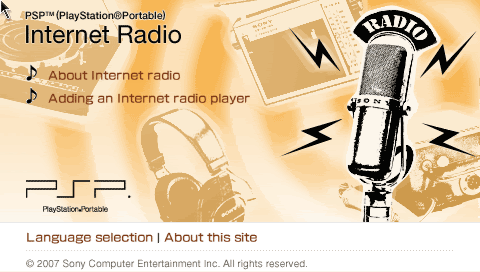
QUOTE(DFlo @ Jan 15 2008, 12:11 AM) I would say "Please read the README." Well said!. Currently enjoying JPOP Anime music on my radio <3. |
|
|
Jan 15 2008, 12:47 AM
|

Senior Member
5,366 posts Joined: Aug 2005 
|
what lah with the new visualization... fugly
 |
|
|
Jan 15 2008, 05:27 AM
|
|
Senior Member
666 posts Joined: Jan 2003 From: Left Hand Society, West London
|
3.80 M33-2 update has been released
M33-2 fixes: QUOTE This update fixes a couple of issues. - Function scePowerGetClockFrequency/scePowerGetClockFrequencyInt was not resolved properly due to a confussion between the two nids applying to the same function. Fixed, this update is necessary for plugins and kernel homebrew reporting psp cpu speed. - PSX EBOOT.PBP that have a icon of 80x80 pixels will not be replaced by Dracula icon in savedata. Explanation of icon issue: In 3.80 pops, Sony has introduced a bug that causes a crash when the icon of the pbp is not 80x80, like those of psstore. To resolve the issue, M33 was replacing the icon in ram by the one with Dracuala image, what caused the side effect of ps1 save games having Dracula icon. Now the behaviour in 3.80 M33-2 is to replace the icon in ram only if the one in the file is not 80x80. If you already have 3.80 M33, just use the network update icon on the XMB and it will download and install automatically to M33-2 This post has been edited by vorchiel: Jan 15 2008, 05:30 AM |
|
|
Jan 15 2008, 09:11 AM
|

Senior Member
1,886 posts Joined: Jan 2005 From: world above you 
|
OMG.. tat was fast. v-2 is out.
|
|
|
Jan 15 2008, 10:11 AM
|
|
Senior Member
690 posts Joined: Sep 2005 From: Temerloh <-> Pendang
|
Great..now can try the network update.
 |
|
|
Jan 15 2008, 10:35 AM
|

Junior Member
165 posts Joined: Jan 2003 From: Puchong
|
Hi, I'm using a slim with 3.6m33 do i need to downgrade my fw in order to upgrade to 3.8m33?
Here is what i think i should do but i'm afraid to brick my psp. Please point out if there are any mistakes. 1.Copy the 3.8m33 Update folder to PSP/GAME/ 2.Copy the 3.8 sony updater to the same folder(PSP/GAME/Update) and rename it to 380.PBP 3.Run the 3.8m33 update from the psp. 4.Remove the Update folder from the /PSP/GAME. 5.Copy the 3.8m33 Update2 folder to /PSP/GAME. 6.Run the 3.8m33 update2. 7.Remove the Update2 folder from the /PSP/GAME.  I think the process is the same for 3.52 M33-3 and higher versions rite? |
|
|
Jan 15 2008, 10:59 AM
|
|
Senior Member
690 posts Joined: Sep 2005 From: Temerloh <-> Pendang
|
QUOTE(Dark Kai @ Jan 15 2008, 10:35 AM) Hi, I'm using a slim with 3.6m33 do i need to downgrade my fw in order to upgrade to 3.8m33? U dont need to downgrade since the readme file says that u need 3.52 M33-3 and higher iinm.Here is what i think i should do but i'm afraid to brick my psp. Please point out if there are any mistakes. 1.Copy the 3.8m33 Update folder to PSP/GAME/ 2.Copy the 3.8 sony updater to the same folder(PSP/GAME/Update) and rename it to 380.PBP 3.Run the 3.8m33 update from the psp. 4.Remove the Update folder from the /PSP/GAME. 5.Copy the 3.8m33 Update2 folder to /PSP/GAME. 6.Run the 3.8m33 update2. 7.Remove the Update2 folder from the /PSP/GAME. I think the process is the same for 3.52 M33-3 and higher versions rite? |
|
Topic ClosedOptions
|
| Change to: |  0.0284sec 0.0284sec
 1.13 1.13
 6 queries 6 queries
 GZIP Disabled GZIP Disabled
Time is now: 1st December 2025 - 04:10 PM |
 Quote
Quote