

Anyway, a morning gift for new thread:

This post has been edited by azhar75: Oct 13 2016, 10:18 AM
Attached thumbnail(s)

Xiaomi Xiaomi Redmi Note 3 Discussion V7, MIUI 8 Android 6 available now!
|
|
 Oct 13 2016, 09:04 AM Oct 13 2016, 09:04 AM
Return to original view | Post
#1
|
 
All Stars
17,220 posts Joined: Dec 2015  
|
Will RN3 thread goes all the way to V25....?
Anyway, a morning gift for new thread:
This post has been edited by azhar75: Oct 13 2016, 10:18 AM Attached thumbnail(s)
|
|
|
|
|
|
Oct 13 2016, 09:29 AM
Return to original view | Post
#2
|
|
All Stars
17,220 posts Joined: Dec 2015
|
QUOTE(feralee @ Oct 13 2016, 09:24 AM) This apps gooding ?😂 Good enuff for Average Joe... 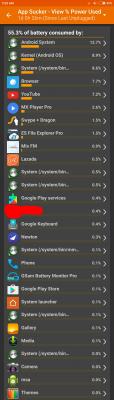
|
|
|
Oct 13 2016, 09:55 AM
Return to original view | Post
#3
|
|
All Stars
17,220 posts Joined: Dec 2015
|
QUOTE(Dovienya @ Oct 13 2016, 09:44 AM) Hi all, Cannot run away from EDL/Download method. This method will wipe everything including the Chinese Stock recovery. So, backup before proceed.Sorry, not sure if it has been asked before but can I just flash bloatrom/vendor rom to global rom using the updater function in the phone instead of using EDI? Would it clean the phone of bloatware/vendor rom or I'll need to flash it using EDI to fully clean the phone? Thanks. 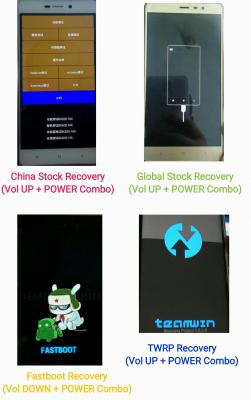
Once we have replaced with Global Stock recovery, can proceed with "fastboot" method to flash without loosing data. This post has been edited by azhar75: Oct 13 2016, 10:00 AM |
|
|
Oct 13 2016, 10:03 AM
Return to original view | Post
#4
|
|
All Stars
17,220 posts Joined: Dec 2015
|
Dropping further...

|
|
|
Oct 13 2016, 10:07 AM
Return to original view | Post
#5
|
|
All Stars
17,220 posts Joined: Dec 2015
|
QUOTE(Dovienya @ Oct 13 2016, 10:04 AM) » Click to show Spoiler - click again to hide... « Azhar, where is this? I was planning to go to directd to buy, its 560 each.. this one is more tempting. 
Bought mine from TERABYTE months ago (now RM509 for 16GB...!) with Global Stock ROM. But recently, some buyers claim it does not anymore... You can also try aromachong service for alternatives... This post has been edited by azhar75: Oct 13 2016, 10:14 AM |
|
|
Oct 13 2016, 02:04 PM
Return to original view | Post
#6
|
|
All Stars
17,220 posts Joined: Dec 2015
|
QUOTE(azam_halim @ Oct 13 2016, 01:54 PM) when i receive my phone, its already has that 'fastboot' screen when i vol down+power.. Fastboot is "standard" to all Xioami's phone; be it Ori or Imported AP. The most important part is Recovery. If your device is Malaysia Ori, it should comes with "Global Stock Recovery". Else, it is Imported/AP/China/Vendor ROM.Only when the device has Global Stock Recovery, you can OTA. |
|
|
|
|
|
Oct 14 2016, 12:43 PM
Return to original view | Post
#7
|
|
All Stars
17,220 posts Joined: Dec 2015
|
QUOTE(seanlss @ Oct 14 2016, 12:25 PM) ya. but before this have to adb devices to make sure phone is detected right? when i type adb devices, the list of devices is empty. Forward to timeline 7:15... You did not accept "Allow USB Debugging" prompt on the phone...that could be the issue... This post has been edited by azhar75: Oct 14 2016, 12:45 PM |
|
|
Oct 14 2016, 03:47 PM
Return to original view | Post
#8
|
|
All Stars
17,220 posts Joined: Dec 2015
|
Just temporary TWRP...it's good to keep the stock recovery for OTA later...
If need to permanently flash TWRP, you have to firstly cook custom boot.img file of MIUI Fastboot ROM using Android Kitchen. Follow link below: Cook/cracked/moded boot.img Method (not easy lohhhh...) Else, can use the readily patched Cofface TWRP .img file to permanently flash Cofface TWRP via Flashify app below : Permanently flash Cofface TWRP This post has been edited by azhar75: Oct 14 2016, 04:38 PM |
|
|
Oct 14 2016, 04:19 PM
Return to original view | Post
#9
|
|
All Stars
17,220 posts Joined: Dec 2015
|
QUOTE(seanlss @ Oct 14 2016, 04:16 PM) thought want to try cm13 rom. EDL / Download methodwill try the cofface twrp. if i want to go back to miui just fastboot flash the official rom. |
|
|
Oct 14 2016, 04:36 PM
Return to original view | IPv6 | Post
#10
|
|
All Stars
17,220 posts Joined: Dec 2015
|
QUOTE(seanlss @ Oct 14 2016, 04:28 PM) FYI: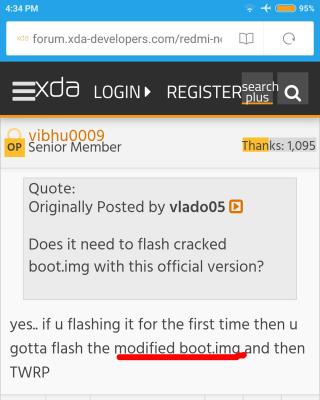
Cannot runaway from the cracked/moded boot.img file... |
|
|
Oct 14 2016, 04:46 PM
Return to original view | IPv6 | Post
#11
|
|
All Stars
17,220 posts Joined: Dec 2015
|
QUOTE(seanlss @ Oct 14 2016, 04:42 PM) huh... so complicated... T.T Wait till you wanna flash CM:Flashing CM |
|
|
Oct 14 2016, 04:55 PM
Return to original view | Post
#12
|
|
All Stars
17,220 posts Joined: Dec 2015
|
QUOTE(seanlss @ Oct 14 2016, 04:52 PM) i did installed custom rom before when the time i using htc one x, lg g2.. If I can do it, so can u... Believe in yourself... (hmmm...just like movie script...LOL...)now my problem is flash twrp, seems so complicated to cook the custom boot img..  This post has been edited by azhar75: Oct 14 2016, 04:57 PM |
|
|
Oct 14 2016, 05:09 PM
Return to original view | Post
#13
|
|
All Stars
17,220 posts Joined: Dec 2015
|
Chin-chai kasi 12 hours SoT till 1%...

This post has been edited by azhar75: Oct 14 2016, 05:10 PM |
|
|
|
|
|
Oct 14 2016, 05:17 PM
Return to original view | Post
#14
|
|
All Stars
17,220 posts Joined: Dec 2015
|
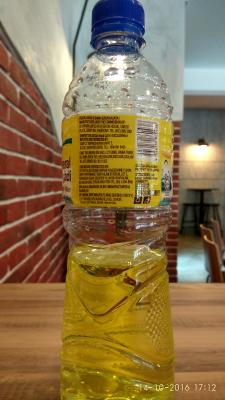
Which is better thru your naked eyes...? 1st or 2nd pic...?

|
|
|
Oct 14 2016, 05:53 PM
Return to original view | IPv6 | Post
#15
|
|
All Stars
17,220 posts Joined: Dec 2015
|
2nd pic is stock global stable ROM 8.0.5.0. Looks like artificial lighting pic has been improved... 1st pix is from Camera FV-5 v.3.25.1.
|
|
|
Oct 14 2016, 06:01 PM
Return to original view | IPv6 | Post
#16
|
|
All Stars
17,220 posts Joined: Dec 2015
|
QUOTE(seanlss @ Oct 14 2016, 05:59 PM) are you using the method 1 to flash twrp? Yes. |
|
|
Oct 15 2016, 04:29 PM
Return to original view | Post
#17
|
|
All Stars
17,220 posts Joined: Dec 2015
|
QUOTE(Jimbitz @ Oct 15 2016, 03:07 PM) I have tried to calibrate it multiple times. even clean data & cache for compass app. Try lock compass app in the background...It will work for a few seconds and after that this issue will happen again. |
|
|
Oct 16 2016, 11:50 PM
Return to original view | Post
#18
|
|
All Stars
17,220 posts Joined: Dec 2015
|
QUOTE(akira87 @ Oct 16 2016, 08:19 PM) New user reporting in... The best method to check is by running the Updater app. If you can update OTA, meaning it is Global ROM.One question, how can check if my phone using global rom? |
|
|
Oct 17 2016, 01:08 PM
Return to original view | Post
#19
|
|
All Stars
17,220 posts Joined: Dec 2015
|
QUOTE(buddho @ Oct 17 2016, 01:00 PM) yes it came with global. So long as you don't set the flashing mode to "Clean all and lock", it will not relock the BL. Therefore, "Clean all and lock" is almost similar to EDL/Download method.if i use fastboot to flash, wouldn't it relock the bootloader again since it will replace with original .mbn file ?  "Clean all" mode will wipe everything but does not relock BL. While, "Save user data" mode is the best option. However, this mode might get "Storage" error most of the time...So, always back-up your data before flashing using the "Clean all" option. This post has been edited by azhar75: Oct 17 2016, 01:11 PM |
|
|
Oct 18 2016, 06:43 PM
Return to original view | Post
#20
|
|
All Stars
17,220 posts Joined: Dec 2015
|
QUOTE(Invince_Z @ Oct 18 2016, 06:28 PM) global rom, kenzo. i'm on 5.1.1 MIUI Global | Stable 7.3.6(LHOMIDD) Goto "Updater" app, tap "Check for updates" and see what happens... most probably your RN3 can't OTA. If can't, meaning it is not official Global ROM.This post has been edited by azhar75: Oct 18 2016, 06:45 PM |
|
Topic ClosedOptions
|
| Change to: |  0.0809sec 0.0809sec
 0.54 0.54
 7 queries 7 queries
 GZIP Disabled GZIP Disabled
Time is now: 9th December 2025 - 04:50 PM |
 Quote
Quote