Outline ·
[ Standard ] ·
Linear+
Xiaomi Xiaomi Redmi Note 3 Discussion V7, MIUI 8 Android 6 available now!
|
helloapple
|
 Nov 18 2016, 03:02 PM Nov 18 2016, 03:02 PM
|
Getting Started


|
QUOTE(rozaini_aimar @ Nov 18 2016, 11:00 AM) nice bro..share some picture please haha i bought the silver, come with Miui 7, will upgrade to miui tonight later  . i have ordered case and screen protector and 32G micro SD from TaoBao, will ship to Msia next week, so for time being can see cant touch  |
|
|
|
|
|
helloapple
|
Nov 18 2016, 09:43 PM
|
Getting Started
|
i m using MIUI 8, and i notice the fingerprint does not working properly.
My understanding is you can use fingerprint to unlock/wake up device WITHOUT having to enter the pattern/password, correct?
for my case, after use fingerprint, i m prompted to enter pattern/password. how skip password input step?
|
|
|
|
|
|
helloapple
|
Nov 19 2016, 11:03 PM
|
Getting Started
|
QUOTE(ljf123 @ Nov 18 2016, 09:59 PM) if too many fingerprint unlock error will prompted to enter pattern/password when setup, try to move your finger around so fingerprint sensor can detect it all around your fingerprint  your tips really works for me, after a proper finger scan the issue disappear, TQVM |
|
|
|
|
|
helloapple
|
Nov 29 2016, 12:10 PM
|
Getting Started
|
i m on 16G and i feel 16G really no suffice even for APP installation, how can i move the APP(new or installed) to external SD card in order to save more space internally?
|
|
|
|
|
|
helloapple
|
Nov 29 2016, 02:08 PM
|
Getting Started
|
QUOTE(ljf123 @ Nov 29 2016, 01:13 PM) I think u need to root then download link2sd apps Thanks for your reply, any other alternative solution as i no familiar with root steps. |
|
|
|
|
|
helloapple
|
Nov 29 2016, 05:07 PM
|
Getting Started
|
QUOTE(azhar75 @ Nov 29 2016, 02:34 PM) Ouch! There's no other way, pal... Better sell it and opt for 32GB variant...  |
|
|
|
|
|
helloapple
|
Dec 3 2016, 08:05 PM
|
Getting Started
|
16G version really no enough, after install essential apps, i left with 3G only, so better dont buy 16G if you dont want/know to root in order to install app in external memory...
|
|
|
|
|
|
helloapple
|
Dec 3 2016, 08:21 PM
|
Getting Started
|
QUOTE(zher4883 @ Dec 3 2016, 08:11 PM) Xiaomi.eu ROM will leave you with more free space since it's debloated. oic, thanks. |
|
|
|
|
|
helloapple
|
Dec 18 2016, 10:49 AM
|
Getting Started
|
for those try to unlock the phone thru official method, do you succeed in doing so? i no so lucky, i got official permission to unlock 3 weeks ago and till now the unlocking process always stuck at 50% with error: "Сouldn`t verify device.
Current account is different from the account info on the device. "
i had read the 1st page and google it and so far no luck yet, can any expert advise?, i had done the following:
1) use same phone no login for both mi phone and MiFlashUnlock
2) enable find my device and only 1 device is active.
|
|
|
|
|
|
helloapple
|
Dec 22 2016, 08:22 PM
|
Getting Started
|
QUOTE(vostro78 @ Dec 18 2016, 11:11 AM) https://youtu.be/G_P7Qd3kpAII hope this help. I use this method instead the first page. Hi Expert I tried to unlock but faced error as shown in photo below, any idea to fix? C:\Users\User\Desktop\Temp\Mi Root File>fastboot flash recovery twrp-3.0.2-2-kenzo.img target reported max download size of 536870912 bytes sending 'recovery' (34360 KB)... OKAY [ 1.082s] writing 'recovery'... FAILED (remote: device is locked. Cannot flash images) finished. total time: 1.102s 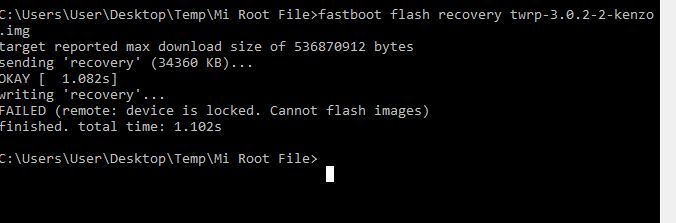 |
|
|
|
|
|
helloapple
|
Dec 23 2016, 09:13 AM
|
Getting Started
|
QUOTE(vostro78 @ Dec 23 2016, 12:04 AM) Hv u run unlock tools? U need goto developer options , mi unlock status to set it unlock . Yes, i have enabled the following from developer option menu: 1) Enable OEM unlock - on 2) USB debugging - on anyway, thanks advance for ur reply, any more idea how to fix it? |
|
|
|
|
|
helloapple
|
Dec 23 2016, 01:08 PM
|
Getting Started
|
QUOTE(GameSky @ Dec 23 2016, 12:03 PM) seems like you havent unlock your phone via miflash? mind to explain more on this? |
|
|
|
|
|
helloapple
|
Dec 23 2016, 01:09 PM
|
Getting Started
|
QUOTE(vostro78 @ Dec 23 2016, 12:00 PM) i not sure already, as now i am on cm14.1 interface diff ... i forgot what else step i do in the middle.... you ask around forumer ... no worry, tq anyway. |
|
|
|
|
|
helloapple
|
Dec 23 2016, 02:26 PM
|
Getting Started
|
QUOTE(GameSky @ Dec 23 2016, 01:55 PM) if you don't unlock your bootloader but you tried to flash twrp or other custom rom, you might end up brick your phone. to unlock your phone officially, use this guide. http://en.miui.com/thread-200858-1-1.htmlmakesure your mi account got the permission to unlock. correct me if i m wrong: i thought my earlier step is to unlock bootloader? i dont have intention to flash twrp... i got official permission to unlock however during the unlocking process, i faced error stuck in 50% and error said could not verify phone. i tried 2 weeks after obtained the permission, and the issue still persists. it forced me turn to unofficial unlock. |
|
|
|
|



 Quote
Quote
 0.0769sec
 0.63
0.63
 7 queries
 GZIP Disabled