


Hardware MAC BOOK AIR STORAGE UPGRADE
Hardware MAC BOOK AIR STORAGE UPGRADE
|
|
 Sep 28 2016, 05:09 PM, updated 10y ago Sep 28 2016, 05:09 PM, updated 10y ago
Show posts by this member only | Post
#1
|
 
Junior Member
149 posts Joined: Jan 2011   
|
Bought the 128GB version as i didn't thought i will be needing the space. I am obviously wrong. Any possible add-ons to increase the space/storage? Will buying AirPort Capsule helps? Thanks
|
|
|
|
|
|
Sep 28 2016, 05:24 PM
Show posts by this member only | Post
#2
|

Junior Member
112 posts Joined: Jun 2013 From: Subang
|
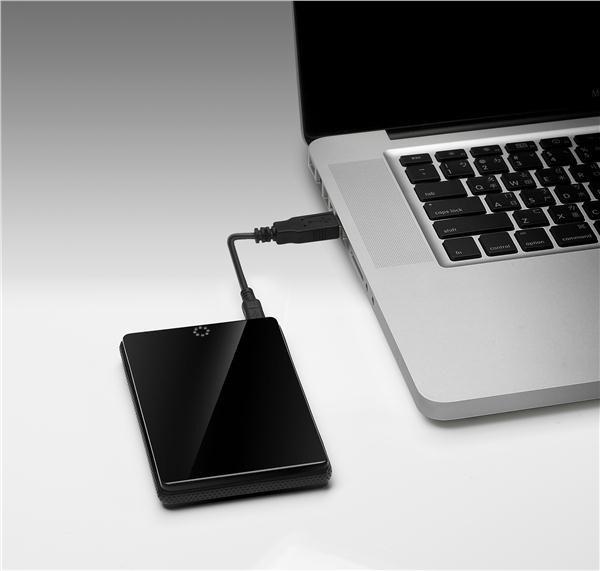
Buy external hard drive
 |
|
|
Sep 28 2016, 05:51 PM
Show posts by this member only | Post
#3
|
|
Junior Member
149 posts Joined: Jan 2011
|
QUOTE(GarubaSwey @ Sep 28 2016, 05:24 PM) Buy external hard drive I have one of those. Wondering if I need to format those in order for it to be compatible with MAC? Problem is, I am also using it for Windows. Will I lose my files? Of course buying a new one helps   Thanks mate. |
|
|
Sep 28 2016, 05:54 PM
Show posts by this member only | Post
#4
|
 
Staff
5,054 posts Joined: Aug 2008
|
QUOTE(calvintiffy @ Sep 28 2016, 05:51 PM) I have one of those. Wondering if I need to format those in order for it to be compatible with MAC? Problem is, I am also using it for Windows. Will I lose my files? Of course buying a new one helps Partition it... One side format it for Mac another for Windows. Thanks mate. |
|
|
Sep 28 2016, 06:01 PM
Show posts by this member only | Post
#5
|
|
Junior Member
149 posts Joined: Jan 2011
|
QUOTE(tarvalslain87 @ Sep 28 2016, 05:54 PM) Partition it... One side format it for Mac another for Windows. Thanks buddy, will do some research on it! |
|
|
Sep 28 2016, 06:09 PM
Show posts by this member only | Post
#6
|

All Stars
31,612 posts Joined: Aug 2010
|
if not mistaken newer macbook air are not able to change the hdd / ssd
and yes, airport capsule will do your job, but is expensive, better grab an external hard disk  as for install windows, you can either partition it to dual boot, else use bootcamp yet, since you want to install windows, make sure your ram got 8gb, else you will facing lag |
|
|
|
|
|
Sep 28 2016, 06:22 PM
Show posts by this member only | Post
#7
|
|
Junior Member
149 posts Joined: Jan 2011
|
QUOTE(XeactorZ @ Sep 28 2016, 06:09 PM) if not mistaken newer macbook air are not able to change the hdd / ssd Thank you senpai. Question: Is it possible to treat airport capsule like your HD? Can we install games there and load it on airport? and yes, airport capsule will do your job, but is expensive, better grab an external hard disk as for install windows, you can either partition it to dual boot, else use bootcamp yet, since you want to install windows, make sure your ram got 8gb, else you will facing lag |
|
|
Sep 28 2016, 06:37 PM
Show posts by this member only | Post
#8
|
|
All Stars
31,612 posts Joined: Aug 2010
|
QUOTE(calvintiffy @ Sep 28 2016, 06:22 PM) Thank you senpai. Question: Is it possible to treat airport capsule like your HD? Can we install games there and load it on airport? you can treat airport capsule like hard disk, now worriesas for install games over there and load it I am not sure about it, better ask Apple Malaysia or visit Apple Premium Reseller sorry |
|
|
Sep 28 2016, 09:30 PM
Show posts by this member only | Post
#9
|

Senior Member
1,711 posts Joined: Jan 2003 From: Kedah Khap Khoun Khap (4K)
|
or you could use the external SD card reader for extending your MBA storage.
There are few available but be warned: the transfer rate speed is really slow though. |
|
|
Sep 28 2016, 10:59 PM
|
|
Junior Member
149 posts Joined: Jan 2011
|
QUOTE(Zaryl @ Sep 28 2016, 09:30 PM) or you could use the external SD card reader for extending your MBA storage. How about Transcend JetDrive Lite? Heard quite a lot of positive review about it There are few available but be warned: the transfer rate speed is really slow though. |
|
|
Sep 29 2016, 08:23 AM
|

Senior Member
1,352 posts Joined: Oct 2010
|
Your best bet here since you need to load up games is an external ssd coupled to the fastest port on your laptop. But expensive loh.
|
|
|
Oct 6 2016, 08:33 AM
|

Senior Member
3,617 posts Joined: Oct 2010
|
Upgrage to Sierra, you'll get at least 10-15Gb of extra space
|
|
|
Oct 6 2016, 05:38 PM
|
|
Junior Member
149 posts Joined: Jan 2011
|
QUOTE(chokia @ Oct 6 2016, 08:33 AM) Upgrage to Sierra, you'll get at least 10-15Gb of extra space Already upgraded, need to perform any task? |
|
|
|
|
|
Oct 6 2016, 07:07 PM
|
|
Senior Member
3,617 posts Joined: Oct 2010
|
QUOTE(calvintiffy @ Oct 6 2016, 05:38 PM) Already upgraded, need to perform any task? ok download disk diag and runhttps://itunes.apple.com/us/app/disk-diag-c...672206759?mt=12 |
|
|
Oct 7 2016, 12:39 AM
|
|
Junior Member
149 posts Joined: Jan 2011
|
QUOTE(chokia @ Oct 6 2016, 07:07 PM) I have downloaded the app but it doesnt allow me to click on any specific folders...help?  |
|
|
Oct 7 2016, 12:51 AM
|
|
Junior Member
149 posts Joined: Jan 2011
|
QUOTE(chokia @ Oct 6 2016, 07:07 PM) Ahhh I think I got it ady, thanks for your recommendation!  |
|
|
Oct 7 2016, 06:18 PM
|

Senior Member
927 posts Joined: Aug 2011
|
for what i understood after read all the comments, if my office pc using windows and at home I used macbook, i cant simply transfer my work to a pendrive n do the work by using mac? like that?
|
|
|
Oct 8 2016, 11:02 PM
|

Junior Member
879 posts Joined: Jan 2007
|
Get Transcend JetDrive, keep you files/movies/music in it. Do not use it for I/O intensive operation.
|
|
|
Oct 11 2016, 04:23 PM
|

Senior Member
593 posts Joined: Feb 2005 From: Highland, Texas
|
|
|
|
Oct 11 2016, 04:45 PM
|
|
Junior Member
149 posts Joined: Jan 2011
|
QUOTE(butthead @ Oct 11 2016, 04:23 PM) Whoa, super expensive haha |
|
|
Oct 11 2016, 05:11 PM
|

Senior Member
1,221 posts Joined: Mar 2005 
|
get a super mini 128gb sandisk thumbdrive. stick it in there and forget about it. i'm currently using it. add an extra 128 juice to my exisitng 256.
|
|
|
Oct 11 2016, 05:12 PM
|
|
Senior Member
1,221 posts Joined: Mar 2005
|
nice and cheap as well. below RM200.
|
|
|
Oct 12 2016, 09:25 AM
|
|
Senior Member
3,617 posts Joined: Oct 2010
|
QUOTE(asamalikum @ Oct 11 2016, 05:12 PM) nice and cheap as well. below RM200. Where you bought it? lazada? |
|
|
Oct 12 2016, 09:29 AM
|
|
Junior Member
879 posts Joined: Jan 2007
|
QUOTE(asamalikum @ Oct 11 2016, 05:11 PM) get a super mini 128gb sandisk thumbdrive. stick it in there and forget about it. i'm currently using it. add an extra 128 juice to my exisitng 256. what kind of sdcard adapter you're using? as we know, standard sdcard adapter will protrude a bit. |
|
|
Oct 12 2016, 09:32 AM
|

Junior Member
517 posts Joined: Sep 2009
|
The sd card slot can convert to storage.
Get nifty mini drive |
|
|
Oct 12 2016, 09:54 AM
|
|
Senior Member
1,221 posts Joined: Mar 2005
|
@chokia
11 street @neuromancerx i'm not using sd at all. not sure if the speeds is fast enough. i'm using usb thumb drive. sandisk. regarding the protrusion part, it does protrude a bit, but it's negligible and won't affect nor need to make any particular adjustment. basically i just leave it there ever since i plug in. dump all movies and music in there. it add in a much needed extra juice. Most importantly, we'll need to periodically organise our drive. No amount of memory drive is enough. @gabriel.l it's an option as well, but having need to pay extra for the adapter alone turn me off. ---- for those who are interested i'm using SanDisk Ultra Fit CZ43 USB 3.0 128gb. i uploaded a picture for your reference, the price as well. it's RM 93 for 128gb. i'm considering getting an extra unit since my mba equipped with 2 usb ports. only hold back is, i'll be upgrading to macbook 12 next year and it only supports usb c. can't really utilise both units. This post has been edited by asamalikum: Oct 12 2016, 10:00 AM Attached thumbnail(s) 

|
|
|
Oct 12 2016, 11:30 AM
|
|
Junior Member
149 posts Joined: Jan 2011
|
QUOTE(asamalikum @ Oct 12 2016, 09:54 AM) @chokia Good idea!11 street @neuromancerx i'm not using sd at all. not sure if the speeds is fast enough. i'm using usb thumb drive. sandisk. regarding the protrusion part, it does protrude a bit, but it's negligible and won't affect nor need to make any particular adjustment. basically i just leave it there ever since i plug in. dump all movies and music in there. it add in a much needed extra juice. Most importantly, we'll need to periodically organise our drive. No amount of memory drive is enough. @gabriel.l it's an option as well, but having need to pay extra for the adapter alone turn me off. ---- for those who are interested i'm using SanDisk Ultra Fit CZ43 USB 3.0 128gb. i uploaded a picture for your reference, the price as well. it's RM 93 for 128gb. i'm considering getting an extra unit since my mba equipped with 2 usb ports. only hold back is, i'll be upgrading to macbook 12 next year and it only supports usb c. can't really utilise both units. |
|
|
Oct 12 2016, 11:35 AM
|
|
Junior Member
60 posts Joined: Nov 2014
|
|
|
|
Oct 12 2016, 11:56 AM
|

Senior Member
1,914 posts Joined: Aug 2009
|
Get the Paragon driver and a external HDD
|
|
|
Oct 12 2016, 02:27 PM
|
|
Junior Member
879 posts Joined: Jan 2007
|
QUOTE(asamalikum @ Oct 12 2016, 09:54 AM) @chokia Currently, I'm using this SanDisk Ultra Fit CZ43 as well 11 street @neuromancerx i'm not using sd at all. not sure if the speeds is fast enough. i'm using usb thumb drive. sandisk. regarding the protrusion part, it does protrude a bit, but it's negligible and won't affect nor need to make any particular adjustment. basically i just leave it there ever since i plug in. dump all movies and music in there. it add in a much needed extra juice. Most importantly, we'll need to periodically organise our drive. No amount of memory drive is enough. @gabriel.l it's an option as well, but having need to pay extra for the adapter alone turn me off. ---- for those who are interested i'm using SanDisk Ultra Fit CZ43 USB 3.0 128gb. i uploaded a picture for your reference, the price as well. it's RM 93 for 128gb. i'm considering getting an extra unit since my mba equipped with 2 usb ports. only hold back is, i'll be upgrading to macbook 12 next year and it only supports usb c. can't really utilise both units. |
|
|
Oct 12 2016, 02:29 PM
|
|
Senior Member
1,221 posts Joined: Mar 2005
|
QUOTE(neuromancerx @ Oct 12 2016, 02:27 PM) Currently, I'm using this SanDisk Ultra Fit CZ43 as well tell me you like it. |
|
|
Oct 12 2016, 05:59 PM
|
|
Junior Member
149 posts Joined: Jan 2011
|
QUOTE(asamalikum @ Oct 12 2016, 02:29 PM) tell me you like it. Since you're leaving it permanently, does it gets hot easily? Seems like a good choice considering the price. |
|
|
Oct 12 2016, 06:01 PM
|
|
Senior Member
1,221 posts Joined: Mar 2005
|
QUOTE(calvintiffy @ Oct 12 2016, 05:59 PM) Since you're leaving it permanently, does it gets hot easily? You won't feel any heat on the exterior plastic side. Only the metal/aluminum part is hot. Don't worry about the durability. Been using for 9 mths and counting. Seems like a good choice considering the price. |
|
|
Oct 12 2016, 06:04 PM
|
|
Senior Member
1,221 posts Joined: Mar 2005
|
Price can't be a major factor for using this. It's in fact quite expensive if u fraction it down per gb.
|
|
|
Oct 17 2016, 05:03 PM
|

Junior Member
252 posts Joined: Aug 2008 From: from an iPhone..how's that?
|
QUOTE(asamalikum @ Oct 12 2016, 09:54 AM) @chokia Same here...even my iTunes library is in it...11 street @neuromancerx i'm not using sd at all. not sure if the speeds is fast enough. i'm using usb thumb drive. sandisk. regarding the protrusion part, it does protrude a bit, but it's negligible and won't affect nor need to make any particular adjustment. basically i just leave it there ever since i plug in. dump all movies and music in there. it add in a much needed extra juice. Most importantly, we'll need to periodically organise our drive. No amount of memory drive is enough. @gabriel.l it's an option as well, but having need to pay extra for the adapter alone turn me off. ---- for those who are interested i'm using SanDisk Ultra Fit CZ43 USB 3.0 128gb. i uploaded a picture for your reference, the price as well. it's RM 93 for 128gb. i'm considering getting an extra unit since my mba equipped with 2 usb ports. only hold back is, i'll be upgrading to macbook 12 next year and it only supports usb c. can't really utilise both units. |
|
|
Oct 18 2016, 02:15 PM
|

Junior Member
201 posts Joined: Aug 2010
|
Here my solution:
- Get a microSD adapter which will fit nicely in your SD card slot. - Buy a microSD card you wish (Disk speed will based on microSD card you bought). Hope it helps.... :thumbsup: 

This post has been edited by vonzipper: Oct 18 2016, 02:26 PM |
|
|
Oct 27 2016, 12:44 AM
|

Junior Member
294 posts Joined: Sep 2011
|
Figure getting this removable storage too , Guys , can i install any applications or windows os on the stick drive ? without any intention taking it out , you know it just gonna stick there all the time . is it safe to do so to run os/applications ? i've been running out of space all usb taken all internal storage occupied . |
|
|
Oct 29 2016, 08:28 AM
|
|
Senior Member
1,221 posts Joined: Mar 2005
|
QUOTE(Cap Jones @ Oct 27 2016, 12:44 AM) Figure getting this removable storage too , What kind of storage are u referring to? Guys , can i install any applications or windows os on the stick drive ? without any intention taking it out , you know it just gonna stick there all the time . is it safe to do so to run os/applications ? i've been running out of space all usb taken all internal storage occupied . Suggest u to use the external storage to keep files like music or movie or high res photo. |
| Change to: |  0.0688sec 0.0688sec
 1.11 1.11
 6 queries 6 queries
 GZIP Disabled GZIP Disabled
Time is now: 22nd December 2025 - 02:35 AM |
 Quote
Quote