Outline ·
[ Standard ] ·
Linear+
How to Format DELL Vostro Laptop without DVD room
|
TSpowind
|
  Sep 19 2016, 06:07 PM, updated 10y ago Sep 19 2016, 06:07 PM, updated 10y ago
|

|
Just asking if I get a laptop without DVD room for example (DELL Vostro Laptop without DVD room)
How am I going to reformat then?
They didn't include reformat original Windows Disc nowadays? So no dvd room how to format?
|
|
|
|
|
|
lawrencesha
|
Sep 19 2016, 06:12 PM
|
|
|
Make a bootable USB pendrive with windows installer in it.
|
|
|
|
|
|
SUSGregyong
|
Sep 19 2016, 06:14 PM
|
|
|
Download the proper ISO and flash it onto a thumbdrive with this https://www.microsoft.com/en-us/download/wi...d-download-toolor download Windows media creation tool for Windows 8.1 and Windows 10. |
|
|
|
|
|
Zhik
|
Sep 19 2016, 06:16 PM
|
|
|
usb
|
|
|
|
|
|
mi-g
|
Sep 19 2016, 06:16 PM
|
|
|
Download ISO from microsoft website, then put in pendrive using USB Tool https://www.microsoft.com/en-us/download/wi...d-download-tool |
|
|
|
|
|
TSpowind
|
Sep 20 2016, 12:11 AM
|
|
|
Usually, where to get the original windows format file?
Will Dell provide nowadays?
Windows 10 Home or Windows 10 Pro is better?
Any big different?
|
|
|
|
|
|
SUSVelocity
|
Sep 20 2016, 07:15 AM
|
|
|
QUOTE(powind @ Sep 20 2016, 12:11 AM) Usually, where to get the original windows format file? Will Dell provide nowadays? Windows 10 Home or Windows 10 Pro is better? Any big different? it depends what your license now. You need to install back what original in your notebook 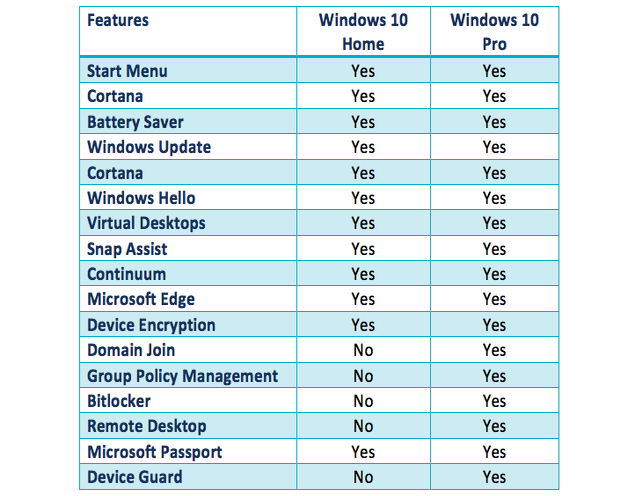 |
|
|
|
|
|
TSpowind
|
Sep 20 2016, 07:23 PM
|
|
|
QUOTE(Velocity @ Sep 20 2016, 07:15 AM) it depends what your license now. You need to install back what original in your notebook So if I m doing home design & video editing no need to use Windows Pro right? |
|
|
|
|
|
shirogawawa
|
Sep 20 2016, 07:46 PM
|
|
|
QUOTE(powind @ Sep 20 2016, 07:23 PM) So if I m doing home design & video editing no need to use Windows Pro right? no need |
|
|
|
|
|
darkskies
|
Sep 20 2016, 09:10 PM
|
|
|
*Ahem* branded laptop/pc do not need to reformat everything.
If you're doing it that way, you're doing it the wrong way. Unless you're downgrading or upgrading your operating system.
They usually comes with preloaded image inside harddisk that's for you to reset it to factory default.
You try to delete the whole harddisk and format it to nothing, you'll destroy the preloaded image and it becomes a hassle to reinstall your windows in future.
It's chargeable if you send it back to them for reinstalling windows , although they'll help you to preload back the backup image.
This is why they do not come with any disc. Dell do however include such operating system disc.
|
|
|
|
|
|
TSpowind
|
Sep 21 2016, 12:16 AM
|
|
|
QUOTE(mi-g @ Sep 19 2016, 06:16 PM) Download ISO from microsoft website, then put in pendrive using USB Tool https://www.microsoft.com/en-us/download/wi...d-download-toolNot download from dell site? |
|
|
|
|
|
SUSrainy~days
|
Sep 21 2016, 01:54 AM
|
Getting Started

|
to reformat window 8.1 & 10 pc is now much more easier with few click and no need to use any backup.
under Settings > Updates & Security > Recovery > Reset This PC
you can make a system image backup of the window into a pendrive.
worst case you screw up everything with no backup, you can call dell to send you a window installer pendrive.
|
|
|
|
|
|
DragonRiderStar
|
Sep 21 2016, 09:06 AM
|
Getting Started
|
You can use USB. but you need go to bios system set the reboot to USB. after you plug in USB and restart then keep click"enter".
This post has been edited by DragonRiderStar: Sep 21 2016, 09:06 AM
|
|
|
|
|




 Quote
Quote




 0.0160sec
 0.16
0.16
 5 queries
 GZIP Disabled