

 Sep 14 2016, 09:00 PM


QUOTE(jacker215 @ Sep 14 2016, 06:31 PM)
hi all..
is there any way i can stream two different output to different device in windows 10? for example i want my game sound in headphone and movie sound in speaker...

What soundcard do you have? I am on Realtek onboard chip and here are the settings, not sure if the feature is available on other soundcard:is there any way i can stream two different output to different device in windows 10? for example i want my game sound in headphone and movie sound in speaker...
Basically, make Realtek Audio Manager to not mute the speakers when headphones are plugged, set headphone as default playback device(unless your games allow you to choose it), then setup your media player/app(MPC-BE in this case) to output via speakers.
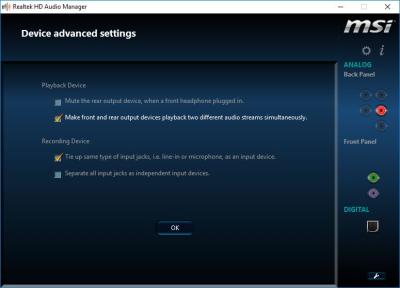
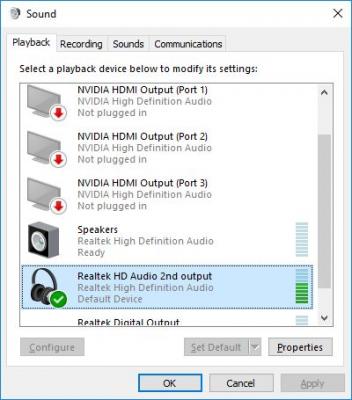
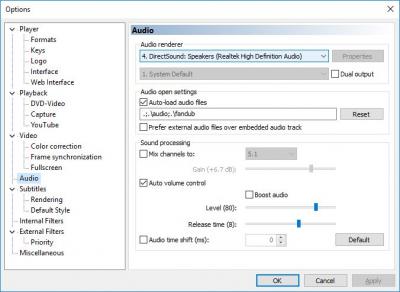
EDIT: You can also use app like Audio Router change/reroute the audio from each app to different playback device so you don't have to mess with individual app settings. Not sure if rerouting would worsen the audio quality though.

This post has been edited by Kellicros: Sep 14 2016, 09:19 PM
 Quote
Quote
 0.0145sec
 0.84
0.84
 7 queries
 GZIP Disabled