

Hi,
After upgraded to Win 10 (x64) , I noticed that my 8GB RAM installed, usable only 4GB.
May I know what is the problem ?
thanks
8GB RAM installed, usable only 4GB, RAM after Win10 update
8GB RAM installed, usable only 4GB, RAM after Win10 update
|
|
 Sep 13 2016, 03:28 PM, updated 10y ago Sep 13 2016, 03:28 PM, updated 10y ago
Return to original view | IPv6 | Post
#1
|
 
Junior Member
292 posts Joined: Jun 2016 
|
Hi,
After upgraded to Win 10 (x64) , I noticed that my 8GB RAM installed, usable only 4GB. May I know what is the problem ? thanks |
|
|
|
|
|
Sep 13 2016, 03:35 PM
Return to original view | IPv6 | Post
#2
|
|
Junior Member
292 posts Joined: Jun 2016
|
QUOTE(salimbest83 @ Sep 13 2016, 03:31 PM) check bios first . Checked, is 8GBis it detect all ur ram  |
|
|
Sep 13 2016, 03:37 PM
Return to original view | IPv6 | Post
#3
|
|
Junior Member
292 posts Joined: Jun 2016
|
QUOTE(rzam @ Sep 13 2016, 03:31 PM) download speccy and post the result here checked . CPU-ZAttached thumbnail(s) 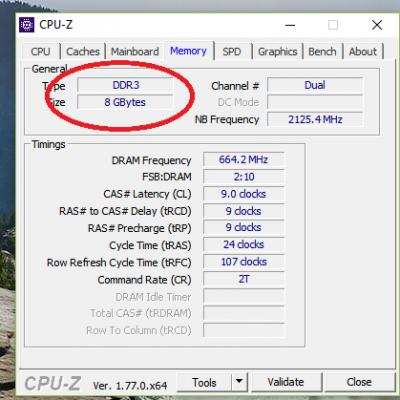
|
|
|
Sep 13 2016, 03:38 PM
Return to original view | IPv6 | Post
#4
|
|
Junior Member
292 posts Joined: Jun 2016
|
QUOTE(Mubarak90 @ Sep 13 2016, 03:36 PM) Are you using an older computer? Older model (usually laptop) has capped for they CPU on how much RAM it can read. Old desktop, year 2010.While on Win 7, shows 8GB ; after upgraded to Win 10 , it shows : Installed 8GB RAM (4GB usable) |
|
|
Sep 13 2016, 03:42 PM
Return to original view | IPv6 | Post
#5
|
|
Junior Member
292 posts Joined: Jun 2016
|
QUOTE(bongah @ Sep 13 2016, 03:41 PM) is ur win10 32bit or 64bit? 64bits32bit os have ram capped to 4GB only |
|
|
Sep 13 2016, 03:46 PM
Return to original view | IPv6 | Post
#6
|
|
Junior Member
292 posts Joined: Jun 2016
|
QUOTE(salimbest83 @ Sep 13 2016, 03:41 PM) taskmanager screenshot? ehhm , I used up all 4 slots....but it said 2 of 4 used.but 8GB was display in screen shot. apa jadi ? Attached thumbnail(s) 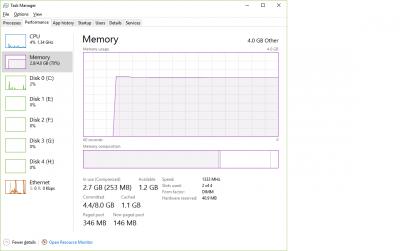
|
|
|
|
|
|
Sep 13 2016, 03:47 PM
Return to original view | IPv6 | Post
#7
|
|
Junior Member
292 posts Joined: Jun 2016
|
QUOTE(xinanxxx @ Sep 13 2016, 03:46 PM) try msconfig > boot > advanced options > check if maximum memory is ticked unticked. |
|
|
Sep 13 2016, 03:49 PM
Return to original view | IPv6 | Post
#8
|
|
Junior Member
292 posts Joined: Jun 2016
|
QUOTE(Why^Me @ Sep 13 2016, 03:45 PM) its time to update your bios and use default bios setting. Can I know how to reset to default setting ? thxhappens to my asus rog mobo. detect 16gb but only running 8gb. tired of checking the bios setting, just reset to default setting and walla. 16gb back. p/s: BIOS shall be latest, but I will recheck later. will update. |
|
|
Sep 13 2016, 03:50 PM
Return to original view | IPv6 | Post
#9
|
|
Junior Member
292 posts Joined: Jun 2016
|
QUOTE(ricstc @ Sep 13 2016, 03:42 PM) right click the windows start icon on the bottom left Win 10 ver 1607run winver and paste the screenshot here so that some of the experts here can check your version |
|
|
Sep 13 2016, 03:57 PM
Return to original view | IPv6 | Post
#10
|
|
Junior Member
292 posts Joined: Jun 2016
|
QUOTE(ricstc @ Sep 13 2016, 03:52 PM) sorry but mind telling us again how do you show that only 4gb is being used? it was showing on the red arrow column , but after I did a memory scan, it shows as per screen shot.where does it show it / how did you suspect this and from which screen? This post has been edited by jpong1: Sep 13 2016, 03:58 PM Attached thumbnail(s) 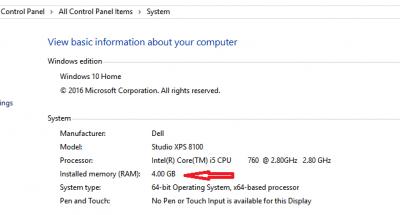
|
|
|
Sep 13 2016, 04:06 PM
Return to original view | IPv6 | Post
#11
|
|
Junior Member
292 posts Joined: Jun 2016
|
QUOTE(ricstc @ Sep 13 2016, 04:02 PM) good but how about this way it said installed 4096control-alt-delete task manager at the bottom click Open Resource Manager then click on the memory tab and look for this screen and the info  |
|
|
Sep 13 2016, 06:23 PM
Return to original view | IPv6 | Post
#12
|
|
Junior Member
292 posts Joined: Jun 2016
|
QUOTE(ricstc @ Sep 13 2016, 04:54 PM) it shows 4096 Available? Available available - what does Available show? Speecy...at this stage I suspect that there is a software reporting module that is not correctly reporting you total physical ram I now suggest that you use a ram testing program like memtest or some other ram testing diagnostics (not the default one that you have used so far) if I were you I would download a bootable DVD or usb that has diagnostic testing prgs like Hirens or something similar don't have - ask some experts here to show you where to download Attached thumbnail(s) 
|
|
|
Sep 13 2016, 09:35 PM
Return to original view | IPv6 | Post
#13
|
|
Junior Member
292 posts Joined: Jun 2016
|
QUOTE(rzam @ Sep 13 2016, 09:06 PM) virtual memory setting Thanks for help. Done as your advise....Still the same.try resetting to Automatic see if that helps » Click to show Spoiler - click again to hide... « |
|
|
|
|
|
Sep 14 2016, 12:12 AM
Return to original view | IPv6 | Post
#14
|
|
Junior Member
292 posts Joined: Jun 2016
|
QUOTE(ricstc @ Sep 13 2016, 11:28 PM) so looks like you've installed the 32 bit of windows which cant use beyond 4gb Cant be , cause when I was still on Win 7 (64bits), RAM always 8GB.back to fresh install is your only way problem solved After upgraded to Win 10, found this problem. |
|
|
Sep 14 2016, 12:13 AM
Return to original view | IPv6 | Post
#15
|
|
Junior Member
292 posts Joined: Jun 2016
|
QUOTE(Why^Me @ Sep 13 2016, 04:59 PM) you need to see on the bios 1st. luckily asus board ha the function. so, it display installed 16gb and usable 8gb. otherwise, either your ram is faulty or bios problem. sometimes, eventhough the ram is faulty, windows still can boot but show less memory. will try your method 2molo. thx |
|
|
Sep 14 2016, 02:12 PM
Return to original view | Post
#16
|
|
Junior Member
292 posts Joined: Jun 2016
|
Thanks all for help..
After start-up this morning (done nothing last night, except mentioned before), the RAM shows 8GB, back to normal. |
|
|
Sep 14 2016, 09:56 PM
Return to original view | IPv6 | Post
#17
|
|
Junior Member
292 posts Joined: Jun 2016
|
QUOTE(evangelion @ Sep 14 2016, 09:13 PM) Miracles do happen !! Win updates shows many updates done and one still hang at 45%; not sure these updates help not.... |
|
|
Sep 14 2016, 10:37 PM
Return to original view | IPv6 | Post
#18
|
|
Junior Member
292 posts Joined: Jun 2016
|
QUOTE(franky1835 @ Sep 14 2016, 10:13 PM) so far so good till now...will monitor few more days ...thx |
|
|
Nov 9 2016, 08:22 PM
Return to original view | IPv6 | Post
#19
|
|
Junior Member
292 posts Joined: Jun 2016
|
QUOTE(maxtor1 @ Nov 9 2016, 07:19 AM) Thats how your system performance. Most app dont take so much ram. 8gb is consider enough for none video editing. U may notice when running games it would use up to 7gb ram. thanks, all back to normal now.I use 16gb ram. |
| Change to: |  0.0199sec 0.0199sec
 0.64 0.64
 7 queries 7 queries
 GZIP Disabled GZIP Disabled
Time is now: 14th December 2025 - 08:37 PM |
 Quote
Quote
