Welcome Guest ( Log In | Register )

Bump Topic Topic Closed RSS Feed
7 Pages « < 3 4 5 6 7 >Bottom

Outline · [ Standard ] · Linear+

Sony Sony Xperia XZ -- Discussion, The Best Camera Technology on Smartphone

views
     
ckchan
post Oct 11 2016, 07:34 PM

Look at all my stars!!
*******
Senior Member
3,026 posts

Joined: Jan 2009


QUOTE(raymondtong94 @ Oct 11 2016, 06:11 PM)
The fingerprint scanner is still there but the software is not included in US set. Fortunately, a simple software flash can enable it back.
*
Yes. But not many will know how to flash. Most user will use their phone as it is
ckchan
post Oct 11 2016, 08:19 PM

Look at all my stars!!
*******
Senior Member
3,026 posts

Joined: Jan 2009


My first day usage... Started using around 930am today. Till now about 10hour 30minutes. Left 15% battery

Attached Image Attached Image
ckchan
post Oct 11 2016, 10:10 PM

Look at all my stars!!
*******
Senior Member
3,026 posts

Joined: Jan 2009


QUOTE(qayzim14 @ Oct 11 2016, 09:20 PM)
first thanks for the upload, that SOT seems superb as it reached 5 hours , but how is your connectivity? mobile data only? wifi only? or mix? and do you use any kind of power saving mood?

thanks
*
no power saving mode at all as i also want to test it's real potential. connectivity... i'll say maybe 40% wifi and 60% on data
ckchan
post Oct 11 2016, 10:53 PM

Look at all my stars!!
*******
Senior Member
3,026 posts

Joined: Jan 2009


ok. this will be like my first 12 hour usage experience with XZ. i will mostly be comparing with my old Z1

- first thing i notice is the screen. on the highest setting, it's brighter than Z1. on the lowest setting, it's dimmer than Z1 as well. rclxms.gif
- the adaptive brightness seems to be too sensitive. it always adjust itself to the lowest setting when no direct light on it. causing the screen to be too dim. i end up switching it off.
- colour of the screen seems very punchy even after i switch off the x-reality. overall still looks better than my old Z1.
- speed... this beast is build for speed... everything seems very fast and smooth. all apps launched almost instantaneously.
- noticed some bloatware this time round like amazon, avg and zalora... cannot uninstall but fortunately can be easily disable.
- tap screen to wake doesn't seems to work all the time. double tap to sleep works flawlessly though.
- front facing stereo speaker! loving it! i used to cup my hand around the speaker whenever i am holding my Z1 watching video as the speaker is at the bottom. if not the sound will be like directed away from me and sounds very soft. now no more... icon_idea.gif
- Wifi... got to say it's very good. as soon as i switch it on, it'll straight away scan and connect to my house wifi in like 1 second... max 2 seconds.
- camera, miles ahead of my Z1. wasn't really expecting it to be that good actually. auto focus is fast generally, but not like 0.6s la...
- SA mode still seems to be grainy when zoom in closely. but then still much better than Z1
- the predictive focus seems to be working much better this time round than in the X. i managed to capture few shots of my 3yo moving around.
- i still prefer to use manual mode, with all settings in auto except the exposure level set to -0.3. the picture in this mode seems to be less grainy (same case as in my Z1)
- I still using 8MP as i think it's better than the full 23MP picture. but i still need more time to test this out.
- so for me right now, if i want to shoot moving object -> SA mode. for stationary object -> manual mode
- battery life is good thus far. as in my previous post, managed to get 5 hours SOT for today. thumbup.gif my old z1, even with stamina mode on and greenified downloaded apps, only manage to tops 4hours+
- stamina mode seems to be different on XZ as i cannot put any apps in standby list anymore.

so, overall as of now, can really feel it's a huge upgrade for me coming from Z1. rclxm9.gif
ckchan
post Oct 12 2016, 08:11 PM

Look at all my stars!!
*******
Senior Member
3,026 posts

Joined: Jan 2009


Today's usage. Total 13 hours. 80% data and 20% wifi

Sot almost 5 hours

Attached Image
ckchan
post Oct 13 2016, 12:00 AM

Look at all my stars!!
*******
Senior Member
3,026 posts

Joined: Jan 2009


QUOTE(wc_how @ Oct 12 2016, 11:46 PM)
I found 2 bugs.
1. The free OTG undetectable.
2. Brightness switch to lowest randomly.
*
1. Mine working fine. Did u select the detect usb device in settings - device connection - usb connectivity?

2. Yes. I found it to be too sensitive as well. That's y I switch off the adaptive brightness
ckchan
post Oct 13 2016, 09:26 AM

Look at all my stars!!
*******
Senior Member
3,026 posts

Joined: Jan 2009


QUOTE(wc_how @ Oct 13 2016, 12:11 AM)
1. Thanks it works.
2. I mean the setting switch to the lowest. Not the screen goes to darker.
*
Yes. U can see from the brightness slider moving on itself to the lowest right?
ckchan
post Oct 13 2016, 11:00 AM

Look at all my stars!!
*******
Senior Member
3,026 posts

Joined: Jan 2009


QUOTE(wc_how @ Oct 13 2016, 10:19 AM)
Yup, but my z3 wont do this. It just change the screen brightness around +-10% only.
*
Yup. Same as my z1. Won't change too much on screen brightness. That's y I said the adaptive brightness on xz is very sensitive and aggressive. I switch it off and just manually adjust screen brightness when needed
ckchan
post Oct 13 2016, 11:02 AM

Look at all my stars!!
*******
Senior Member
3,026 posts

Joined: Jan 2009


QUOTE(Areas Elysian @ Oct 13 2016, 10:28 AM)
The way auto brightness works on the XZ is different from previous Sonys. Not sure why the change.

Previous Sonys, on auto, you can still 'tweak' the brightness to give it a bias, meaning it'll be auto brightness +/- however much you move the slider. So if you find the auto brightness too dim/bright, you can set it to be brighter/dimmer, but still with auto.

On the XZ it seems like selecting auto will give you just that, auto. No way to tweak it to your liking and you got to like what they give. I find moving the slider on the XZ only overrides the auto and disables it. To re-enable it I'll need to switch the auto off and then back on again. At least, this is how I'm finding it to work. Other users do share your experiences.
*
Yes. I prefer the old auto brightness on my z1
ckchan
post Oct 13 2016, 11:28 AM

Look at all my stars!!
*******
Senior Member
3,026 posts

Joined: Jan 2009


QUOTE(Areas Elysian @ Oct 13 2016, 11:17 AM)
Being on android, there are ways in which you can overcome some issues.

Are you finding the screen to bright? Or just that it changes a lot/fluctuates?
*
Example is in my room. My lights are not too bright. But when I am holding my phone facing away from the light source the screen will auto adjust to the lowest, which in the case is way too dim for the lighting condition. This nvr happen b4 with my z1
ckchan
post Oct 14 2016, 06:01 PM

Look at all my stars!!
*******
Senior Member
3,026 posts

Joined: Jan 2009


QUOTE(pohsze @ Oct 14 2016, 04:03 PM)
sigh im gonna miss N7 for its battery and camera..
*
Err... At least xz battery is safe
ckchan
post Oct 14 2016, 10:37 PM

Look at all my stars!!
*******
Senior Member
3,026 posts

Joined: Jan 2009


QUOTE(ChuanHong @ Oct 14 2016, 09:43 PM)
No laggy in my z5p.. Wonder why laggy for your case..  I miss my se satio.. Nearly 2k in 6 years back.

For all xz users, may watch this video. Quite interesting

https://youtu.be/O-F00RFmxA0
*
That is why I seldom use superior auto mode...
ckchan
post Oct 15 2016, 01:16 AM

Look at all my stars!!
*******
Senior Member
3,026 posts

Joined: Jan 2009


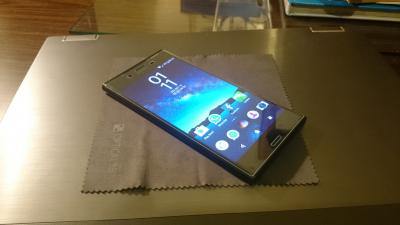
Just applied the temper glass so on my xz. Buy stupid me accidentally touched the inner side of the glass. So can see smudges on the upper right corner...

Attached Image Attached Image
ckchan
post Oct 15 2016, 01:51 AM

Look at all my stars!!
*******
Senior Member
3,026 posts

Joined: Jan 2009


QUOTE(Michael_Lee @ Oct 15 2016, 01:43 AM)
Is there a film inside your tempered glass?
*
No film
ckchan
post Oct 15 2016, 11:09 AM

Look at all my stars!!
*******
Senior Member
3,026 posts

Joined: Jan 2009


QUOTE(qayzim14 @ Oct 15 2016, 08:45 AM)
Where did you get it?
*
Bought it online at ultimate shield website. It offer great sp for my z1. Been very satisfied. But the same cannot be said for xz case due to the curved edge.

This glass only stick to the phone on the side. Due to the curve. Meaning fhe whole middle part is not really stick to the phone. So the whole feeling of it is like not so solid and also affect the screen sensitivity.

I don't quite like the normal plastic sp. I am now considering getting the style cover and leave the screen bare without any sp
ckchan
post Oct 15 2016, 01:25 PM

Look at all my stars!!
*******
Senior Member
3,026 posts

Joined: Jan 2009


QUOTE(raymondtong94 @ Oct 15 2016, 01:01 PM)
Sleek cover, at a price. RM259 ohmy.gif
I didn't bought if. just trying out
*
The screen still work with the cover on right? Does it affect the sensitivity of the screen?
ckchan
post Oct 15 2016, 07:11 PM

Look at all my stars!!
*******
Senior Member
3,026 posts

Joined: Jan 2009


QUOTE(teckyang97 @ Oct 15 2016, 07:07 PM)
Just tried the XZ today at The Curve, first impression is SUPER SEXY! Then I tried the fingerprint sensor, all I can say is, its by far the fastest fingerprint sensor I've ever used! Even faster than my Mate 8, which is the 2nd fastest I've used, and 3rd fastest is the iPhone 7. Literally you just press the power button, you don't even have a chance to check notification or time, it just unlocks immediately! However I don't really like how the body feels, somehow it doesn't feel like metal or aluminium, feels slightly plastic, not sure why, must be the shiny property makes it feel that way(similar to iPhone 7 Jet Black feel). Camera is OK, overall I think the selling point of this phone is the sexy look and design and also the blazing speed fingerprint. For now, not worth the upgrade from Mate 8 to XZ
*
The curve already has xz display set? Last few days I go there they only display x compact
ckchan
post Oct 16 2016, 12:12 PM

Look at all my stars!!
*******
Senior Member
3,026 posts

Joined: Jan 2009


QUOTE(squall_kay @ Oct 16 2016, 09:59 AM)
any recommendation theme that can change home button with Xperia logo?
used to have it in rooted Xperia Z2
*
https://play.google.com/store/apps/details?...shmallow.X.blue

https://play.google.com/store/apps/details?....Marshmallow.xz
ckchan
post Oct 16 2016, 12:20 PM

Look at all my stars!!
*******
Senior Member
3,026 posts

Joined: Jan 2009


For me personally, it's not so much as to which speaker is louder.

In my previous z1 which has a bottom speaker. Whenever I am watching video in landscape mode, the speaker will be firing to my right, which at night towards my wife and she'll always complain why I put the volume so loud. I end up having to cup my hand around the speaker to direct the sound to me. If I am watching a 10min video, I can't move my hand at all cos dking so I may not hear the sound clearly...

So to me having a front facing speaker is always better than a louder back/bottom facing speaker
ckchan
post Oct 16 2016, 06:35 PM

Look at all my stars!!
*******
Senior Member
3,026 posts

Joined: Jan 2009


Wanted to get my dad a xz at the curve. Mana tau all sold out! Xz very laku ke?

7 Pages « < 3 4 5 6 7 >Top
Topic ClosedOptions
 

Change to:
| Lo-Fi Version
0.0287sec    0.60    7 queries    GZIP Disabled
Time is now: 14th December 2025 - 04:42 AM