Outline ·
[ Standard ] ·
Linear+
Samsung Galaxy Note 7 Official Discussion V4!, Release date postponed to September 2016
|
thugs
|
 Aug 20 2016, 06:52 PM Aug 20 2016, 06:52 PM
|

|
QUOTE(hengguowei @ Aug 20 2016, 06:51 PM) Hi, is this a screen protector or some coating? No issue with any type of casings so far? I applied the X-One SP and casings which cover the SP will definitely lift the SP. Wasted money on casing that ended up being useless.. On a side note, Spigen Thin Fit will not touch the SP and hence no lifting issue though this case is only scratch-proof definitely not drop-proof. You didn't trim off the X-one SP? I m waiting for my X-one SP.... now everyone said will have lift up issue... how?  |
|
|
|
|
|
hengguowei
|
Aug 20 2016, 06:56 PM
|
|
|
QUOTE(thugs @ Aug 20 2016, 06:52 PM) You didn't trim off the X-one SP? I m waiting for my X-one SP.... now everyone said will have lift up issue... how? Nope didn't trim anything. While it does cover well and there are some minor lift-offs, after applying some water and then rubbing the SP again, it seems to have stayed quite well for these few days. But I think it will be lifted up by most casings. I thought the shop owner was just exaggerating and tried using another case I got and it lifted the SP. He told me this is the problem with Edge screen. This post has been edited by hengguowei: Aug 20 2016, 06:56 PM |
|
|
|
|
|
thugs
|
Aug 20 2016, 06:57 PM
|
|
|
QUOTE(hengguowei @ Aug 20 2016, 06:56 PM) Nope didn't trim anything. While it does cover well and there are some minor lift-offs, after applying some water and then rubbing the SP again, it seems to have stayed quite well for these few days. But I think it will be lifted up by most casings. I thought the shop owner was just exaggerating and tried using another case I got and it lifted the SP. He told me this is the problem with Edge screen. Apply some water then rubbing the SP again... after that you do not have casing put on? i think if trim maybe should solve the lifting issue?  |
|
|
|
|
|
BeastX
|
Aug 20 2016, 07:00 PM
|
|
|
QUOTE(TOMEI-R @ Aug 20 2016, 06:40 PM) Now wonder this thread is moving so fast. You guys should learn to spoiler you quotes.  pages added is by number of post not by the length of the post.... it's just longer for you to scroll through... This post has been edited by BeastX: Aug 20 2016, 07:01 PM |
|
|
|
|
|
abahumie
|
Aug 20 2016, 07:01 PM
|
New Member

|
QUOTE(hengguowei @ Aug 20 2016, 06:51 PM) Hi, is this a screen protector or some coating? No issue with any type of casings so far? I applied the X-One SP and casings which cover the SP will definitely lift the SP. Wasted money on casing that ended up being useless.. On a side note, Spigen Thin Fit will not touch the SP and hence no lifting issue though this case is only scratch-proof definitely not drop-proof. I have tried x-one...burn rm89 within 5 minutes...want to buy samsung's sp rm39..but hear same problem..luckly one of our member 'gunzit?'..shared the coating...straight away fit the coating @sunway... So far, i havent notice any peeling or bubbles on the screen yet...anyway, if peeled...have lifetime warranty...so can ask them to replce new one...no additional cost... |
|
|
|
|
|
amenlo9
|
Aug 20 2016, 07:01 PM
|
|
|
http://dacota.pixnet.net/blog/post/34344872Coating service from Taiwan. Fully covered!
|
|
|
|
|
|
N_Silver
|
Aug 20 2016, 07:06 PM
|
|
|
QUOTE(afiqsabri @ Aug 20 2016, 06:29 PM) WORKED FOR ME.... https://www.gottabemobile.com/2016/08/19/ho...-galaxy-note-7/"To reset a frozen Galaxy Note 7 all owners need to do is press and hold down both the power button and volume down simultaneously for 7-10 seconds Push and hold volume down and power at the same time and hold them down until you feel a vibrate and see the Galaxy Note 7 reset. Even if the phone is completely unresponsive this will work. The phone will turn off, reboot and turn back on to full working order. It’s worth noting that some owners may see the device boot into a “safe” maintenance mode if things were really messed up. If so, use volume up/down to navigate to “reboot” and hit power to select that option. Be careful to only reboot the phone, as owners can accidentally do a factory data reset in this menu and erase everything on the Galaxy Note 7. That’s it and you’ve now successfully rebooted a frozen Galaxy Note 7. Any problems or issues that were happening before are likely gone, and it should be working good as new. If not, call your carrier for additional help, or check our Note 5 problems and fixes guide. Most of those tips still apply to the Galaxy Note 7." tempo solution? |
|
|
|
|
|
jacky91
|
Aug 20 2016, 07:09 PM
|
|
|
QUOTE(amenlo9 @ Aug 20 2016, 07:01 PM) http://dacota.pixnet.net/blog/post/34344872Coating service from Taiwan. Fully covered! itu taiwan la bang..haha in Malaysia = clear coat / mobile outfitters |
|
|
|
|
|
silencer5089
|
Aug 20 2016, 07:13 PM
|
|
|
QUOTE(amenlo9 @ Aug 20 2016, 07:01 PM) http://dacota.pixnet.net/blog/post/34344872Coating service from Taiwan. Fully covered! Sigh, too bad i'm in taiwan when the phone is released, else i can wrap it and share the photos with u guys already.  |
|
|
|
|
|
TOMEI-R
|
Aug 20 2016, 07:15 PM
|
|
|
QUOTE(jerico @ Aug 20 2016, 06:58 PM) Simple minded. What is technology when it makes usability worse? Only fags think like that. The Edge screen and its functions works for me. I dont think anyone here has any problems with the edge screen apart from having difficulty in getting a sp that sticks. Every feature is properly and cleverly thought of by the designers. Of course, you couldnt figure that out with a mind like that. |
|
|
|
|
|
abahumie
|
Aug 20 2016, 07:15 PM
|
New Member
|
|
|
|
|
|
|
FishnChipx
|
Aug 20 2016, 07:16 PM
|
|
|
Spigen neo hybrid and spigen neo hybrid crystal the difference is just transparent ? The size and cutting all same ?
|
|
|
|
|
|
goskype
|
Aug 20 2016, 07:17 PM
|
|
|
I'm watching all these videos and I want to make a switch and try the note 7, i saw on the first page on the celcom plans but I do not see any of the site.
|
|
|
|
|
|
TOMEI-R
|
Aug 20 2016, 07:18 PM
|
|
|
QUOTE(BeastX @ Aug 20 2016, 07:00 PM) pages added is by number of post not by the length of the post.... it's just longer for you to scroll through... True to that. Its more towards wasting bandwidth. |
|
|
|
|
|
thugs
|
Aug 20 2016, 07:24 PM
|
|
|
QUOTE(goskype @ Aug 20 2016, 07:17 PM) I'm watching all these videos and I want to make a switch and try the note 7, i saw on the first page on the celcom plans but I do not see any of the site. Try and you will never go back! Lol |
|
|
|
|
|
thugs
|
Aug 20 2016, 07:26 PM
|
|
|
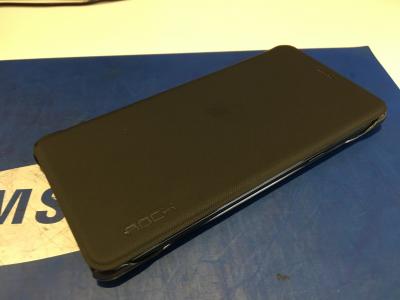
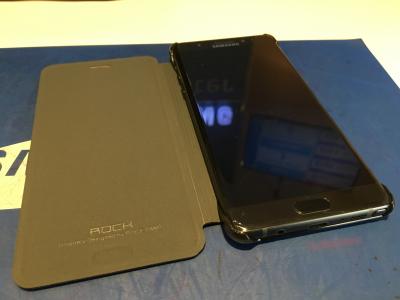
QUOTE(jerryhean @ Aug 20 2016, 06:58 PM) No sp, use this flip case first la I guess... This case also nice. At least can protect the screen! |
|
|
|
|
|
rajlesta00
|
Aug 20 2016, 07:27 PM
|
|
|
QUOTE(afiqsabri @ Aug 20 2016, 06:29 PM) WORKED FOR ME.... https://www.gottabemobile.com/2016/08/19/ho...-galaxy-note-7/"To reset a frozen Galaxy Note 7 all owners need to do is press and hold down both the power button and volume down simultaneously for 7-10 seconds Push and hold volume down and power at the same time and hold them down until you feel a vibrate and see the Galaxy Note 7 reset. Even if the phone is completely unresponsive this will work. The phone will turn off, reboot and turn back on to full working order. It’s worth noting that some owners may see the device boot into a “safe” maintenance mode if things were really messed up. If so, use volume up/down to navigate to “reboot” and hit power to select that option. Be careful to only reboot the phone, as owners can accidentally do a factory data reset in this menu and erase everything on the Galaxy Note 7. That’s it and you’ve now successfully rebooted a frozen Galaxy Note 7. Any problems or issues that were happening before are likely gone, and it should be working good as new. If not, call your carrier for additional help, or check our Note 5 problems and fixes guide. Most of those tips still apply to the Galaxy Note 7." Thank you bro. I just had this problem 15mins ago. The phone freeze with black screen+ time/wifi icons visible at top notification section. Unable to force restart by holding power button. your trick worked Power + Volume down. FYI to others. I haven't update to new FW. And mysamsung app is still there in the phone. Going to uninstall shortly and upgrade to new FW version thanks |
|
|
|
|
|
-cmi-
|
Aug 20 2016, 07:30 PM
|
|
|
QUOTE(jerico @ Aug 20 2016, 06:58 PM) Simple minded. What is technology when it makes usability worse? Only fags think like that. Move on then? This phone just not for you |
|
|
|
|
|
eddmecha
|
Aug 20 2016, 07:36 PM
|
|
|
QUOTE(-cmi- @ Aug 20 2016, 07:30 PM) Move on then? This phone just not for you lol that chap keep bashing samsung but yet still lowballing in all wts s7e n note 7 thread. what a dick |
|
|
|
|



 Quote
Quote












 0.0239sec
 0.68
0.68
 6 queries
 GZIP Disabled