

Xiaomi Xiaomi Redmi Note 3 Discussion V6, MIUI 8 available now!
Xiaomi Xiaomi Redmi Note 3 Discussion V6, MIUI 8 available now!
|
|
 Aug 26 2016, 10:29 PM Aug 26 2016, 10:29 PM
Return to original view | Post
#1
|
 
All Stars
17,220 posts Joined: Dec 2015  
|
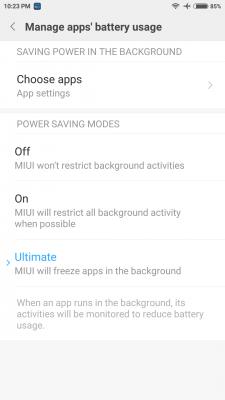
To enable the "Ultimate" battery saver mode, tap the "On" >5 times.
|
|
|
|
|
|
Aug 26 2016, 11:43 PM
Return to original view | Post
#2
|
|
All Stars
17,220 posts Joined: Dec 2015
|
QUOTE(batman1172 @ Aug 26 2016, 10:58 PM) Huh... miui 8 but android 5.1.1. Why not upgrade to 6? Normal for redmi devices? Xiaomi is trying to trick their customers by introducing new versions of MIUI "frequently". But the base Android platform for Xiaomi's models will take ages to be implemented... RN3 Mellow stable global will come soon. Source Don't have high hope for Nougat release anymore.... |
|
|
Aug 27 2016, 12:26 PM
Return to original view | Post
#3
|
|
All Stars
17,220 posts Joined: Dec 2015
|
QUOTE(ashraf095 @ Aug 27 2016, 12:10 PM) nightly? :hmm: so still no more stable build yet? First public release. V8.1 will be better build... Now it's public "beta" v8.0 |
|
|
Aug 27 2016, 03:49 PM
Return to original view | Post
#4
|
|
All Stars
17,220 posts Joined: Dec 2015
|
QUOTE(ahbenchai @ Aug 27 2016, 03:39 PM) even with pin push, its so frustrating when u keep failing to pull it out (maybe its new so its very tight or wat) i hope they design it in such a way that u can push in and the tray will pop out <_< Totally agree. The spring SIM tray design is more user-friendly. Just like when we insert the SD-card in our laptop. But of course, the spring mechanism will tend to break easily. |
|
|
Aug 28 2016, 10:06 AM
Return to original view | Post
#5
|
|
All Stars
17,220 posts Joined: Dec 2015
|
QUOTE(xxx306 @ Aug 28 2016, 09:28 AM) I'm on miui8 developer version. Can i just update to stable version? QUOTE(GameSky @ Aug 28 2016, 09:38 AM) might better you wipe first Backup is ur friend. Never ever try to flash without backups... |
|
|
Aug 28 2016, 11:10 AM
Return to original view | Post
#6
|
|
All Stars
17,220 posts Joined: Dec 2015
|
Me too choose full ROM. OTA has a risk of soft brick if your internet connection is not reliable.
|
|
|
|
|
|
Aug 28 2016, 11:43 AM
Return to original view | Post
#7
|
|
All Stars
17,220 posts Joined: Dec 2015
|
QUOTE(ameri @ Aug 28 2016, 11:33 AM) Btw, anyone tried the scrolling screenshot? I can't get it to work. Pressing volume down and power button simultaneously doesn't do the trick. It gets reboot instead. Use the notification shade to get screenshot. You will see floating screenshot on the top-right screen. Tap it and there'll be menu "scroll"...However, not all app/screenview works for the scroll screenshot... |
|
|
Aug 28 2016, 02:30 PM
Return to original view | Post
#8
|
|
All Stars
17,220 posts Joined: Dec 2015
|
QUOTE(GameSky @ Aug 28 2016, 12:06 PM) only few apps..or try stock browser? QUOTE(ameri @ Aug 28 2016, 02:16 PM) Stock browser works. TugaBrowser scroll screenshot does NOT work. |
|
|
Aug 28 2016, 07:04 PM
Return to original view | Post
#9
|
|
All Stars
17,220 posts Joined: Dec 2015
|
QUOTE(djhenry91 @ Aug 28 2016, 06:00 PM) for miui 8..they remove the schedule everyday i want the phone on wat time i set for airplane at what time disable airplane.. Settings > Battery & Performance > Power > cog-wheel icon > Schedule Power On/Off |
|
|
 Aug 28 2016, 07:37 PM Aug 28 2016, 07:37 PM
Return to original view | Post
#10
|
|
All Stars
17,220 posts Joined: Dec 2015
|
You guys need to settle with either:
1) Do not disturb mode, or 2) install 3rd party apps, or 3) downgrade back to MIUI 7...  This post has been edited by azhar75: Aug 28 2016, 07:44 PM |
|
|
Aug 28 2016, 09:55 PM
Return to original view | Post
#11
|
|
All Stars
17,220 posts Joined: Dec 2015
|
QUOTE(MGM @ Aug 28 2016, 07:57 PM) How do I add a file as an icon on RN3 desktop using its existing apps? The solution I got from google is to use ES-file-explorer. 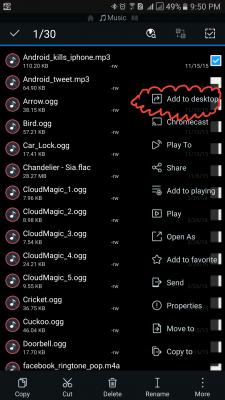
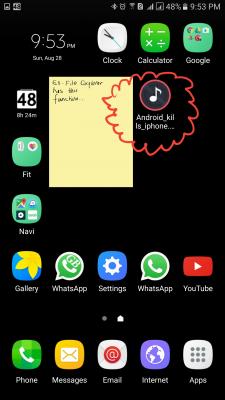
|
|
|
Aug 28 2016, 11:25 PM
Return to original view | Post
#12
|
|
All Stars
17,220 posts Joined: Dec 2015
|
QUOTE(MGM @ Aug 28 2016, 10:32 PM) So the solution is to use ES file-explorer? I'm using the "Pro" version. It's the best file manager app from my point of view... |
|
|
Aug 29 2016, 08:58 AM
Return to original view | Post
#13
|
|
All Stars
17,220 posts Joined: Dec 2015
|
QUOTE(aromachong @ Aug 29 2016, 08:40 AM) hmm how u make the clock... hours and minute same size? That screenshots is from my Note5. But, I hv R3S, use the default MIUI 8 clock widget also same like Note5, isn't it...?root? 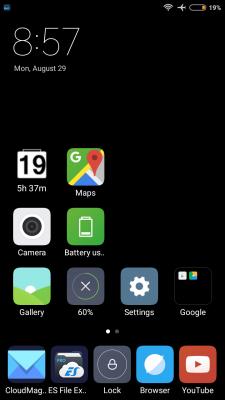
|
|
|
|
|
|
Aug 29 2016, 09:11 AM
Return to original view | Post
#14
|
|
All Stars
17,220 posts Joined: Dec 2015
|
QUOTE(aromachong @ Aug 29 2016, 09:06 AM) yes prob im on MUIU7 haha Whether 8 or 7, I still hate the clock widget because it takes lots of space on the grid size. We can't put icons on the right side of the clock widget. So, it just blank space... wasted...oh well, use 3rd party clock app lohhh...Below is also the stock widget (MIUI8). Much better coz text size bigger. But the date is in weird YYYY/MM/DD format... 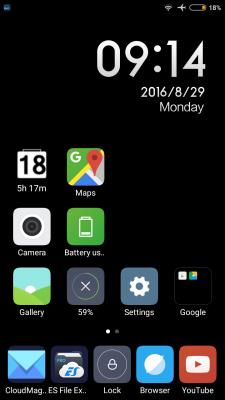
This post has been edited by azhar75: Aug 29 2016, 09:17 AM |
|
|
Aug 29 2016, 09:22 AM
Return to original view | Post
#15
|
|
All Stars
17,220 posts Joined: Dec 2015
|
QUOTE(aromachong @ Aug 29 2016, 09:15 AM) i hate the small size of 'minutes' shown in MUIU7 . Now you have valid reason to update to MIUI8...LOL... This post has been edited by azhar75: Aug 29 2016, 09:22 AM |
|
|
Aug 29 2016, 09:26 AM
Return to original view | Post
#16
|
|
All Stars
17,220 posts Joined: Dec 2015
|
QUOTE(daniel2006 @ Aug 29 2016, 09:22 AM) Why my Whatsapp and other messaging apps doesn't shows up when the screen is off? Only shows when I unlock and goes into the app?? Please refer to my post:» Click to show Spoiler - click again to hide... « Allow your app into startup in Security app, and exclude it from battery saving list. may i know how to do this?? https://forum.lowyat.net/index.php?showtopi...post&p=81264161 |
|
|
Aug 29 2016, 09:46 AM
Return to original view | Post
#17
|
|
All Stars
17,220 posts Joined: Dec 2015
|
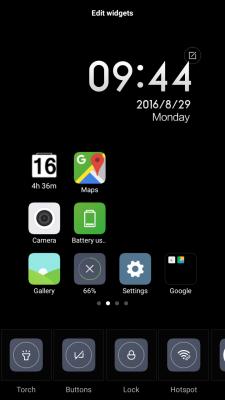
QUOTE(ahbenchai @ Aug 29 2016, 09:32 AM) dude where to get that lock apps xD Inside the "Toggles" widget: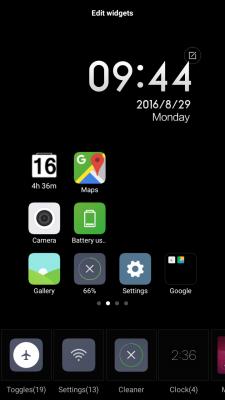
This post has been edited by azhar75: Aug 29 2016, 09:47 AM |
|
|
Aug 29 2016, 09:59 AM
Return to original view | Post
#18
|
|
All Stars
17,220 posts Joined: Dec 2015
|
QUOTE(ywheng89 @ Aug 29 2016, 09:55 AM) Hi bro,thanks for this... You're on MTK or Snap chip?mind to share on how to flash the TWRP properly? i tried to follow the guides posted on the front page. I did it few times,but it always brick my phone.. lol,then had to re-install everything  Have you unlocked the bootloader? |
|
|
Aug 29 2016, 10:01 AM
Return to original view | Post
#19
|
|
All Stars
17,220 posts Joined: Dec 2015
|
QUOTE(No Reason @ Aug 29 2016, 09:58 AM) luckily, not that. I use Xiaomi.eu TWRP...no issue since day one...only im stuck at 50%, had to flash China dev rom just to get it unlock, cant flash twrp, my adb not working, then getting lost on how to flash twrp, got twrp, supersu, then xposed not working. in short, steps to getting it done was a bit messy, not as per usual way when doing other android devices. almosy give up halfway lol anyway, miui had a wierd way in grouping its setting. all native apps setting grouped in one place, they put security in separated app, battery saver in security app etc Xiaomi.eu TWRP Oh ya, read and understand the 3 warnings at the bottom of the page... This post has been edited by azhar75: Aug 29 2016, 10:04 AM |
|
|
Aug 29 2016, 10:11 AM
Return to original view | Post
#20
|
|
All Stars
17,220 posts Joined: Dec 2015
|
I just use whatever in the vid for max protection...

This post has been edited by azhar75: Aug 29 2016, 10:17 AM |
|
Topic ClosedOptions
|
| Change to: |  0.0787sec 0.0787sec
 0.89 0.89
 7 queries 7 queries
 GZIP Disabled GZIP Disabled
Time is now: 10th December 2025 - 08:17 AM |
 Quote
Quote