Welcome Guest ( Log In | Register )

Bump Topic Topic Closed RSS Feed
64 Pages « < 14 15 16 17 18 > » Bottom

Outline · [ Standard ] · Linear+

 ILLEGEAR Custom Gaming Laptops v.3, RTX ON! ILLEGEAR RTX Gaming Notebook.

views
     
TSPrince J
post May 23 2017, 04:10 PM

Regular
******
Senior Member
1,272 posts

Joined: May 2010
From: Team ILLEGEAR


QUOTE(leekaisuen69 @ May 23 2017, 01:58 PM)
last few days i've seen z5 and z7 tat can opt for 4k resolution monitor.. but today i see the option is no longer there. can please clarify ? would really love to get a z5/z7 with 4k resolution. not really a fan of the d series
*
Hi,

We are doing internal testing, will put the 4k display option live once it's approved by technical team.
TSPrince J
post May 23 2017, 07:38 PM

Regular
******
Senior Member
1,272 posts

Joined: May 2010
From: Team ILLEGEAR


Inside ILLEGEAR TROIKA, EMPOWER 120 AIO water cooler ensure Intel Core i7-7700K processor doesn't exceed 57C in normal stress test and 70C in normal overclocking condition. The Empower 120 comes FOC and installed in every TROIKA we ship.

user posted image
leekaisuen69
post May 24 2017, 10:58 AM

Getting Started
**
Junior Member
123 posts

Joined: Dec 2009


QUOTE(Prince J @ May 23 2017, 04:10 PM)
Hi,

We are doing internal testing, will put the 4k display option live once it's approved by technical team.
*
oh yea. this is good. z7 4k display with 1070!!!!
hyperyouth_firepower
post May 24 2017, 01:08 PM

BlackBerry enthusiast
******
Senior Member
1,964 posts

Joined: Apr 2005
From: Sabah, Malaysia.


Hi there.

How can I test my GPU, to see if its running okay?

I'm using MSI Afterburner.

Or should I not use it?

I'm using Illegear RS-15, GTX 980M
AZIM@ILLEGEAR
post May 24 2017, 02:40 PM

New Member
*
Junior Member
28 posts

Joined: Feb 2017
From: Team ILLEGEAR


QUOTE(hyperyouth_firepower @ May 24 2017, 01:08 PM)
Hi there.

How can I test my GPU, to see if its running okay?

I'm using MSI Afterburner.

Or should I not use it?

I'm using Illegear RS-15, GTX 980M
*
Hi hyperyouth_firepower,

We would recommend either by using HWinfo (https://www.hwinfo.com/download.php) or GPU-Z (https://www.techpowerup.com/download/techpowerup-gpu-z/) for a complete summary and overview, up to your preference.

This post has been edited by AZIM@ILLEGEAR: May 24 2017, 07:03 PM
TSPrince J
post May 25 2017, 01:30 PM

Regular
******
Senior Member
1,272 posts

Joined: May 2010
From: Team ILLEGEAR


Z series commercial.


hyperyouth_firepower
post May 25 2017, 03:03 PM

BlackBerry enthusiast
******
Senior Member
1,964 posts

Joined: Apr 2005
From: Sabah, Malaysia.


QUOTE(AZIM@ILLEGEAR @ May 24 2017, 03:40 PM)
Hi hyperyouth_firepower,

We would recommend either by using HWinfo (https://www.hwinfo.com/download.php) or GPU-Z (https://www.techpowerup.com/download/techpowerup-gpu-z/) for a complete summary and overview, up to your preference.
*
many thanks. much appreciated.
sonyfanzz
post May 26 2017, 10:28 PM

On my way
****
Senior Member
682 posts

Joined: Mar 2016


QUOTE(Prince J @ May 9 2017, 10:26 PM)
Hi sony

Which model are you using? That sounds a very weird and rare issue, could you pm me your serial number?

We do not open tomorrow.
*
The laptop is working fine after RMA. Thank you thumbsup.gif

ckhait
post Jun 2 2017, 01:33 AM

New Member
*
Newbie
3 posts

Joined: Jun 2012
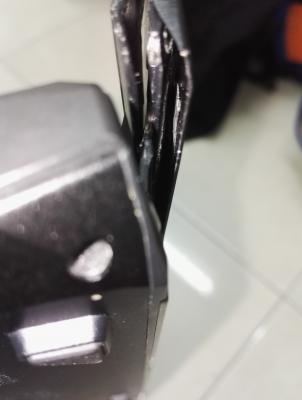
This happend when I try to close the lid of my S5, anyone have solution for this?
Attached Image
Attached Image
Attached Image
TSPrince J
post Jun 2 2017, 02:07 PM

Regular
******
Senior Member
1,272 posts

Joined: May 2010
From: Team ILLEGEAR


QUOTE(ckhait @ Jun 2 2017, 01:33 AM)
This happend when I try to close the lid of my S5, anyone have solution for this?
Attached Image
Attached Image
Attached Image
*
Hi chkait,

Can you pm us your serial number? Will assist from there.
TSPrince J
post Jun 5 2017, 08:28 PM

Regular
******
Senior Member
1,272 posts

Joined: May 2010
From: Team ILLEGEAR


user posted image
keanoppy
post Jun 8 2017, 09:30 AM

Click click click
******
Senior Member
1,090 posts

Joined: Nov 2008
Any side by side comparison of laguna vs q5 evo? Laguna seemed thin but quite heavy at 2.75kg..
AZIM@ILLEGEAR
post Jun 8 2017, 09:46 AM

New Member
*
Junior Member
28 posts

Joined: Feb 2017
From: Team ILLEGEAR


QUOTE(keanoppy @ Jun 8 2017, 09:30 AM)
Any side by side comparison of laguna vs q5 evo? Laguna seemed thin but quite heavy at 2.75kg..
*
Here you go:

user posted image
TSPrince J
post Jun 8 2017, 10:22 AM

Regular
******
Senior Member
1,272 posts

Joined: May 2010
From: Team ILLEGEAR


QUOTE(keanoppy @ Jun 8 2017, 09:30 AM)
Any side by side comparison of laguna vs q5 evo? Laguna seemed thin but quite heavy at 2.75kg..
*
The laguna uses better heatsink and material comparing to Q5 Evo, that's why it's heavier.
TSPrince J
post Jun 8 2017, 06:21 PM

Regular
******
Senior Member
1,272 posts

Joined: May 2010
From: Team ILLEGEAR


user posted image

Introducing ILLEGEAR LAGUNA. Engineered with incredible 7th Generation Intel Core i7 processors, Nvidia GeForce GTX 1060 / 1070 graphics and smart RGB keyboard & touchpad in a stylish anodized aluminum body, the 15.6" LAGUNA strikes the perfect balance between power, styles and mobility. Conquer the games wherever you go.

Starting from RM6,299, customize LAGUNA at http://goo.gl/0Bvbk7

This post has been edited by Prince J: Jun 8 2017, 06:22 PM
jedi_dc
post Jun 8 2017, 06:38 PM

Look at all my stars!!
*******
Senior Member
2,273 posts

Joined: Jan 2003
From: Miri,Sarawak.


Is the Laguna available in the showroom? Looks good and great pricing for a 1070 laptop. A few questions though:

What is Smart RGB keyboard? Individual backlit RGB or still zoned?
Also, is it possible to opt for a 120hz gsync panel?

edit: figured out its zoned from the screenshot of the control centre tongue.gif

This post has been edited by jedi_dc: Jun 9 2017, 12:48 AM
Darkshining
post Jun 9 2017, 02:17 AM

New Member
*
Junior Member
36 posts

Joined: Mar 2011


Hello Illegear, the latest Laguna looks good! I would appreciate it if you can tell me more about the screen because I'm a designer, particularly concerned about the colour accuracy and colour gamut of the screen.

Due to the slim design how does Laguna perform in thermal performance?

Thank you in advance.
AZIM@ILLEGEAR
post Jun 9 2017, 10:40 AM

New Member
*
Junior Member
28 posts

Joined: Feb 2017
From: Team ILLEGEAR


jedi_dc Yes, the ILLEGEAR Laguna is now available in our showroom, come2 visit to test the mini-beast! smile.gif Yes, the smart keyboard has a tri-zone RGB coloring that you can customize in the control centre. The smart touchpad light color is also customizable & it has a sensor built-in, so it will actually light up upon contact. At the moment, there is no 120Hz G-SYNC panel option available.

Darkshining The IPS screen that we're utilizing for ILLEGEAR LAGUNA has a 100% sRGB color coverage actually, perfect for designers but we would recommend to opt for the professional color calibration, it will yield the best results later for the color coverage as well as the color accuracy. In terms of thermal performance, it is actually slightly better than the S5. Under heavy load, the estimation of the temperature is <68°C for GTX 1060 and <75°C for GTX 1070.
jedi_dc
post Jun 9 2017, 11:17 AM

Look at all my stars!!
*******
Senior Member
2,273 posts

Joined: Jan 2003
From: Miri,Sarawak.


QUOTE(AZIM@ILLEGEAR @ Jun 9 2017, 10:40 AM)
jedi_dc Yes, the ILLEGEAR Laguna is now available in our showroom, come2 visit to test the mini-beast!  smile.gif  Yes, the smart keyboard has a tri-zone RGB coloring that you can customize in the control centre. The smart touchpad light color is also customizable & it has a sensor built-in, so it will actually light up upon contact. At the moment, there is no 120Hz G-SYNC panel option available.

*
Thanks for the reply! Will be checking it out in the coming days biggrin.gif
Darkshining
post Jun 9 2017, 11:22 AM

New Member
*
Junior Member
36 posts

Joined: Mar 2011


QUOTE(AZIM@ILLEGEAR @ Jun 9 2017, 10:40 AM)
Darkshining The IPS screen that we're utilizing for ILLEGEAR LAGUNA has a 100% sRGB color coverage actually, perfect for designers but we would recommend to opt for the professional color calibration, it will yield the best results later for the color coverage as well as the color accuracy. In terms of thermal performance, it is actually slightly better than the S5. Under heavy load, the estimation of the temperature is <68°C for GTX 1060 and <75°C for GTX 1070.
*
Thank you for the reply Azim. The showroom is at Oval Damansara right?


64 Pages « < 14 15 16 17 18 > » Top
Topic ClosedOptions
 

Change to:
| Lo-Fi Version
0.0309sec    0.23    6 queries    GZIP Disabled
Time is now: 7th December 2025 - 07:33 PM