Outline ·
[ Standard ] ·
Linear+
ILLEGEAR Custom Gaming Laptops v.3, RTX ON! ILLEGEAR RTX Gaming Notebook.
|
TSPrince J
|
 Nov 17 2016, 07:13 PM Nov 17 2016, 07:13 PM
|

|
QUOTE(imin @ Nov 17 2016, 07:04 PM) Is this Z5 battery is removable? And can you give us the battery run time? Really interested in it, since it support optimus.. currently doesn't see many laptop with 1060 and above series that supports optimus Hi imin, Z5 and Z7 battery is removable but you need screwdriver to unscrew the bottom cover first. It's not hard to do that. |
|
|
|
|
|
imin
|
Nov 17 2016, 07:15 PM
|
|
|
QUOTE(Prince J @ Nov 17 2016, 07:13 PM) Hi imin, Z5 and Z7 battery is removable but you need screwdriver to unscrew the bottom cover first. It's not hard to do that. how about s5? is the battery removeable? |
|
|
|
|
|
TSPrince J
|
Nov 17 2016, 09:08 PM
|
|
|
QUOTE(imin @ Nov 17 2016, 07:15 PM) how about s5? is the battery removeable? Same as Z5, yes it is removable. You can setup smart charging in BIOS to prevent overcharging. |
|
|
|
|
|
TSPrince J
|
Nov 24 2016, 05:01 PM
|
|
|
The new Z5 pascal has new palm rest and matte screen bezel.  |
|
|
|
|
|
TSPrince J
|
Nov 28 2016, 04:26 PM
|
|
|
ILLEGEAR D7X is on PC.COM November issue with platinum award (9.2/10)!  |
|
|
|
|
|
asaku21
|
Nov 28 2016, 07:10 PM
|
New Member

|
been using rs 15 for more than 3 years already
really excellent i must say
now itching for d7x
have cristmas promotion?
|
|
|
|
|
|
hayrol
|
Nov 30 2016, 06:40 PM
|
Getting Started
|
Hello PrinceJ, Seems my D5 Haswell have another major problem. Right now my display turn into white after using its for some period (2 or 3 hours) . It turn back to normal for some time (after restart) and turn back into the same problem. Other than that, my system were doing fine. Have to depend to my extension monitor for now. 
|
|
|
|
|
|
TSPrince J
|
Nov 30 2016, 06:54 PM
|
|
|
QUOTE(asaku21 @ Nov 28 2016, 07:10 PM) been using rs 15 for more than 3 years already really excellent i must say now itching for d7x have cristmas promotion? Hi asaku21, Thanks for your feedback, I will inform you if we have it  QUOTE(hayrol @ Nov 30 2016, 06:40 PM) Hello PrinceJ, Seems my D5 Haswell have another major problem. Right now my display turn into white after using its for some period (2 or 3 hours) . It turn back to normal for some time (after restart) and turn back into the same problem. Other than that, my system were doing fine. Have to depend to my extension monitor for now.
Hi Hayrol, can we have the system to check? The screen part is ready if there is a need for replacement. |
|
|
|
|
|
hayrol
|
Nov 30 2016, 07:42 PM
|
Getting Started
|
Ermm, seems I need to send by postage again.  I guess there's no other way. |
|
|
|
|
|
Wazzzap
|
Dec 5 2016, 06:39 PM
|
|
|
hi i noticed when i plugged in my headphones that time there's a buzzing sound and the weirdest part is when i scroll my mouse up and down while surfing it make noises according to the scrolls.
however if i plug it into another jack which is for speakers then it doesnt produce that kind of noise
anyone experience this?
This post has been edited by Wazzzap: Dec 5 2016, 06:41 PM
|
|
|
|
|
|
TSPrince J
|
Dec 6 2016, 10:57 AM
|
|
|
QUOTE(Wazzzap @ Dec 5 2016, 06:39 PM) hi i noticed when i plugged in my headphones that time there's a buzzing sound and the weirdest part is when i scroll my mouse up and down while surfing it make noises according to the scrolls. however if i plug it into another jack which is for speakers then it doesnt produce that kind of noise anyone experience this? Hi Wazzzap, Can you pm me with the photos of the jack that you plug in? (with noise and without noise). If possible, we would like to test your headset and the computer. |
|
|
|
|
|
Wazzzap
|
Dec 6 2016, 02:47 PM
|
|
|
Hi Prince J, attached is the picture of the jacks that i used for the headphones the left side (the jack with red light) is the one with noise and the right side is the normal one. i think i will go back home and try to use different headphones to confirm on the problem. will get back to you on this. Thank you very much. This post has been edited by Wazzzap: Dec 6 2016, 02:49 PM Attached thumbnail(s)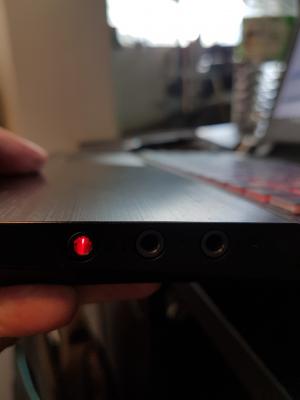
|
|
|
|
|
|
TSPrince J
|
Dec 6 2016, 03:00 PM
|
|
|
QUOTE(Wazzzap @ Dec 6 2016, 02:47 PM) Hi Prince J, attached is the picture of the jacks that i used for the headphones the left side (the jack with red light) is the one with noise and the right side is the normal one. i think i will go back home and try to use different headphones to confirm on the problem. will get back to you on this. Thank you very much. Oh you are using S5. You plugged in your headphone to the wrong jack. The one with headphone logo is the one you were supposed to plug in. |
|
|
|
|
|
Wazzzap
|
Dec 7 2016, 01:15 AM
|
|
|
QUOTE(Prince J @ Dec 6 2016, 03:00 PM) Oh you are using S5. You plugged in your headphone to the wrong jack. The one with headphone logo is the one you were supposed to plug in. i didn't plug in the wrong one. there are 3 jacks. left is headphones, middle is microphone, the right side is like a speaker logo if i am not mistaken. both left and right did produce sound for me. just that the jack with headphone logo have some minor buzzing sound but if you on loud music you wouldnt hear it |
|
|
|
|
|
TSPrince J
|
Dec 8 2016, 10:56 AM
|
|
|
QUOTE(Wazzzap @ Dec 7 2016, 01:15 AM) i didn't plug in the wrong one. there are 3 jacks. left is headphones, middle is microphone, the right side is like a speaker logo if i am not mistaken. both left and right did produce sound for me. just that the jack with headphone logo have some minor buzzing sound but if you on loud music you wouldnt hear it If I remember correctly, we always plug into the right in-jack, not the left one with red light. What's your S5 edition? I will check with my tech. |
|
|
|
|
|
Wazzzap
|
Dec 9 2016, 01:21 AM
|
|
|
QUOTE(Prince J @ Dec 8 2016, 10:56 AM) If I remember correctly, we always plug into the right in-jack, not the left one with red light. What's your S5 edition? I will check with my tech. how do i check? it is the gtx 1060 version |
|
|
|
|
|
3antz
|
Dec 9 2016, 09:08 AM
|
Getting Started
|
Hi there, can i know how long it takes to build the S5 upon order? Also the weight of S5 without the 2.5hdd - fully on SSD? Thanks.
|
|
|
|
|
|
TSPrince J
|
Dec 9 2016, 10:57 AM
|
|
|
QUOTE(Wazzzap @ Dec 9 2016, 01:21 AM) how do i check? it is the gtx 1060 version Ok will check with technician. QUOTE(3antz @ Dec 9 2016, 09:08 AM) Hi there, can i know how long it takes to build the S5 upon order? Also the weight of S5 without the 2.5hdd - fully on SSD? Thanks. Current lead time is 5 to 7 working days without rush, 1 working day with rush. S5 without HDD is 2.375kg. |
|
|
|
|
|
wingwp
|
Dec 10 2016, 05:47 PM
|
|
|
thinking to buy another Illegear for video works, which models r possible for component upgrade?
|
|
|
|
|
|
TSPrince J
|
Dec 13 2016, 11:35 AM
|
|
|
QUOTE(wingwp @ Dec 10 2016, 05:47 PM) thinking to buy another Illegear for video works, which models r possible for component upgrade? Hi wingwp, For D series, it can upgrade RAM, HDD, SSD, WLAN card and screen in future. CPU and GPU have chances to upgrade as well (depends on future gen. GPU and CPU compatibility). For other series, only RAM, HDD, SSD and WLAN can be upgraded. |
|
|
|
|



 Quote
Quote




 0.0251sec
 0.59
0.59
 6 queries
 GZIP Disabled