Outline ·
[ Standard ] ·
Linear+
Maxis Broadband Wired 2Mbps, Welcome all the wired users!
|
logic_life
|
 Mar 14 2011, 08:36 AM Mar 14 2011, 08:36 AM
|
Getting Started


|
recently i just got myself the maxis wired broadband 1mb package for my home which comes with the zyxel modem and aztech wifi router. all seems fine. connecting using cable on my desktop is ok, wifi on my wife's laptop is ok. only problem is the wifi connection on my handphones. it detects the wifi, shows connected on the phones. but i can never go online on it. never understand why is that. then yesterday borrowed a linksys wireless modem. all working great. connections all fast and stable.
what i want to know is what settings do i need to change on the aztech wifi router to be able to connect through my phones? hope users here who had the same experience can tell me what to do.
Thanks in advance to all!
|
|
|
|
|
|
logic_life
|
Apr 11 2011, 04:09 PM
|
Getting Started
|
hi guys. i was wondering if anyone who is on 2mb package provide a screen capture showing that it is actually a 2mb line?
i got my wired broadband 1mb. but i upgraded to 2mb. but i still getting download speeds which is for 1mb line, which is around 80-110kbps. on the modem settings, it shows 1024kbps. this means my line is still on 1mb am i right? maxis keeps telling me that i am already running 2mb line everytime i check with them and they say that if it shows 1024kbps, it means 2mbps. and they told me that maxis controls the speed so that everyone will have a fairly distributed connection to the internet (no one hogging the line all the time).
are they serious? hope someone can enlighten me on this!
Thanks!
This post has been edited by logic_life: Apr 11 2011, 04:16 PM
|
|
|
|
|
|
logic_life
|
Apr 12 2011, 08:11 AM
|
Getting Started
|
QUOTE(cloudstrife07 @ Apr 12 2011, 02:21 AM) 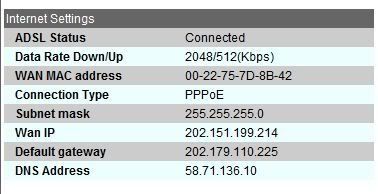 mine. wow.. means all the while i am on 1mb la.. somemore can tell me i am already on 2mb line.. dem.. anyways thanks alot bro!  |
|
|
|
|



 Quote
Quote

 0.0295sec
 0.44
0.44
 7 queries
 GZIP Disabled