Welcome Guest ( Log In | Register )

11 Pages « < 3 4 5 6 7 > » Bottom

Outline · [ Standard ] · Linear+

 Maxis Broadband Wired 2Mbps, Welcome all the wired users!

views
     
cloudstrife07
post Oct 6 2009, 12:47 PM

I'm back, beaches!
*******
Senior Member
4,688 posts

Joined: Jan 2003
From: http://127.0.0.1


QUOTE(magiara @ Oct 6 2009, 11:01 AM)
maxis have confirmed wif me they are upgrading their 1mbps package to 2mbps for every users for free, just matter of time when are you guys getting it only, and i'm not getting it yet! damn!


Added on October 6, 2009, 12:00 pmuser posted image

SIEN!!!  yawn.gif  yawn.gif  yawn.gif
*
it's ok. your time will come then biggrin.gif
cloudstrife07
post Oct 6 2009, 01:56 PM

I'm back, beaches!
*******
Senior Member
4,688 posts

Joined: Jan 2003
From: http://127.0.0.1


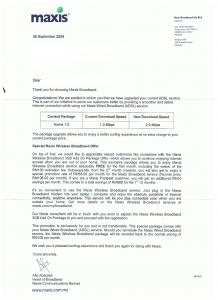
official letter from Maxis.

Attached Image
cloudstrife07
post Oct 6 2009, 05:25 PM

I'm back, beaches!
*******
Senior Member
4,688 posts

Joined: Jan 2003
From: http://127.0.0.1


QUOTE(magiara @ Oct 6 2009, 03:11 PM)
i haven't receive any letter from them yet!
omg come on maxis faster upgrade puchong area hahaha
*
QUOTE(soul2soul @ Oct 6 2009, 03:22 PM)
I am so jealous.
*
QUOTE(KKW @ Oct 6 2009, 04:18 PM)
walau.. still got discount on maxis wireless bb also  sweat.gif
I should not move house..  cry.gif
*
so RM58 for 3GB wireless add-on package. and -RM10 again if use maxis postpaid.

since i got a postpaid, i guess i'll pay only RM48 for the wireless.

but will i subscribe to it AGAIN? NO.
cloudstrife07
post Oct 6 2009, 07:50 PM

I'm back, beaches!
*******
Senior Member
4,688 posts

Joined: Jan 2003
From: http://127.0.0.1


QUOTE(KKW @ Oct 6 2009, 07:02 PM)
lols..
currently I'm using maxis wireless which doesn't give me any problem at all..
*
and i grew fedup of it.

1. CS will ask to reset modem, and then change to GPRS. why the hell i'm paying for speed up to 640kbps if i can only use GPRS?
2. intermittent connection
3. sometimes no connection at all but at phone got 3G and i can videocall. funny
4. that bukakke-white modem
5. 3GB upload and download. yeah right. you're downloading something from rapidshare, and then connection down. and in the end you had to download AGAIN, which results in higher bandwidth usage.
cloudstrife07
post Oct 6 2009, 08:33 PM

I'm back, beaches!
*******
Senior Member
4,688 posts

Joined: Jan 2003
From: http://127.0.0.1


QUOTE(KKW @ Oct 6 2009, 07:55 PM)
I think ur batch got problem.. and the modem too..
btw, my usage on wireless bb 1GB-2GB out of 5GB.. lol.. tongue.gif
*
wow so little sweat.gif

QUOTE(ozak @ Oct 6 2009, 08:30 PM)
Is there any different with/without letter? My home already running at 1mbps speed while I subscript to 512kbps longtime liao. And I believe most of you here too. Running double the speed. Maybe after upgrade I can get 2mbps speed kua. he...
*
well atleast it's official rather than rumors this and that. smile.gif
cloudstrife07
post Oct 9 2009, 08:09 PM

I'm back, beaches!
*******
Senior Member
4,688 posts

Joined: Jan 2003
From: http://127.0.0.1


QUOTE(KKW @ Oct 8 2009, 08:13 PM)
that's good..
haiz.. now maxis paying RM 88 can get 2mbps,
my streamyx paying for RM 110 only can get 1mbps speed  cry.gif
*
lai lai come join back the community brows.gif
cloudstrife07
post Oct 12 2009, 10:37 PM

I'm back, beaches!
*******
Senior Member
4,688 posts

Joined: Jan 2003
From: http://127.0.0.1


QUOTE(s538 @ Oct 10 2009, 05:57 PM)
U all are so lucky.

I am using 1.0home package also, but just get speed like 256 home package, i also pay RM88 every month.

I got email maxis about this problem but they still haven't solve for me, half year already.

i also got receive maxis's letter about  their 2.0Mbps free upgraded,  but the speed is still same slow and this few day keep cant connect. More look like downgrade for me, not upgrade.

This turtle speed is really "consistent", i test it every day for almost 1 year, and i get the same speed as below every day.

What can i do?

user posted image
*
why dont you complained to them? i mean rather than email it, it's better that u call them every now and then.

This post has been edited by cloudstrife07: Oct 12 2009, 10:40 PM
cloudstrife07
post Oct 13 2009, 11:51 PM

I'm back, beaches!
*******
Senior Member
4,688 posts

Joined: Jan 2003
From: http://127.0.0.1


QUOTE(ozak @ Oct 13 2009, 01:08 PM)
May I ask, do you guys switch on your modem router 24hr? Do you ON/OFF frequently or hang very often?

My new belkin modem router hang and need On/OFF everyday. Something wrong liao. Seems like cannot handle the traffic. Last time use aztech, hang only every few day.

Is there any setting need to be set that I don't no?
*
My mom said to me that the modem frequently hangs than the aztech. i'm seldom at home nowadays so i didn't notice it.

posted at network tech support section about that modem hangs at odd hours. after installing the new firmware posted by one of the forumer, the hang is less frequent.

still, i guess i'm starting to regret purchasing this Belkin, and you confirm my regretness. lifetime warranty doesn't justify the pain we had (e.g. having to reset the modem every now and then)

will be selling this Belkin and get Linksys WRT54GL with custom DD-WRT firmware from MX510 if i got extra monies. selling as "not compatible with Maxis Wired broadband".

This post has been edited by cloudstrife07: Oct 13 2009, 11:55 PM

cloudstrife07
post Oct 14 2009, 01:25 AM

I'm back, beaches!
*******
Senior Member
4,688 posts

Joined: Jan 2003
From: http://127.0.0.1


QUOTE(exiakitt @ Oct 14 2009, 01:20 AM)
hi guys, can u all access megaupload and rapidshare now? mine seems blocked. it will owez to go http://www.maxis.com.my/maxisbb?CPURL=http...gaupload.com%2F.  if i type megaupload.com.
*
i can view it normally. r u sure you're using maxis wired?
cloudstrife07
post Oct 14 2009, 01:26 AM

I'm back, beaches!
*******
Senior Member
4,688 posts

Joined: Jan 2003
From: http://127.0.0.1


QUOTE(KKW @ Oct 14 2009, 12:03 AM)
so fast got problem already  sweat.gif
as my opinion, use back the Aztech modem.. I on 24hours on torrent downloading..
doesn't give me any hangs or dc.. biggrin.gif
*
the prob is the aztech modem also facing frequent disconnection just like the aztech. sweat.gif maxis said there's no prob on their side sweat.gif
cloudstrife07
post Oct 17 2009, 09:43 PM

I'm back, beaches!
*******
Senior Member
4,688 posts

Joined: Jan 2003
From: http://127.0.0.1


hmm disconnection is less frequent now.

most of the DC i saw it's not because of cannot connected, but because the modem cannot search the DNS server sweat.gif
cloudstrife07
post Oct 18 2009, 09:10 PM

I'm back, beaches!
*******
Senior Member
4,688 posts

Joined: Jan 2003
From: http://127.0.0.1


QUOTE(ozak @ Oct 18 2009, 08:28 AM)
Maxis don't have router. You must specific the brand. It should be the aztech. Maxis is more choosy. Buying the modem router also difficult.  rclxub.gif
*
yes a bit difficult it seems. well i had to live with this DC. sad.gif
cloudstrife07
post Oct 19 2009, 11:38 PM

I'm back, beaches!
*******
Senior Member
4,688 posts

Joined: Jan 2003
From: http://127.0.0.1


QUOTE(jerrykhor @ Oct 19 2009, 04:15 PM)
Using Maxis Wired at Pusat Bandar Puchong.
OpenDNS + original Aztech Modem and so for no problem... biggrin.gif
*
dc usually occurs in the evening to night, from 5pm~8pm.
cloudstrife07
post Oct 23 2009, 09:35 PM

I'm back, beaches!
*******
Senior Member
4,688 posts

Joined: Jan 2003
From: http://127.0.0.1


QUOTE(jerrykhor @ Oct 23 2009, 11:10 AM)
from the promotion package, subscriber will get two months broadband fee waive, and waive on fixed line monthly fee for 12months..but they charged me both..... icon_question.gif
*
oh that one. i made complain directly at maxis center for that.

in terms of billing, i don't trust the hotline customer service that much sweat.gif
cloudstrife07
post Oct 24 2009, 08:53 PM

I'm back, beaches!
*******
Senior Member
4,688 posts

Joined: Jan 2003
From: http://127.0.0.1


QUOTE(magiara @ Oct 24 2009, 08:43 PM)
still no speed improvement for puchong area zzzzz!!!
*
and i still experienced DC zzzz.

really irritating lah sometimes because whenever i need to do important task, DC occurs doh.gif
cloudstrife07
post Oct 25 2009, 05:35 PM

I'm back, beaches!
*******
Senior Member
4,688 posts

Joined: Jan 2003
From: http://127.0.0.1


QUOTE(ozak @ Oct 25 2009, 05:23 PM)
I subscript 512 but get 1mb speed. That is double speed.
*
magiara said he didnt get the speed upgrade unlike the rest of us.
cloudstrife07
post Oct 26 2009, 04:16 PM

I'm back, beaches!
*******
Senior Member
4,688 posts

Joined: Jan 2003
From: http://127.0.0.1


YEAY MY DC PROBLEM IS SOLVED.

i accidentally put the wrong wire for the splitter, no wonder always DC.
cloudstrife07
post Oct 26 2009, 08:49 PM

I'm back, beaches!
*******
Senior Member
4,688 posts

Joined: Jan 2003
From: http://127.0.0.1


QUOTE(KKW @ Oct 26 2009, 06:51 PM)
I think he mean he plug the modem wire to phone port at the splitter and phone wire plug to modem port
splitter got 2 port right? one is for phone and another for modem
*
yup that's what i meant. thanks KKW. smile.gif

connection is more stable then before but still DC, so i called maxis around 5.30pm just now. after doing some followup(which they call and call for 30mins+), they said that they'll just reset the port 1st and if problem still occurs, they will send technician to my home.

and once again, i forgot to take the report number for my own convenience. doh.gif

so far right now ok. i'll monitor the connection for tonight.
cloudstrife07
post Oct 26 2009, 10:05 PM

I'm back, beaches!
*******
Senior Member
4,688 posts

Joined: Jan 2003
From: http://127.0.0.1


QUOTE(KKW @ Oct 26 2009, 09:17 PM)
no probs bro biggrin.gif
lol.. btw, I try to swap my wire at the splitter..
the same connection I get..  blink.gif
*
well, DC occurs again. i just called them for the complain feedback and said my connection is still unstable, and they said they'll send a technician to my house within 3 to 5 days.

but i said i need the internet urgently to do my work, and the CS requested me to call again tomorrow morning to see if there is any available technician for that day.
cloudstrife07
post Oct 26 2009, 10:57 PM

I'm back, beaches!
*******
Senior Member
4,688 posts

Joined: Jan 2003
From: http://127.0.0.1


QUOTE(KKW @ Oct 26 2009, 10:11 PM)
Hmm.. I suspect ur internal wiring got problem...
*
maybe. sigh.

QUOTE(ozak @ Oct 26 2009, 10:55 PM)
Try direcy plug without the splitter. Or you got another wall phone plug. Try that one.
*
left 1 plug only. the downstairs one oso down already due to lightning some 2~3 years ago. direct plugging to the wall plug oso the same.

11 Pages « < 3 4 5 6 7 > » Top
 

Change to:
| Lo-Fi Version
0.0377sec    0.51    7 queries    GZIP Disabled
Time is now: 3rd December 2025 - 12:41 AM