Outline ·
[ Standard ] ·
Linear+
[OFFICIAL] Ubiquiti Networks, Home/SOHO/Enterprise Networking
|
wanttotree
|
 Mar 30 2019, 12:15 AM Mar 30 2019, 12:15 AM
|

|
QUOTE(bryanyz @ Mar 30 2019, 12:06 AM) Hi all, im planning to upgrade my wifi due to the pingstrike to my mobile game. currently on time 100mbps plan & using the tplink c1200 as router and 5g ap and a asus rt-n18u as 2.4g ap. if i change to edge router x + ap ac pro will it solve the pingstrike issue? is the sqm useful? i found the qos on the tplink router is shit. kinda useless. Sqm is definitely a work of magic. Not really, but it really is work of art. In this case, u look like u need a better ap more than router. But ofcourse the combination of both will definitely be better. Qos on tp-link or any consumer branded router are incomparable with sqm imo. |
|
|
|
|
|
wanttotree
|
Mar 30 2019, 12:37 PM
|
|
|
QUOTE(bryanyz @ Mar 30 2019, 12:02 PM) so is the edge router x + ap ac pro, a good combination? how about comparing unifi nano hd & ap ac pro, which is better? can i put the ap on the shelf? i cant mount it on the ceiling as I'm renting this place. my home is 1400sqf condo, the green color area is the current location that i put my router, if i put the ap at this same area. can the 5g cover the whole house? 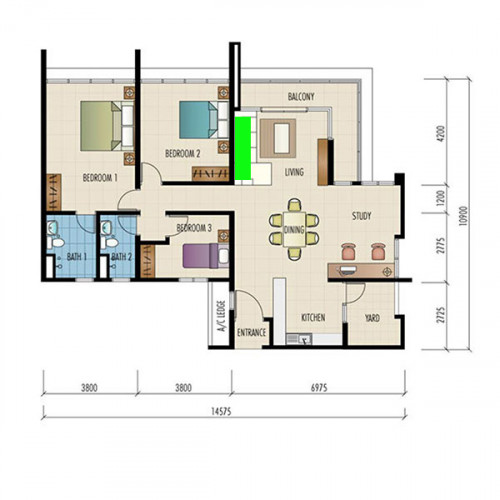 Edgerouter x and uap ac pro will be just good enough. Hard to say for 5g coverage. It definitely need to be mounted high up and upside down. A lil bit hard to recommend a ceiling mounted ap in this case, maybe someone here can recommend a desktop ap. I did use an ap on a shelf before, not so good in my opinion. Maybe try a high than normal shelf? Now in comparison for nanohd vs pro, a big advantage for nanohd is its a wave 2 802.11ac, so its designed for mu-mimo which will result better speed for high user count. In reality that means it might only make a difference if there are at least 30-60 "active" users. In home environment which only takes 4-8 "active" users, uap ac pro is still slightly overkill for internet under 100mbps. Even my uap ac lite can handle over 500mbps just fyi. |
|
|
|
|
|
wanttotree
|
Mar 31 2019, 01:30 PM
|
|
|
QUOTE(Sky.Live @ Mar 31 2019, 01:06 PM) Correct me if I am wrong Ubiquiti is a enterprise grade hardware/software but selling at cheaper price? It's kinda hard to justify the price difference between these hardware and those cheaper Chinese brand. It would be interesting to hear what chinese brand u r comparing it to. Do share pls. This post has been edited by wanttotree: Mar 31 2019, 01:31 PM |
|
|
|
|
|
wanttotree
|
Apr 22 2019, 11:52 PM
|
|
|
QUOTE(MX510 @ Apr 22 2019, 09:49 PM) Stay tune another one using airfibre 15km full duplex setup coming soon . Will update pictures later Thanx for the post. Rly cool and looking forward for airfibre setup. |
|
|
|
|
|
wanttotree
|
Apr 26 2019, 04:08 AM
|
|
|
QUOTE(TechieGuy93 @ Apr 26 2019, 03:43 AM) So I wanna jump into this Unifi universe... I wanna start with the USG and a Cloud Key Gen2, later on I will start adding APs... I will continue to use my current ones. I saw PRECOMP in Cheras sells Ubiquiti equipment but not the Cloud Key Gen2... Any suggestions on where to get it all in one place this weekend?  I couldn't find the Cloud Key Gen 2 in any online shop... Do you need the cloud key though? Any specific need for one? |
|
|
|
|
|
wanttotree
|
Aug 7 2019, 06:05 PM
|
|
|
QUOTE(jianming80 @ Aug 7 2019, 05:47 PM) Thanks. I thought the controller can install on our PC? Looks like Ubiquiti products split each features into standalone devices. Yes u can. Or better better yet on a headless server eg debian/ubuntu. Basically copy and paste 3 lines of commands and its installed ready to adopt devices. |
|
|
|
|
|
wanttotree
|
Aug 7 2019, 08:15 PM
|
|
|
QUOTE(jianming80 @ Aug 7 2019, 06:08 PM) Eg: Using Virtualization inside the NAS? or raspberry pi 3? or using their UC-CK Ubiquiti Networks Unified Controller? Thank You Inside nas is so easy. Install through docker is a click away. Rasp pi can install via raspbian apt. Of u got both, i recommend the nas cz its gonna run 24/7 anyway. =) |
|
|
|
|
|
wanttotree
|
Sep 6 2019, 01:09 PM
|
|
|
QUOTE(Garena @ Sep 4 2019, 04:25 PM) I'm planning to deploy a router for a hostel. Currently choosing between EdgeRouter 12 and RB4011iGS+5HacQ2HnD-IN. Which one is better in terms of network traffic monitoring, network traffic history record and network quality of service? Can EdgeOS features compete with RouterOS in any ways? Yes it can. What specific need do u have for the setup may i ask? |
|
|
|
|
|
wanttotree
|
Sep 11 2019, 02:49 PM
|
|
|
QUOTE(Garena @ Sep 11 2019, 02:25 PM) Does it have a interface that shows all connected devices via LAN and WLAN? Like a list of all IP address, MAC address, current Tx/Rx speed, total downloaded Bytes, the device connected via which UniFi AP. These pictures should answer that.  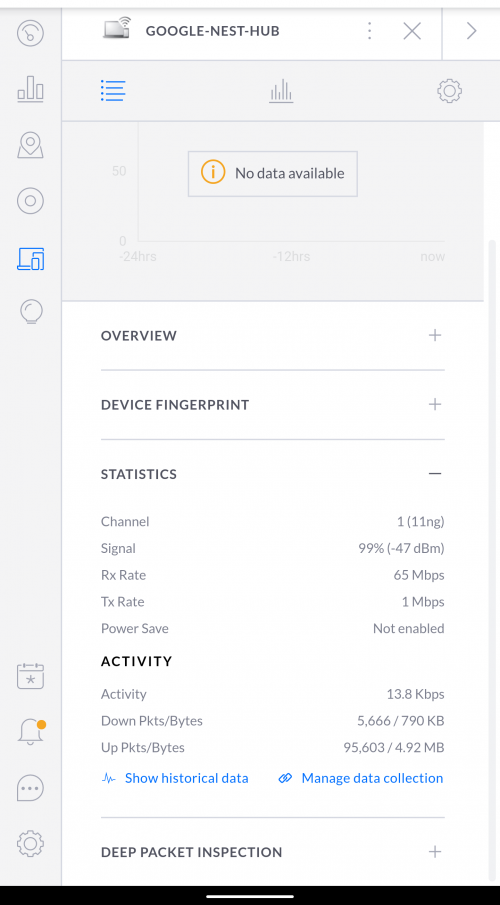 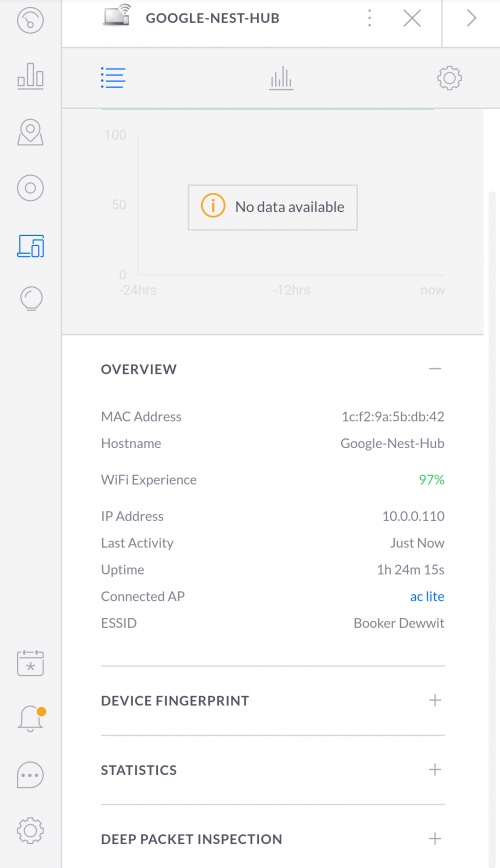 |
|
|
|
|
|
wanttotree
|
Nov 3 2019, 01:44 PM
|
|
|
QUOTE(HuorEarfalas @ Nov 2 2019, 04:12 PM) 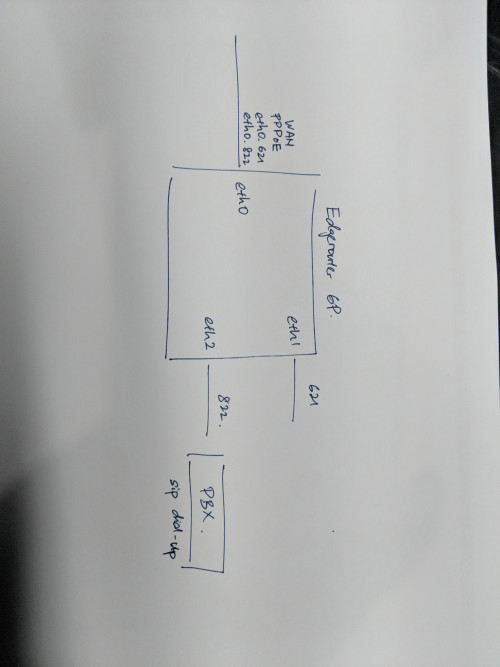 Anyone can teach me how to bridge Maxis VoIP VLAN822 in edgerouter 6p? Eth0 = WAN port Eth1 = To internet clients (WAP, PC, etc) Eth2 = To on-premise PBX .. this PBX need to see VLAN 822 tag to dial up the SIP account You can check my tutorial on how to bridge interface and vlans. Its under the unifi hypptv tutorial. Specifically under hypptv config. Pretty simple and i dont think u need to buy another device just to get voip working. Gd luck. |
|
|
|
|
|
wanttotree
|
Nov 9 2019, 06:00 PM
|
|
|
QUOTE(HuorEarfalas @ Nov 9 2019, 03:46 PM) I'll give that a shot... but now another thing is how to tag a VLAN on the port? I have multiple VLAN 100,101,102,etc.. that has firewall policy eth0 - PPPoE WAN eth1 - connected to my switch networks <-- this port I want to tag multiple VLAN eth2 - connected to my PBX for VoIP EdgeRouter-6P doesn't have a switch chip, so cannot configure switch0 interface. U dont need switch chip to make it work. Just add vlan 822 under eth0, then add a bridge, etc: (br0). Then add eth2 and vlan 822 to (br0). As long as u dont specify vlan 822 under any firewall, it wont be affected as the other vlans. This post has been edited by wanttotree: Nov 9 2019, 06:05 PM |
|
|
|
|
|
wanttotree
|
Nov 10 2019, 04:38 PM
|
|
|
QUOTE(HuorEarfalas @ Nov 10 2019, 03:01 PM) I'm not talking about those ISP vlan.. i'm talking about my own.. i..e CCTV VLAN, VoIP VLAN, Native VLAN, Client Vlan,... etc.. etc... i have firewall rules applied to them I understand. Your 822 is gonna be fine. |
|
|
|
|
|
wanttotree
|
Apr 1 2020, 02:22 PM
|
|
|
QUOTE(vincentcheng96 @ Apr 1 2020, 01:52 PM) Yes it is solid white. I try the guide but still no internet detected. But if I from the Nokia Unifi Modem plug in to ASUS Router then to the Dream Machine then its work. Why is it like this. If I want direct the Nokia unifi Modem is it possible ? How bout vlan? Done that? |
|
|
|
|
|
wanttotree
|
Apr 1 2020, 02:31 PM
|
|
|
QUOTE(vincentcheng96 @ Apr 1 2020, 02:26 PM) No idea how to do it. Anyone expert here kindly can teach me? Go into Settings>Internet>WAN Networks>Edit>Use VLAN ID Vlan id: Unifi: 500 Maxis: 621 |
|
|
|
|
|
wanttotree
|
Apr 15 2020, 03:23 PM
|
|
|
QUOTE(Xnet @ Apr 15 2020, 02:35 PM) Thanks I have decided on UniFi AC LR AP and disable the ASUS wifi and see how it performs Tbh it wont improve your range much if you have a bigger house. Its better to run both asus and the uap at the same time. You just need to wire the uap. |
|
|
|
|
|
wanttotree
|
Apr 20 2020, 05:54 PM
|
|
|
QUOTE(Jjuggler @ Apr 20 2020, 04:24 PM) I am in survey of looking for a new networking gear upgrade for my existing basic home-networking gear. I've heard about the beauty of Ubiquiti products and currently interested in EdgeRouter 6P. May I know the number of intervals of the model receives firmware update? I've experience of using Mikrotik products so once in a two weeks, the router receives firmware upgrade. Just want to confirm this. This link should be helpful. Although i have to say that firmware update interval dont directly portray how good a product is. With that said, it is important to patch for security reasons. Cheers. |
|
|
|
|
|
wanttotree
|
Apr 21 2020, 03:20 AM
|
|
|
QUOTE(xinjiechew @ Apr 21 2020, 02:04 AM) Hi sifus, any guide on how to port forward edgerouter x? i tried follow a few guide on line no luck on port forwarding my router. I have set my lan interface to switch0 and my wan to eth0. This is one of the link i tried. https://help.ui.com/hc/en-us/articles/217367937Thanks! change your wan to pppoe0 instead. This post has been edited by wanttotree: Apr 21 2020, 03:21 AM |
|
|
|
|
|
wanttotree
|
May 19 2020, 06:01 PM
|
|
|
QUOTE(mazranz @ May 19 2020, 12:00 PM) Thanks! Ordered the router already. what switch would you recommend for the hypptv? If u have an erx. U wont need a switch. Just use the erx to manage your hypptv. |
|
|
|
|
|
wanttotree
|
May 25 2020, 02:50 PM
|
|
|
QUOTE(eddyann @ May 25 2020, 01:13 PM) Just got myself my very 1st Ubiquiti product: a) ER-X b) UAP AC LR c) Azure remote PC for Unifi controller hopefully can fix my lagged/non responsive ac3150 from tplink. once in a while i need to restart it to monitor via apps/web. number of clients can be as much as 35-38 Oh wow. Nobody should need to restart their router anymore. I have a good feeling that problem will go away forever. Erx and ac lr is a very good choice. Bang for bucks in my opinion. Out of curiosity and not being familiar with azure, what makes u choose that for the controller? |
|
|
|
|
|
wanttotree
|
May 25 2020, 03:48 PM
|
|
|
QUOTE(eddyann @ May 25 2020, 03:42 PM) I'm using the Azure free trial first to see how it runs. you can use the virtual machine to install the controller. otherwise you need a cloud key or real pc to run 24/7. you can also use raspberry Pi. since the controller cost more than RM 400, I'm thinking of trying rasp pi later on. Oh thanx for the explanation. I do run mine on my debian vm. Though in your case having to use one ap, not sure if u benefit running the controller 24/7. Just my 2 cents. |
|
|
|
|



 Quote
Quote
 0.0490sec
 0.53
0.53
 7 queries
 GZIP Disabled