Outline ·
[ Standard ] ·
Linear+
[OFFICIAL] Ubiquiti Networks, Home/SOHO/Enterprise Networking
|
TSpandera999
|
 Jan 29 2019, 09:11 PM Jan 29 2019, 09:11 PM
|

|
QUOTE(MX510 @ Jan 29 2019, 08:23 PM) It's an office in KL Eco Suites in front of garden mid valley Yeah this interior office all design by designer even i purpose a rack rejected lol Later i ask the designer :-) thanks... i actually design my own workstation room... so want to have that kind of rack... put my cpu beside... mount monitor on wall..  |
|
|
|
|
|
TSpandera999
|
Jan 30 2019, 11:37 AM
|
|
|
QUOTE(loonsave @ Jan 30 2019, 09:57 AM) Thank you for your clarification. How about other devices like switch/USG? All also come with EU adapter? yes.. all ubiquiti products in malaysia comes with original adapter. sometimes it up to distributor or reseller change it for you. |
|
|
|
|
|
TSpandera999
|
Jan 30 2019, 11:45 PM
|
|
|
QUOTE(cyberic @ Jan 30 2019, 10:36 PM) Is cloud key gen 2 available in Malaysia already? yes.... if you see my post.. i did unbox mine... but mine is gen2+ |
|
|
|
|
|
TSpandera999
|
Jan 31 2019, 11:56 AM
|
|
|
QUOTE(cyberic @ Jan 31 2019, 09:15 AM) I know yours was the plus edition. It’s nice but i wonder what’s price for both. I only have 2 AP, don’t need plus 🙂 nahh.. not telling you to get gen2+  if u have only 2 AP, why dont get the first gen CK? cheaper than gen2... normal i think about rm400+, gen2 estimated price around rm800+ i think. bought gen2+ around rm1k+ |
|
|
|
|
|
TSpandera999
|
Jan 31 2019, 10:59 PM
|
|
|
QUOTE(Xteoh @ Jan 31 2019, 09:44 PM) Guys i need some help here. My UAP-AC-LR keep reboot no stop. The LED light show: Steady white > Blinking white > Off > repeat again. Using cat6 connect from DLink router to UAP-AC-LR. It's possible cat6 cable too long ?  What i have try: Reset UAP-AC-LR but still same keep reboot Cat6 cable tested no issue Max cable is 100m... so i dont think ur cable dat super long.. less than 5m? Should not be an issue... steady white blinking seems related with booting if i not mistaken.. This post has been edited by pandera999: Jan 31 2019, 11:00 PM |
|
|
|
|
|
TSpandera999
|
Jan 31 2019, 11:32 PM
|
|
|
QUOTE(Xteoh @ Jan 31 2019, 11:07 PM) 30M only from ground floor to first floor. Tomorrow I will retest again use other cable should be fine. just curious. how you manage the AP? on your laptop? or have cloud key? |
|
|
|
|
|
TSpandera999
|
Feb 1 2019, 09:07 AM
|
|
|
Connection at LAN Port. ISP : TIME TP LINK : 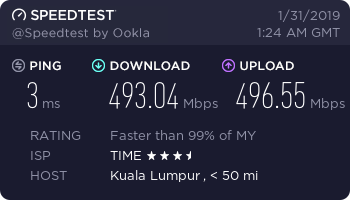 EdgeRouter Lite  |
|
|
|
|
|
TSpandera999
|
Feb 6 2019, 06:46 PM
|
|
|
QUOTE(teohes @ Feb 6 2019, 10:48 AM) @wanttotree, I am trying to get my head around your use of the words “smart switch”. Is this like an ATA ? (I been reading abt FXO/FXS etc and just trying to work out the exact piece of hw I need to get to do this. Can you help with some examples of devices ? For example , will something like this do what I want? 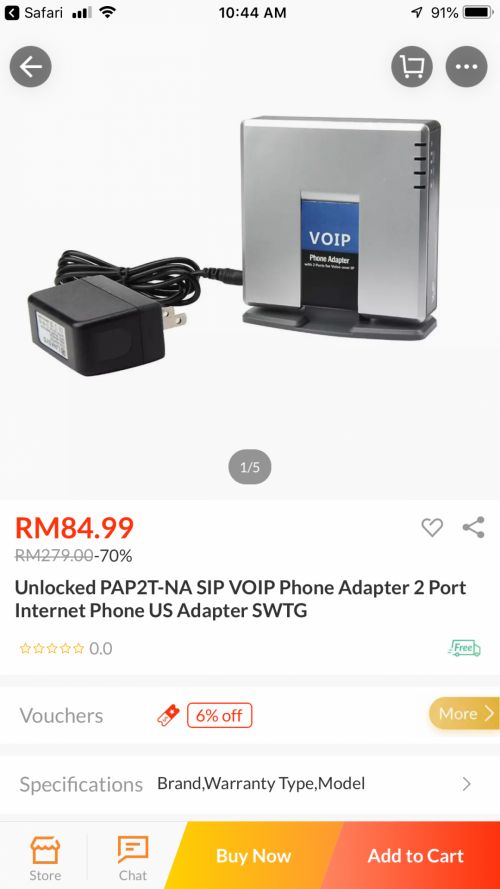 A managed switch offers significantly more advanced control features at a higher cost. A smart switch is an entry-level managed switch, providing the best of both worlds. In general, a business network hosting less than 100 active users will do just fine with a smart switch. I was thinking that each vlan have their own dhcp server.. because.. these vlan for sure will separate and isolate your network (guest vlan and personal vlan). |
|
|
|
|
|
TSpandera999
|
Feb 7 2019, 11:52 AM
|
|
|
QUOTE(pokchik @ Feb 7 2019, 11:49 AM) which means that the Gen2 Plus no longer require NVR if we want to setup surveillance system? Gen2+ have build in hdd up to 5Tb. you can see my previous post. a gen2+ and some login interface |
|
|
|
|
|
TSpandera999
|
Feb 7 2019, 11:53 AM
|
|
|
QUOTE(teohes @ Feb 7 2019, 11:13 AM) Thanks @pandera999, @wanttotree. OK, I think I understand what I need to do. @wanttotree, Is my latest attached diagram here correct? From @wanttotree's description, I understand both routers (ie, the USG and the TP-Link AC1200) will need to establish their own PPPoE connection to MAXIS. QUESTION: Does Maxis allow 2 simultaneous PPPoE logins from the same account ? yes... correct.. it can be done in that way which is much easier... less hassle.. |
|
|
|
|
|
TSpandera999
|
Feb 19 2019, 02:42 PM
|
|
|
whoaaa... big2 project...  This post has been edited by pandera999: Feb 19 2019, 02:43 PM This post has been edited by pandera999: Feb 19 2019, 02:43 PM |
|
|
|
|
|
TSpandera999
|
Feb 21 2019, 10:33 AM
|
|
|
QUOTE(MX510 @ Feb 21 2019, 09:25 AM) Yesterday finish everything 9 x point cat 6 cabling 6 x UVC G3 Cameras Dome 1 x UVC G3 Camera Outdoor 2 x UAP NanoHD 1 x 24 ports POE Switch Ubiquiti 1 x 9u ST rack 1 x P2P Nano HD AC Gen 2 To be continue another point at second house   that was nice.... wish can do something like that cloud key.. even my ck was left hanging like dat as well... |
|
|
|
|
|
TSpandera999
|
Mar 13 2019, 09:23 AM
|
|
|
QUOTE(MX510 @ Mar 13 2019, 09:10 AM) Hehehe Testing Point To Point Nanobeam AC Gen 2 Speedtest nanobeam is always great.... i love it... but airfiber....     soo hard to tune sometimes... but great throughput... |
|
|
|
|
|
TSpandera999
|
Mar 13 2019, 02:48 PM
|
|
|
NEW AC IN WALL  |
|
|
|
|
|
TSpandera999
|
Mar 13 2019, 03:01 PM
|
|
|
QUOTE(wanttotree @ Mar 13 2019, 02:56 PM) This looks awesome. Make me wanna drill my walls. Lol i check with my friend.. they have the pricing +/- Rm1k. but not sure can order or not. 4 ports + wifi... |
|
|
|
|
|
TSpandera999
|
Mar 17 2019, 10:25 PM
|
|
|
QUOTE(dexterkwok @ Mar 17 2019, 07:09 PM) Anyone got price list for Unifi G3 Cameras? (Dome, Bullet and Flex) Got 4 recently and i love em. Now planning for bigger deployment in the office. can check price from sublime at lelong.... so it should b around that price |
|
|
|
|
|
TSpandera999
|
Mar 25 2019, 12:03 PM
|
|
|
QUOTE(lencent @ Mar 25 2019, 10:14 AM) 2 Users, assume at least 10 devices connected at all time. Light data, just typical home usage, with streaming of videos and music. Occasional conference calls, this is crucial for me. will be using unifi 100mbps package. I have checked out a couple of routerboard, wondering if Gigabit ethernet is a must or i can live without it?  Thanks : ) my pov..gigabit ethernet always give u advantages... especially streaming between 2 devices... not talking about internet backbone... because occasional conference calls... gigabit definetly help. me myself also occasional conference calls user.. i had experienced using just megabit tot gigabit is not necessary.. but hey.. im alone the user 🤣 |
|
|
|
|
|
TSpandera999
|
Mar 25 2019, 06:43 PM
|
|
|
QUOTE(FollowMeRogerThat @ Mar 25 2019, 04:00 PM) Hi Sifu, I'm interested to buy Ubiquiti NanoHD and have someone install it for me. This will be for home usage and I will ask the technician to pull some wire. Question is where and what does the technician need to pull? Is it from the port that Unifi installed for the Fibre optics? Also, do I need to buy any POE Switch in advance to power up the POE line? Sorry for noobie question as I've been reading up but still have these few questions before purchasing one. why not just ask the technician to mount and terminate it for you? much easier.... if 1 or 2 units... just use poe adapter that comes with it.. |
|
|
|
|
|
TSpandera999
|
Mar 25 2019, 07:30 PM
|
|
|
QUOTE(lencent @ Mar 25 2019, 01:06 PM) Thank you for the feedback, however, isnt the ISP the bottleneck for conference call? gigabit would be helpful for transferring of data within the network right? Sorry, not really a IT geek  read abit but totally cannot understand most of it. last time maybe.. these days.. so far no issue.. more upload... even much better.... yes... very helpful transferring data.. |
|
|
|
|
|
TSpandera999
|
Mar 30 2019, 09:31 AM
|
|
|
QUOTE(bryanyz @ Mar 30 2019, 12:06 AM) Hi all, im planning to upgrade my wifi due to the pingstrike to my mobile game. currently on time 100mbps plan & using the tplink c1200 as router and 5g ap and a asus rt-n18u as 2.4g ap. if i change to edge router x + ap ac pro will it solve the pingstrike issue? is the sqm useful? i found the qos on the tplink router is shit. kinda useless. even vpn doesnt work stable on those tplink or dlink... talk about qos... far beyond their quality... only good for normal2 use...  |
|
|
|
|



 Quote
Quote
 0.0538sec
 0.60
0.60
 7 queries
 GZIP Disabled