QUOTE(CoffeeDude @ Jul 15 2016, 01:15 PM)
holy sheeterrooo I also have the same errors!!

and when I connect an external HDD to the router I also get some error messages.
QUOTE(fkinmeng @ Jul 15 2016, 01:19 PM)
maybe once you solve it, can show us a step by step guide, not sure if mine also got the error.
1. Go to Administration > System
2. Under
Persistent JFFS2 partition tick
Yes on
Format JFFS partition at next boot3. Under
Miscellaneous tick
Yes on
Enable Telnet4. Click
Apply5. Download
PuTTY. Choose
putty.exe & ignore the rest
6. Follow my PuTTY configuration as per the screenshot below

7. Type in your router login username then press Enter
8. Type in your router login password then press Enter (you won't see the password that you typed)
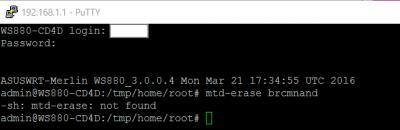
9. If you typed your password correctly, you should be able to see this:

10. Type
mtd-erase2 brcmnand & press Enter
11. Wait for about 1 minute then type
reboot & press Enter
12. Your router will reboot
This post has been edited by sHawTY: Jul 16 2016, 01:25 AM 

 Jul 15 2016, 11:11 PM


 Quote
Quote

 Anyone having similar issues?






 0.0202sec
 0.14
0.14
 6 queries
 GZIP Disabled