Welcome Guest ( Log In | Register )

119 Pages « < 49 50 51 52 53 > » Bottom

Outline · [ Standard ] · Linear+

 Cheap Asus Wifi Router Alternative, Huawei WS880 & Others

views
     
apoc1810
post Aug 9 2016, 05:15 PM

Getting Started
**
Junior Member
55 posts

Joined: Apr 2006
QUOTE(sHawTY @ Aug 9 2016, 05:38 PM)
AiCloud doesn't have anything to do with the DDNS
I disabled AiCloud but I still can access my router from my phone mobile data
*
am thinking that as well but, can't seem to be able to connect if without aicloud...anyway, it's working at the moment...thanks again
Alexdino
post Aug 9 2016, 08:38 PM

Look at all my stars!!
*******
Senior Member
2,006 posts

Joined: Sep 2007

where to do vlan tagging in xwrt? or cant be done must use tomato?
sHawTY
post Aug 9 2016, 10:09 PM

Frequent Reporter
********
All Stars
14,909 posts

Joined: Jul 2005

QUOTE(Alexdino @ Aug 9 2016, 08:38 PM)
where to do vlan tagging in xwrt? or cant be done must use tomato?
LAN > IPTV > Select ISP Profile > Manual Setting
x3cream
post Aug 9 2016, 10:50 PM

Casual
***
Junior Member
391 posts

Joined: Mar 2012


I want to ask all the sifus here, will it be difficult to set this up? Like I saw need to do flashing and stuff. Plan to buy new router but I have no idea how to set it up, I'm using unifi. Thought of buying asus ac55u, heard its good and easy to set up.
SUSraynman
post Aug 9 2016, 10:57 PM

Look at all my stars!!
*******
Senior Member
4,333 posts

Joined: Jan 2003


QUOTE(x3cream @ Aug 9 2016, 10:50 PM)
I want to ask all the sifus here, will it be difficult to set this up? Like I saw need to do flashing and stuff. Plan to buy new router but I have no idea how to set it up, I'm using unifi. Thought of buying asus ac55u, heard its good and easy to set up.
*
If you buy the Huawei WS880, you don't have to flash custom firmware.

It comes with Unifi support out of the box.

You just need to enter your Unifi userID and password.

user posted image

fruitie
post Aug 9 2016, 11:15 PM

Rise and Shine
Group Icon
Staff
72,807 posts

Joined: Sep 2005
From: KUL

Looks like updating my WiFi driver doesn't help. dry.gif Never had this no Internet connection (despite connected) issue when I was using Xiaomi Nano router as AP or the old Huawei router by TM. dry.gif

This issue doesn't happen frequently but will happen once a while, then my connection will go offline for few seconds and resume back again. sweat.gif

I just noticed there is another newer driver update and I have done that, not sure if this helps but honestly speaking I'm giving up already. Maybe not fated to use this router? I may sell it off then if it is still happening. laugh.gif
SUSraynman
post Aug 9 2016, 11:28 PM

Look at all my stars!!
*******
Senior Member
4,333 posts

Joined: Jan 2003


fruitie, have you tried flashing your Huawei WS880 to the latest Xwrt-Vortex firmware 380.61?
fruitie
post Aug 9 2016, 11:44 PM

Rise and Shine
Group Icon
Staff
72,807 posts

Joined: Sep 2005
From: KUL

QUOTE(raynman @ Aug 9 2016, 11:28 PM)
fruitie, have you tried flashing your Huawei WS880 to the latest Xwrt-Vortex firmware 380.61?
*
I haven't. blush.gif
The truth is my current firmware was flashed by a friend. blush.gif
I supposed upgrading firmware is not as difficult as flashing a totally new firmware right?
I last updated a router firmware was back in 2013. blush.gif
AMDAthlon
post Aug 9 2016, 11:51 PM

The future is Fusion
*******
Senior Member
5,221 posts

Joined: Aug 2007
From: Deneb star


QUOTE(fruitie @ Aug 9 2016, 11:44 PM)
I haven't. blush.gif
The truth is my current firmware was flashed by a friend. blush.gif
I supposed upgrading firmware is not as difficult as flashing a totally new firmware right?
I last updated a router firmware was back in 2013. blush.gif
*
Yup..much easier than flashing new firmware.

Follow our forumer guide here

QUOTE(sHawTY @ Aug 7 2016, 12:33 PM)
1. Download latest firmware from XWRT-Vortex website
2. Extract the firmware to your harddrive
3. Login into your router from 192.168.1.1
4. Go to: Administration > Firmware Upgrade > Choose File > Locate the .trx file > Click Upload

Very Important:
DO NOT update your firmware through Wi-Fi. If the upload stream is corrupted, you may brick your router. When uploading firmware, always use ethernet cable
*
Credits to sHawTY thumbsup.gif
SUSraynman
post Aug 9 2016, 11:52 PM

Look at all my stars!!
*******
Senior Member
4,333 posts

Joined: Jan 2003


QUOTE(fruitie @ Aug 9 2016, 11:44 PM)
I haven't. blush.gif
The truth is my current firmware was flashed by a friend. blush.gif
I supposed upgrading firmware is not as difficult as flashing a totally new firmware right?
I last updated a router firmware was back in 2013. blush.gif
*
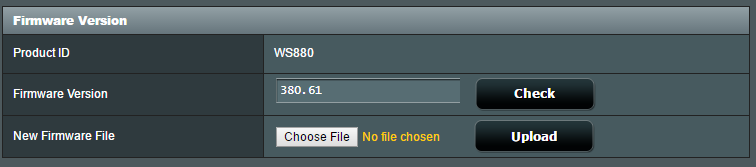
If your friend has already flashed Xwrt-Vortex firmware 380.58 for you, it is very easy to flash the latest version 380.61

Just go to Administration --> Firmware Upgrade page, select the downloaded firmware file, which has a .trx extension, and click Upload. smile.gif

user posted image
fruitie
post Aug 9 2016, 11:52 PM

Rise and Shine
Group Icon
Staff
72,807 posts

Joined: Sep 2005
From: KUL

QUOTE(AMDAthlon @ Aug 9 2016, 11:51 PM)
Yup..much easier than flashing new firmware.

Follow our forumer guide here
Credits to sHawTY  thumbsup.gif
*
Excellent! Thank you and sHawTY, I will do it right now. biggrin.gif
Alexdino
post Aug 9 2016, 11:52 PM

Look at all my stars!!
*******
Senior Member
2,006 posts

Joined: Sep 2007

QUOTE(sHawTY @ Aug 9 2016, 10:09 PM)
LAN > IPTV > Select ISP Profile > Manual Setting
*
ok will try it tomorrow. the tomato wifi signalseem to be weaker than stock firmware.....
fruitie
post Aug 9 2016, 11:53 PM

Rise and Shine
Group Icon
Staff
72,807 posts

Joined: Sep 2005
From: KUL

QUOTE(raynman @ Aug 9 2016, 11:52 PM)
If your friend has already flashed Xwrt-Vortex firmware 380.58 for you, it is very easy to flash the latest version 380.61

Just go to Administration --> Firmware Upgrade page, select the downloaded firmware file, which has a .trx extension, and click Upload.  smile.gif

user posted image
*
Alright, thanks for the guide. biggrin.gif
Will do it now. Awesome guys. notworthy.gif
LostAndFound
post Aug 9 2016, 11:53 PM

Look at all my stars!!
*******
Senior Member
6,264 posts

Joined: Jul 2005
From: UEP Subang Jaya


For those using the DDNS, are you really comfortable with exposing your router admin page to the internet with only a password verification?

For those who know how, use ssh access (key+password or key only) and then port forward for mobile access to the router. At least that way more secure.
fruitie
post Aug 10 2016, 12:00 AM

Rise and Shine
Group Icon
Staff
72,807 posts

Joined: Sep 2005
From: KUL

raynman, AMDAthlon, sHawTY thanks guys for the guidance and pointers. I have done updating my firmware. biggrin.gif
user posted image

Let's see if it helps with my issue. I don't want to let go such a good router. cry.gif

This post has been edited by fruitie: Aug 10 2016, 12:00 AM
SUSraynman
post Aug 10 2016, 12:08 AM

Look at all my stars!!
*******
Senior Member
4,333 posts

Joined: Jan 2003


QUOTE(fruitie @ Aug 10 2016, 12:00 AM)
raynman, AMDAthlon, sHawTY thanks guys for the guidance and pointers. I have done updating my firmware. biggrin.gif
user posted image

Let's see if it helps with my issue. I don't want to let go such a good router. cry.gif
*
One more thing you can try.

Go to Wireless --> Professional.

Under Tx power adjustment, drag the slider from default 'Balance' to "Performance' and see if it helps.

user posted image

fruitie
post Aug 10 2016, 12:19 AM

Rise and Shine
Group Icon
Staff
72,807 posts

Joined: Sep 2005
From: KUL

QUOTE(raynman @ Aug 10 2016, 12:08 AM)
One more thing you can try.

Go to Wireless --> Professional.

Under Tx power adjustment, drag the slider from default 'Balance' to "Performance' and see if it helps.

user posted image
*
Thanks. Just done as per your advice. thumbup.gif

Will this router go on idle mode when not using it? unsure.gif
x3cream
post Aug 10 2016, 12:32 AM

Casual
***
Junior Member
391 posts

Joined: Mar 2012


QUOTE(raynman @ Aug 9 2016, 10:57 PM)
If you buy the Huawei WS880, you don't have to flash custom firmware.

It comes with Unifi support out of the box.

You just need to enter your Unifi userID and password.

user posted image
*
Oh then why I saw many of you guys do flashing? And how's the connection of unifi on the router? I still cant make decision on the huawei ws880 or the asus rt-ac55u. how much is the price for the huawei ws880?
SUSraynman
post Aug 10 2016, 12:36 AM

Look at all my stars!!
*******
Senior Member
4,333 posts

Joined: Jan 2003


QUOTE(fruitie @ Aug 10 2016, 12:19 AM)
Thanks. Just done as per your advice. thumbup.gif

Will this router go on idle mode when not using it? unsure.gif
*
You mean the router goes into power-saving mode and shutdown WIFI transmission/reception?

From my experience, no.

My router is powered on 24/7 unless there is a power trip.

And I don't experience any WIFI dropouts at all for all my devices. smile.gif

fruitie
post Aug 10 2016, 12:41 AM

Rise and Shine
Group Icon
Staff
72,807 posts

Joined: Sep 2005
From: KUL

QUOTE(raynman @ Aug 10 2016, 12:36 AM)
You mean the router goes into power-saving mode and shutdown WIFI transmission/reception?

From my experience, no.

My router is powered on 24/7 unless there is a power trip.

And I don't experience any WIFI dropouts at all for all my devices.  smile.gif
*
Yes. I just want to find out the possibility for my issue. Mine also 24/7 and so far other devices are OK.
I'm not sure if it is because of my old card - Intel® Centrino® Wireless-N 1030 since it is only single band. hmm.gif I have been using this laptop for 5 years and no such issue until I changed to this router. sad.gif

119 Pages « < 49 50 51 52 53 > » Top
 

Change to:
| Lo-Fi Version
0.0311sec    0.14    6 queries    GZIP Disabled
Time is now: 7th December 2025 - 03:21 PM