Welcome Guest ( Log In | Register )

Outline · [ Standard ] · Linear+

Unifi IP Reservation for TM UniFi Innacomm RG4332 Router, Unable to reserve an IP for IP Camera

views
     
TSQuekZai
post Jul 7 2016, 06:54 PM, updated 10y ago

New Member
*
Junior Member
35 posts

Joined: Apr 2013


Hi guys,

I am currently setting up an IP camera for my house. I would like to use VLC player to watch RSTP stream.

I would like to reserve an IP for my camera as DHCP will give different IP addresses for my camera every time.

However, I am unable to find a similar selection in 192.168.0.1 for this modem.

Is anyone have experience with this modem for ip reservation?

IP Camera: XiaoYi IP Camera
Router: Innacomm RG4332 for TM UniFi

Thank you in advance for help.

Regards,
QuekZai
Anime4000
post Jul 7 2016, 11:00 PM

Look at all my stars!!
*******
Senior Member
2,399 posts

Joined: Jul 2009
From: /dev/null


QUOTE(QuekZai @ Jul 7 2016, 06:54 PM)
Hi guys,

I am currently setting up an IP camera for my house. I would like to use VLC player to watch RSTP stream.

I would like to reserve an IP for my camera as DHCP will give different IP addresses for my camera every time.

However, I am unable to find a similar selection in 192.168.0.1 for this modem.

Is anyone have experience with this modem for ip reservation?

IP Camera: XiaoYi IP Camera
Router: Innacomm RG4332 for TM UniFi

Thank you in advance for help.

Regards,
QuekZai
*
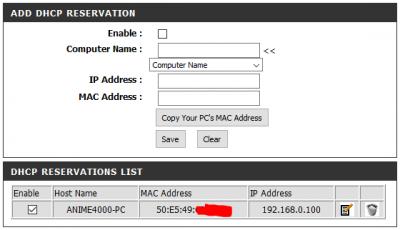
Find under LAN and reversed an LAN IP
Attached Image
soonwai
post Jul 7 2016, 11:39 PM


********
All Stars
11,458 posts

Joined: Oct 2007
From: KL


QUOTE(QuekZai @ Jul 7 2016, 06:54 PM)
...
I would like to reserve an IP for my camera as DHCP will give different IP addresses for my camera every time.
...
Router: Innacomm RG4332 for TM UniFi
...
*
First things first, the RG4332 is a router and not a modem. Just a minor detail. smile.gif

Second, you can't do it. As far as I know, there's no option for DHCP IP Reservation on this router.

TSQuekZai
post Jul 8 2016, 03:39 PM

New Member
*
Junior Member
35 posts

Joined: Apr 2013


QUOTE(Anime4000 @ Jul 7 2016, 11:00 PM)
Find under LAN and reversed an LAN IP
Attached Image
*
Hi,

Thank you for your help. However, I am unable to find a similar selection this yours. May I know your router model?

I have attached the image for the possible location.

Attached Image
Attached Image

Is it familiar to you?

QUOTE(soonwai @ Jul 7 2016, 11:39 PM)
First things first, the RG4332 is a router and not a modem. Just a minor detail.  smile.gif

Second, you can't do it. As far as I know, there's no option for DHCP IP Reservation on this router.
*
Hi,

Sorry for the typo. I do feel so too. However, I have friend who is having a CCTV at his place using the same router. However, after some browsing through his settings(he allow me to do so), I found that he had an IP in the DMZ and this IP appears in the LAN client list and the lease time is 0.

Do you have any idea on this?


soonwai
post Jul 8 2016, 04:11 PM


********
All Stars
11,458 posts

Joined: Oct 2007
From: KL


Anime's screenshot is from a DLink router. The one below is also from a DLink. Note the similarities.
user posted image

This is the current RG4332 that I have access to.
user posted image
Confirm no DHCP reservation. I think your only solution is to set a static IP address for the camera. Then port forward as needed. There's no need to use DMZ if you don't have to. Lease time 0 probably indicates a manually set IP.

This post has been edited by soonwai: Jul 8 2016, 04:12 PM
TSQuekZai
post Jul 8 2016, 04:27 PM

New Member
*
Junior Member
35 posts

Joined: Apr 2013


QUOTE(soonwai @ Jul 8 2016, 04:11 PM)
Anime's screenshot is from a DLink router. The one below is also from a DLink. Note the similarities.
user posted image

This is the current RG4332 that I have access to.
user posted image
Confirm no DHCP reservation. I think your only solution is to set a static IP address for the camera. Then port forward as needed. There's no need to use DMZ if you don't have to. Lease time 0 probably indicates a manually set IP.
*
Hi Soon Wai,

Thank you for your reply.

May I know how to set a static IP address while the router has DHCP working for the other devices?

Can I have you walk me through the steps? Or do you have any guides on this topics? I am sorry to trouble you as I do not have any idea or experience on it.


soonwai
post Jul 8 2016, 05:15 PM


********
All Stars
11,458 posts

Joined: Oct 2007
From: KL


QUOTE(QuekZai @ Jul 8 2016, 04:27 PM)
Hi Soon Wai,

Thank you for your reply.

May I know how to set a static IP address while the router has DHCP working for the other devices?

Can I have you walk me through the steps? Or do you have any guides on this topics? I am sorry to trouble you as I do not have any idea or experience on it.
*
No problem. This is my suggestion.

1. Reduce the router's DHCP range to 192.168.0.11-192.168.0.254. So the router will not try to assign 192.168.0.2-192.168.0.10 via DHCP and you're free to use those addresses for static IP. In future you might need more in case you add more cameras or other stuff.
user posted image

2. You set the static IP on the camera. You can use any IP you like from 192.168.0.2 to 192.168.0.10. How to set on the camera depends on the model. Usually done through a web interface also. Basically it'll be like:
IP Address: 192.168.0.5 (address you choose)
Subnet Mask: 255.255.255.0
Gateway IP address: 192.168.0.1 (address of router)

Then after this you'll need to do port forwarding for the camera to be accessible from the internet. The ports that needs to be forwarded will depend on what the camera needs.

Note: Some cameras use UPNP to do automatic port forwarding so for this ones, you don't need to do anything.

This post has been edited by soonwai: Jul 8 2016, 06:54 PM

alucard89
post Jul 10 2016, 07:15 PM

Look at all my stars!!
*******
Senior Member
4,454 posts

Joined: Apr 2006
Even I had to manually set the ip on my router since there's no option to manually setup static ip address in the yi home camera setting

Btw, which yi home camera are you using now?
The one with 360 rotation or yi home camera 2 (1080p)?
soonwai
post Jul 11 2016, 07:43 PM


********
All Stars
11,458 posts

Joined: Oct 2007
From: KL


If cannot set static IP on the camera and cannot reserve IP on router's DHCP then the only thing I can think of is to increase the lease time.

If you don't switch off the camera then the lease time shouldn't be a problem. If you turn it off for say, 12 hours everyday, then set the DHCP lease time to longer than 12 hours. The next time you switch the camera on, it should be assigned the same IP.

But this is also depends on how the DHCP server on the RG4332 works. Try and see.

This post has been edited by soonwai: Jul 11 2016, 09:19 PM


Change to:
| Lo-Fi Version
0.0209sec    0.58    6 queries    GZIP Disabled
Time is now: 14th December 2025 - 06:11 PM