

QUOTE(vergas @ Jun 30 2016, 05:38 PM)
Many thanks!Official TM ÜniFi High Speed Broadband Thread V26
Official TM ÜniFi High Speed Broadband Thread V26
|
|
 Jun 30 2016, 06:21 PM Jun 30 2016, 06:21 PM
Return to original view | Post
#21
|
 
Senior Member
4,761 posts Joined: Jun 2007 From: My house  
|
QUOTE(vergas @ Jun 30 2016, 05:38 PM) Many thanks! |
|
|
|
|
|
Jun 30 2016, 06:21 PM
Return to original view | Post
#22
|
|
Senior Member
4,761 posts Joined: Jun 2007 From: My house
|
QUOTE(mztang52 @ Jun 30 2016, 05:27 PM) Yup. You can set the Port 3 and Port 4 to 600 for Hypptv service. Thanks. Will try it out later. |
|
|
Jul 1 2016, 01:53 PM
Return to original view | Post
#23
|
|
Senior Member
4,761 posts Joined: Jun 2007 From: My house
|
For the rookies in Unifi, I am sure that some of us would like to get more out of the installed setup, to get higher speed, better stability, add more features, wider coverage, etc.
I would like to compile the inputs from those who have fine tuned this and that to get the extra miles out of Unifi. Subjects can include speed (download, upload), IPV4 vs IPV6, firewall, security, wireless, network, shareport, port forwarding, static/dynamic, etc., etc. Basically, what you have done and the results. I will compile the tips in a doc and then share it here. Many thanks. |
|
|
Jul 1 2016, 07:12 PM
Return to original view | Post
#24
|
|
Senior Member
4,761 posts Joined: Jun 2007 From: My house
|
QUOTE(plumberly @ Jul 1 2016, 01:53 PM) For the rookies in Unifi, I am sure that some of us would like to get more out of the installed setup, to get higher speed, better stability, add more features, wider coverage, etc. For those with tips to share, please send it in this format:I would like to compile the inputs from those who have fine tuned this and that to get the extra miles out of Unifi. Subjects can include speed (download, upload), IPV4 vs IPV6, firewall, security, wireless, network, shareport, port forwarding, static/dynamic, etc., etc. Basically, what you have done and the results. I will compile the tips in a doc and then share it here. Many thanks. AA What is gain/improvement? BB What and how was it done? This will make my compilation a lot easier. Thanks. |
|
|
Jul 2 2016, 07:31 PM
Return to original view | Post
#25
|
|
Senior Member
4,761 posts Joined: Jun 2007 From: My house
|
Reading the DL manual. Hope that you can help.
AA 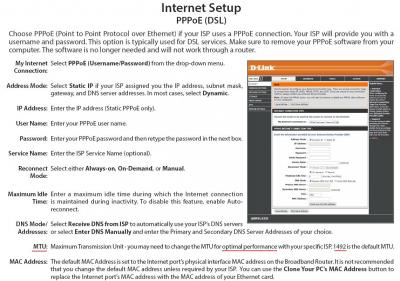
For Unifi 30, what is the optimal MTU value? Is that system specific, location specific? BB Don't know how to get that DL orange configuration page now in 850L. Manual says select either auto or manual configuration. Manual configuration will bring up the above configuration page. But no such auto or manual configuration selection on going to http://192.168.0.1. How to go to this DL orange configuration page? In my DL 2750E, the orange configuration page is the default page on logging in. Don't tell me DL has changed all that and has not updated the manual like their password = "blank" error! Many thanks. This post has been edited by plumberly: Jul 2 2016, 07:42 PM |
|
|
Jul 7 2016, 04:32 PM
Return to original view | Post
#26
|
|
Senior Member
4,761 posts Joined: Jun 2007 From: My house
|
For those with free 1 yr HypTV after getting your Unifi package, have a look at the free ASTRO Supersports channels. Impressive with the HD picture quality! I will be using that for the coming Olympics coverage.
|
|
|
|
|
|
Jul 8 2016, 08:24 AM
Return to original view | Post
#27
|
|
Senior Member
4,761 posts Joined: Jun 2007 From: My house
|
QUOTE(fkinmeng @ Jul 8 2016, 12:09 AM) 1 year? QUOTE(soonwai @ Jul 8 2016, 12:16 AM) Yah, what 1 yr? I thought free for all? https://www.tm.com.my/unifiadvance/Pages/pe...2rOuRoCD1Lw_wcBIf I got it right, the free package is the basic package. ASTRO Super Sports is part of the Jumbo package. I can view this now. Maybe this Jumbo package is only free for 1 month. Hopefully for 1 year. If Super Sports is free in HypTV, then I think this is a bad strategy on ASTRO's part as sports is their main revenue crowd puller. So why dilute their revenue by allowing HypTV taking some of the cake? Ha. This post has been edited by plumberly: Jul 8 2016, 08:28 AM |
|
|
Jul 8 2016, 03:25 PM
Return to original view | Post
#28
|
|
Senior Member
4,761 posts Joined: Jun 2007 From: My house
|
QUOTE(underGr0und_8 @ Jul 8 2016, 12:44 PM) Plan to get Unifi 30mbps at my area, but i am looking for speedtest.net result at this thread but can't seems to find any after flipping through pages, any help? My 2 cents here on speed change.Thanks ! Don't expect a huge improvement in your interneting. Say you change from 8 Mbps to 30 Mbps, about 4 times increase in speed. So instead of 3-4 seconds in refreshing a page while reading The Star, don't expect an instant page refresh (less than a second) when on 30 Mbps. From my experience, the page refresh now is 1-2 seconds. Downloading is faster now but not 4 times faster than before, eg. torrent etc. Depends on the traffic load at the other end. On Kodi, slightly better than before in speed, still see some waiting for it to response to my selection (changing the menu etc). Seeing less of the bufferings when watching HD movies. Good. I am getting 30-33 Mbps on speed test. Then why still seeing the above slowness at that speed? Bottleneck can be at any point between one end of the line to the other end. Do see a much faster uploading now, old 0.5 Mbps vs 10 Mbps now. Seeing less and less in speed improvement with higher Mbps for me. Guess I will only change to a higher speed if I have more users at my end. Otherwise, 30 Mbps is sufficient for me. Power internet users will say even 100 Mbps is not enough for them, aiming for 1 Gbps! |
|
|
Jul 10 2016, 12:23 PM
Return to original view | Post
#29
|
|
Senior Member
4,761 posts Joined: Jun 2007 From: My house
|
QUOTE(underGr0und_8 @ Jul 10 2016, 07:32 AM) Thanks for the input ! Because my area only start to offer Unifi recently (Kluang, Johor) thus i am going to change to it, just not sure if i should go 30, 50 or 100mbps Another 2 cents from me ... Ha.Depends on your need and budget. If it is only 1-3 persons using the net, say net browsing, some movie streaming etc, then 30 Mbps is sufficient. If the price difference 30-50 or 30-100 is small, then go for it. How small is small, you to decide. |
|
|
Jul 16 2016, 08:55 AM
Return to original view | Post
#30
|
|
Senior Member
4,761 posts Joined: Jun 2007 From: My house
|
Maybe slightly off topic here. But related to Unifi package.
My son was watching a VOD on HypTV and I warned him that it is not free. He said some VOD are free. For the ones which are not free, they will state the amount and ask you to confirm. True? Better check and verify than regret later when I see the bill. Ha. |
|
|
Jul 16 2016, 11:15 AM
Return to original view | Post
#31
|
|
Senior Member
4,761 posts Joined: Jun 2007 From: My house
|
QUOTE(zher4883 @ Jul 16 2016, 10:18 AM) You should be a good parent and allow your children to watch whatever he wants except rated 18 of course OK thanks. Jokes aside, those chargeable VOD will confirm whether you want to purchase or not Good to know what he says is correct. |
|
|
Aug 2 2016, 08:54 AM
Return to original view | Post
#32
|
|
Senior Member
4,761 posts Joined: Jun 2007 From: My house
|
My Unifi was down since yesterday morning. Only recovered this morning.
AA I am in Bintulu, Any one knows the reason for the failure? Heard there were some Unifi issues in Selangor and Miri yesterday. BB Can one claim for fee deduction for the outage? Not the money I am after but the annoyance it created when we could not check this and that on the net. Thanks. |
|
Topic ClosedOptions
|
| Change to: |  0.0988sec 0.0988sec
 0.44 0.44
 7 queries 7 queries
 GZIP Disabled GZIP Disabled
Time is now: 2nd December 2025 - 11:58 AM |
 Quote
Quote