

After refreshing Windows, installation of GOW4 completed in 1 go. Refreshing Windows will also fix whatever issue you have with your Windows.
Add me Cruxiaer if wanna play GOW4 together

This post has been edited by Silverfire: Oct 6 2016, 03:20 PM
Gears of War 4
|
|
 Oct 6 2016, 03:06 PM Oct 6 2016, 03:06 PM
Return to original view | Post
#1
|
 
Senior Member
4,947 posts Joined: Nov 2007   
|
Hi all, I had issues install GOW4 as well. The easiest fix will be reinstalling/refreshing your Windows 10 without affecting any of your files. Just download the Media Creation Tool from Microsoft website and start from there.
After refreshing Windows, installation of GOW4 completed in 1 go. Refreshing Windows will also fix whatever issue you have with your Windows. Add me Cruxiaer if wanna play GOW4 together This post has been edited by Silverfire: Oct 6 2016, 03:20 PM |
|
|
Oct 6 2016, 05:54 PM
Return to original view | Post
#2
|
|
Senior Member
4,947 posts Joined: Nov 2007
|
QUOTE(ChaChaZero @ Oct 6 2016, 03:37 PM) Reinstalling Windows isn't exactly an easy fix. In fact I think it is excessive to need to reinstall Windows just to get one game running. Sorry, not reinstalling. Refreshing your copy of Windows will do and that takes probably an hour or so and will not affect anything personal files and settings. Nothing will be changed except Windows fixing Windows itself   So yeah, I still recommend doing a refresh if you encounter any problem installing GOW4. |
|
|
Oct 8 2016, 07:53 PM
Return to original view | Post
#3
|
|
Senior Member
4,947 posts Joined: Nov 2007
|
QUOTE(chtan @ Oct 8 2016, 04:15 PM) Tested my notebook in ultra setting, FPS are good and solid average in 100++. Actually the game is quite nice to me. Wah GTX1070 laptop spotted! Nice one bro 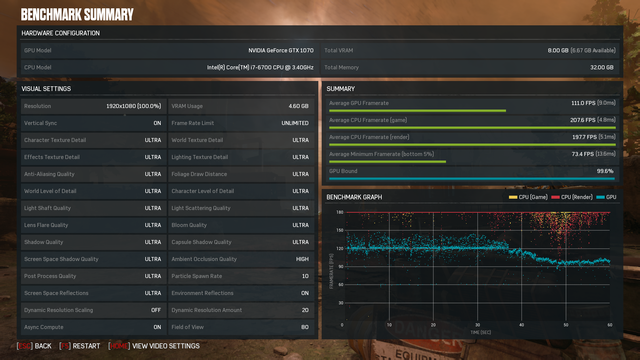  |
| Change to: |  0.0152sec 0.0152sec
 0.68 0.68
 7 queries 7 queries
 GZIP Disabled GZIP Disabled
Time is now: 22nd December 2025 - 10:59 PM |
 Quote
Quote