Welcome Guest ( Log In | Register )

302 Pages « < 227 228 229 230 231 > » Bottom

Outline · [ Standard ] · Linear+

 Kodi Official Discussion Thread V2, Free and Open Source (GPL) Media Center

views
     
sheridankamal
post Jan 9 2018, 09:08 AM

Getting Started
**
Junior Member
213 posts

Joined: Feb 2013


QUOTE(voncrane @ Jan 8 2018, 07:24 PM)
Acestream service/apk running
Plexus addon running
Play compatible links.. wait for p2p connections to sync..
Enjoy!!
That's weird.. Usually most have problems with audio and not video.. First rule out hardware problems.. Connect directly to the TV is using an AVR and change HDMI cables or source on TV.. Anyway, tried reinstalling the addon and problem still persist? If you've tried this and it still doesn't work. Try clearing out your Kodi cache (not data on android devices cuz this will wipe your installation).
*
Thanks for the suggestion. Ill give it a try.
xtracooljustin
post Jan 11 2018, 02:33 PM

Joining the 1K Club
******
Senior Member
1,602 posts

Joined: Aug 2005
From: KL/SG


Having "no stream available' problem on my Covenant on Kodi 17.4.

Tried a few of the fixes on Youtube and on Google, not solving the problem at all. any help from sifus here?
TSvoncrane
post Jan 11 2018, 03:30 PM

Noir et fier!
*******
Senior Member
7,118 posts

Joined: Oct 2011
From: Wakanda


QUOTE(bharath11 @ Jan 11 2018, 11:18 AM)
Hey i found solutin for  Kodi media center, in earlier times known as XBMC™ Media Center, is an award-winning free and open source software media player which is available for different systems and entertainment focal point for digital media for HTPCs (Home theater PCs). olpair and openload.co are the most popular sites and having huge amount of movies. In this article we are going to fix olpair.com and openload.co/pair issues in kodi addon.olpair
*
Joined: Today, 11:16 AM
Today, 11:18 AM

Hope you didn't create this account simply to spam links.. Anyway, old trick and it's not a "fix".. It's just normal prompt to drive traffic to their website.

QUOTE(xtracooljustin @ Jan 11 2018, 02:33 PM)
Having "no stream available' problem on my Covenant on Kodi 17.4.

Tried a few of the fixes on Youtube and on Google, not solving the problem at all. any help from sifus here?
*
Perhaps it's old content with no actual links for Covenant to scrape? Try playing recent content to test if the addon still works.. If it does, then it probably wasn't able to find links for the previous search.
TVWatcher
post Jan 11 2018, 07:43 PM

New Member
*
Newbie
27 posts

Joined: Jan 2018
QUOTE(xtracooljustin @ Jan 11 2018, 02:33 PM)
Having "no stream available' problem on my Covenant on Kodi 17.4.

Tried a few of the fixes on Youtube and on Google, not solving the problem at all. any help from sifus here?
*
If you like Covenant, maybe you can try Placenta. It's a new addon (Covenant fork). I tried it and it's not bad. Getting some 1080p/720p links. It's still being tweaked by the dev so I should think it would be getting even better in time. Just remember to update.

It's on the Blamo repo. Not sure if I'm allowed to show the URL here.


GuyM
post Jan 11 2018, 09:06 PM

Regular
******
Senior Member
1,787 posts

Joined: Jul 2007
QUOTE(voncrane @ Jan 11 2018, 03:30 PM)
Joined: Today, 11:16 AM
Today, 11:18 AM

Hope you didn't create this account simply to spam links.. Anyway, old trick and it's not a "fix".. It's just normal prompt to drive traffic to their website.
Perhaps it's old content with no actual links for Covenant to scrape? Try playing recent content to test if the addon still works.. If it does, then it probably wasn't able to find links for the previous search.
*
Myriad, Rebirth and Poseidon all returning good HD besides Quasar..... But still Terrarium TV and Streamio are your other options available....
xtracooljustin
post Jan 12 2018, 11:32 PM

Joining the 1K Club
******
Senior Member
1,602 posts

Joined: Aug 2005
From: KL/SG


QUOTE(voncrane @ Jan 11 2018, 03:30 PM)
Perhaps it's old content with no actual links for Covenant to scrape? Try playing recent content to test if the addon still works.. If it does, then it probably wasn't able to find links for the previous search.
*
Tried playing a few recent movies... Guardians of the Galaxy Vol 2 and others... zilch.

TSvoncrane
post Jan 13 2018, 12:27 AM

Noir et fier!
*******
Senior Member
7,118 posts

Joined: Oct 2011
From: Wakanda


QUOTE(TVWatcher @ Jan 11 2018, 07:43 PM)
If you like Covenant, maybe you can try Placenta.  It's a new addon (Covenant fork).  I tried it and it's not bad.  Getting some 1080p/720p links.  It's still being tweaked by the dev so I should think it would be getting even better in time.  Just remember to update.

It's on the Blamo repo.  Not sure if I'm allowed to show the URL here.
*
Yup.. Sure you can share clean urls here.. No worries, I'll test all properly and update the first page sometime next week.

QUOTE(GuyM @ Jan 11 2018, 09:06 PM)
Myriad, Rebirth and Poseidon all returning good HD besides Quasar..... But still Terrarium TV and Streamio are your other options available....
*
Quoted the wrong fella buddy.. smile.gif

QUOTE(xtracooljustin @ Jan 12 2018, 11:32 PM)
Tried playing a few recent movies... Guardians of the Galaxy Vol 2 and others... zilch.
*
I see.. Just tried a few recent and popular content.. Some played and others nothing. So you may be onto something there. Plus, It's my understanding that Covenant is on the verge of being abandoned and replaced with the Placenta addon (fork).. Same with Poseidon being replaced with Neptune Rising. Mr. Blamo and co are busy.. So give those 2 addons a try.. Tested and even managed to get FHD with 5.1 AAC audio.. Not bad.

Edit: Both can be gotten from the Blamo repo... url for file manager..

This post has been edited by voncrane: Jan 13 2018, 12:29 AM
Maxieos
post Jan 13 2018, 07:37 PM

Look at all my stars!!
*******
Senior Member
3,757 posts

Joined: May 2008
voncraneAVFAN

Not much related with kodi but more on how do I connect HDMI to a LCD Monitor.
What device converter I should get splitting up HDMI to DVI and sound ?
HDMI in , DVI out on monitor

The problem is the LCD is or something with 16:10 which is not 16:10.Most probably only support 1440x900.

I only know HDMI only support HD or full HD resolution but not other resolution , only converter box will work but I didn't find any result on which boxes will work.
AVFAN
post Jan 13 2018, 09:36 PM

20k VIP Club
*********
All Stars
24,453 posts

Joined: Nov 2010
QUOTE(Maxieos @ Jan 13 2018, 07:37 PM)
voncraneAVFAN

Not much related with kodi but more on how do I connect HDMI to a LCD Monitor.
What device converter I should get splitting up HDMI to DVI and sound ?
HDMI in , DVI out on monitor

The problem is the LCD is or something with 16:10 which is not 16:10.Most probably only support 1440x900.

I only know HDMI only support HD or full HD resolution but not other resolution , only converter box will work but I didn't find any result on which boxes will work.
*
u shud mention what device u want to connect to lcd monitor?

there r convertors hdmi->dvi+audio... but i hv never used them... price?

or maybe just get hdmi->dvi, no audio type, cheaper.
since monitor is only video, u must do some connection to get audio.
boxes come one or more of these audio outputs - coaxial (single rca), optical (toslink cable) and stereo L/R (dual rca cables).
u need to connect one of them to yr audio system, be it multimedia, amp or home theater.

this has nothing to do with kodi, so... this is overdrive.

please start a new thread in the right section if u need!

This post has been edited by AVFAN: Jan 14 2018, 08:54 AM
TSvoncrane
post Jan 13 2018, 10:09 PM

Noir et fier!
*******
Senior Member
7,118 posts

Joined: Oct 2011
From: Wakanda


QUOTE(Maxieos @ Jan 13 2018, 07:37 PM)
voncraneAVFAN

Not much related with kodi but more on how do I connect HDMI to a LCD Monitor.
What device converter I should get splitting up HDMI to DVI and sound ?
HDMI in , DVI out on monitor

The problem is the LCD is or something with 16:10 which is not 16:10.Most probably only support 1440x900.

I only know HDMI only support HD or full HD resolution but not other resolution , only converter box will work but I didn't find any result on which boxes will work.
*
Truly sign0006.gif However, knock yourself out..
» Click to show Spoiler - click again to hide... «

gin&tonic
post Jan 14 2018, 10:56 PM

Look at all my stars!!
*******
Senior Member
4,874 posts

Joined: Sep 2011


Any good working movie addons. My PC on Kodi 17.6 &
Rebirth seems very slow to load up and mostly "video streaming not available".
TSvoncrane
post Jan 15 2018, 10:06 AM

Noir et fier!
*******
Senior Member
7,118 posts

Joined: Oct 2011
From: Wakanda


QUOTE(gin&tonic @ Jan 14 2018, 10:56 PM)
Any good working movie addons. My PC on Kodi 17.6 &
Rebirth seems very slow to load up and mostly "video streaming not available".
*
Quasar still rules especially on a PC with large fast internal storage. Then there's Neptune's Rising and Placenta.. I made a post about em earlier.

This post has been edited by voncrane: Jan 15 2018, 10:07 AM
Scissorshand
post Jan 15 2018, 09:13 PM

Regular
******
Senior Member
1,691 posts

Joined: Nov 2008
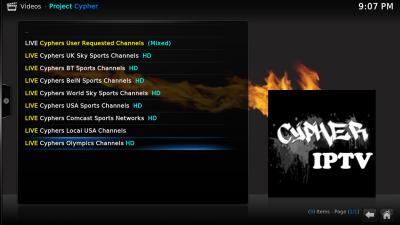
This Project Cypher in preparation for Olympics.... Works well with VPN pointing to EU. Will try them out this weekend football to see if it holds up


Attached thumbnail(s)
Attached Image Attached Image Attached Image
fkinmeng
post Jan 16 2018, 10:47 PM

Look at all my stars!!
*******
Senior Member
6,373 posts

Joined: May 2007
how is icdrama in kodi? does it lag? are there other apk to watch korean drama other than icdrama?
UntilUComeBack
post Jan 17 2018, 09:48 AM

HueHueHue
***
Junior Member
481 posts

Joined: Feb 2011
From: Pj


QUOTE(fkinmeng @ Jan 16 2018, 10:47 PM)
how is icdrama in kodi? does it lag? are there other apk to watch korean drama other than icdrama?
*
watching Running Man everyweek there,
no lag. okey saja.
dreamwave
post Jan 18 2018, 10:17 PM

New Member
*
Newbie
9 posts

Joined: Mar 2011
Hi, I'm using Kodi Quasar on my Q10 Pro box but it keeps telling me I do not have enough space in my download path. I'm only trying to watch a 720p show which is 1GB. I don't install many apps in my box and don't have any large files. I know my box has 16GB of space so I do not know why Quasar is giving that message. Any one has experienced the same thing and have a fix for this?

This post has been edited by dreamwave: Jan 18 2018, 10:33 PM
AVFAN
post Jan 18 2018, 11:17 PM

20k VIP Club
*********
All Stars
24,453 posts

Joined: Nov 2010
QUOTE(dreamwave @ Jan 18 2018, 10:17 PM)
Hi, I'm using Kodi Quasar on my Q10 Pro box but it keeps telling me I do not have enough space in my download path. I'm only trying to watch a 720p show which is 1GB. I don't install many apps in my box and don't have any large files. I know my box has 16GB of space so I do not know why Quasar is giving that message. Any one has experienced the same thing and have a fix for this?
*
typically, after firmware and a normal set of apps, u hv 8-9gb available.

quasar is not wrong, u r running out of storage - becos of unwanted saved files buildup.

this happens if u hv set quasar to save previous videos.

or by accident, by wrong clicking, they get saved.

what to do:

.. get into the files with a file manager - es file manger or some other... find org.xbmc.kodi... remove/delete them in the torrents folder.

.. check yr quasar settings - set it NOT to save after download or after playing.
dreamwave
post Jan 19 2018, 12:14 AM

New Member
*
Newbie
9 posts

Joined: Mar 2011
QUOTE(AVFAN @ Jan 18 2018, 11:17 PM)
typically, after firmware and a normal set of apps, u hv 8-9gb available.

quasar is not wrong, u r running out of storage - becos of unwanted saved files buildup.

this happens if u hv set quasar to save previous videos.

or by accident, by wrong clicking, they get saved.

what to do:

.. get into the files with a file manager - es file manger or some other... find org.xbmc.kodi... remove/delete them in the torrents folder.

.. check yr quasar settings - set it NOT to save after download or after playing.
*
Thanks a lot. That worked!
TSvoncrane
post Jan 19 2018, 12:16 AM

Noir et fier!
*******
Senior Member
7,118 posts

Joined: Oct 2011
From: Wakanda


QUOTE(dreamwave @ Jan 18 2018, 10:17 PM)
Hi, I'm using Kodi Quasar on my Q10 Pro box but it keeps telling me I do not have enough space in my download path. I'm only trying to watch a 720p show which is 1GB. I don't install many apps in my box and don't have any large files. I know my box has 16GB of space so I do not know why Quasar is giving that message. Any one has experienced the same thing and have a fix for this?
*
Check storage settings and actual free storage left on device... Either download path is full or your box is actually near full but you are unaware.. Time for clean up and yes, as suggested.. To avoid such, set the addon to NOT save/keep files when done. It'll delete automatically.
dreamwave
post Jan 19 2018, 02:59 PM

New Member
*
Newbie
9 posts

Joined: Mar 2011
QUOTE(voncrane @ Jan 19 2018, 12:16 AM)
Check storage settings and actual free storage left on device... Either download path is full or your box is actually near full but you are unaware.. Time for clean up and yes, as suggested.. To avoid such, set the addon to NOT save/keep files when done. It'll delete automatically.
*
Thanks a lot smile.gif

302 Pages « < 227 228 229 230 231 > » Top
 

Change to:
| Lo-Fi Version
0.0248sec    0.64    6 queries    GZIP Disabled
Time is now: 2nd December 2025 - 11:57 PM