Outline ·
[ Standard ] ·
Linear+
Xiaomi Xiaomi Redmi Note 3 Thread V4, Fullmetal+Fingerprint+4,000mAh=Awesome
|
fruitie
|
 May 14 2016, 09:36 PM May 14 2016, 09:36 PM
|
Rise and Shine


|
Hello, there's a music player thingy at the notification bar. How to disable or remove it? I searched in previous topic, somebody suggested to slide right. I did but it kept showing the notification page?
|
|
|
|
|
|
fruitie
|
May 14 2016, 09:47 PM
|
Rise and Shine
|
QUOTE(soulz69 @ May 14 2016, 09:43 PM) go to settings>notifications>app notifications. find the music app there. disable show notification. QUOTE(gogo2 @ May 14 2016, 09:45 PM) Normally slide or press the X at the bottom. Both don't work.  Or I'm too stupid. This post has been edited by fruitie: May 14 2016, 09:47 PM |
|
|
|
|
|
fruitie
|
May 14 2016, 10:12 PM
|
Rise and Shine
|
QUOTE(soulz69 @ May 14 2016, 09:56 PM) how about reboot the phone?  Just did, doesn't work. QUOTE(gogo2 @ May 14 2016, 10:02 PM) How about kill the music app? By the way, you're talking about Music App right? Must kill ah? Yes, Music App. QUOTE(soulz69 @ May 14 2016, 10:09 PM) can give screenshoot? is it the music player at the toggle bar fruitie ? Yes. I tried to screenshot but it seems I can screenshot that page.  This is my sister's phone, not mine so I'm not familiar.  |
|
|
|
|
|
fruitie
|
May 14 2016, 10:18 PM
|
Rise and Shine
|
soulz69, this is what I meant. Music App on top of toggle icons. 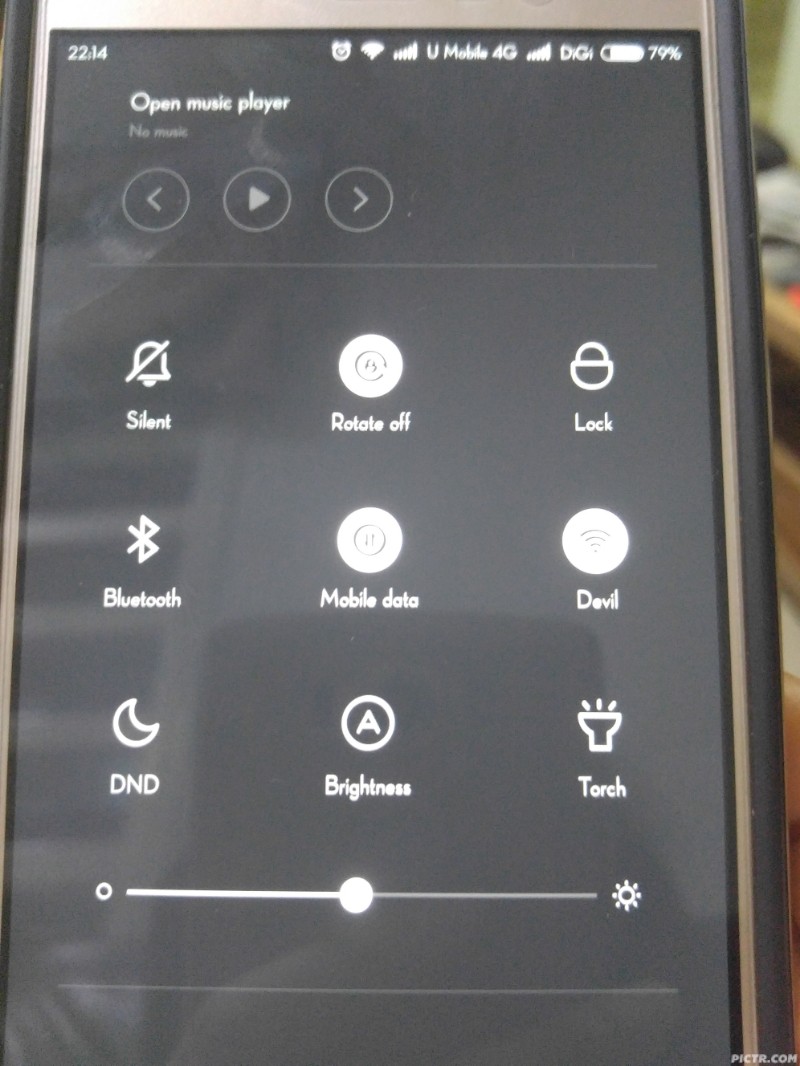
|
|
|
|
|
|
fruitie
|
May 14 2016, 10:26 PM
|
Rise and Shine
|
QUOTE(soulz69 @ May 14 2016, 10:19 PM) at the toggle icon got screenshot button or use vol down + power. Thanks, I used toggle screenshot and didn't work. QUOTE(soulz69 @ May 14 2016, 10:21 PM) if this music player, can't be remove. its their design iinm. it will stick there. My sis said just recently only appeared oh. |
|
|
|
|
|
fruitie
|
May 14 2016, 10:39 PM
|
Rise and Shine
|
QUOTE(soulz69 @ May 14 2016, 10:31 PM) i forgot if use the toggle screenshot it will make the notification bar goes up. thats weird if the player just appear or maybe she did not notice it before? usually it will be up there. Honestly, I last saw her phone in early March and I don't recall seeing that too, then I went for vacation and didn't come back home until today. She showed me and sought for my help to disable it. I don't know how to help her. This post has been edited by fruitie: May 14 2016, 10:39 PM |
|
|
|
|
|
fruitie
|
May 14 2016, 11:49 PM
|
Rise and Shine
|
QUOTE(kimimaro_kun @ May 14 2016, 10:45 PM) Dont think u can remove it from there.. OK lo.  QUOTE(AMDAthlon @ May 14 2016, 10:57 PM) Change to other theme Hmm. Let me explore this option with her. |
|
|
|
|
|
fruitie
|
May 15 2016, 11:51 AM
|
Rise and Shine
|
QUOTE(Marcian @ May 15 2016, 11:49 AM) You're right. Mine also didnt' have that until recently. Cant' remember what I did. Maybe it came with 7.2.5.0? Anyone on the older firmware can check if that music player thing is showing? Let me check her firmware, I think it wasn't that version. She claimed that she was watching a live badminton match on her phone, then this thing just stays there permanently... |
|
|
|
|
|
fruitie
|
May 18 2016, 10:24 AM
|
Rise and Shine
|
QUOTE(gogo2 @ May 18 2016, 07:52 AM) New firmware remove the music player in the toggle setting Ah is it? Funny though, her phone no matter how keeps telling her it is already the latest version.  |
|
|
|
|
|
fruitie
|
May 18 2016, 10:39 AM
|
Rise and Shine
|
QUOTE(gogo2 @ May 18 2016, 10:38 AM) Let me ask her later. I suspected her phone is rooted and no more update. She bought it from 11 Street back in January... |
|
|
|
|
|
fruitie
|
May 29 2016, 01:36 PM
|
Rise and Shine
|
My sis‘ phone is still stuck with 7.0.19.0.0 (LHNCNCJ) and if she tries to update from OTA, it will tell her it's already latest version. Is it have to update manually?
|
|
|
|
|
|
fruitie
|
May 29 2016, 07:16 PM
|
Rise and Shine
|
QUOTE(gogo2 @ May 29 2016, 04:39 PM) No. Its OTA. Probably your sister phone is not bought from Xiaomi. She need to flash global ROM She bought from 11Street before it was launched here. OK, will check this out. |
|
|
|
|
|
fruitie
|
May 29 2016, 09:51 PM
|
Rise and Shine
|
QUOTE(jsflim @ May 29 2016, 09:47 PM) I think your sister phone was loaded with vendor's ROM, same as mine. What you can do is help her flash it to the original Mi Global ROM. Yes, it is. Is there any risk of losing all the data? I will Google and check it out later. |
|
|
|
|
|
fruitie
|
May 29 2016, 10:38 PM
|
Rise and Shine
|
QUOTE(kayro @ May 29 2016, 10:12 PM) There is no risk in flashing ROM in Mi Phones but better backup first before do it. Usually Mi phones does not wipe /data and /sdcard partition while flashing rom unless upgrading android version. eg: 5.0 (lollipop) to 6.0 (marshmallow) because of updated API level and new system environment makes some outdated applications crashed after upgrade. This is not updating oh.. QUOTE(AMDAthlon @ May 29 2016, 10:23 PM) 7.3.2.0 is an official OTA updates, you can update it as usual. Flashing rom using MiFlash will wipe out data. But at least you get clean official rom  Follow the guide in this link properly. http://en.miui.com/forum.php?mod=viewthrea...%3D676&mobile=2I also suggest ANYONE that uses vendor rom/ap sets to do the same. You will get clean official stable rom like what most of the Xiaomi Malaysia set user. EDIT: Make sure to choose Redmi Note 3 Qualcolmm Global Stable ROM and not China ROM Thanks for the information! Need to backup then. Any easier way to backup if it's not rooted? I used to use Ti Backup during my rooting days, these days I'm just too lazy. |
|
|
|
|
|
fruitie
|
May 29 2016, 10:45 PM
|
Rise and Shine
|
QUOTE(AMDAthlon @ May 29 2016, 10:40 PM) I'm not sure how to backup without root. Maybe other can help. Maybe can try backup using the MiPcSuite? I'm not really sure since all my backups are using titanium backup though but you could give it a try. :lol Sigh, if only I knew this, will help her to flash to Global ROM when she just bought it... Hopefully others can suggest how to backup on a non-rooted phone... |
|
|
|
|
|
fruitie
|
May 29 2016, 10:56 PM
|
Rise and Shine
|
QUOTE(AMDAthlon @ May 29 2016, 10:52 PM) Give the MiPcSuite a try. I think it can backup data. Check this link : http://en.miui.com/thread-95630-1-1.htmlThanks! Will check it out. |
|
|
|
|



 Quote
Quote

 0.0531sec
 0.22
0.22
 7 queries
 GZIP Disabled