Outline ·
[ Standard ] ·
Linear+
Worth to buy PCIe SSD?, OS booting, application start etc
|
Vannus
|
 Apr 29 2016, 07:05 AM Apr 29 2016, 07:05 AM
|

|
I suggest go for 512gb 950 pro m.2 pcie. Dont buy 256gb. Few games installed and thats it full.  for me i 512gb m.2 pcie for c drive and apps. And a 512gb sata ssd like evo for movies and data on secondary drive. Put in together i7 6600k and a 32gb ram ddr4 with a gtx1080 8gb. Its just perfect will last you at least 5 years, you have enough vitamin c hehe This post has been edited by Vannus: Apr 29 2016, 07:07 AM |
|
|
|
|
|
Vannus
|
May 8 2016, 11:29 PM
|
|
|
QUOTE(kianweic @ May 8 2016, 12:34 AM) Nope, I am not using 6700K.  I had bad experience with one of Coolermaster non-backplate heatsink fan. The mounting wore off and the entire heatsink came off few years back. Bro, same spec bought new last week, just that im using 850 pro. Skip 950 pro and wait for sm961 few more months to slot the empty m.2. I7 6700k 4.7ghz, 32gb ddr4 3000mhz cl15, gtx970 But im not geek like you having more than 10gbs hdd 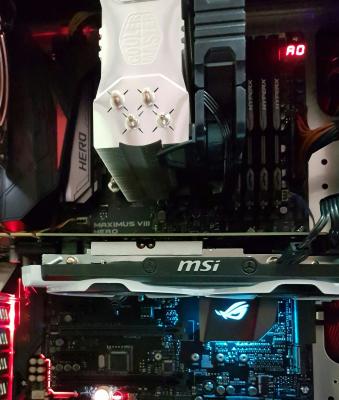 This post has been edited by Vannus: May 8 2016, 11:49 PM
 |
|
|
|
|
|
Vannus
|
May 9 2016, 10:51 AM
|
|
|
QUOTE(kianweic @ May 9 2016, 10:36 AM) What cooler is that? Looks familiar. I am also skipping PCI SSD at the moment since I am quite happy with the current SATA SSD. All of my computers are running SATA SSDs including old laptop. May not be as fast as PCI SSD but they have continued to serve me well. It's cooler master 212x, the fan is great, 7x cfm, it keeps my cpu cool and around 60C on full load. and when idle it's around 38C to 42C depends on room ambient temp. Yea, just wondering when the SM961 will be release. Lets keep an eye on the release. actually sata SSD is also doing well here, bootup time and loading is just a quick. Not sure can get significant gain or not after switching to nvme ssd. This post has been edited by Vannus: May 9 2016, 10:52 AM |
|
|
|
|
|
Vannus
|
May 9 2016, 01:37 PM
|
|
|
QUOTE(chanhin @ May 9 2016, 01:30 PM) My 212x only one fan. You add-on extr fan? How to fit? Worth to add extra fan? How many lower temperature you manage to get? No need add fan, no difference. Im using the original fan. It seems that the original fan is high grade fan. |
|
|
|
|
|
Vannus
|
May 10 2016, 09:52 PM
|
|
|
Wait when you say 5 secs is from the moment you press the power button on the case till you see your working desktop?
|
|
|
|
|
|
Vannus
|
May 14 2016, 09:31 PM
|
|
|
I have the same issue on my new pc. More than 10s from the point i press the power button till my desktop windows is ready. I read about it on internet, the culprit is your mobo taking too long to initialize whatever it has to. There is a settings in bios under ram config, you van turn it to enable and now the time taken is about 5 secs
|
|
|
|
|
|
Vannus
|
Jun 5 2016, 12:56 PM
|
|
|
QUOTE(chanhin @ Jun 5 2016, 12:00 AM) Yeah... After getting new desktop with the excellent Samsung 950 Pro, I was having problem using my Asus ultrabook. End up today also change the laptop HDD into SSD. I can feel the speed at least doubled up. Anyway, maybe because my laptop SSD is still SATA3 based, it still lost to my desktop 950 Pro noticeable... Bootup not noticeable between m.2 and sata ssds. Maybe during extensive transfer file or big program loading or rendering yea. Playing games, web browsing and watching movies both are same fast. |
|
|
|
|



 Quote
Quote


 0.0204sec
 0.25
0.25
 7 queries
 GZIP Disabled