QUOTE(Skylinestar @ Apr 24 2016, 08:38 PM)
That's what people said about 1600x1200, 1920x1200 & 1920x1080 a few years ago.
LCD is meant to run at native resolution. 4k in, 4k out. Like any upscaling on LCD monitor, it will look terrible. Upscale on CRT & Plasma is the best, but these are obsolete.
Today's technology is not ready for 4k gaming at high fps.
But it's true that with higher pixel count, the need to apply Anti-Aliasing is lessen. AA needed to smooth out jagged lines visible at lower resolution, but higher resolution mean higher pixel density, hence the jagged line effect is not as obvious compare to lower res. I think these illustrations show what I mean
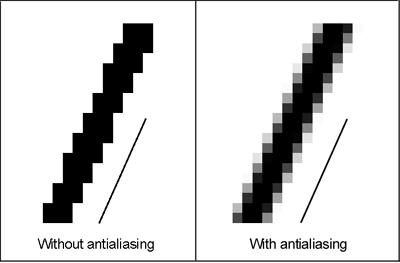

Moving from FHD monitor to UHD, I can tell you personally that you need to apply less or no AA when running games at this resolution.
On the upscalling thing, I'm not so sure if other monitors do any resolution upscalling, but my Samsung UHD doesn't. So if I play FHD movie or view 1920 x 1080 photo on my UHD monitor, it looks exactly the same if I run it on FHD monitor. But that is the point. If you have UHD monitor and you run FHD content, the content will just look same like you run it on a FHD monitor. If its terrible on FHD monitor, it will still look terrible on on UHD. If its nice on FHD, it will look just as nice on UHD. But if you watch UHD content (like movie or photos) on FHD monitor, it will never look as good or as nice as seeing it on UHD monitor. Even Youtube now started streaming some UHD content.
If you're gaming only, I guess its matter of preferences. Some prefer 144 Hz FHD than having 60 Hz UHD. Even top tier GPU struggle to push newer games to 60 fps on UHD. But if you do other things like watching photos or into UHD video contents, a UHD does have a lot of benefit. Even right now, UHD contents comes at max 60 FPS, which compare to normal FHD movies at 24/30fps, still whole lot nicer.


 Apr 21 2016, 04:50 PM, updated 10y ago


 Quote
Quote


 0.0182sec
 0.83
0.83
 5 queries
 GZIP Disabled