

 Apr 20 2016, 09:46 PM, updated 4y ago


Package includes: Official Activation Key and download link upon Payment (within 24 Hours)
Price:
Light edition (personal license): MYR 200 >> (discount 50%) RM 100
Standard edition (personal license): MYR 1000 >> (discount 50%) RM 500
Advanced edition (business license): MYR 2800 >> (discount 50%) RM 1400
Warranty: Lifetime
Dealing method: Online Banking/ COD (KL Area)
Location: Any Location
Contact method/details: PM/ Email @ piausukliang@yahoo.com
Item(s) conditions: New + Official License deliver from official email address
Picture:
Reason for sale: Reseller
URL: Official Website
Welcome to Windows Password Recovery, a network security analyzer and Windows password recovery utility. Windows Password Recovery tool is the only solution that implements the most advanced, patented password recovery technologies developed in Passcape Software, such as Artificial Intelligence or Pass-phrase attack.
Compared to similar products, Windows Password Recovery features a number of competitive advantages:
For home users - easy set up and use. Easily recovers or resets forgotten passwords to any Windows account.
For system administrators - password audit reveals security breaches, helping the administrators to ensure the reliability and security of the corporate network. Checks the security level of Windows operating systems.
For forensics, industry and government security experts - analyzes and audits system security policies, issues recommendations on improving the stability of the operating systems' password protection.
Features:
> Contemporary, easily customizable graphical user interface.
> Imports hashes from 9 other programs.
> Imports directly from SAM or ntds.dit; even if the files are locked by the system, the program still reads them.
> Imports hashes from remote computers.
> Import hashes from system shadow copies, restore points, backup and repair folders.
> Can backup\save local registry files and Active Directory database.
> Imports password history hashes.
> Recovers some account passwords instantly (when importing locally).
> Supports Active Directory (domain accounts).
> Supports importing from 64-bit systems.
> Exports hashes to the PWDUMP file.
> The software has 18 types of different attacks. 10 of them are unique, implemented upon patented technologies and used in our products only.
> The program supports multithreading, fully leveraging the power of modern computers.
> Dictionary attack supports text dictionaries in the ASCII, UNICODE,UTF8, PCD, RAR and ZIP formats.
> Broad choice of online dictionaries for dictionary attacks (about 2 GB). Not enough? Take a look at our ultimate and unique 15 Gb wordlist collection.
> Some of the program's functions - e.g., word mutation - are unique. For example, the total number of mutation rules exceeds a hundred and fifty. Not any other similar application features that!
> Supports unlimited number of hashes.
> Supports for long (up to 255 character) passwords.
> Artificial Intelligent analysis of found passwords.
> High search speed on modern computers - over billion passwords per second utilizing GPU power.
> Includes auxiliary tools: hash generator, password strength check, rainbow tables generators, SAM/NTDS.DIT backup tool, asterisk password revealer, resetting user password directly in SAM or NTDS.DIT files, SAM and NTDS.DIT explorers, DPAPI offline decoder, searching passwords by indexing disk sectors, etc.
> Useful wordlist utilities
> Advanced password reports
> And much more
Screenshot:
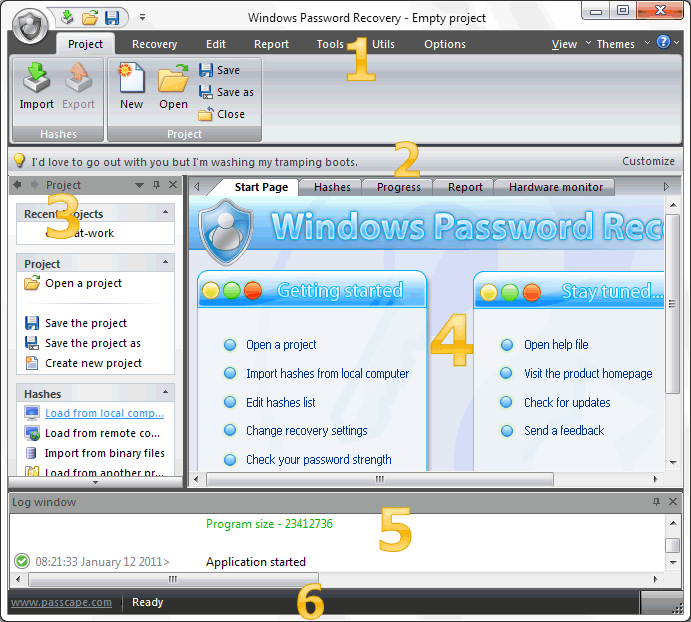
The entire interface can be conventionally divided into several components:
1. Menu Bar
2. Information Bar - for displaying brief information texts - like tips, warnings, etc.
3. Task Bar - duplicates and compliments the menu bar, providing quick access to the most common operations. Consists of three parts:
- Project - includes the main operations over project - like opening, closing, creating a new project, and importing hashes.
- Hash Editor. Duplicates the most common editing operations.
- Tools - includes a clock, calendar, and calculator.
4. Main Window - bears the main burden and consists of 4 parts. The first tab is the welcome window. The second tab contains the list of hashes to be analyzed and recovered. Then there goes a tab with the current attack state (progress) indicator, a tab with the statistics/reports. And finally - a hardware monitor tab.
5. Log Window - displays information on the current state of the application, current operation, etc. The program's log can be copied to clipboard or saved to a file (right-clicking opens the corresponding menu).
6. Status Bar is designed for informational purposes.
Demo Video: http://www.passcape.com/download/demo/wpr/WPR_DEMO.html
This post has been edited by piausuk: May 17 2020, 01:51 AM
 Quote
Quote


 0.0163sec
 1.30
1.30
 5 queries
 GZIP Disabled