Outline ·
[ Standard ] ·
Linear+
Huawei Mate 8 forum discussion V2, The truly premium flagship?
|
yc1437
|
 Apr 30 2016, 08:27 AM Apr 30 2016, 08:27 AM
|
Getting Started


|
QUOTE(MadDog89 @ Apr 20 2016, 06:57 PM) u should read the terms of polar.. cos those high end device fitness watch normally pair well witb samsung sony n apple.. my client use suunto.. only can pair with samsung.. his asus zenfone deluxe cannt support for his suunto. Try install ANT+ Plugin Service from Google Play Store. |
|
|
|
|
|
yc1437
|
May 1 2016, 11:18 PM
|
Getting Started
|
QUOTE(fidodido21 @ Apr 30 2016, 12:24 PM) I'm using protected apps for disa, yesterday I noticed that I didnt get notification until I went into the app. It had been almost 5 hours. I'm on B170. I did put the phone into airplane mode while I took a nap and whatsapp gave me a notification but Disa did not. Never had this issue with my iPhone or One plus 2 Other than Protected Apps setting, you need to set Allowed in Setting > Apps > Advanced > Ignore Battery Optimization for any apps encounter no notification issue. This fix my Gmail Inbox no notification problem. If problem still persist, you may want to wipe Cache via Recovery or wipe apps data and reconfigure again. Hope this helps. |
|
|
|
|
|
yc1437
|
May 1 2016, 11:33 PM
|
Getting Started
|
QUOTE(yoyoan @ May 1 2016, 10:59 AM) Yeah same here, using internet speed meter, but no numbers, just the icon. Any tweaks need to be done? My Calendar on status bar also can't display the correct date icon in notification bar. Not sure it is Mate 8 specific issue or common on Android 6... |
|
|
|
|
|
yc1437
|
May 2 2016, 09:19 PM
|
Getting Started
|
QUOTE(Joseph Hahn @ May 2 2016, 10:37 AM) Oh wow I had no idea there's more settings. I see Facebook and Twitter in there. Will set to don't allow lol. No wonder Tasker didn't work before. For Tasker to work properly, need to allow the app in Accessibility service too. |
|
|
|
|
|
yc1437
|
May 4 2016, 08:39 PM
|
Getting Started
|
QUOTE(yoyoan @ May 4 2016, 12:44 PM) Same here, very cool phone except when using navigation and the phone is under the windscreen, it's heats up like nobody's business If your phone is exposed to sun light, it will turn very hot because of metal body, same thing happened to my old G8. |
|
|
|
|
|
yc1437
|
May 6 2016, 09:38 AM
|
Getting Started
|
QUOTE(mon678 @ May 6 2016, 08:23 AM) you hve to root to use this function. You do not need root, just activate in Google Now setting |
|
|
|
|
|
yc1437
|
May 8 2016, 10:48 AM
|
Getting Started
|
QUOTE(plain_white @ May 8 2016, 09:23 AM) I use pavoscreen glass SP. Quite fitting for mate 8. It covers right until the black border of the screen. Before this i installed a cheap tempered glass SP but it was not fitting and affecting the readability at the screen edge. Removed it immediately and wasted my money  I got it from this dealer. https://forum.lowyat.net/index.php?showtopic=3903398&hl=Bro can share photo of your Mate 8 with Pavoscreen SP? Interested to see how much thickness added to the phone. The original Huawei glass SP come with the phone is thin but lousy oleophobic effect... |
|
|
|
|
|
yc1437
|
May 14 2016, 01:43 AM
|
Getting Started
|
QUOTE(Titan_Gunners @ May 13 2016, 05:19 PM) Mate 8 will charge as 5v2a only I checked with Taobao Aukey official seller, they confirmed Huawei Quick Charge is not supported. Guess need to wait for official Huawei charger, especially i need the car charge. |
|
|
|
|
|
yc1437
|
May 14 2016, 01:45 AM
|
Getting Started
|
QUOTE(danieltan @ May 12 2016, 05:42 PM) Premium 64gb come with flip casing and normal screen protector for normal version 32gb only with back casing and normal screen protector. hmm, the premium one should come with tempered glass SP |
|
|
|
|
|
yc1437
|
May 14 2016, 11:22 AM
|
Getting Started
|
QUOTE(juniorsia @ May 14 2016, 10:41 AM) Means it only supports QC2. 0? Means Mate 8 Quick Charge is supported by Huawei own charger only... I tried survey via Google no one report the success of fast charging using 3rd party quick charger. Be it QC2 or QC3. |
|
|
|
|
|
yc1437
|
May 14 2016, 11:54 AM
|
Getting Started
|
QUOTE(psjjl @ May 13 2016, 07:30 PM) B180, on the way.. Edit: Fixed: '4G' icon is gone when i switched to wifi. Hi bro, what is your B180 Android security patch date and baseband version? My manual updated B180 don't have the 4G icon when connected to WiFi. 
|
|
|
|
|
|
yc1437
|
May 14 2016, 02:41 PM
|
Getting Started
|
QUOTE(psjjl @ May 14 2016, 01:14 PM) Same patch date bro. Yes, the 4g icon is gone when switched to wifi. When i'm on B170, I always forgot the turn the mobile on after I left my house or office. I manually downgrade to B170 and immediately get B180 OTA. Different is, I got the release notes in Updater. 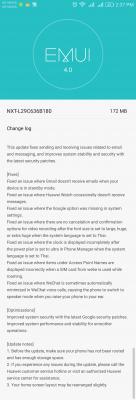
|
|
|
|
|
|
yc1437
|
May 14 2016, 09:33 PM
|
Getting Started
|
QUOTE(temanle @ May 14 2016, 06:29 PM) Suspect the EMUI 4.0 got problem with notification bar display. My Status Bar Calendar software do not work correctly on Mate 8. The icon display by day on notification bar never work anymore. |
|
|
|
|
|
yc1437
|
May 15 2016, 09:32 AM
|
Getting Started
|
QUOTE(squareballs @ May 15 2016, 08:07 AM) Not sure about 2 sim cause I'm not using 2 sim.. But no effeCt on my whatsapp draining power I have this issue once where my Sim 2 suddenly loss 4G data (set default Sim 2 data). Turn off mobile data option and on again it back to normal. You may try it. If problem persist try reboot your phone, try wipe Cache partition by turn off the phone > press volume up + power to enter Recovery mode > Format Cache (WARNING DO NOT WRONGLY RESET YOUR PHONE). |
|
|
|
|
|
yc1437
|
May 15 2016, 02:04 PM
|
Getting Started
|
QUOTE(benny888 @ May 15 2016, 01:47 PM) You must unlock bootloader to root phone first Titanium Backup works only on rooted phones Yes you can select extsdcard to save all your backup Yes all your app n data will fully be restored Just to share, if you don't want to root the phone, you may use Huawei Backup to backup everything except WiFi passwords. To backup WiFi passwords you need to use HiCloud which is the only way. If you can't find HiCloud in Google Playstore you can install the China version of HiSuit then install Huawei Market to get HiCloud. Btw, the Huawei Music app China version let you listen free music online. 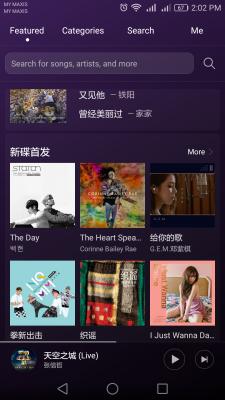
|
|
|
|
|
|
yc1437
|
May 15 2016, 10:39 PM
|
Getting Started
|
QUOTE(leongsem @ May 15 2016, 09:17 PM) hope this feature can add into my mate 7 You can download and install the apk via Huawei Market. |
|
|
|
|
|
yc1437
|
May 16 2016, 03:59 PM
|
Getting Started
|
QUOTE(benny888 @ May 16 2016, 12:28 PM) For local set, need to install HiSuite China version, then you can install the Huawei Market, then you can get the China variants of apps including Stock Music app which allow you to listen to online music. However, no matter what you cannot login to Huawei music with you Huawei ID... So can't download songs or save Playlist... http://consumer.huawei.com/minisite/HiSuite_cn/index.html |
|
|
|
|
|
yc1437
|
May 17 2016, 08:59 PM
|
Getting Started
|
QUOTE(jackdon @ May 17 2016, 07:22 PM) Benny, FYI the Backup in the Tools on the Mate 8 support backup to SD Card, Internal Storage, USB Storage and Computer. Will give that a try once I get my high speed 64GB MicroSD card tomorrow. Thanks for the reply. jackdon The WiFi passwords will not be backup. |
|
|
|
|
|
yc1437
|
May 17 2016, 09:02 PM
|
Getting Started
|
QUOTE(leewh23 @ May 17 2016, 02:31 PM) why not just backup your whatsapp to google drive and restore it to new phone? When you backup WhatsApp to Google Drive, it will create a set of local copy in internal sdcard folder named "WhatsApp" If you hate about the long waiting of backup to Google Drive you can copy the entire WhatsApp folder to somewhere safe. |
|
|
|
|
|
yc1437
|
May 17 2016, 11:34 PM
|
Getting Started
|
QUOTE(wayne99 @ May 17 2016, 09:26 PM) Do note that only apk being backup...not actually the apps data. I migrated from my mate 7 to mate 8 using the huawei backup thru hisuite to computer, restoration will only install app, not returning app to previous settings or data. Abit misleading to begin with..im actually hoping the android 6.0 will keep the app data too...but not really in actual. Not sure the best way to backup the app data Did you backup both apk and data (need to check both option)? |
|
|
|
|



 Quote
Quote
 0.0589sec
 0.60
0.60
 7 queries
 GZIP Disabled