Outline ·
[ Standard ] ·
Linear+
Huawei Honor 7 Official Thread v2, still very unfair for other phone!
|
ngmunwai
|
 Aug 24 2016, 08:29 AM Aug 24 2016, 08:29 AM
|
Getting Started


|
Hi Guy, just copied the package before I update from B130 to B340. Here is the link, you may download and extract to your SD card then update manual to B340 without downgrade to B130 PLK-L01C636B340 full firmware package https://drive.google.com/open?id=0ByonaBW2-...Z2dvcWpNLVZqRTQ |
|
|
|
|
|
ngmunwai
|
Aug 24 2016, 10:33 AM
|
Getting Started
|
QUOTE(fiezwan @ Aug 24 2016, 10:17 AM) at least we still have someone who think about their friends out here.  You r the 1 giving me the idea to sharing it here with sharing your B330.  |
|
|
|
|
|
ngmunwai
|
Aug 24 2016, 10:52 AM
|
Getting Started
|
QUOTE(ideaplus @ Aug 24 2016, 10:48 AM) Actually how to copy out that file as system will install immediately after downloaded? After finish download, there is one folder in your phone storage named as HWOTA. just copied the file inside to somewhere else.  |
|
|
|
|
|
ngmunwai
|
Aug 24 2016, 10:55 AM
|
Getting Started
|
QUOTE(s30ckf @ Aug 24 2016, 10:52 AM) Thanks for sharing, learnt something today since u learnt d, next update should know what to contribute. haha |
|
|
|
|
|
ngmunwai
|
Aug 24 2016, 11:27 AM
|
Getting Started
|
QUOTE(ideaplus @ Aug 24 2016, 11:21 AM) I checked but no such folder. Is it need to check before install? Yes, before install. I forget is it HWOTA is the exactly named. somewhere folder name start from "HW___" |
|
|
|
|
|
ngmunwai
|
Aug 24 2016, 11:50 AM
|
Getting Started
|
QUOTE(ideaplus @ Aug 24 2016, 11:33 AM) But system will install automatically after downloaded. How you manage to copy out it? firstly u will download it. after completed, it will show you an install button. Don't click install button, go file directory copy it. |
|
|
|
|
|
ngmunwai
|
Aug 24 2016, 04:10 PM
|
Getting Started
|
I direct upgrade from B130 to B340. no whatapps & fast charging issues
|
|
|
|
|
|
ngmunwai
|
Aug 25 2016, 12:44 AM
|
Getting Started
|
Rename the file to update.zip.
Move the update.zip file to the dload folder you created on your SD card. Then using the phone head to Settings>Update>>Menu>Local Update and the update.zip file should then be recognised, just tap on the file and the phone will do the rest
|
|
|
|
|
|
ngmunwai
|
Aug 25 2016, 01:18 AM
|
Getting Started
|
QUOTE(s30ckf @ Aug 25 2016, 01:04 AM) Don't have "Local Update" there... 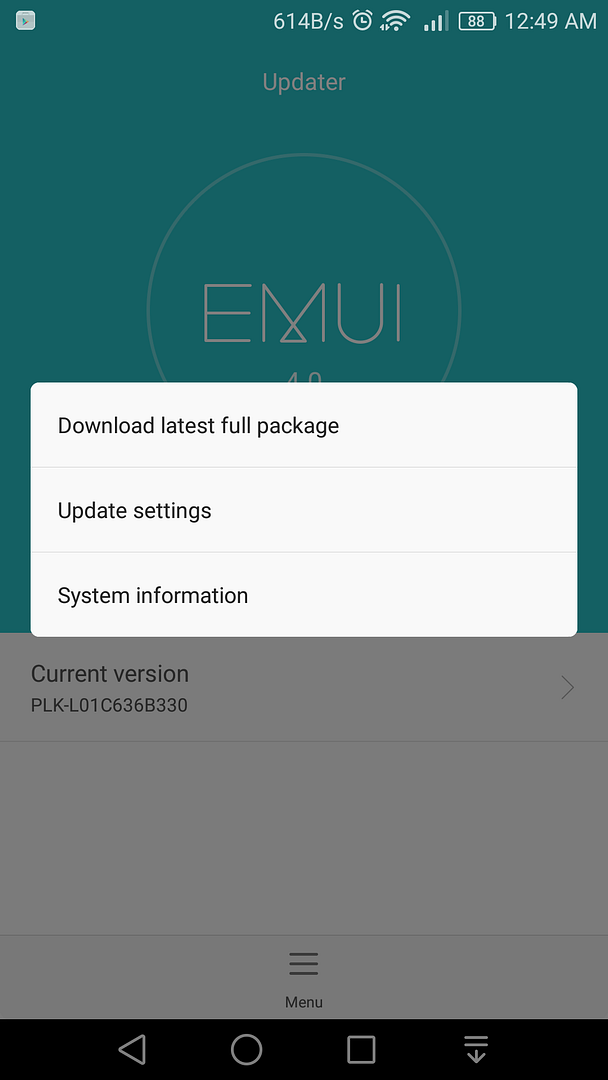 In case you’re on Marshmallow, dial“*#*#2846579#*#*”, select Software Upgrade > SDCard Upgrade and confirm the installation |
|
|
|
|
|
ngmunwai
|
Aug 25 2016, 10:55 AM
|
Getting Started
|
QUOTE(fiezwan @ Aug 25 2016, 10:47 AM) I don't think you need to unzip the file that our friend upload it. Straight away copy the downloaded zip file - put in your storage. That might be the easiest way, perhaps? ya, just rename the downloaded file to update.zip and put in storage |
|
|
|
|
|
ngmunwai
|
Aug 25 2016, 12:05 PM
|
Getting Started
|
QUOTE(fkinmeng @ Aug 25 2016, 11:40 AM) i did it. 1) rename the zip file to "update.zip" 2) copy the "update.zip" into my internal storage, and put it inside a newly created folder "dload". 3) local update. 4) wait super long. now i'm on android 6.0, B340, security patch 1 june 2016. good to hear that. haha... |
|
|
|
|
|
ngmunwai
|
Aug 25 2016, 01:39 PM
|
Getting Started
|
QUOTE(haniffnazrin @ Aug 25 2016, 01:07 PM) How long is "super long" ? My screen goes blank after updating using this file and not coming up. :  how you do it? which version u from. |
|
|
|
|
|
ngmunwai
|
Aug 25 2016, 02:28 PM
|
Getting Started
|
QUOTE(haniffnazrin @ Aug 25 2016, 02:26 PM) from B130 if im not mistaken.. is this ok? ya. did you make sure the update file you use is 1.2gb? I'm from B130 to B340 also. i believe fkinmeng also same. |
|
|
|
|
|
ngmunwai
|
Aug 25 2016, 02:29 PM
|
Getting Started
|
QUOTE(wailing81 @ Aug 25 2016, 02:04 PM) will it wipe your phone data as usual? no data wipe for the upgrade. |
|
|
|
|
|
ngmunwai
|
Aug 25 2016, 03:53 PM
|
Getting Started
|
QUOTE(haniffnazrin @ Aug 25 2016, 03:45 PM) Yup, 1.23 GB.. now still wont turn ON.. tried pressing power button and hold for 15 seconds, vibrate once, and nothing happen after that.. did i just bricked my phone? or is there still hope? try press vol up + vol down + power button until somescreen pop out. |
|
|
|
|
|
ngmunwai
|
Aug 25 2016, 04:41 PM
|
Getting Started
|
QUOTE(haniffnazrin @ Aug 25 2016, 04:30 PM) nope, still won't turn on. vibrate once, and nothing happen after that. not sure how to fix this. at least if screen turn, still can fix via fasboot/adb. do u unroot your phone first before flash it? |
|
|
|
|
|
ngmunwai
|
Aug 25 2016, 04:54 PM
|
Getting Started
|
QUOTE(haniffnazrin @ Aug 25 2016, 04:52 PM) nope. rooted. is this mandatory? because i did not found this in instruction oh no... it must be unroot before update any firmware. (it is mandatory for all huawei/honor devices). you may try your luck, take it to service centre ask for a fix. |
|
|
|
|
|
ngmunwai
|
Aug 25 2016, 07:33 PM
|
Getting Started
|
QUOTE(Kven148 @ Aug 25 2016, 07:01 PM) Hello guys my Waze GPS is not working after i updated it to Android 6.0 can anyone assist me on this Thanks! Go to setting, apps, waze, permission, enable location permission |
|
|
|
|
|
ngmunwai
|
Aug 25 2016, 11:38 PM
|
Getting Started
|
QUOTE(s30ckf @ Aug 25 2016, 10:22 PM) Finally in B340 now.... 1. Download file which extracted and uploaded by ngmunwai here: https://drive.google.com/open?id=0ByonaBW2-...Z2dvcWpNLVZqRTQ (thanks for the file) 2. Rename PLK-L01C636B340.zip to "update" (not "update.zip" as it will appear as "update.zip.zip" and cause the device say: 'no upgrade file!' (thanks fkinmeng) 3. Create a folder "dload", and copy the update.zip into it 4. Connect phone to PC via USB, copy and paste dload folder into internal/external sdcard 5. Disconnect the phone from PC. Go to Setting - Update - Menu - Local Update and tap on the upgrade file 6. Phone will go into reboot - updating process... it tooks approximately 18-20 mins Important: Ensure your phone unrooted before doing the upgrade Which firmware u from? P.s, must be stock recovery to upgrade. |
|
|
|
|
|
ngmunwai
|
Sep 1 2016, 05:10 PM
|
Getting Started
|
QUOTE(fkinmeng @ Sep 1 2016, 05:08 PM) maxis said it's phone's problem. honor said it's telco's problem.  Should be phone problem. Maybe touch sensor.. |
|
|
|
|



 Quote
Quote


 0.0624sec
 0.62
0.62
 7 queries
 GZIP Disabled