Outline ·
[ Standard ] ·
Linear+
The Apple iPhone SE Discussion Thread | V1, A big step for small.
|
pknride
|
 Jan 18 2017, 01:46 PM Jan 18 2017, 01:46 PM
|
Getting Started


|
QUOTE(pearlok @ Jan 16 2017, 11:45 PM) maybe you can sign up for plans and get iphone se... there gt many telcos offer this kind of plans... last week i sign up for celcom platinum,when you pay rm188 you can get away iphone se,but after that you have 24 months contract..every month pay rm 150.. don't u need pay for upfront payment? |
|
|
|
|
|
pknride
|
Feb 4 2017, 11:09 AM
|
Getting Started
|
help please... 1. just bought iphone SE 64gb yesterday. 2. then connected to itunes to restore my previous backup from iphone 5 3. need to update to ios 10.2.1 before restore my backup 4. updating using itunes.. at final stage got this error and my iphone SE stuck at 'connect to itunes screen' 5. tried to uninstall and reinstall itunes, use different pc, use different cable also failed. 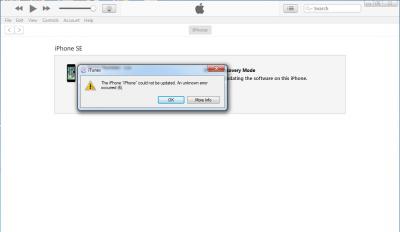
|
|
|
|
|
|
pknride
|
Feb 4 2017, 02:28 PM
|
Getting Started
|
QUOTE(shyan90's @ Feb 4 2017, 01:10 PM) Back up your iphone 5 again and factory reset your iphone SE iphone SE can't turn on.. stuck at recovery mode.. problem settled... baru balik dari Apple Authorised Service Provider terbang RM60.. demmm |
|
|
|
|
|
pknride
|
Feb 6 2017, 10:46 AM
|
Getting Started
|
QUOTE(domcobb @ Feb 4 2017, 05:12 PM) What's the RM60 for, if you don't mind me asking. they said need to pay for restoring and updating firmware warranty not cover software issue |
|
|
|
|
|
pknride
|
Feb 6 2017, 10:50 AM
|
Getting Started
|
QUOTE(kamikraze @ Feb 4 2017, 05:26 PM) what have they do to your phone btw? restoring and update firmware |
|
|
|
|
|
pknride
|
Feb 6 2017, 10:56 AM
|
Getting Started
|
QUOTE(jumpstat @ Feb 4 2017, 08:00 PM) Always update the new phone on its own, not through iTunes. After updating firmware, then with itunes do a restore. And another good note is that in iTunes, do not let the device sync automatically. By doing it manually, you will minimize alot of issues. I have benn there and done that with my experience with ip4, ip5s, ip6, ip6+ and ip7. thanks for ur advise bro... |
|
|
|
|



 Quote
Quote
 0.0695sec
 0.27
0.27
 7 queries
 GZIP Disabled