Outline ·
[ Standard ] ·
Linear+
[OFFICIAL]Rig Suggestion Q&A Thread V11!
|
adilz
|
 Jun 26 2016, 01:57 PM Jun 26 2016, 01:57 PM
|
Getting Started


|
QUOTE(baracudas @ Jun 26 2016, 01:49 AM) [Budget] 5k ~ 5.5k max [Purpose] Gaming/Working [Hardwares that will be re-use] keyboard/mouse [Games & softwares that use frequently] Dota2/ Maya/ AutoC4D/ Photoshops + some other adobe softwares / Video Editing [Personal preferences] Would want AAA titles pc games to run on as high quality as possible .Speakers can be excluded if no budget. [Location] KL Also wondering if I should get a sound card too? If gaming, Skylake with GeForce or Radeon GPUs. Working, Intel Xeon or i7-5960X with Quadro or Firepro GPUs. |
|
|
|
|
|
adilz
|
Jun 27 2016, 08:21 AM
|
Getting Started
|
QUOTE(goldfries @ Jun 27 2016, 08:05 AM) Haha on the RX480 part. Too bad AMD tell me to keep quiet. Anyway I'll be doing live session this Wednesday 9PM for the RX480, because that's when the NDA lifted. As for GTX 1070 can rival Titan X but loses out to OCed GTX 980 Ti like Gigabyte GTX 980 Ti Xtreme Edition. 600W is super duper whatever mode than enough for RX480 CFX. You can even put 4 cards if you want and still a bit of room for processor. (depending on what processor) btw here's my RX480.  https://www.facebook.com/goldfries.fanpage/...4389203/?type=3 https://www.facebook.com/goldfries.fanpage/...4389203/?type=3Does the side Radeon logo glow? |
|
|
|
|
|
adilz
|
Jun 27 2016, 08:46 AM
|
Getting Started
|
QUOTE(goldfries @ Jun 27 2016, 08:25 AM) Ohhh. Hope I can sell my second rig (Intel Xeon 8-Core GTX 970 SLI) to buy RX 480 for my freesync monitor. I wish Asus can come up with white ref cooler RX 480 just like my current Asus GTX 970 Turbo OC. Kinda like maintaining that white aesthetics. |
|
|
|
|
|
adilz
|
Jun 27 2016, 02:23 PM
|
Getting Started
|
QUOTE(terence_nwb @ Jun 27 2016, 01:31 PM) I won't recommend you to go for 4K UHD on RX 480 though, it is basically a FHD card (or 2K QHD at slightly lower FPS output than FHD). There is a very limited FreeSync monitor in Malaysia due to high market share of Nvidia GPU in our local market segment. BenQ XL2730Z, 2K QHD TN 144Hz Samsung U28E590DS, 4K UHD TN 60Hz If you go for Nvidia then there are many choices. I just found out why G-sync monitor expensive. I thought because of branding only. So monitor manufacture actually have to pay Nvidia for the G-sync module they use in the monitors. Hmm I guess when you're almost dominant, can charge anything. |
|
|
|
|
|
adilz
|
Jun 27 2016, 02:33 PM
|
Getting Started
|
QUOTE(terence_nwb @ Jun 27 2016, 02:28 PM) Yes it is due to the GSync module, even it is expensive, there are still many GSync adopters out there though. Sadly AMD is kinda weak in Malaysia, we have limited choices on the FreeSync monitor  Weak in Malaysia? I though they were weak globally before this. But maybe their Polaris will change things. Read that for US RX 480 debut this 29th, AMD has 25X the stock size of Nvidia's GTX 1080 launch. Anyway, I need to get AMD card soon. Have to try out my monitor freesync. |
|
|
|
|
|
adilz
|
Jun 27 2016, 02:51 PM
|
Getting Started
|
QUOTE(terence_nwb @ Jun 27 2016, 02:39 PM) Yes, their market share is much lower than Nvidia globally, but for the gamers in US (and other countries), they have plenty of FreeSync monitors to choose from, we as a Malaysian are currently stuck with few limited models only, I am emphasizing on the FreeSync monitor choice, not GPU, we do have wide range of AMD GPU to choose from in Malaysia (Sapphire, PowerColor, Asus, Gigabyte, MSI and XFX which just re-joined the Malaysian market recently). You're right there. Don't see much of freesync monitor being mention around. Its G-sync, g-sync, g-sync. Its that obscure, I bought Samsung U28590D UHD monitor early this year. I think I saw that AMD Freesync logo on the box but didnt' give two hoots about it and bought GTX 970 (which then went from single to SLI within a week+). Now only my sel sel otak berhubung and realized I have a freesync 4K monitor. Going to team red next. |
|
|
|
|
|
adilz
|
Jun 27 2016, 03:31 PM
|
Getting Started
|
QUOTE(bingding @ Jun 27 2016, 03:26 PM) ok, got it. and shud i opt for qwhd or 4k? any big difference? and does a freesync monitor really helps or just gimmick Its best that you go to place like low yatt and see what you prefer. Some people prefer 2K 144 Hz monitor than 4K 60 Hz monitor. Some can live with 60 hz, some can't live with 60 hz. Some can see 4K, some say 2K and 4K looks the same. But the R9 290 will struggle at 2K 144 Hz or 4K 60 Hz. |
|
|
|
|
|
adilz
|
Jun 27 2016, 04:04 PM
|
Getting Started
|
QUOTE(bingding @ Jun 27 2016, 03:32 PM) what card u recommend to run 144hz 2k or 4k 60 hz GTX 1080. He he he no lah, joking only. My advice, do lots of googling. There're tons of benchmark for various GPUs out there (I like to read from Tweaktown, Guru3D, Hexus.net, Hardwarecanucks). It depends on what game you play. ie 2013 Grid 2 Racing game on my GTX 970 SLI, 2K average 141 fps, 4K around 80 fps. But go to Battlefield 4, 2K just round 80 fps, I guess 4K below 60 fps. |
|
|
|
|
|
adilz
|
Jun 28 2016, 01:23 AM
|
Getting Started
|
QUOTE(Hyph @ Jun 27 2016, 11:17 PM) Oh silly me lol.. It is the Intel i5 4690K.. If your room ambient temp is below 30°C and you get 85°C, personally for me the delta is a bit on the high side. Here's my CPU, overclock to 4.5 Ghz, using Enermax ELC 240, room ambient around 27°C, running prime95 blend test after 5 minutes Attached thumbnail(s)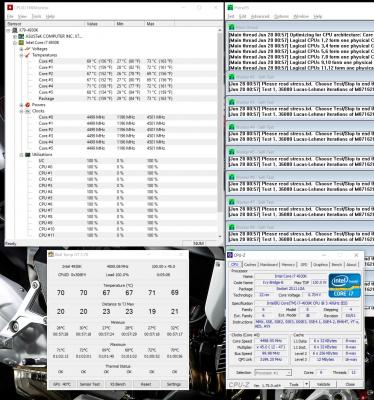
|
|
|
|
|
|
adilz
|
Jun 28 2016, 01:15 PM
|
Getting Started
|
QUOTE(terence_nwb @ Jun 28 2016, 11:15 AM) Bitfenix Prodigy M has 2 "not-so-real" handlers on top, but price isn't cheap though, RM 350+. I have Bitfenix Prodigy M - White. Looks compact but its heavy, guess its built tough. The only thing that I don't like (which I only found out after a year if using it), is the "soft-touch" plastic they use for the front cover and also the top-bottom handles. If its get's dirty, its very hard to clean. Plus now after a few time of cleaning it, the surface change from "soft-touch" to "sticky-touch", as if the surface is made from the glue side of a masking tape. But I think no problem if you get Black color. I still have the Prodigy M case (not in use), might want to repaint it some day, or maybe cover with those cheap carbon-fiber sticker from Mr DIY |
|
|
|
|
|
adilz
|
Jun 28 2016, 04:07 PM
|
Getting Started
|
QUOTE(tlts @ Jun 28 2016, 04:04 PM) btw i 1st time use tgat prime95 and click that'just test only' will it auto stop?or need manual click stop test? i leave it run for like 19 minute.i kindda scared it my kill or damage my cpu..btw 19 minute at around 60c 65c is it ok? You have to manually stop the prime95 workers. If its stabilizes at 60-65C, thats pretty good already. |
|
|
|
|
|
adilz
|
Jun 29 2016, 12:22 PM
|
Getting Started
|
QUOTE(MagnificM @ Jun 29 2016, 09:53 AM) Hi, just want to ask for spec with latest pricing for 2 different rigs [Budget] 3k and 4k [Purpose] Workstation and Movies [Hardwares that will be re-use] None [Monitor resolution] anything suitable for working environment [Games & softwares that use frequently] Lumion 6, Sketchup, CS6, AutoCAD [Personal preferences] i7 is needed as multitasking is a must for the rig, if you can, please suggest spec with and w/o monitor, much prefer include monitor but if the performance need to be tune down, try to exclude monitor [Location] Shah Alam Have a look at my rig for sale https://forum.lowyat.net/topic/3985351Intel Xeon E5-2670 V1 8-Core/ 16-Thread Passmark score of 12,465 points is higher Lumion 6 requirement of minimum required of 10,000 for recommended setup. GTX 970 meets the 8,000 min point but not 6GB for recommended setup. However okay for moderately complex scenes 6,000 passmark points 4GB RAM. https://lumion3d.com/faq.htmlThis post has been edited by adilz: Jun 29 2016, 12:25 PM |
|
|
|
|
|
adilz
|
Jun 29 2016, 10:03 PM
|
Getting Started
|
QUOTE(MagnificM @ Jun 29 2016, 12:48 PM) woahhh, nice deal bro  , but these rigs are for my friend, but ill try and ask them whether they are interested or not, anything ill pm you Cool. If its for those rendering apps, i think the Xeon will be a good fit. But heavy gaming, maybe new 4 core i7 skylake better |
|
|
|
|
|
adilz
|
Jul 21 2016, 12:24 AM
|
Getting Started
|
QUOTE(Leon be here now @ Jul 20 2016, 06:47 PM) GTX 1060 vs RX 480 One of the best reviews I found so far, http://www.techspot.com/review/1209-nvidia...060/page10.htmlits very balanced review, has direct x 11 and 12, some Vulkan test too. eg tomshardware is soo nividia paid, majority direct x 11 tittles etc.... too bad the prices in Malaysia of the 2 are soo similar One of the comment on G-Sync vs Freesync Monitors "Except these days you have to consider the screen situation too. The price premium on G-sync monitors means the GTX 1060 either gets pushed out of mainstream territory price-wise or you get a nicer screen with the RX 480. Either way, nVidia's refusal to support DisplayPort Adaptive Sync or make G-sync cheaper means that the only people this card is best for are those not likely to change their screen or who will be gaming on a type of screen that doesn't support variable refresh rates (projector etc.)." Which i true because those going for AMD will have to fork out less to get adaptive refresh rate monitors because freesync monitor cost way less than G-sync monitor. |
|
|
|
|
|
adilz
|
Jul 21 2016, 10:13 AM
|
Getting Started
|
QUOTE(Darksorrow3010 @ Jul 21 2016, 10:06 AM) all those Freesync/Gsync monitors are above Rm1k? damn... haha btw i heard that Kaby Lake will be released in Q3 2016. should i wait for it or just buy the skylake now? will be there significant price drop compared to last gens? The AOC 144 Hz Freesync around RM 1,170. Acer Predator 144 Hz G-Sync Rm 1,799 - RM 1,899. RM 600 to RM 700 goes to Nvidia? |
|
|
|
|



 Quote
Quote
 0.0647sec
 0.47
0.47
 7 queries
 GZIP Disabled