

 Feb 15 2016, 10:02 AM, updated 10y ago


Hi guys, new thread here. The old one was very cluttered and abandon(2007 post)
Ill be separating some guides to registration, setting and how to manage the game
will spoiler it since heacvy image guide
For registration
» Click to show Spoiler - click again to hide... «
please follow the pictures to avoid question  you can ask if you dont understand
To begin the registering process for the game, you need to visit this URL.
http://www.megatenonline.com/begin/
公式サイトへ = Home (official website)

ゲームダウンロード Download (game download)

無料登録 Free Registration

To register, go to this URL
secure.cave-online.jp/preregist/instruction?referer=
Enter you're email on the white rectangle. You will get a temporary email registration URL
Then click on the Red button

which means (click if you agree to the terms of service)
1 新規会員登録 (New User Registration)
2 登録用メール の送信 (Confirm email address)
3 会員登録情報 の入力 (User registration information input)
4 登録完了 (Complete registration)
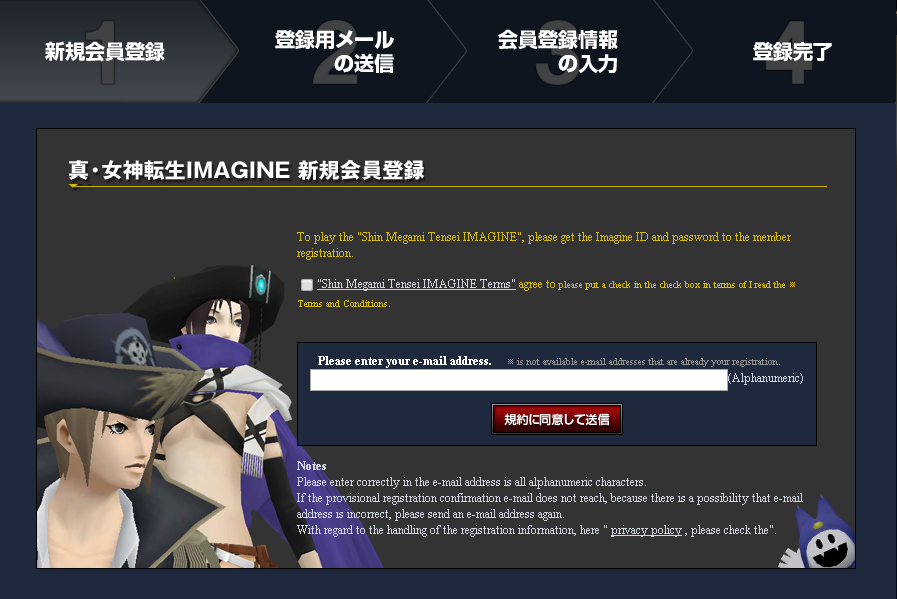
This next page, is just confirming with you that you will receive and email shortly
Note: if you didn't receive and email from them, then they don't support your email service provider
(Gmail & Hotmail) worked for me

You will then get an email, which looks like this
Click on the link that goes
secure.cave-online.jp/regist/entry?key= <your key>

nce you click on your URL key, it will take you to the "User Registration Input"
Imagine ID: (You're Username)
Password: (obvious is obvious)
Password confirmation: (Type it again)
Email address: (You're email)
Birthday: (0000/00/00)
Secret question: (Please select your question)
Question #1 (What's your favorite movie?)
Question #2 (What is your elementary schools name?)
Question #3 (Which historical figure you respect?)
Question #4 (Your 6 digit license number?)
Question #5 (A motto?)
Email-Subscription (Option #1 Receive Option #2 Do not receive)
Safe guard (Option #1 Enable Option #2 Disable)
I know some of you are wondering what safe guard is or what it does
Well, I will tell you.
Every time you open up the game (the screen it takes you where you have to log in)
Once you have typed your username/password and clicked on the log in button
it will send you an email to a link to log in. So if you enabled it remember the email
you used or use a genuine email you use every day.
So basically you have to log in twice. Like a Two-step authentication
If you're secure just click no for safe guard option


Once you have filled all the information correctly
click on the red button to register in the game
This next page is just confirming with you that all the information you have
typed is correct.
登録 (Register) (red) 戻る (Return/Back) (black)
http://i.imgur.com/yyj1UST.png
The next page is just informational. Nothing important
Lastly, you will get one last email confirming everything
http://i.imgur.com/5sXvyom.png
Now you are done registering for the game.
you can ask if you dont understandTo begin the registering process for the game, you need to visit this URL.
http://www.megatenonline.com/begin/
公式サイトへ = Home (official website)
ゲームダウンロード Download (game download)
無料登録 Free Registration
To register, go to this URL
secure.cave-online.jp/preregist/instruction?referer=
Enter you're email on the white rectangle. You will get a temporary email registration URL
Then click on the Red button
which means (click if you agree to the terms of service)
1 新規会員登録 (New User Registration)
2 登録用メール の送信 (Confirm email address)
3 会員登録情報 の入力 (User registration information input)
4 登録完了 (Complete registration)
This next page, is just confirming with you that you will receive and email shortly
Note: if you didn't receive and email from them, then they don't support your email service provider
(Gmail & Hotmail) worked for me
You will then get an email, which looks like this
Click on the link that goes
secure.cave-online.jp/regist/entry?key= <your key>
nce you click on your URL key, it will take you to the "User Registration Input"
Imagine ID: (You're Username)
Password: (obvious is obvious)
Password confirmation: (Type it again)
Email address: (You're email)
Birthday: (0000/00/00)
Secret question: (Please select your question)
Question #1 (What's your favorite movie?)
Question #2 (What is your elementary schools name?)
Question #3 (Which historical figure you respect?)
Question #4 (Your 6 digit license number?)
Question #5 (A motto?)
Email-Subscription (Option #1 Receive Option #2 Do not receive)
Safe guard (Option #1 Enable Option #2 Disable)
I know some of you are wondering what safe guard is or what it does
Well, I will tell you.
Every time you open up the game (the screen it takes you where you have to log in)
Once you have typed your username/password and clicked on the log in button
it will send you an email to a link to log in. So if you enabled it remember the email
you used or use a genuine email you use every day.
So basically you have to log in twice. Like a Two-step authentication
If you're secure just click no for safe guard option
Once you have filled all the information correctly
click on the red button to register in the game
This next page is just confirming with you that all the information you have
typed is correct.
登録 (Register) (red) 戻る (Return/Back) (black)
http://i.imgur.com/yyj1UST.png
The next page is just informational. Nothing important
Lastly, you will get one last email confirming everything
http://i.imgur.com/5sXvyom.png
Now you are done registering for the game.
Settings your computer to read japanese
» Click to show Spoiler - click again to hide... «
So, you completed the registration part of the guide.
Now it's time to set up your computer in order to read the kanji from the game.
Otherwise you would see some numbers & letters instead of readable characters.
So lets begin.
Note: For this tutorial I will be using the latest version of windows: Windows 10
First, go to your "settings
http://i.imgur.com/OoxUudo.png
click on time and language
http://i.imgur.com/NEQKjrv.png
select region and language
http://i.imgur.com/RF0TDyl.png
Now that you added the option "Japanese" language to your list. We need to download it.
Click on "Japanese" language, you will see "Options" click it.
http://i.imgur.com/szmJAUe.png
Then click on "Download"
(wait till it downloads and installs)
http://i.imgur.com/myivJGW.png
http://i.imgur.com/HH0Mul4.png
Now that you have successfully installed the "Japanese" language pack onto your computer
We need to install a program to run the game in Japanese locale.
To do this, we need a program called "Locale Emulator" download it here
Note: please extract the files in a secure place, because if you delete the files
it will uninstall the program. So please be careful.
Once you have extracted the program, run/open "LEInstaller.exe"
http://i.imgur.com/TpF5Gf9.png
Then click "Install / Upgrade"
(It will restart explorer)
If everything went well you will see this (when you right click any program)
http://i.imgur.com/0H5cJXf.png
Now we need to add the Japanese language to the program, to do this
Open up "LEGUI.exe"
http://i.imgur.com/v57r4pE.png
Then click save, and that's it. If you did it all correctly you will see the options like this
http://i.imgur.com/NjQzF5w.png
Now you can download the game, to run the games installer in Japanese locale
Go to this URL to download the game
www.megatenonline.com/support/download.html
Click the obvious button that says "download"
Once you have downloaded the installer, Run it in "Japanese Locale"
http://i.imgur.com/NDPacB8.png
just click agree, and next and youve done installation
That's it! you have successfully set up your computer to run the game.
http://i.imgur.com/U9mgebD.png
How to put names in game when creating character
» Click to show Spoiler - click again to hide... «
you cant put normal names like pekkauwer or anything
you need to use THIS SITE for fulldwidth character
There are 3 servers, small malaysian group are in cerberus, theres pixie and chuchulainn server too
for ahem2 discussion pm me
you need to use THIS SITE for fulldwidth character
There are 3 servers, small malaysian group are in cerberus, theres pixie and chuchulainn server too
for ahem2 discussion pm me
eq8all
Megaten wiki
Shin megami tensei japanese wiki
sorry for delays cant post more pics
 Quote
Quote
 0.0132sec
 0.49
0.49
 5 queries
 GZIP Disabled