Thanks everyone for the replies and feedback's. Yup I'm also aware of signal interference/wifi congestion and antenna issues. I think I have tried what I can to reduce the signal interference. Hence, I come down to wifi router not good enough for my use on 30mbps. hehe.

Had a family member also same issue as mine.
QUOTE(ldragon @ Feb 22 2016, 04:37 AM)
mmohdnor ,
Lowyat ViewNet Asus RT-AC1200HP RM370 + Free AEON RM50 Vouchers
All of my friends on Unifi Advance 30Mbps & 50Mbps their upload speed has been upgraded to 10Mbps & 20Mbps

Thanks for the suggestion. Will look into it. (though a bit more on the price for me.

)
And yeah, mine was just upgraded to 10mbps upload to recently. The picture was taken earlier than that.
Now the download is still not ... errrr ... hehe.
QUOTE(zher4883 @ Feb 22 2016, 07:07 AM)
lazy to change router? get a access point
Thanks for the suggestion. Will look into it.
QUOTE(jolmy @ Feb 22 2016, 09:23 AM)
On wireless, it works both ways. Not only you need a good router, e.g. a high-power router from Asus is preferred.
But also, the wireless interface of your device (phone, laptop, etc.) must also be good.
I myself am using Asus RT-N12HP but could never get 30Mbps. The best I got was about 20Mbps, and particularly due to the following reasons:
1) Interference from neighboring access points
2) Poor wireless interface on my laptop, phone, etc.
If changing router does not help, you may want to consider an external USB wireless interface for your laptop.
However, best of all use LAN cable, if that is not feasible, consider HomePlug + LAN cable combo.
QUOTE(voncrane @ Feb 22 2016, 10:25 AM)
You need to first get rid of as many network interferences as possible, starting with the position of the router & that DECT phone. Both need to have quite some distance away from each other. Then about routers, I get there's not much cash & cheaper would be better. However, we are talking about a router here. A device that handles and routes all network connections. Get a really good one (not necessarily the best/most expensive), not just a cheap one cuz it'll serve you better and for much longer than your TM contract. So evaluate your current network setup, devices & plan for the future as well.
Thanks.
I'm using using Channel 6, 20/40MHz bandwidth on Wifi 802.1b/g/n (auto).
Not so many wifi signal at my place. Even during no other wifi around, the speed is like this too.
All my devices/smartphones are at least Wifi N, except one Note5 which is Wifi AC supported.
All 6 devices connected to wifi at all times. But only one or two is streaming youtube and doing some light surfing. The rest is just idle/connected.
This post has been edited by mmohdnor: Feb 22 2016, 10:41 PM 

 Feb 22 2016, 12:22 AM


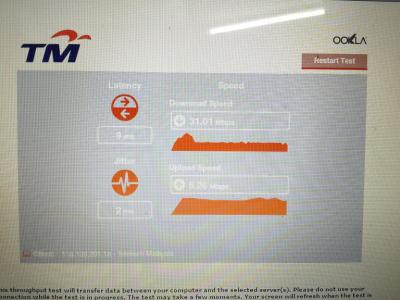
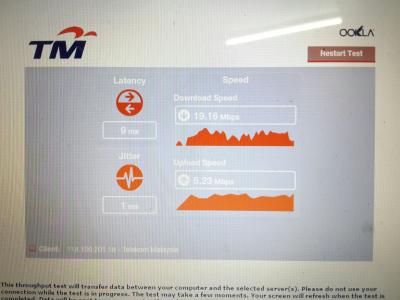
 ... any suggestions (cheap is always preferred...LOL!
  ) ?
) ? Quote
Quote


 0.0414sec
 0.46
0.46
 7 queries
 GZIP Disabled