Welcome Guest ( Log In | Register )

Bump Topic Topic Closed RSS Feed
126 Pages « < 30 31 32 33 34 > » Bottom

Outline · [ Standard ] · Linear+

 Official TM UniFi High Speed Broadband Thread V24

views
     
mmohdnor
post Feb 22 2016, 10:37 PM

Regular
******
Senior Member
1,021 posts

Joined: Aug 2006
From: Penang Island, Alor Star


QUOTE(megahertz @ Feb 22 2016, 09:32 AM)
i hv same router and same problem as urs, on LAN, i get 30mbps consistently, but on wifi devices (phone), sometimes ok, sometimes not. (around 15-30 mbps)
but i dont care since my wifi devices mostly use for light usage,fb, etc. at least 10mbps is  good enough for those usage.

but all my high  usage devices on LAN ( NAS, ps4, desktop).
*
Thanks for the reply. Yeah, kinda annoying because you know that you are paying for the '30mbps' and not 20mbps or so ... haha. tongue.gif laugh.gif


QUOTE(^Ware^wolf @ Feb 22 2016, 09:44 AM)
Asus RT-N12 , Rm130 only...lazada...
*
Not bad! Will look in to it. Thanks for the reply. thumbup.gif

QUOTE(aaz2082 @ Feb 22 2016, 01:50 PM)
I'm using ASUS RT-N12....Very happy with its performance.....Considering its price of RM160 when I bought it and it is sufficient enough to provide very good Wifi coverage in my 2-storey terrace house (Router is placed at the centre of the house, near the staircase...).

The ASUS RT-N14 UHP with its 3 antenna (9db gain) are also very good....The RT-N12 has 5db gain......The higher the gain, the stronger the Wifi signal.....

Position of the router in your home also plays a very crucial role to ensure optimum performance.
*
Cool. Will look into it. Seems like there are several models with "Asus RT-N12***/RT-N14***" naming too.
Thanks for the reply. thumbup.gif
'ed
post Feb 23 2016, 12:16 AM

Getting Started
**
Junior Member
116 posts

Joined: Jun 2012
QUOTE(mmohdnor @ Feb 22 2016, 10:37 PM)
Thanks everyone for the replies and feedback's. Yup I'm also aware of signal interference/wifi congestion and antenna issues. I think I have tried what I can to reduce the signal interference. Hence, I come down to wifi router not good enough for my use on 30mbps. hehe.  tongue.gif
Had a family member also same issue as mine.

Thanks for the suggestion. Will look into it. (though a bit more on the price for me.  blush.gif )
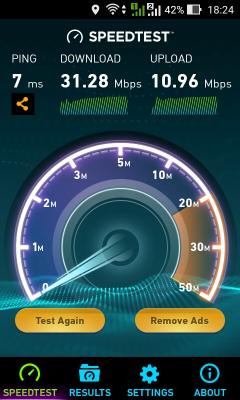
And yeah, mine was just upgraded to 10mbps upload to recently. The picture was taken earlier than that.
Now the download is still not ... errrr ...  hehe.  tongue.gif
Thanks for the suggestion. Will look into it.
Thanks.
I'm using using Channel 6, 20/40MHz bandwidth on Wifi 802.1b/g/n (auto).
Not so many wifi signal at my place. Even during no other wifi around, the speed is like this too.
All my devices/smartphones are at least Wifi N, except one Note5 which is Wifi AC supported.
All 6 devices connected to wifi at all times. But only one or two is streaming youtube and doing some light surfing. The rest is just idle/connected.  blush.gif
*


Why dont u try change the setting instead of 20/40MHz; 802.1b/g/n to 40MHz only; 802.1n only and see the result.
defaultname365
post Feb 23 2016, 11:12 AM

Windows® 8.1 | Xbox 360™ | PlayStation® 4
******
Senior Member
1,098 posts

Joined: Nov 2006
Unifi down for me (5Mps / Kepong area)... but I believe is due to the 'Modem' (the black one) sweat.gif To be more precise, when I turn on the Router + Modem, the Modem just blinks, the green lights. Turning on/off sees the variation of the blinking speed. I guess the Modem is toast. I never turn off my router + modem. It is on for months on end unless there is a power shortage like recently.

Called up TM and they said could be issue with the outside port since no signal is receive at my modem?! laugh.gif They will send someone to check on it but I believe my Huawei EchoLife HG850a is faulty (been using since 2012 with no issue). Some say changing the power adapter works, will try this in the meantime.
Kitkat88
post Feb 23 2016, 11:16 AM

New Member
*
Junior Member
31 posts

Joined: Dec 2007


Today I experience extremely slow downloading speed. Anyone experiencing this today?

I am downloading the TV series LOST. The downloading speed used to be around 50 Kbps.. but today suddenly dropped to about 5 Kbps..

Attached Image

This is really slow! It will take 20 hours to download a 350MB file sad.gif
voncrane
post Feb 23 2016, 11:21 AM

Noir et fier!
*******
Senior Member
7,118 posts

Joined: Oct 2011
From: Wakanda


QUOTE(Kitkat88 @ Feb 23 2016, 11:16 AM)
Today I experience extremely slow downloading speed. Anyone experiencing this today?

I am downloading the TV series LOST. The downloading speed used to be around 50 Kbps.. but today suddenly dropped to about 5 Kbps..

Attached Image

This is really slow! It will take 20 hours to download a 350MB file  sad.gif
*
Could also be an issue from the source you are downloading. Go download something "normal" & test speed.
kun5455
post Feb 23 2016, 11:47 AM

Getting Started
**
Junior Member
78 posts

Joined: Sep 2009
Hi all,
i just install unifi30mb.

i had a question that my router was at living room and my dekstop at bedroom.
The wifi signal in at my bedroom is quite poor, should i use wifi extender with Lan port or powerline for better connection? Will powerline extend the wifi coverage as well for other wifi devices in the bedroom?
zher4883
post Feb 23 2016, 12:27 PM

Look at all my stars!!
*******
Senior Member
4,490 posts

Joined: Oct 2014


QUOTE(kun5455 @ Feb 23 2016, 11:47 AM)
Hi all,
i just install unifi30mb.

i had a question that my router was at living room and my dekstop at bedroom.
The wifi signal in at my bedroom is quite poor, should i use wifi extender with Lan port or powerline for better connection? Will powerline extend the wifi coverage as well for other wifi devices in the bedroom?
*
Powerline is a better solution to be honest
fruitie
post Feb 23 2016, 01:15 PM

Rise and Shine
Group Icon
Staff
72,795 posts

Joined: Sep 2005
From: KUL

QUOTE(Kitkat88 @ Feb 23 2016, 11:16 AM)
Today I experience extremely slow downloading speed. Anyone experiencing this today?

I am downloading the TV series LOST. The downloading speed used to be around 50 Kbps.. but today suddenly dropped to about 5 Kbps..

Attached Image

This is really slow! It will take 20 hours to download a 350MB file  sad.gif
*
It's the source and try downloading from IDM. smile.gif
I never had issue with direct downloading. smile.gif
SUSpakji
post Feb 23 2016, 01:47 PM

Regular
******
Senior Member
1,386 posts

Joined: Nov 2012


QUOTE(Kitkat88 @ Feb 23 2016, 11:16 AM)
Today I experience extremely slow downloading speed. Anyone experiencing this today?

I am downloading the TV series LOST. The downloading speed used to be around 50 Kbps.. but today suddenly dropped to about 5 Kbps..

Attached Image

This is really slow! It will take 20 hours to download a 350MB file  sad.gif
*
best use IDM
akuinsan
post Feb 23 2016, 01:50 PM

Getting Started
**
Junior Member
253 posts

Joined: Oct 2004
From: Bangi/Kajang


UniFi30 installation done on 22feb.

speedtest showing 30/10, i think new user already set to 10mb upload speed.

speedtest from phone
Attached Image


as my previous post ( * ), tm installer give me extra super long fiber cable
Attached Image
NielWooWoo1205
post Feb 23 2016, 02:22 PM

Getting Started
**
Junior Member
81 posts

Joined: Apr 2014
From: Bora-Bora Island


I am currently using Streamyx 1Mbps and upgrading to Unifi Adv 30Mbps soon using FTTH. Should I terminate my Streamyx?
Can I keep my current landline no?
Can I only subscribe to one channel and not the whole pack?

This post has been edited by NielWooWoo1205: Feb 23 2016, 02:29 PM
iXora.ix
post Feb 23 2016, 02:40 PM

scoot scoot
******
Senior Member
1,682 posts

Joined: Jan 2007
From: Kuala Lumpur


QUOTE(NielWooWoo1205 @ Feb 23 2016, 02:22 PM)
I am currently using Streamyx 1Mbps and upgrading to Unifi Adv 30Mbps soon using FTTH. Should I terminate my Streamyx? YES
Can I keep my current landline no? yes you may to keep it but need to pay the monthly change (few ringgit i think)
Can I only subscribe to one channel and not the whole pack? Nope
*
VeeJay
post Feb 23 2016, 03:08 PM

Look at all my stars!!
*******
Senior Member
3,845 posts

Joined: Aug 2005


QUOTE(NielWooWoo1205 @ Feb 23 2016, 02:22 PM)
I am currently using Streamyx 1Mbps and upgrading to Unifi Adv 30Mbps soon using FTTH. Should I terminate my Streamyx?
Can I keep my current landline no?
Can I only subscribe to one channel and not the whole pack?
*
1) lol...yup to you...some like to keep the number so that they dont need to inform all their contacts on the number changes

2) yes, can keep current landline, I think you just need to pay RM1 Check with TM on the charges for calls

3)with the current unifi package, its all bundled. it may change in future offers
Kitkat88
post Feb 23 2016, 03:59 PM

New Member
*
Junior Member
31 posts

Joined: Dec 2007


QUOTE(fruitie @ Feb 23 2016, 01:15 PM)
It's the source and try downloading from IDM. smile.gif
I never had issue with direct downloading. smile.gif
*
What is IDM? Internet Download Manager? Please guide me...

What do you mean direct downloading? Yes, I am downloading direct from the source I think.. isn't this direct downloading?

Thanks.

oner789
post Feb 23 2016, 04:59 PM

New Member
*
Junior Member
10 posts

Joined: Feb 2016
Thanks for sharing. Now I have an idea on what would be the best moving forward.
fruitie
post Feb 23 2016, 05:11 PM

Rise and Shine
Group Icon
Staff
72,795 posts

Joined: Sep 2005
From: KUL

QUOTE(Kitkat88 @ Feb 23 2016, 03:59 PM)
What is IDM? Internet Download Manager? Please guide me...

What do you mean direct downloading? Yes, I am downloading direct from the source I think.. isn't this direct downloading?

Thanks.
*
Yes, Internet Download Manager.
Just paste the link in IDM and let it download?
Well, downloading from IDM, it is considered as direct download too. laugh.gif Not directly download from website la. laugh.gif
zher4883
post Feb 23 2016, 05:19 PM

Look at all my stars!!
*******
Senior Member
4,490 posts

Joined: Oct 2014


QUOTE(fruitie @ Feb 23 2016, 05:11 PM)
Yes, Internet Download Manager.
Just paste the link in IDM and let it download?
Well, downloading from IDM, it is considered as direct download too. laugh.gif Not directly download from website la. laugh.gif
*
I'm pretty sure it's still direct download but just multiple session at the same time
junclj
post Feb 23 2016, 05:42 PM

Look at all my stars!!
*******
Senior Member
2,347 posts

Joined: Apr 2008


QUOTE(NielWooWoo1205 @ Feb 23 2016, 02:22 PM)
I am currently using Streamyx 1Mbps and upgrading to Unifi Adv 30Mbps soon using FTTH. Should I terminate my Streamyx?
Can I keep my current landline no?
Can I only subscribe to one channel and not the whole pack?
*
Last Sunday I was just registered unifi advance 30mbps. They were setting up few pondok at my Taman area to open for unifi registration because my house area soon will launch unifi.

So, I ask him can I keep my current landline tel. no and bring it to my new unifi account? He say "yes, you can." An extra charge of RM1.00 in my unifi bill. The reason why I need to keep my current landline telephone no is because my house got alarm. The alarm was bound with my home phone number. If I terminate and change to new phone no., I have to waste money to call the alarm technician to come my home to set new number again.

You cannnot just subscribe to one channel only, I just choose to lowest pack with RM179. I just told the TM sales, I don't mind about the HyppTV package. I'm chinese but don't want to pick the Ruby package because that one is RM10 more expensive than Aneka & Varnam.

This post has been edited by junclj: Feb 23 2016, 05:47 PM
Kitkat88
post Feb 23 2016, 06:24 PM

New Member
*
Junior Member
31 posts

Joined: Dec 2007


QUOTE(zher4883 @ Feb 23 2016, 05:19 PM)
I'm pretty sure it's still direct download but just multiple session at the same time
*
Multiple sessions... I wonder if IDM will be able to do this since I am downloading from file sharing sites without Premium account, so these sites will only allow one download at a time. If so, using IDM will still be faster, compared to downloading in a web browser?

zher4883
post Feb 23 2016, 07:15 PM

Look at all my stars!!
*******
Senior Member
4,490 posts

Joined: Oct 2014


QUOTE(Kitkat88 @ Feb 23 2016, 06:24 PM)
Multiple sessions... I wonder if IDM will be able to do this since I am downloading from file sharing sites without Premium account, so these sites will only allow one download at a time. If so, using IDM will still be faster, compared to downloading in a web browser?
*
If the file sharing doesn't allow, IDM will only be able to make a single connection.

126 Pages « < 30 31 32 33 34 > » Top
Topic ClosedOptions
 

Change to:
| Lo-Fi Version
0.0211sec    0.45    6 queries    GZIP Disabled
Time is now: 2nd December 2025 - 04:45 PM