Outline ·
[ Standard ] ·
Linear+
Tardisk Expansion, For MacBook Air and Pro
|
TSMavik
|
 Jan 24 2016, 12:11 AM, updated 10y ago Jan 24 2016, 12:11 AM, updated 10y ago
|
Patience is a virtue


|
Just read about another competitor for the Jetdrive but works a lot better compared to other solutions. http://www.digitaltrends.com/pc-accessory-...pear-review/#/2Looks like it merges with your existing HDD storage space on your MacBook Air/Pro to see it as 1 logical drive. Interesting but freaking expensive! |
|
|
|
|
|
amoxacilin
|
Jan 24 2016, 05:44 PM
|
|
|
Wow. So expensive! Much more expensive compared to the price difference between 256gb and 512gb MBP.
|
|
|
|
|
|
harmeet15
|
Jan 24 2016, 07:24 PM
|
|
|
I bought this last month but did not have the time to set this up to pear with my MBP.
For now using like regular memory expansion.
Once i pear it with my macbook, it won't be seen as an expansion, rather as one bigger drive.
|
|
|
|
|
|
TSMavik
|
Jan 24 2016, 07:25 PM
|
Patience is a virtue
|
QUOTE(harmeet15 @ Jan 24 2016, 07:24 PM) I bought this last month but did not have the time to set this up to pear with my MBP. For now using like regular memory expansion. Once i pear it with my macbook, it won't be seen as an expansion, rather as one bigger drive. The price is the stopping factor to me. Another method which the folks in US do is buy the SSD from eBay from other macs to upgrade the storage space |
|
|
|
|
|
harmeet15
|
Jan 26 2016, 11:50 AM
|
|
|
QUOTE(Mavik @ Jan 24 2016, 07:25 PM) The price is the stopping factor to me. Another method which the folks in US do is buy the SSD from eBay from other macs to upgrade the storage space It is rather pricey, but i had no other option which i could use. i found this JetDrive upgrade kit, but was told it did not support my mac. If it supports your mac, this should be a good option. You get a new bigger drive, and use your old one as external drive. 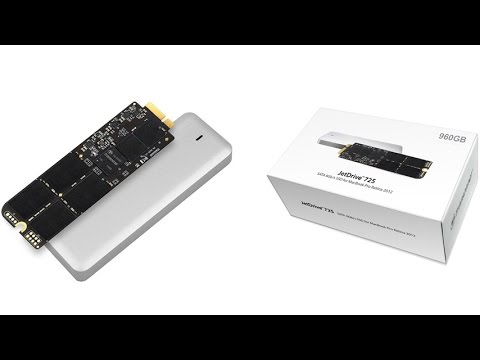 |
|
|
|
|
|
TSMavik
|
Jan 26 2016, 11:53 AM
|
Patience is a virtue
|
QUOTE(harmeet15 @ Jan 26 2016, 11:50 AM) It is rather pricey, but i had no other option which i could use. i found this JetDrive upgrade kit, but was told it did not support my mac. If it supports your mac, this should be a good option. You get a new bigger drive, and use your old one as external drive. You have another alternative but it involves a bit of risks. 1) Find the part number of your SSD or get your Mac Number For example, my Mac is a rMBP 13" late 2014. That translate it to A1502 Next search on eBay for OEM SSD for A1502 http://www.ebay.com/sch/i.html?_from=R40&_...em+ssd&_sacat=0This gives you a number of OEM SSD's which you can replace your current SSD on the newer Macs. |
|
|
|
|
|
harmeet15
|
Jan 26 2016, 12:02 PM
|
|
|
QUOTE(Mavik @ Jan 26 2016, 11:53 AM) You have another alternative but it involves a bit of risks. 1) Find the part number of your SSD or get your Mac Number For example, my Mac is a rMBP 13" late 2014. That translate it to A1502 Next search on eBay for OEM SSD for A1502 http://www.ebay.com/sch/i.html?_from=R40&_...em+ssd&_sacat=0This gives you a number of OEM SSD's which you can replace your current SSD on the newer Macs. thanks for the tip bro.. will look for this. |
|
|
|
|
|
Pegasus88
|
Feb 3 2016, 03:04 PM
|
|
|
QUOTE(amoxacilin @ Jan 24 2016, 05:44 PM) Wow. So expensive! Much more expensive compared to the price difference between 256gb and 512gb MBP. Should just the original 256gb macbook  If price differences are not far, take the difference to "buy back" the card slot lol  |
|
|
|
|
|
TSMavik
|
Feb 6 2016, 01:49 PM
|
Patience is a virtue
|
QUOTE(Pegasus88 @ Feb 3 2016, 03:04 PM) Should just the original 256gb macbook If price differences are not far, take the difference to "buy back" the card slot lol Its easy to say just get the larger one. Most of the folks here bought the Macbook 128Gb without knowing that in the future they needed more storage space. There will always be a need and sometimes those needs can be minor. Hence the sharing of this alternative way to obtain more storage space for your Mac. |
|
|
|
|
|
Pegasus88
|
Feb 6 2016, 11:26 PM
|
|
|
QUOTE(Mavik @ Feb 6 2016, 01:49 PM) Its easy to say just get the larger one. Most of the folks here bought the Macbook 128Gb without knowing that in the future they needed more storage space. There will always be a need and sometimes those needs can be minor. Hence the sharing of this alternative way to obtain more storage space for your Mac. Im the one who regret buying 128gb 13retina mbp.  Luckily still have cloud storage, but not enought space to sync onto mac can be quite inconvenient. |
|
|
|
|
|
sudhirian
|
Feb 16 2016, 07:08 AM
|
Getting Started

|
Why do you guys want to use the more tedious option compared to the relatively easier option which is jetdrive?
|
|
|
|
|
|
TSMavik
|
Feb 16 2016, 10:13 AM
|
Patience is a virtue
|
QUOTE(sudhirian @ Feb 16 2016, 07:08 AM) Why do you guys want to use the more tedious option compared to the relatively easier option which is jetdrive? I am using JetDrive now, and it is painstakingly slow. Very super duper slow transfer speed. |
|
|
|
|
|
sudhirian
|
Feb 16 2016, 10:24 AM
|
Getting Started
|
QUOTE(Mavik @ Feb 16 2016, 10:13 AM) I am using JetDrive now, and it is painstakingly slow. Very super duper slow transfer speed. So the 95Mbps transfer rate is a scam? |
|
|
|
|
|
TSMavik
|
Feb 16 2016, 11:50 AM
|
Patience is a virtue
|
QUOTE(sudhirian @ Feb 16 2016, 10:24 AM) So the 95Mbps transfer rate is a scam? It fluctuates around 20MBps to 55MBps. If you are looking at just storing small data files such as documents on it, it works fine. If you work on graphics, images, videos, then performance suffers tremendously. |
|
|
|
|
|
remix2040
|
Feb 16 2016, 01:36 PM
|
|
|
QUOTE(Mavik @ Jan 26 2016, 11:53 AM) You have another alternative but it involves a bit of risks. 1) Find the part number of your SSD or get your Mac Number For example, my Mac is a rMBP 13" late 2014. That translate it to A1502 Next search on eBay for OEM SSD for A1502 http://www.ebay.com/sch/i.html?_from=R40&_...em+ssd&_sacat=0This gives you a number of OEM SSD's which you can replace your current SSD on the newer Macs. Damn son. 1TB PCIe SSD is upwards of 4k. Was thinking of picking one up to use as external hard drive. |
|
|
|
|
|
sudhirian
|
Feb 18 2016, 07:52 AM
|
Getting Started
|
QUOTE(Mavik @ Feb 16 2016, 11:50 AM) It fluctuates around 20MBps to 55MBps. If you are looking at just storing small data files such as documents on it, it works fine. If you work on graphics, images, videos, then performance suffers tremendously. Tardisk's speed more stable and less variable? |
|
|
|
|
|
TSMavik
|
Feb 18 2016, 10:58 AM
|
Patience is a virtue
|
QUOTE(sudhirian @ Feb 18 2016, 07:52 AM) Tardisk's speed more stable and less variable? According to the benchmarks which reviewers ran, it gets close to your hard disk speed. http://www.digitaltrends.com/pc-accessory-...sk-pear-review/QUOTE We decided to put it to through its paces with BlackMagic Disk Speed Test. With the TarDisk installed, it reported write speeds consistently around 620MB/s and read speeds around 1250MB/s. Without it, the write speeds and read speeds were exactly the same. Read more: http://www.digitaltrends.com/pc-accessory-.../#ixzz40U6uRL7M Follow us: @digitaltrends on Twitter | digitaltrendsftw on Facebook |
|
|
|
|





 Quote
Quote


 0.0196sec
 0.40
0.40
 5 queries
 GZIP Disabled