Welcome Guest ( Log In | Register )

246 Pages « < 195 196 197 198 199 > » Bottom

Outline · [ Standard ] · Linear+

 LG OLED TV Discussion Thread, OLED TV

views
     
TongCN
post Jun 30 2022, 10:38 AM

Look ma, I have lots stars :D
*******
Senior Member
6,659 posts

Joined: Aug 2008
From: Malaysia


QUOTE(Jeebuy @ Jun 30 2022, 10:19 AM)
Thanks. I have been watching a lot of YouTube videos too and the use of Fancy Zones seem really practical.
Sounds great. I am an analyst who works from home mostly, so i will use a lot of browsers and word processing docs, excel, pdfs for researches and stuff. I hope with fancy zones, it’ll be able to provide a good workflow. My only sad point right now is that my main machine is the M1 Mac Mini, which only has 60Hz max output. But i tell myself the C1 will serve as a good monitor for PS5 lol.
*
At the moment i think only Safari support 120hz for MacOS , right ? And also like certain pages.

Apple still need to improve on those laugh.gif
zzzz52
post Jun 30 2022, 03:41 PM

Weeeeeeeeee
******
Senior Member
1,177 posts

Joined: Apr 2005
From: Sg petani Kedah

QUOTE(TongCN @ Jun 30 2022, 09:43 AM)
I just started using from a month ago.

At first i will feel headache when looking at quite a short distance placing on a 70cm width table (70 * 140 ).
Probably due to the brightness.

Now i completely adjusted to it an can use it like a normal "monitor" for PC usage such as browsing, microsoft office specially Excel is super nice to use now on 48"  whistling.gif

My current setup for this C1 is PC, Xbox Series S & Switch (docked)
*
How far are you sitting from the monitor?
SSJBen
post Jun 30 2022, 03:57 PM

Stars deez nuts.
*******
Senior Member
4,522 posts

Joined: Apr 2006


QUOTE(TongCN @ Jun 30 2022, 09:43 AM)
I just started using from a month ago.

At first i will feel headache when looking at quite a short distance placing on a 70cm width table (70 * 140 ).
Probably due to the brightness.

Now i completely adjusted to it an can use it like a normal "monitor" for PC usage such as browsing, microsoft office specially Excel is super nice to use now on 48"  whistling.gif

My current setup for this C1 is PC, Xbox Series S & Switch (docked)
*
Important for using TVs as monitor usage: make sure the brightness is at 100 cd/m².

This is not just for the sake of accuracy adhering to SDR guidelines, but also not to burn out your panel too quickly (it will still happen eventually, but the idea is that by the time it happens, the TV is so old you might as well junk it).

The OLED brightness setting to achieve 100cd is a value between 32-35 for most panels, at least the ones I've already calibrated (done about 15x C1 panels so far).
maxstrife P
post Jun 30 2022, 04:15 PM

New Member
*
Probation
5 posts

Joined: May 2022
QUOTE(zzzz52 @ Jun 30 2022, 03:41 PM)
How far are you sitting from the monitor?
*
Bro 70cm width also still headache when playing xbox ? Alamak, then what is the suitable distance bro? I'm using 120cm x 60cm table. Planning lg c2 42
TongCN
post Jun 30 2022, 04:25 PM

Look ma, I have lots stars :D
*******
Senior Member
6,659 posts

Joined: Aug 2008
From: Malaysia


QUOTE(zzzz52 @ Jun 30 2022, 03:41 PM)
How far are you sitting from the monitor?
*
QUOTE(maxstrife @ Jun 30 2022, 04:15 PM)
Bro 70cm width also still headache when playing xbox ? Alamak, then what is the suitable distance bro? I'm using 120cm x 60cm table. Planning lg c2 42
*
My table is 70cm width and the TV already occupied like 25~30cm.
So if calculate my keyboard distance is edge there (end of the 70cm), my eyes distance currently roughly 50~60cm away from the TV if i use keyboard and mouse tongue.gif
Gaming with controller will be further from it like 1.5~2 meter away.

QUOTE(SSJBen @ Jun 30 2022, 03:57 PM)
Important for using TVs as monitor usage: make sure the brightness is at 100 cd/m².

This is not just for the sake of accuracy adhering to SDR guidelines, but also not to burn out your panel too quickly (it will still happen eventually, but the idea is that by the time it happens, the TV is so old you might as well junk it).

The OLED brightness setting to achieve 100cd is a value between 32-35 for most panels, at least the ones I've already calibrated (done about 15x C1 panels so far).
*
Yea, this one also done d, screensaver, hide taskbar, dark background as well.
Hide those desktop icons away.
zzzz52
post Jul 1 2022, 07:50 AM

Weeeeeeeeee
******
Senior Member
1,177 posts

Joined: Apr 2005
From: Sg petani Kedah

QUOTE(SSJBen @ Jun 30 2022, 03:57 PM)
Important for using TVs as monitor usage: make sure the brightness is at 100 cd/m².

This is not just for the sake of accuracy adhering to SDR guidelines, but also not to burn out your panel too quickly (it will still happen eventually, but the idea is that by the time it happens, the TV is so old you might as well junk it).

The OLED brightness setting to achieve 100cd is a value between 32-35 for most panels, at least the ones I've already calibrated (done about 15x C1 panels so far).
*
In my room, I tried setting it to 35 brightness, but it is just a tad dark for me, unless I'm using it with the lights off. In my normal use, I set it to 45 brightness.
toytoy
post Jul 1 2022, 10:11 AM

Enthusiast
*****
Senior Member
875 posts

Joined: Jan 2003


QUOTE(maxstrife @ Jun 30 2022, 04:15 PM)
Bro 70cm width also still headache when playing xbox ? Alamak, then what is the suitable distance bro? I'm using 120cm x 60cm table. Planning lg c2 42
*
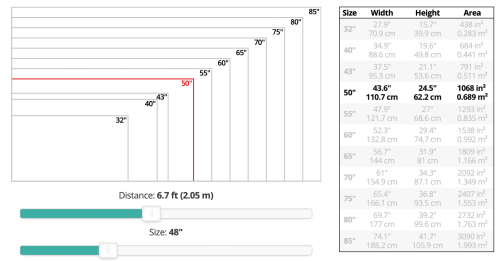
According to recommended viewing distance for "TV" should be around 6'7" away.
But even for 55" I sit at only around 4' away.
I think the rule of thumb is as long as you don't have to pan your head left and right then it's ok already.
it should be far away to just move your eyeball from edge to edge.

user posted image

Taken from RTINGS.com
https://www.rtings.com/tv/reviews/by-size/s...ce-relationship

This post has been edited by toytoy: Jul 1 2022, 10:13 AM
zzzz52
post Jul 1 2022, 12:28 PM

Weeeeeeeeee
******
Senior Member
1,177 posts

Joined: Apr 2005
From: Sg petani Kedah

QUOTE(TongCN @ Jun 30 2022, 04:25 PM)
My table is 70cm width and the TV already occupied like 25~30cm.
So if calculate my keyboard distance is edge there (end of the 70cm), my eyes distance currently roughly 50~60cm away from the TV if i use keyboard and mouse tongue.gif
Gaming with controller will be further from it like 1.5~2 meter away.
Yea, this one also done d, screensaver, hide taskbar, dark background as well.
Hide those desktop icons away.
*
wow, 50-60cm is near for me. I could not use it that way. I'm about 1.5m away during normal browsing and typing. ~2m gaming with controller.
Jeebuy
post Jul 1 2022, 02:09 PM

New Member
*
Newbie
40 posts

Joined: Sep 2014
QUOTE(TongCN @ Jun 30 2022, 10:38 AM)
At the moment i think only Safari support 120hz for MacOS , right ? And also like certain pages.

Apple still need to improve on those  laugh.gif
*
I am not too sure of that myself.

I just got the TV a few hours ago, still getting used to it, and currently too close for comfort. Waiting for my TV stand to arrive so that I can have better viewing distance.
SSJBen
post Jul 1 2022, 02:26 PM

Stars deez nuts.
*******
Senior Member
4,522 posts

Joined: Apr 2006


QUOTE(zzzz52 @ Jul 1 2022, 07:50 AM)
In my room, I tried setting it to 35 brightness, but it is just a tad dark for me, unless I'm using it with the lights off. In my normal use, I set it to 45 brightness.
*
You can use whatever OLED brightness (don't be confused with the other option known as brightness, that controls the digital white point and not the brightness of the pixels itself) you want.

Adhering to 100cd/m2 is because SDR content is mastered and toned to that brightness level. Up to you how anal you want to be in accuracy.


QUOTE(zzzz52 @ Jul 1 2022, 12:28 PM)
wow, 50-60cm is near for me. I could not use it that way. I'm about 1.5m away during normal browsing and typing. ~2m gaming with controller.
*
The idea is to have a 30 degree FOV from your eyes to screen. This is optimal for monitor usage because you don't have to turn your head to see things at the edges of the screen.

Any further you then lose the ability to appreciate the fine details that's afforded by 2160p resolution.
ben3003
post Jul 6 2022, 02:52 PM

10k Club
********
All Stars
10,859 posts

Joined: Jan 2003
From: Sarawak


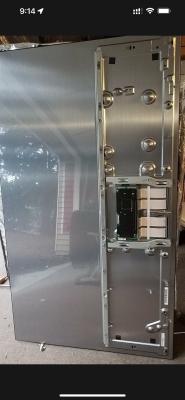
user posted image

Anyone know wat panel is this? Replacement panel they gave me but got problem also, got line then they say might is the module got problem. Took my tv back their service centre let them do watever they need lol.
SSJBen
post Jul 6 2022, 03:01 PM

Stars deez nuts.
*******
Senior Member
4,522 posts

Joined: Apr 2006


QUOTE(ben3003 @ Jul 6 2022, 02:52 PM)
user posted image

Anyone know wat panel is this? Replacement panel they gave me but got problem also, got line then they say might is the module got problem. Took my tv back their service centre let them do watever they need lol.
*
That's a CX panel.... which is also a C9 panel.
Convael
post Jul 6 2022, 08:14 PM

Regular
******
Senior Member
1,109 posts

Joined: Sep 2007
From: Kuala Lumpur
It seems like they are offering the same panel replacement with both C7 and C8 as well.

The screen is actually compatible across all multiple generation of OLEDs .

You will still probably need to do some tweaking .They have added some improvement and features since then.

This post has been edited by Convael: Jul 6 2022, 08:19 PM
ben3003
post Jul 6 2022, 09:15 PM

10k Club
********
All Stars
10,859 posts

Joined: Jan 2003
From: Sarawak


QUOTE(Convael @ Jul 6 2022, 08:14 PM)
It seems like they are offering the same panel replacement with both C7 and C8 as well.

The screen is actually compatible across all multiple generation of OLEDs .

You will still probably need to do some tweaking .They have added some improvement and features since then.
*
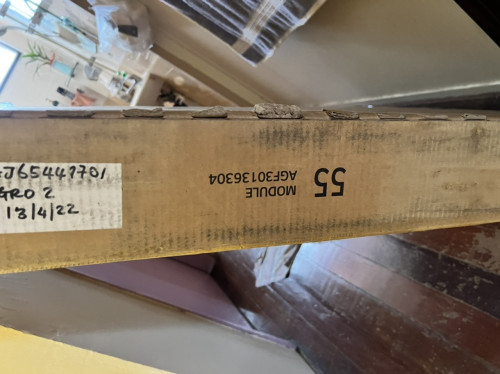
There is 1 control module at the panel, that thing they say seems like broken. Seems like my screen punya issue is caused by that module also. Cos the replacement unit one when switch on wil have all lines over the screen. Then they swap with my old one, then see the same issue but worse. So actually is not the oled panel but most likely tat control module.

Attached Image
found this photo, the black color one.

This post has been edited by ben3003: Jul 6 2022, 09:16 PM
IntensiveBytes
post Jul 11 2022, 01:40 PM

On my way
****
Junior Member
519 posts

Joined: Aug 2011
Looks like the C1 48” is sold out everywhere. Only one place on Shopee is selling for RM4,699 which isn’t a good deal compared to what you guys are able to get recently. :/
Azureknight94
post Jul 11 2022, 08:42 PM

Regular
******
Senior Member
1,667 posts

Joined: Oct 2006


QUOTE(IntensiveBytes @ Jul 11 2022, 01:40 PM)
Looks like the C1 48” is sold out everywhere. Only one place on Shopee is selling for RM4,699 which isn’t a good deal compared to what you guys are able to get recently. :/
*
Phasing out and being replaced by the C2 I guess.
Few months back during Lazada birthday the C1 was going for 3.6k sweat.gif regret didn't pull the trigger at that time.
heavendevil
post Jul 11 2022, 09:57 PM

New Member
*
Newbie
17 posts

Joined: Mar 2009


Was looking forward to the 42 C2, disappointed it's not coming here.
IntensiveBytes
post Jul 12 2022, 06:38 PM

On my way
****
Junior Member
519 posts

Joined: Aug 2011
Sooo.. I ended up buying the C2 48" from Harvey Norman with the extended warranty. Anyone know if their extended warranty covers burn-in? The salesperson claims that they do cover burn-in but I don't know if I really trust their word.
SSJBen
post Jul 12 2022, 06:59 PM

Stars deez nuts.
*******
Senior Member
4,522 posts

Joined: Apr 2006


QUOTE(IntensiveBytes @ Jul 12 2022, 06:38 PM)
Sooo.. I ended up buying the C2 48" from Harvey Norman with the extended warranty. Anyone know if their extended warranty covers burn-in? The salesperson claims that they do cover burn-in but I don't know if I really trust their word.
*
LG Malaysia already cover burn-in for warranty since C8 days. So yes, the extended warranty from HVN covers it but under their own cost (which you paid for).
IntensiveBytes
post Jul 12 2022, 09:28 PM

On my way
****
Junior Member
519 posts

Joined: Aug 2011
QUOTE(SSJBen @ Jul 12 2022, 06:59 PM)
LG Malaysia already cover burn-in for warranty since C8 days. So yes, the extended warranty from HVN covers it but under their own cost (which you paid for).
*
Ty for the confirmation sir.

246 Pages « < 195 196 197 198 199 > » Top
 

Change to:
| Lo-Fi Version
0.0263sec    0.32    6 queries    GZIP Disabled
Time is now: 9th December 2025 - 05:58 PM