

QUOTE(cyrobytes @ May 25 2021, 03:02 PM)
» Click to show Spoiler - click again to hide... «

The TV will receive Nvidia shield signal then suddenly no signal and then comes back (quite annoying)
LG OLED TV Discussion Thread, OLED TV
|
|
 May 25 2021, 03:54 PM May 25 2021, 03:54 PM
Return to original view | Post
#21
|
 
Senior Member
6,622 posts Joined: Aug 2008 From: Malaysia   
|
QUOTE(cyrobytes @ May 25 2021, 03:02 PM) » Click to show Spoiler - click again to hide... « The TV will receive Nvidia shield signal then suddenly no signal and then comes back (quite annoying) |
|
|
|
|
|
May 28 2021, 08:41 AM
Return to original view | Post
#22
|
|
Senior Member
6,622 posts Joined: Aug 2008 From: Malaysia
|
still no update for my TV (03.21.16) lolz ..
Malaysia roll out slow XD |
|
|
May 28 2021, 06:34 PM
Return to original view | Post
#23
|
|
Senior Member
6,622 posts Joined: Aug 2008 From: Malaysia
|
QUOTE(cyrobytes @ May 28 2021, 10:49 AM) Already get .21 few days ago Mine still not yet  |
|
|
Jun 3 2021, 08:20 AM
Return to original view | Post
#24
|
|
Senior Member
6,622 posts Joined: Aug 2008 From: Malaysia
|
QUOTE(881118 @ Jun 1 2021, 10:26 PM) My C1 48 arrives today, but screen won't turn on omg .. so have u found out the issue?the red indicator light is flashing, but screen never show anything wtf so bad luck? _____________________________________________________________________________________________________ So finally Tuesday pop out the update for .21 and updated. But suddenly there is these 2 issues happened between after update and last night that i occured. My connection is : 1) Shield TV (Tube) > Samsung Q950T Soundbar <eArc< LG CX 2) Xbox series X > LG CX >eArc> Samsung Q950T Soundbar 1st issue: watching contents from shield TV and suddenly black screen for like 2-4 seconds and then come back. The black screen is just pure black without audio and not showing "no signal". This happen twice. 2nd issue: Xbox series X boot up and no audio. Resolution only shows 640x480 and cannot change. Solve by rebooting the Xbox Series X. [checked online forum and saw quite a few ppl having this issue even before firmware .21] This post has been edited by TongCN: Jun 3 2021, 08:25 AM |
|
|
Jun 3 2021, 05:11 PM
Return to original view | Post
#25
|
|
Senior Member
6,622 posts Joined: Aug 2008 From: Malaysia
|
QUOTE(arslow @ Jun 3 2021, 04:07 PM) These kind of funny things is the reason why I'm still using 3.00.70 ancient firmware on my cx65 lol .. the original firmware when i bought last time came with 3.21.16 already actually XD Will only upgrade when I either really need 4k120 or if some new app need a newer firmware down the road  So far i havent actually "reboot/off wallplug" everything to do a new handshake after the update. |
|
|
Jun 8 2021, 09:13 AM
Return to original view | Post
#26
|
|
Senior Member
6,622 posts Joined: Aug 2008 From: Malaysia
|
QUOTE(SSJBen @ Jun 3 2021, 05:31 PM) I have mentioned before, every time after a new firmware update, the user should; 1) & 2) & 3) Yea, normally after firmware update, i will "reboot" the TV by turn off and drain out the power1) Turn off the TV. 2) Turn off the main switch the TV is connected to, remove the power plug too. 3) Wait 15-30 minutes for the TV's PSU to discharge any left over current. 4) Reconnect your TV, turn it on in sequence of source > external audio (if available) > TV. Also as for your Shield, after several updates you should once in a while do system reboot on it as well - just like what you'd do with your phone. Lastly, eARC and ARC doesn't always work 100% of the time. You should accept this flaw by now. 4) i also got unplug everything and reconnect to initialize the handshake. FYI, I did time to time reboot my shield TV like 2~3 days and the netflix app got loading/buffering issue (stuck at 25%) which require Shield to reboot. The issue now i still having is Video signal goes black screen with Audio signal still running. This only happened on the connection of Shield TV connect to Soundbar Q950T then connect to LG CX. I might wanna try change the HDMI cable 2.0 (provided in the soundbar) to HDMI 2.1 between STV and Soundbar to test again see. So far Xbox series X and nintendo Switch which connect direct to LG CX i do not notice the issue (touchwood) |
|
|
|
|
|
Jun 14 2021, 08:54 AM
Return to original view | Post
#27
|
|
Senior Member
6,622 posts Joined: Aug 2008 From: Malaysia
|
QUOTE(cyrobytes @ Jun 13 2021, 04:29 PM) There is a new firmware version 03.23.06 for CX. But has been seeing people complaint hdmi ARC broke the Dolby Atmos. Yea, i also saw the ARC broken issue on avforums. If everything's working fine on your current firmware, I'd advise waiting. Now just stick to 03.21.21 atm. |
|
|
Jul 2 2021, 12:37 PM
Return to original view | Post
#28
|
|
Senior Member
6,622 posts Joined: Aug 2008 From: Malaysia
|
Seems like LG CX has good news on the 4k120hz with Dolby vision + AMD Freesync update.
|
|
|
Jul 9 2021, 03:20 PM
Return to original view | Post
#29
|
|
Senior Member
6,622 posts Joined: Aug 2008 From: Malaysia
|
QUOTE(norazwan79 @ Jul 9 2021, 12:48 PM) Ok thanks. I got 10k points. Lol. Tak pernah pakai. EZcredit saja selalu pakai. Do note that no more EzCredit gain already. They now change to S-coin which is quite confusing some how 100 coins = RM1 redemption and has daily limit redemption if not wrong >.< Good things wont last long |
|
|
Jul 28 2021, 10:46 AM
Return to original view | Post
#30
|
|
Senior Member
6,622 posts Joined: Aug 2008 From: Malaysia
|
any LG CX user update to 3.23.15 ?
Still holding off as so many ARC broken issue since .06 |
|
|
Aug 3 2021, 04:42 PM
Return to original view | Post
#31
|
|
Senior Member
6,622 posts Joined: Aug 2008 From: Malaysia
|
QUOTE(Nojo @ Aug 3 2021, 01:48 PM) Since I have no SenQ member points, I assume it's cheapest to get 48" C1 from Shopee with cashback? I think it's limited unit but can try ask them  If u still have EzCredit remaining then best best cheap Now they change the EzCredit system to S-Coin which not really sure how it really works. It also has limited claim / day / purchase |
|
|
Aug 3 2021, 05:17 PM
Return to original view | Post
#32
|
|
Senior Member
6,622 posts Joined: Aug 2008 From: Malaysia
|
QUOTE(Nojo @ Aug 3 2021, 05:05 PM) Not a member so no points or credit You mean this: https://www.senq.com.my/plusone-members-dayAsked them usually how much do I need to purchase to earn those 600 points needed for the price, was told 4k  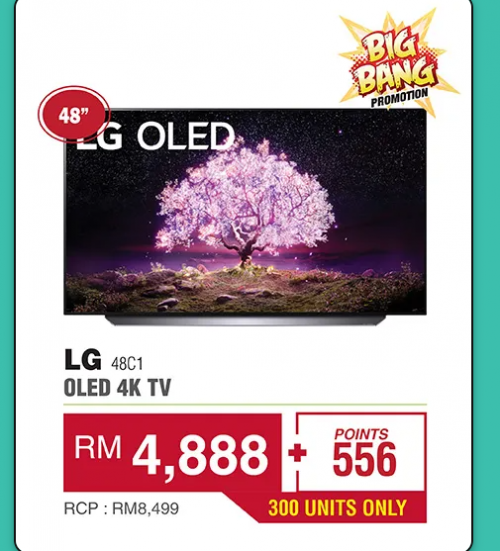 |
|
|
Aug 4 2021, 11:49 AM
Return to original view | Post
#33
|
|
Senior Member
6,622 posts Joined: Aug 2008 From: Malaysia
|
QUOTE(DuncanDuke @ Aug 4 2021, 11:02 AM) Pros of S-coin - It is like cashback and there is no cap amount. Some products offer high S-coin like 50%. Now they have double promo like 25%+25% S-coin cashback. Most products offer 3%+3% S-coins. But not as good as ezcredit u can use unlimited to max at the RM25 / blockCons of S-coin - you can only use max RM100 per week of the S-coins you have. I would say, not too bad. Good if u moving house or want to upgrade a lot of appliances. Every week buy 1 item with RM100 off. |
|
|
|
|
|
Aug 5 2021, 12:16 PM
Return to original view | Post
#34
|
|
Senior Member
6,622 posts Joined: Aug 2008 From: Malaysia
|
QUOTE(David3850 @ Aug 5 2021, 12:08 PM) Thanks for the tips bro. But Shopee doesn’t allow us to top up and spend a combined value of more than RM 4999, because on top of the daily limit they also have a monthly limit. Transfer back to bank XDSo meaning, if today I top up RM 4999 into my shopeepay already, I can’t spend of those money until next month as I have hit the monthly limit. That means my RM 4999 parked under shopeepay for 1 month which i cannot spend. did you face this issue when you made your purchase? This is the clarification from shopee agent. 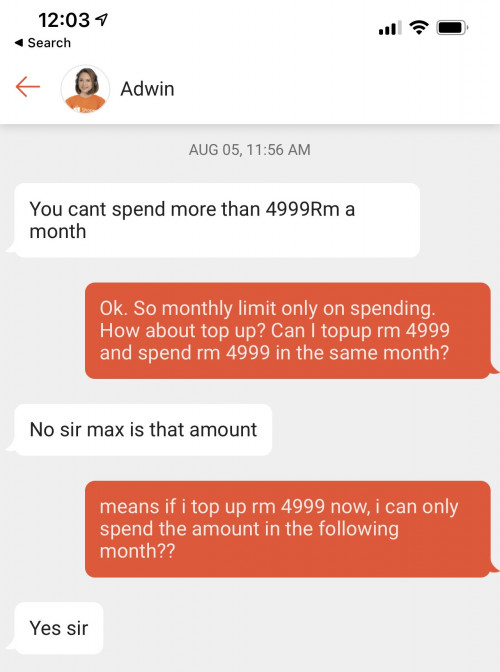 |
|
|
Aug 9 2021, 04:48 PM
Return to original view | Post
#35
|
|
Senior Member
6,622 posts Joined: Aug 2008 From: Malaysia
|
QUOTE(munchoong @ Aug 9 2021, 04:42 PM) Are there any CX or C1 owners here who are also retro gamers? According to RTING : https://www.rtings.com/tv/reviews/lg/cx-oledNeed confirmation if these panels can accept native 1440p signal, since 1440p is an integer perfect scale from 240p and 480p source. I am upscaling my Megadrive, Saturn, PS2, and Wii using a RetroTink 5X, which allows up to 1440p output, but my LG OLED E6 can only accept up to 1200p. 1440p @ 60Hz : Yes (forced resolution required) 1440p @ 120Hz : Yes (native support) munchoong liked this post
|
|
|
Sep 13 2021, 11:09 AM
Return to original view | Post
#36
|
|
Senior Member
6,622 posts Joined: Aug 2008 From: Malaysia
|
Seems like the latest 3.23.35 firmware for LG CX fix the nightmare of eArc/Arc HDMI CEC issue.
Still waiting Malaysia to push OTA. |
|
|
Sep 13 2021, 05:34 PM
Return to original view | Post
#37
|
|
Senior Member
6,622 posts Joined: Aug 2008 From: Malaysia
|
QUOTE(Kahlamx @ Sep 13 2021, 03:24 PM) oops what kinda of eArc issue again? Cause I will be pairing with my samsung atmos soundbar. Handshake issue. Turn on TV and cannot control the sound bar sort of. Need to on/off soundbar for correction handshake |
|
|
Oct 23 2021, 09:04 AM
Return to original view | IPv6 | Post
#38
|
|
Senior Member
6,622 posts Joined: Aug 2008 From: Malaysia
|
Anyone (malaysian) update their LG CX to version 4.xx.xx ?
4k Dolby Vision 120hz for xbox series console |
|
|
Oct 26 2021, 09:52 AM
Return to original view | Post
#39
|
|
Senior Member
6,622 posts Joined: Aug 2008 From: Malaysia
|
QUOTE(palgo47 @ Oct 26 2021, 08:28 AM) I access my movies via wifi on the network using only the WebOS file manager. No issue playing various formats at 4k. The only issue is minor stutter when streaming files sizes above 50GB Just received OTA update yesterday I guess if I used LAN it should be fine.I think the built in player is perfectly fine if you just want to watch 4k movies Yup, updated via the engineering menu last month and received this version Now only left the audio issue between this TV and xbox series X :\ The passthrough + eArc still cannot work for Dolby Atmos for Home Theater |
|
|
Oct 28 2021, 10:04 AM
Return to original view | Post
#40
|
|
Senior Member
6,622 posts Joined: Aug 2008 From: Malaysia
|
QUOTE(palgo47 @ Oct 27 2021, 09:20 AM) Maybe your amp have eArc compatibility issue with the tv? Am using Samsung Q950T right now.I'm using LG soundbar didn't encounter any issues playing atmos with my Xbox SX What's ur setup ? Mine is Xbox SX connect to TV HDMI4 (audio setting there passthrough is ticked) TV HDMI ARC/eARC to Samsung Q950T (soundbar will show eArc) Under LG TV sound setting, these are the scenario: 1) using HDMI ARC , eArc on and using Auto = i can get Dolby Atmos for Home theater, however this might result some delay sync in some games. 2) using HDMI ARC , eArc on and using Passthrough = i can only pick uncompressed 5.1/7.1 and unable to choose bitstream out under xbox series x. |
| Change to: |  0.0327sec 0.0327sec
 1.36 1.36
 7 queries 7 queries
 GZIP Disabled GZIP Disabled
Time is now: 2nd December 2025 - 03:22 PM |
 Quote
Quote