

QUOTE(salimbest83 @ Jan 21 2016, 09:46 AM)
hisense 40 tv is quite good i must say

Ya, really no competition with the discount price.Plan to buy and use it as computer monitor.
 GEMFIVE 11STREET QOO10 ZALORA ENSOGO TAOBAO EBAY, Discount % Codes Inside Version 2
|
|
 Jan 21 2016, 10:26 AM Jan 21 2016, 10:26 AM
Return to original view | Post
#1
|
 
Senior Member
1,031 posts Joined: May 2008  
|
QUOTE(salimbest83 @ Jan 21 2016, 09:46 AM) hisense 40 tv is quite good i must say Ya, really no competition with the discount price.Plan to buy and use it as computer monitor. |
|
|
Jan 21 2016, 11:43 AM
Return to original view | Post
#2
|
|
Senior Member
1,031 posts Joined: May 2008
|
QUOTE(ckweng @ Jan 21 2016, 10:56 AM) Is this the one that you're referring to? Hisense 40" Yes, I'm referring the Hisense 40"By the way, for this kind of non-smart TV, how to make it smart or run like a computer? Make sense to pair it with devices like the Intel compute stick or Chromecast for Youtube/Netflix/Iflix? It's good that it can play files directly from USB and hopefully it supports a wide range of codec. Any display that can accept HDMI, DVI, VGA input considered can run as computer monitor. For Youtube/Netflix/Iflix, Chromecast is your best bet. But, actually many cheap Bluray Player from Samsung/Sony/Panasonic do support these streaming features too (Youtube/Netflix/iFlix), works like Chromecast, with added Bluray Playback capability. Bluray player guarantee has much better codec support, especially those Dolby and DTS surround sound format, and support for better subtitle display too. QUOTE(alucard89 @ Jan 21 2016, 11:05 AM) Intel computer stick or android boxes should be enough It depend on budget la, but pricing wise will come down quickly, given many Android TV or Smart TV has these similar built in feature.Chromecast you stil need to rely on another device like tab/phones. |
|
|
Jan 21 2016, 02:04 PM
Return to original view | Post
#3
|
|
Senior Member
1,031 posts Joined: May 2008
|
QUOTE(ckweng @ Jan 21 2016, 12:37 PM) Thank you guys for your comments. You may check if certain streaming service you want is on the platform you buy. Sooner or later I will need a TV/home entertainment system so better research properly and get ready first. Sooner or later I will need a TV/home entertainment system so better research properly and get ready first.For Youtube, it should be common on those new branded Bluray player. But for Netflix, iFlix, you may need to check out some brand, not every brand's smart apps has these, even not every smart TV can stream Netflix. Different region's Smart TV has different streaming service. Currently Netflix, iFlix is available for Chromecast, Android TV, maybe on some Smart TV platform on different brand. This post has been edited by Alan Yee: Jan 21 2016, 02:07 PM |
|
|
Jan 21 2016, 03:42 PM
Return to original view | Post
#4
|
|
Senior Member
1,031 posts Joined: May 2008
|
QUOTE(salimbest83 @ Jan 21 2016, 02:47 PM) shud work fine Hahaha.... no need so high end la.u might want to get the 42" 4k one. looks more drooling  My requirement are just 40" and full hd resolution. But 40" seems too big as a computer monitor at close range usage. But this Hisense 40" TV price is beating those 27" monitor, and 32" TV/monitor, with 1080p resolution. Some more, TV as monitor has sound output from HDMI. This post has been edited by Alan Yee: Jan 21 2016, 03:48 PM |
|
|
Jan 21 2016, 03:56 PM
Return to original view | Post
#5
|
|
Senior Member
1,031 posts Joined: May 2008
|
QUOTE(RevanChrist @ Jan 21 2016, 03:49 PM) U seriously want to use TV screen as computer monitor? Their refresh rate and response time seems to be very different from a computer monitor. I sit close close to TV watching one two hours eyes feel tired aldy. I sit in front of computer can tahan two three hours still can tahan. haha, just a suggestion only.Actually their refresh rate are the same, typically at 60hz, with all the motion-flow enhancement turn off. The size itself at 40" maybe is a concern, too big for normal close range usage. |
|
|
Jan 22 2016, 09:48 AM
Return to original view | Post
#6
|
|
Senior Member
1,031 posts Joined: May 2008
|
QUOTE(salimbest83 @ Jan 22 2016, 09:10 AM) but.. add a lil bit more only http://www.gemfive.com/my/electronics/cons...ed-tv-led42k320 You means this model? Hisense 42" 4K TV? |
|
|
Jan 23 2016, 04:33 PM
Return to original view | Post
#7
|
|
Senior Member
1,031 posts Joined: May 2008
|
QUOTE(mineSweeper @ Jan 23 2016, 03:33 PM) Hisense 40" TV damn cheap. But I don't need a TV. Is it good to use as a monitor? Any reviews when use as a monitor? Does it support 4:4:4 chroma sub-sampling so that text are readable? I think just need to turn off the "over sampling", set the sharpness to half will make text rendered in it's native resolution, make the text readable, via HDMI connection.I try this on my 40" Sharp LE268M TV. Yes, 40" Hisense 1080p TV is the cheapest 40" TV, and also the cheapest monitor at 40". This post has been edited by Alan Yee: Jan 23 2016, 04:36 PM |
|
|
Jan 23 2016, 06:57 PM
Return to original view | Post
#8
|
|
Senior Member
1,031 posts Joined: May 2008
|
QUOTE(mineSweeper @ Jan 23 2016, 06:47 PM) Have you gotten yours yet? Saw a previous post saying you intend to get one as a monitor too. Share a snapshot or something Haha, I still in consideration if want getting the set as monitor. Currently using a cheap old 23" LG 1080p monitor. For TV as monitor stuff, tried before with my own 1080p TV la. Basically, as long as Desktop, Laptop can output in HDMI, then the text will be as sharp, 1080p resolution, 60hz. Other thing that need to take care, maybe is the "over sampling" thing, turn off this, you will get full 1080p display. |
|
|
Jan 23 2016, 08:26 PM
Return to original view | Post
#9
|
|
Senior Member
1,031 posts Joined: May 2008
|
QUOTE(mineSweeper @ Jan 23 2016, 06:47 PM) That would help alot. Thanks. Try viewing this image. I think I understand your concern. 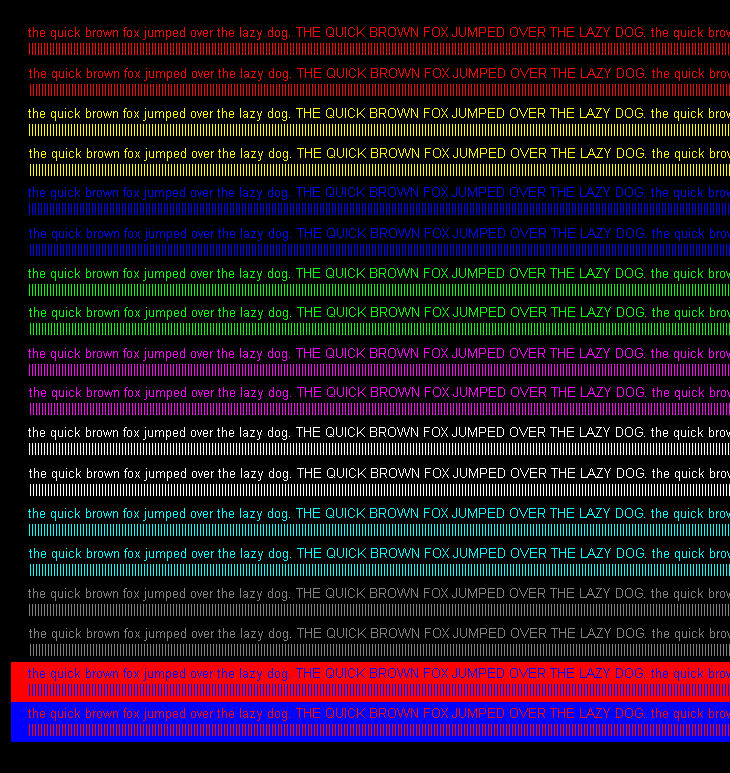 Have you gotten yours yet? Saw a previous post saying you intend to get one as a monitor too. Share a snapshot or something Test on my Panasonic TV, look closely, some color not display properly. Some pixel is overlapping on displaying different color on thin text. Dunno this will happen on Hisense TV. 

|
|
|
Jan 23 2016, 10:32 PM
Return to original view | Post
#10
|
|
Senior Member
1,031 posts Joined: May 2008
|
QUOTE(mineSweeper @ Jan 23 2016, 09:16 PM) It's the bottom two lines of text with background color that's holding me back from getting a TV as main monitor. Hmm.... Interesting, never see this before.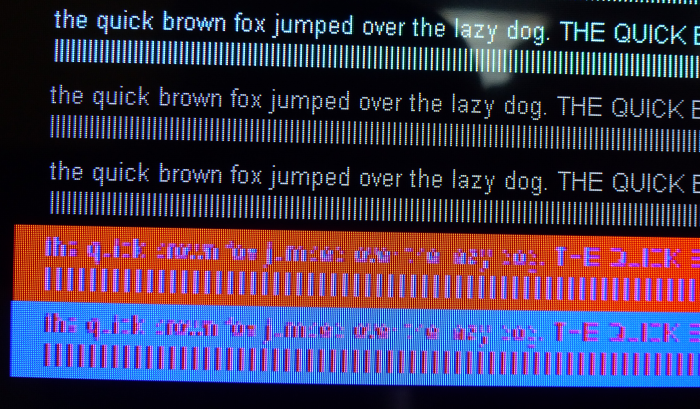 Actually different display has different sub sampling. Mine still readable. 
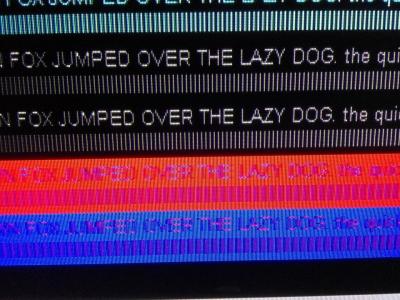
On normal background color, small text still ok. 
This post has been edited by Alan Yee: Jan 23 2016, 10:41 PM |
|
|
Jan 24 2016, 12:07 PM
Return to original view | Post
#11
|
|
Senior Member
1,031 posts Joined: May 2008
|
QUOTE(mineSweeper @ Jan 23 2016, 09:16 PM) It's the bottom two lines of text with background color that's holding me back from getting a TV as main monitor. Well, using VGA PC input mode did solve the issue.Some TV HDMI can set to GAME/PC mode for 4:4:4 subsampling. (This Panasonic fail on each mode) May test out the stuff at nearest electrical store. 
|
|
|
Jan 24 2016, 07:19 PM
Return to original view | Post
#12
|
|
Senior Member
1,031 posts Joined: May 2008
|
QUOTE(mineSweeper @ Jan 24 2016, 02:56 PM) Font looks okay. If only you have that Hisense Tv to test, haha. This is quite an interesting topic.Not even high end TV are capable for the 4:4:4 full RGB support. Waiting our forummer to connect their Hisense TV via HDMI and test with this picture. Just need to download this picture, and open in the laptop/PC/tablet/phone with HDMI output can know the result. This post has been edited by Alan Yee: Jan 24 2016, 07:23 PM |
|
|
Jan 24 2016, 09:04 PM
Return to original view | Post
#13
|
|
Senior Member
1,031 posts Joined: May 2008
|
QUOTE(mineSweeper @ Jan 24 2016, 02:56 PM) Font looks okay. If only you have that Hisense Tv to test, haha. Just now go and test the real Hisense TV at nearby shop.This is the result. Still, it is not perfect, but the text actually is very clear. Weird thing is when plug in HDMI, the Hisense TV remote control suddenly not working. Need to turn of the TV, then turn on again for making remote control working. Other settig that need to set is at "Advance Setting" set the display to "Full" (turn off over scan). 

|
|
|
Jan 24 2016, 09:54 PM
Return to original view | Post
#14
|
|
Senior Member
1,031 posts Joined: May 2008
|
QUOTE(mineSweeper @ Jan 24 2016, 09:20 PM) What model you tested? It's that exact model Hisense LED40D50 that we're looking at? Really tempted. What input and cable to achieve that result? VGA or HDMI? It is exactly the 40D50 model, I test with other model as well, 50", 42", all result is the same. Nobody in the shop is serving me, then I test it myself.But from your image comfirm not 4:4:4 or maybe need some tweaking. i don't know. I'm using HDMI, via my Windows tablet. (Mini HDMI to full size HDMI) It is confirm not 4:4:4, I play around the setting, tried all picture mode, including the "Game Mode", nothing changed. Only thing in advance setting is the "Zoom" and "Full" mode. Still, the result not as bad as your posting. This post has been edited by Alan Yee: Jan 24 2016, 09:54 PM |
|
|
Jan 26 2016, 09:38 AM
Return to original view | Post
#15
|
|
Senior Member
1,031 posts Joined: May 2008
|
QUOTE(salimbest83 @ Jan 26 2016, 09:10 AM) get the Using VGA input can reach 1080p (Full HD) resolution?Hisense 40" RM818 price with TV20 code = RM654 really worth every single penny bro screen quite sharp. watch HD content like Astro HD make me smile VGA input also so i try with my lappy. display font correctly and no tearing definitely can use as big a$$ pc monitor. dont have time to play games on it yet coz gaming rig on up floor and super heavy to move around. now thinking to get the hisense 42" 4K model for gaming display already |
|
|
Jan 26 2016, 10:05 AM
Return to original view | Post
#16
|
|
Senior Member
1,031 posts Joined: May 2008
|
QUOTE(salimbest83 @ Jan 26 2016, 09:54 AM) yup. Will bring laptop to those electrical shop and test again with VGA cable.1080p sure can. 1440p cannot even with normal DVI, HDMI n VGA ( need use Duallink DVI cable, display port or HDMI 1.4 at the least ) I know some TV just can only display up to 1366 x 768 resolution with VGA(PC) input(My Panasonic TV is like this). Maybe need to rely on the old analog VGA connection for using as proper monitor. Good old VGA cable. Update: So this from the user manual for the Hisense 40D50P download from Hisense Australia page. VGA max resolution is 1280 x 1024. HDMI connection confirm can reach 1920 x 1080. It is nice if there is a real screen shot for those resolution. 
This post has been edited by Alan Yee: Jan 26 2016, 10:22 AM |
|
|
Jan 26 2016, 10:47 PM
Return to original view | Post
#17
|
|
Senior Member
1,031 posts Joined: May 2008
|
QUOTE(fulltimekiller86 @ Jan 26 2016, 09:30 PM) Very good, mind PM on how you do this?  |
|
|
Jan 27 2016, 12:07 PM
Return to original view | Post
#18
|
|
Senior Member
1,031 posts Joined: May 2008
|
QUOTE(salimbest83 @ Jan 27 2016, 10:59 AM) i bought this http://www.gemfive.com/my/hisense-40-led-tv-led40d50-1 Wow, really can consider already.just confirmed last nite. connecting with VGA is the best coz picture is perfectly aligned ) 1920x1080 pixel from source is displayed in correct pixel position in the tv if using HDMI need to rescale in graphic properties ( Laptop ) rescale to 72-75 need abit fine tune to make it pixel perfect VGA input with 1920x1080 resolution compatible, have to stick back with the old VGA. RM654 as 40" Full HD monitor, really not bad. |
|
|
Jan 27 2016, 09:23 PM
Return to original view | Post
#19
|
|
Senior Member
1,031 posts Joined: May 2008
|
QUOTE(urnicksux2 @ Jan 27 2016, 09:16 PM) http://www.11street.my/product/ProductDeta...do?prdNo=679836 With coupon?bought this powerbank for 37,i more confident buying from the seller than lazada and bluedio t2+ recommended by ktard for 99 |
|
|
Jan 27 2016, 09:42 PM
Return to original view | Post
#20
|
|
Senior Member
1,031 posts Joined: May 2008
|
QUOTE(urnicksux2 @ Jan 27 2016, 09:39 PM) yeah,the coupon are all over the place Every day have to chase coupon at 9am and 11am.manage to grab some...pineng ,28% app,11% cimb,2 shipping coupons I always miss the coupon.  |
| Bump Topic Topic ClosedOptions New Topic |
| Change to: |  0.0270sec 0.0270sec
 0.28 0.28
 7 queries 7 queries
 GZIP Disabled GZIP Disabled
Time is now: 6th December 2025 - 12:55 AM |
 Quote
Quote