Outline ·
[ Standard ] ·
Linear+
Bluetooth Connectivity Issue
|
TSshaniandras2787
|
 Jan 15 2016, 09:25 AM, updated 10y ago Jan 15 2016, 09:25 AM, updated 10y ago
|

|
I have no idea why but it seems like suddenly my bluetooth connectivity has issues. I have a Harman Kardon Onyx and it has been working superbly well since the first day I bought it.
I check the Bluetooth pairing page, it's paired and I opened the Sound control panel and noticed the bluetooth speaker appeared in the window but with a red downward arrow attached to it.
Everytime I "un-pair" and "re-pair" it, it stays connected for a while (with the green tick symbol) but when I tried to play audio over it then it just gets disconnected.
I've tried pairing it with my iPhone and it works =(
Windows 10 performed a major software update a few days ago so I don't know if it's that =/
|
|
|
|
|
|
horns
|
Jan 15 2016, 11:28 AM
|
|
|
you can try reinstall the bluetooth driver and see if it works. btw which bluetooth adapter do you have? you can find this out in device manager.
if this is a problem with new drivers from ms, you can disable automatic driver updates to prevent this from happening again. press win+x keys, select system, goto advanced system settings > hardware tab > device installation settings.
|
|
|
|
|
|
TSshaniandras2787
|
Jan 15 2016, 12:22 PM
|
|
|
QUOTE(horns @ Jan 15 2016, 11:28 AM) you can try reinstall the bluetooth driver and see if it works. btw which bluetooth adapter do you have? you can find this out in device manager. if this is a problem with new drivers from ms, you can disable automatic driver updates to prevent this from happening again. press win+x keys, select system, goto advanced system settings > hardware tab > device installation settings. I went to Device Manager and uninstall the speaker from there and then reinstall it by pairing it up again. Still, the problem persisted =/ I'm not sure what went wrong. I have done nothing to it, it just happened after the software update so I'm pretty sure it's the software but I cannot confirm. |
|
|
|
|
|
horns
|
Jan 15 2016, 12:29 PM
|
|
|
QUOTE(shaniandras2787 @ Jan 15 2016, 12:22 PM) I went to Device Manager and uninstall the speaker from there and then reinstall it by pairing it up again. Still, the problem persisted =/ I'm not sure what went wrong. I have done nothing to it, it just happened after the software update so I'm pretty sure it's the software but I cannot confirm. no i mean your bluetooth adapter. something like this: 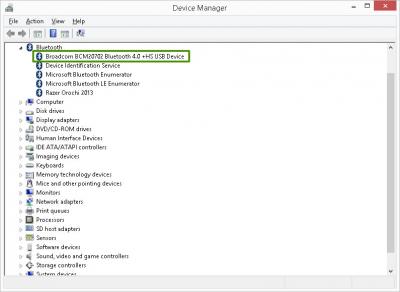
|
|
|
|
|
|
TSshaniandras2787
|
Jan 15 2016, 12:36 PM
|
|
|
QUOTE(horns @ Jan 15 2016, 12:29 PM) no i mean your bluetooth adapter. something like this:
Ouh! ok. Will try that later tonight and see if it works =/ |
|
|
|
|
|
dcheah
|
Feb 16 2016, 03:24 PM
|
|
|
You can also right-click the device and disable the power management option.  |
|
|
|
|



 Quote
Quote


 0.0158sec
 0.47
0.47
 6 queries
 GZIP Disabled