Outline ·
[ Standard ] ·
Linear+
Microsoft Windows 10 (V.2)
|
xonedl
|
 Feb 3 2016, 02:48 AM Feb 3 2016, 02:48 AM
|
Getting Started


|
QUOTE(domo_kun @ Feb 2 2016, 03:02 PM) You mean when I'm using the Media Tool, I'll be extracting the contents real time directly from Microsoft website into a USB drive or burning the contents directly from Microsoft to the DVD? If you choose to download the ISO file, You will need this small tool to transfer the ISO to a DVD/USB drive : http://wudt.codeplex.com/(because manual copy won't make the DVD/USB drive bootable) |
|
|
|
|
|
xonedl
|
Jul 2 2016, 05:05 PM
|
Getting Started
|
Wondering when they will give option to adjust start menu font size.....
|
|
|
|
|
|
xonedl
|
Aug 4 2016, 04:55 PM
|
Getting Started
|
I'll advice to make a system image before proceeding to the update... Either you prefer 3rd party software or use the built-in [ Backup & Restore (Windows 7)] tool. If anything happens, it only takes a few minutes to restore back your PC to working condition... What is the download size? I heard it's around 3GB...? I'm on quota internet so having a tad trouble. Will get the midnight 5GB plan to deal with this update later... hopefully enough... Question - is it possible to update FROM the latest ISO instead of using Windows Update?  (will be faster if have multiple PC...) This post has been edited by xonedl: Aug 4 2016, 05:05 PM |
|
|
|
|
|
xonedl
|
Aug 5 2016, 03:08 AM
|
Getting Started
|
Phew, from burning DVD to finish update took about half an hour, not as fast as fresh installation but at least zero problem occured, everything went smoothly. Though the first message I got was CCleaner got uninstalled automatically due to compatible  Had a tad trouble with the mobile hotspot function though, seems like I got the ol' problem of my phone stuck at identifying Ip address, guess I still have to depend on 3rd party software for hotspot at the moment. Also, ink is strictly activated ONLY with hand writing / touch devices connected? Hmm... maybe I get a wacom someday... A Windows.old folder (~10GB) is created with previous build, safe to delete right? This post has been edited by xonedl: Aug 5 2016, 04:28 AM |
|
|
|
|
|
xonedl
|
Aug 5 2016, 09:31 PM
|
Getting Started
|
WOAH WOAH WOAH!!!  CRITICAL_PROCESS_DIED Not even reach 24 hours into update... The only thing I did prior to this happens was just delete Windows.Old, rearrange Start menu (which seems kinda buggy as icon keep gone missing) & watch movie... Good thing I have previous system image...  This post has been edited by xonedl: Aug 5 2016, 09:56 PM
|
|
|
|
|
|
xonedl
|
Aug 5 2016, 09:56 PM
|
Getting Started
|
QUOTE(horns @ Aug 5 2016, 09:54 PM) wow.. what's the exact error in event viewer? i suggest you just do a clean install. i have done the same to 3 machines. everything is good. I straight up re-image back to before update version though, so can't check anything else. The error totally make the system DEAD, no chance of getting into Windows. I just roll back and re-try update a gain now, see if it happens again tomorrow (hopefully not). Clean install is kinda... I lazy to dealt with every single software and account any more This post has been edited by xonedl: Aug 5 2016, 09:58 PM |
|
|
|
|
|
xonedl
|
Aug 7 2016, 12:24 AM
|
Getting Started
|
Urgh, it kinda annoyed me when they changes something in the network department... (sometime I wish there is a button that says "f**k all security features, just get it working~!!!  ) And what kind of problem is this? 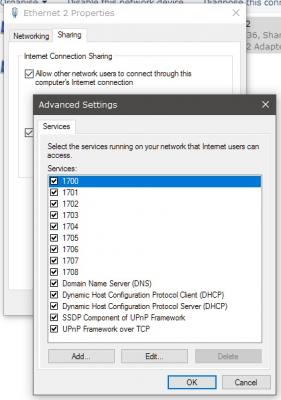 This post has been edited by xonedl: Aug 7 2016, 12:29 AM
 |
|
|
|
|
|
xonedl
|
Aug 8 2016, 11:30 PM
|
Getting Started
|
QUOTE(Leohart @ Aug 8 2016, 10:53 PM) My issue actually is that after the PC login, without chrome and games open, the utilization of RAM is 12GB, I think this is abnormal and ridiculous. Anyone have this issue or just me?  Abnormal. ~4GB utilize is about right for 64-bit. You can check what ate up the memory by clicking "Open Resource Monitor" beneath that window. In case of no task been listed, it might be some kind of memory leak bug from certain running application. Might be a good idea to look up your start up applications (also under task manager > Start-Up) This post has been edited by xonedl: Aug 8 2016, 11:32 PM |
|
|
|
|
|
xonedl
|
Aug 9 2016, 12:20 PM
|
Getting Started
|
QUOTE(Leohart @ Aug 9 2016, 12:03 AM) Found the Avast antivirus is the second higher of the RAM usage, after uninstall the software now the utilization back to normal which is about 17% without game open. so far after anniversary patch, i had reinstall Xunlei again after the patch as unable to complete any bt download. i think some software will be corrupted after the patch. There are also some softwares that supposedly listed as compatible with W10 got auto removed upon update... I had to roll back to old 1511 after realize the update causing problem in my working softwares though... |
|
|
|
|
|
xonedl
|
Aug 9 2016, 03:55 PM
|
Getting Started
|
QUOTE(horns @ Aug 9 2016, 01:36 PM) too bad. by the way what working software are those? Sketchup 3D modelling. The explorer icon preview didn't work for a lot of model files which is a CRUCIAL function. Windows also confused which one is version 2015 and which one is 2016, appoint the wrong software version to open my files. This post has been edited by xonedl: Aug 9 2016, 06:42 PM |
|
|
|
|
|
xonedl
|
Aug 9 2016, 10:01 PM
|
Getting Started
|
Btw about the calendar, is there a way to import our local public holiday & school holiday into Windows record, instead of doing it manually?
|
|
|
|
|
|
xonedl
|
Oct 17 2016, 05:52 PM
|
Getting Started
|
Is anybody on latest W10 build (anniversary+) using Sketchup 3D authoring software? Is wondering the file icon preview are working properly now, as last time I tried - it didn't.
|
|
|
|
|
|
xonedl
|
Oct 5 2018, 12:44 PM
|
Getting Started
|
Is it just me Microsoft Edge seems to "purposely have problem" with Google search and often display as broken/no-connection page?
|
|
|
|
|
|
xonedl
|
Oct 26 2018, 02:06 PM
|
Getting Started
|
QUOTE(horns @ Oct 24 2018, 02:29 AM) yes, it's all good. it's also good to know that we have more bugs found out before the next iteration of 1809 re-release. for this zip bug, you will not be affected if you're using third-party archivers like 7zip. Dunno if related, but my zip drag-and-drop don't work anymore, no matter if it's WIndows own zip or using 7zip. Eg: open archive > drag item from archive to folder / desktop > nothing happens |
|
|
|
|
|
xonedl
|
Dec 14 2020, 04:42 PM
|
Getting Started
|
Installed latest 2020 W10... and... there are several things that they kinda make inconvenience.
- clicking on the 'system' in control panel jump you to the new control screen first... wtfish
- netplwiz 'user must enter password to login blah blah blah' is gone wtfish?
|
|
|
|
|



 Quote
Quote
 0.1359sec
 0.50
0.50
 7 queries
 GZIP Disabled