

 Dec 15 2015, 12:06 PM, updated 10y ago


“Flicker” is inevitable in LED Displays because it is related to the LED backlight technology, LED’s brightness can be controlled by adjusting the current intensity so we call this is the analogy dimming modulation. But the LED’ color will have some change when the current strength is up or down. This problem has no impact in our normal using when we need to light up somewhere. So it is the general using in LED lighting. But LED for high end using like in monitor display, color shift is unallowable because customer need more colorful and lightness leaves to see a picture or entertainment using. For this reason it needs another backlight technology to solve the color missing problem. For now on, LED monitor all most us the PWM modulation to control to control monitor’s light grade. But it cause another problem is “Flicker”, and it is more easy to see when we reduce the brightness.
PWM (Pulse width modulation) is a technology that using digital to control analog signal output, it commonly used in the buzzer, electric, motor, fan speed and light control.
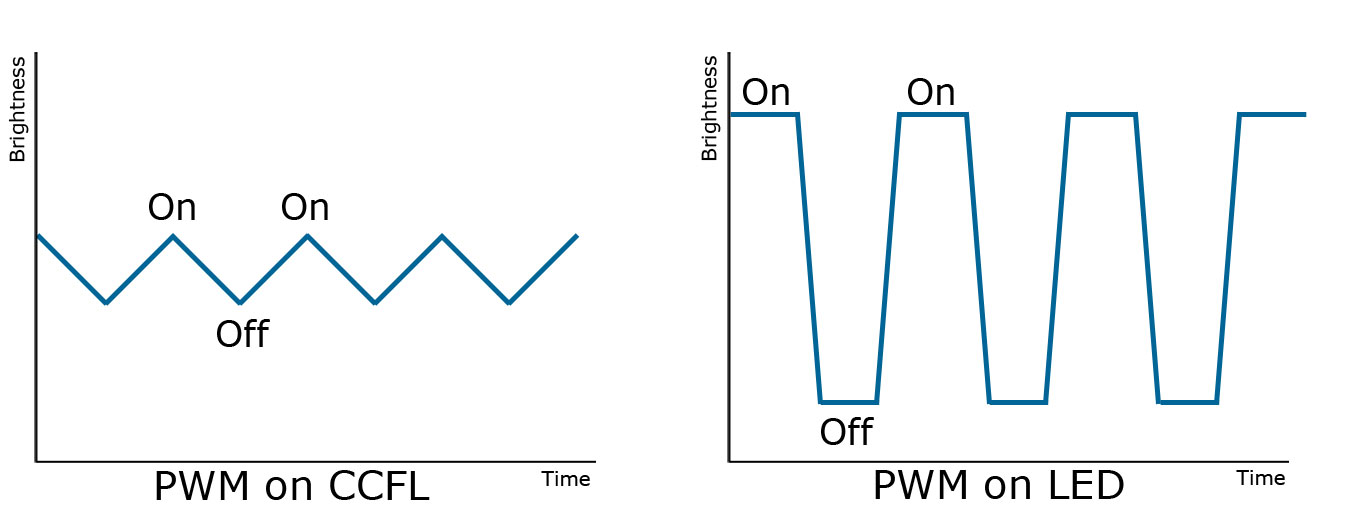
PWM is set the LED lamp power on or off in high frequency in 200 times/ sec (200hz) that human eye can’t easy to find. If we want the 25% backlight, we put the brightest time to 25%, dark to 75% in quick repeatedly turn on and off while we will see the 25% bright.
So the lamp always in the on and off situation and keep the frequency over 100hz ~200hz to avoid people see the flicker. Although the frequency over 200hz human can see the flicker but it still cause a damage of our eyes, because our optic nerve still work to get with flash frequency change from black to white, which can cause our eyes tired.
 Quote
Quote


 0.0165sec
 0.54
0.54
 5 queries
 GZIP Disabled