

QUOTE(DeepMemory @ May 2 2016, 09:47 AM)
Swipe to the most left of your homescreen and there will now be news.

I don't see anything on the left most 
The Official iPhone 6s/6s+ Discussion Thread | V3, The only thing changed is everything.
|
|
 May 2 2016, 11:38 PM May 2 2016, 11:38 PM
|
 
All Stars
14,082 posts Joined: Aug 2009 From: Malaysia  
|
QUOTE(DeepMemory @ May 2 2016, 09:47 AM) Swipe to the most left of your homescreen and there will now be news. I don't see anything on the left most |
|
|
|
|
|
May 3 2016, 01:07 AM
|

Senior Member
1,242 posts Joined: Sep 2013 From: Quantum Universe
|
QUOTE(chiahau @ May 2 2016, 11:38 PM) I don't see anything on the left most need to turn on  This post has been edited by Mr.7: May 3 2016, 01:09 AM |
|
|
May 3 2016, 07:27 AM
|
|
All Stars
14,082 posts Joined: Aug 2009 From: Malaysia
|
QUOTE(Mr.7 @ May 3 2016, 01:07 AM) need to turn on I restarted the phone and wham, everything is there as mentioned. |
|
|
May 3 2016, 10:00 AM
|

Junior Member
161 posts Joined: Aug 2005 From: Honolulu 
|
It seems u can see spotlight news only when on wifi
|
|
|
May 3 2016, 10:10 AM
|

Senior Member
1,573 posts Joined: Jan 2003 From: Nilai, Negeri Sembilan
|
Anyone facing wifi connectivity issues with the new firmware?
I have a 6+ and 6. The 6 is working fine and properly. But the 6+ is having issues in connecting to my home wifi whereby it is always saying that "Incorrect password for network". I have done hard reset on both my routers and my 6+. Not working at all. I have tried to get it connected to other wifi network(outside), it is no good. Even if it does manage to connect to the wifi network but there's no internet access at all. Any ideas guys? I googled up and found some of the users are having the same kind of problem. Tweeted up Apple Support even they don't have a clue. All they asked of me is to send to the nearest service centre for hardware check. |
|
|
May 3 2016, 12:20 PM
|

Junior Member
60 posts Joined: Mar 2013
|
Looking for used ip6s 64gb (preferably rose gold color)
pm price and details thanks. *cod in kl area only |
|
|
|
|
|
 May 3 2016, 12:24 PM May 3 2016, 12:24 PM
|

Junior Member
204 posts Joined: Jun 2006 From: at the end of the rainbow  
|
guys, really need help here
tried to snap photo yesterday, but this thing happen  now really worried even still have warranty.. Attached thumbnail(s) 

|
|
|
May 3 2016, 12:36 PM
|
|
Senior Member
1,242 posts Joined: Sep 2013 From: Quantum Universe
|
QUOTE(Izanis @ May 3 2016, 12:24 PM) guys, really need help here either cable inside loose or something. send back to check and warranty.tried to snap photo yesterday, but this thing happen now really worried even still have warranty.. |
|
|
May 3 2016, 12:39 PM
|
|
Senior Member
1,242 posts Joined: Sep 2013 From: Quantum Universe
|
QUOTE(boxsystem @ May 3 2016, 10:10 AM) Anyone facing wifi connectivity issues with the new firmware? yes. i am having this issue with my iphone 5. doesnt seem like there's any way to fix it other than turning wifi and airplane mode on/off. I'm on IOS 9.3.1.I have a 6+ and 6. The 6 is working fine and properly. But the 6+ is having issues in connecting to my home wifi whereby it is always saying that "Incorrect password for network". I have done hard reset on both my routers and my 6+. Not working at all. I have tried to get it connected to other wifi network(outside), it is no good. Even if it does manage to connect to the wifi network but there's no internet access at all. Any ideas guys? I googled up and found some of the users are having the same kind of problem. Tweeted up Apple Support even they don't have a clue. All they asked of me is to send to the nearest service centre for hardware check. |
|
|
 May 3 2016, 12:47 PM May 3 2016, 12:47 PM
|
|
Junior Member
204 posts Joined: Jun 2006 From: at the end of the rainbow
|
QUOTE(Mr.7 @ May 3 2016, 12:36 PM) either cable inside loose or something. send back to check and warranty. thank you |
|
|
May 3 2016, 01:24 PM
|
 
VIP
11,882 posts Joined: Jan 2003
|
QUOTE(Izanis @ May 3 2016, 12:24 PM) guys, really need help here Damn, that looks bad.tried to snap photo yesterday, but this thing happen now really worried even still have warranty.. Please update us what happened after you send it for warranty claim. Cheers |
|
|
May 3 2016, 02:27 PM
|

Senior Member
4,966 posts Joined: Mar 2011
|
QUOTE(Izanis @ May 3 2016, 12:24 PM) guys, really need help here Just send back for warranty claim tried to snap photo yesterday, but this thing happen now really worried even still have warranty..  |
|
|
May 3 2016, 04:27 PM
|
|
Junior Member
204 posts Joined: Jun 2006 From: at the end of the rainbow
|
QUOTE(shockk @ May 3 2016, 01:24 PM) Damn, that looks bad. i will update for sure Please update us what happened after you send it for warranty claim. Cheers   still, worried on what will happen during their diagnosis still, worried on what will happen during their diagnosis  |
|
|
|
|
|
May 3 2016, 04:40 PM
|
|
VIP
11,882 posts Joined: Jan 2003
|
QUOTE(Izanis @ May 3 2016, 04:27 PM) i will update for sure Not all phones are perfect. Just be happy that your unit is still under warranty. still, worried on what will happen during their diagnosis Good luck and do remember to share with us. Cheers!  |
|
|
May 3 2016, 08:19 PM
|

All Stars
17,766 posts Joined: Dec 2007 From: Bandar Baru Bangi , Malaysia
|
QUOTE(Izanis @ May 3 2016, 12:24 PM) guys, really need help here claim for warranty lorr tried to snap photo yesterday, but this thing happen now really worried even still have warranty..  |
|
|
May 3 2016, 10:24 PM
|
|
Senior Member
4,622 posts Joined: Mar 2007
|
QUOTE(Izanis @ May 3 2016, 12:24 PM) guys, really need help here no cosmetic damage SURE can claim tried to snap photo yesterday, but this thing happen now really worried even still have warranty.. if still under warrantylast time my friend ipad drop, screen also like this weird line... due to no costmetic damage, then claim a refurbished ipad one to one exchange |
|
|
May 4 2016, 05:19 AM
Show posts by this member only | IPv6 | Post
#1097
|
|
Junior Member
204 posts Joined: Jun 2006 From: at the end of the rainbow
|
QUOTE(vez @ May 3 2016, 10:24 PM) no cosmetic damage SURE can claim Its been screen flashing for couple of months (when using the on off button), i thought its due to wallpaper or something. Even the wallpaper or certain page drops or move to half of the page before, i thought im doing too many activity @ multitasking. Few weeks before, fail to charge and i thought due to the charger not original if still under warrantylast time my friend ipad drop, screen also like this weird line... due to no costmetic damage, then claim a refurbished ipad one to one exchange |
|
|
May 4 2016, 05:31 AM
|

Junior Member
140 posts Joined: Mar 2008
|
about wifi problem.. i also have this problem before this about 3-4week back.. but now seems not having this issue on my iphone 6s plus 9.3.1.. at 1st I started having this issue i got bit fuckup some how when i turn on VPN app the speed when to normal but when i turn off and the speed when back to 0.65mb and jerking and what did i do is i restore from icloud back to the time that my iphone 6plus that have jb in it and a 9.0.2 and wifi when back to high speed again.. here is some tip to help u guys if u encounter similar problem.. try on/off toggle the wifi network, on/off the airplane mode and hard reset
|
|
|
May 4 2016, 09:22 AM
|
|
Senior Member
1,573 posts Joined: Jan 2003 From: Nilai, Negeri Sembilan
|
QUOTE(dragon360 @ May 4 2016, 05:31 AM) about wifi problem.. i also have this problem before this about 3-4week back.. but now seems not having this issue on my iphone 6s plus 9.3.1.. at 1st I started having this issue i got bit fuckup some how when i turn on VPN app the speed when to normal but when i turn off and the speed when back to 0.65mb and jerking and what did i do is i restore from icloud back to the time that my iphone 6plus that have jb in it and a 9.0.2 and wifi when back to high speed again.. here is some tip to help u guys if u encounter similar problem.. try on/off toggle the wifi network, on/off the airplane mode and hard reset Done all that. So, basically here are the steps I've done.Solution 1. 1. Toggle WiFi ON/OFF. 2. Toggle Airplane mode. 3. Reset the phone. 4. Erase network settings. 5. Erase the content and all settings. 6. Reset my router to factory settings and re-configured. 7. Restore from backup (still ios9.3.1). Solution 2. 1. Repeat steps 1 till 3 from Solution 1. 2. Erase the content and all settings. 3. Set up as new phone. 4. Reset my router to factory settings and re-configured. Even after all these steps taken, the WiFi still failed. Sent it to Apple service centre and will take at least 14 working days for them to figure it out. Luckily, I took 2 years warranty. Who knows, I might get a new unit. |
|
|
May 5 2016, 01:04 PM
|
 
Elite
27,801 posts Joined: Jun 2007 From: Johor
|
Bought the 2000 mAh extended battery pack for my iphone 6s+. Now charging it
The pack is quite slim and fits into the iphone perfectly Anyone here had experience using such a battery pack I bought it from EBAY for US$ 18 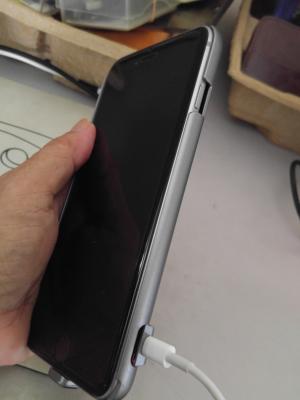
|
|
Topic ClosedOptions
|
| Change to: |  0.0369sec 0.0369sec
 0.41 0.41
 6 queries 6 queries
 GZIP Disabled GZIP Disabled
Time is now: 3rd December 2025 - 06:05 AM |
 Quote
Quote