Welcome Guest ( Log In | Register )

Outline · [ Standard ] · Linear+

 2015 Android TV, A new TV with Android TV built-in

views
     
TSwkkm007
post Dec 3 2015, 11:22 PM, updated 7y ago

Look at all my stars!!
*******
Senior Member
3,123 posts

Joined: Sep 2008
From: OUG - Muhibbah LRT


https://www.android.com/tv/

QUOTE
Upgrade to Android Marshmallow 6.0
http://www.sony.com.my/support/download/61...uct/kdl-43w800c

System Software Update for Asia Pacific
Article ID:618571(modified 21 Jun 2017)

Download For
Applicable Models
KDL-43W800C, KDL-43W800D, KDL-43W950C, KDL-43W950D, KDL-50W800C, KDL-50W800D, KDL-50W950C, KDL-50W950D, KDL-55W800C, KDL-55W800D, KDL-65W850C, KDL-75W850C
» Click to show Spoiler - click again to hide... «


http://www.philips.com.my/c-m-so/televisions
http://www.sharp-world.com/aquos/en/androidtv/
http://www.sony.net/Products/tv/androidtv/...short=androidtv
Xiaomi TV
*but use Xiaomi's custom UI instead of Android TV.

QUOTE(AVFAN @ Aug 7 2016, 02:55 PM)
Google android tv is offered in relevant sony, sharrp and philips models.

Not just apps from playstore, u can load other apps via usb too.

Lg, samsung, panasonic, toshiba have own smart tv systems.
*
Sony Android Smart TV System 2015 review
http://www.trustedreviews.com/sony-android...tem-2015-review


Opera TV browser very bad can't use Bluetooth keyboard to type mad.gif
QUOTE
*Mouse are require
*Can't search Google Chrome directly via Google play store app because the is no Android TV version of it.
The normal/current version Google Chrome can run smoothly now I am using it thumbup.gif
To download Google Chrome:
1. Log in Google ID in Google play store app
2. Surf using Opera TV browser, search Google Chrome using web version play.google.com (also log in Google ID here) or This link
CODE
https://play.google.com/store/apps/details?id=com.android.chrome&hl=en

3. Click download and it will remote and run at background download it via Google play store app
4. Once complete download you can locate it under Setting - App - Download App - Google Chrome


Android TV Remote Control
user posted image

https://play.google.com/store/apps/details?...tv.remote&hl=en
Use your Android phone or tablet as a remote for your Android TV. Easily switch between d-pad and touchpad modes to navigate content and play games on your Android TV device. Tap the mic to start a voice search, or use the keyboard to input text on Android TV.
To get started, connect your Android phone or tablet to the same network as your Android TV device or find your Android TV via bluetooth.

Sideload Launcher - Android TV
user posted image
user posted image

https://play.google.com/store/apps/details?...dlauncher&hl=en
http://www.androidheadlines.com/2015/05/an...d-launcher.html
That is, the ability to easily navigate and access sideloaded content is much longer than normal content. As Google Play does not ‘recognize’ sideloaded apps as Android TV compatible apps, the information on the apps (logos, icons, etc) are not displayed on Google’s native launcher on the Nexus Player.

Due to this, those who sideload apps to the Nexus Player normally have to go through a much longer process of navigating down to ‘settings’, then to ‘apps’, then finding the app, clicking on the app and then finally clicking on ‘open’, all just to launch the app.

ES File Explorer File Manager
Install Android phone’s application to Android TV
https://play.google.com/store/apps/details?...droid.pop&hl=en
user posted image
Android TV Tab allow user to installing app from 'any installed app inside android smartphone' via Wi-Fi (same network/1 router) connection remotely (need to set tick(enable) on Android TV side Android Debugging Mode (Click/press Enter 5 time Android build version under Setting -About) over Wi-Fi) thumbup.gif

This post has been edited by wkkm007: Sep 16 2017, 07:10 PM
TSwkkm007
post Dec 20 2015, 02:39 AM

Look at all my stars!!
*******
Senior Member
3,123 posts

Joined: Sep 2008
From: OUG - Muhibbah LRT


Android TV Remote Control
user posted image

https://play.google.com/store/apps/details?...tv.remote&hl=en
Use your Android phone or tablet as a remote for your Android TV. Easily switch between d-pad and touchpad modes to navigate content and play games on your Android TV device. Tap the mic to start a voice search, or use the keyboard to input text on Android TV.
To get started, connect your Android phone or tablet to the same network as your Android TV device or find your Android TV via bluetooth.
TSwkkm007
post Mar 31 2016, 03:14 AM

Look at all my stars!!
*******
Senior Member
3,123 posts

Joined: Sep 2008
From: OUG - Muhibbah LRT


Sideload Launcher - Android TV
user posted image
user posted image

https://play.google.com/store/apps/details?...dlauncher&hl=en
http://www.androidheadlines.com/2015/05/an...d-launcher.html
That is, the ability to easily navigate and access sideloaded content is much longer than normal content. As Google Play does not ‘recognize’ sideloaded apps as Android TV compatible apps, the information on the apps (logos, icons, etc) are not displayed on Google’s native launcher on the Nexus Player.

Due to this, those who sideload apps to the Nexus Player normally have to go through a much longer process of navigating down to ‘settings’, then to ‘apps’, then finding the app, clicking on the app and then finally clicking on ‘open’, all just to launch the app.
TSwkkm007
post Jun 17 2016, 12:43 AM

Look at all my stars!!
*******
Senior Member
3,123 posts

Joined: Sep 2008
From: OUG - Muhibbah LRT


QUOTE(AVFAN @ Apr 9 2016, 11:41 PM)
well... for netflix 4k, u must have a 4k tv regardless of having a box or not! biggrin.gif
i was wrong 4 months ago when i thought the androids in smart tv's are crappy.

not anymore. the latest androids in premium tv's now are as good as any in a box, if not better.

i had tried my own 4k tv's android enough - it is good, can take any app a box can; good memory size.

so, u save the cost, power, wear and tear on a separate box.

the big advantage of a separate box is probably the audio function. tv's arc (hdmi or optical) don't go very far with audio, tops dd/dts.

for playback dtshdma, ddtrue dolby, dd atmos, dts:x, need the right box.
*
I use optical Toslink output good audio quality, from my Sony W800C BRAVIA (with build in Android TV) to Klipsch Reference R-15PM Powered Speaker
user posted image
user posted image
TSwkkm007
post Jun 22 2016, 01:39 PM

Look at all my stars!!
*******
Senior Member
3,123 posts

Joined: Sep 2008
From: OUG - Muhibbah LRT


QUOTE(DrBarbarian @ Jun 22 2016, 08:17 AM)
can hdtv or myiptv app be installed on to android smart tvs?
*
Is just same like Android tv box technically can be install.
TSwkkm007
post Aug 6 2016, 07:37 PM

Look at all my stars!!
*******
Senior Member
3,123 posts

Joined: Sep 2008
From: OUG - Muhibbah LRT


TSwkkm007
post Sep 8 2017, 01:57 PM

Look at all my stars!!
*******
Senior Member
3,123 posts

Joined: Sep 2008
From: OUG - Muhibbah LRT


rss media reader android tv is working rclxm9.gif
TSwkkm007
post Sep 12 2017, 09:45 AM

Look at all my stars!!
*******
Senior Member
3,123 posts

Joined: Sep 2008
From: OUG - Muhibbah LRT


QUOTE(Indrani @ Sep 11 2017, 08:25 PM)
Hello - can someone pls help with my question. I have an android Toshiba TV which can connect to my TM Streamyx with speed 4mbps (TM can only provide 4mbps at my area) during day time but during evenings or nights, my tv  not able to connect to wifi. Thank you.
*
I am using LAN cable stable.
TSwkkm007
post Sep 12 2017, 09:22 PM

Look at all my stars!!
*******
Senior Member
3,123 posts

Joined: Sep 2008
From: OUG - Muhibbah LRT


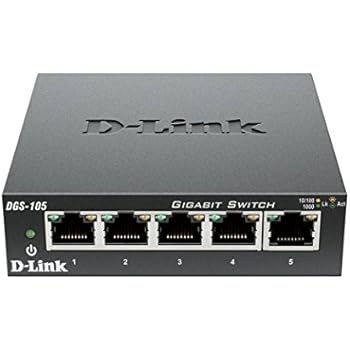
QUOTE(sonypshomer @ Sep 12 2017, 02:52 PM)
Not enough port
*
buy this

user posted image
TSwkkm007
post Sep 14 2017, 11:34 PM

Look at all my stars!!
*******
Senior Member
3,123 posts

Joined: Sep 2008
From: OUG - Muhibbah LRT


QUOTE(sonypshomer @ Sep 14 2017, 07:02 AM)
Thanks. I have 4 rooms to furnish with TV for Airbnb. Still thinking whether to buy Android Tv or normal Tv with android boxes.

Due to the recent kodi 17.x incompatibility with kitkat and below, what is the best solution?

I'm leaning toward android TV for lesser equipment to maintain (or operate) - storage, update, power adapter, socket, wireless keyboard/ remote controller batteries / charging etc.
*
If for other people use they will roughly use will press until rosak, better just buy separately, from a point of audiophile/ home theater user you can replace the faulty unit whichever first. Also cheaper for upgrade if in future needed. Maybe you start with smaller TV first see will they last or not.
TSwkkm007
post Sep 16 2017, 12:05 AM

Look at all my stars!!
*******
Senior Member
3,123 posts

Joined: Sep 2008
From: OUG - Muhibbah LRT


Upgrade to Android Marshmallow 6.0
http://www.sony.com.my/support/download/61...uct/kdl-43w800c

System Software Update for Asia Pacific
Article ID:618571(modified 21 Jun 2017)

Download For
Applicable Models
KDL-43W800C, KDL-43W800D, KDL-43W950C, KDL-43W950D, KDL-50W800C, KDL-50W800D, KDL-50W950C, KDL-50W950D, KDL-55W800C, KDL-55W800D, KDL-65W850C, KDL-75W850C

This software update (version PKG3.885.0137PAA) provides the following benefits and improvements:

Support Hybrid Log-Gamma HDR for HDMI
Improves general performance of the TV
This software update also includes previous update benefits and improvements:

Upgrade to Android Marshmallow
Enhancement of screen design and usability
Expansion of the built-in memory. You can now move the downloaded games and apps to a USB memory device or HDD as an extended memory
Displaying programs in each genre
New design of Help menu
Accessibility support on Netflix
Reduce input lag for HDR game (Applicable only for 4K HDR models: X85C, S85C, X90C, X93C and X94C)
Improves general performance of the TV
Improves general performance of the TV (including TV’s remote control)
Replace new application name of "TV SideView" to "Video & TV SideView"
Support One Touch HDD Recording**
Support Programmed (Timer) Recording**
Support Remote Self Timer recording**
Support Twin Picture
Address a condition where the Netflix* application may not remember the log in details
Support Camera App*
Support Restricted Profile for Android
- Restricts Apps on Home menu
Support SonyLiv/Bigflix *
Support Opera TV store *
New Smile Shutter feature added to the Camera App *
3D glass pairing success message to be displayed
Support HDMI - Ultra HD resolutions of 3840X2160 (4K) 50p/60p (4K Model)
Improved upscaling picture quality (4K Model)
Support Netflix* 4K
Support PlayMemories Online
Integrated Internet Browser
Support Indian Apps* (Camera, Notification)
Fix input icons are displayed twice on HOME menu if language is changed to specific language.
Lip Sync in HDMI input
Improved Picture Quality (dynamic range, noise reduction, sharpness)
Input icons are displayed twice on HOME menu if language is changed to specific language.
* Not all content services are available in all countries
** Only applicable for Australia and New Zealand.

Do I need to update?

Your system software may already be up to date, especially if you have a new Bravia TV model. If you're not sure, it's easy to check which version of system software you have. Please follow these instructions to check it.

Power on the TV set and press the HOME button on the Remote Commander to display the Home Menu.
Navigate to the Help from Settings category and press OK to select it.

The version number is shown on the left portion of ? icon or top right corner of the screen.


What do you need?

A computer with access to the internet
A compatible TV
A compatible USB storage device* (with at least 4GB available storage space)
How to update?
Follow the simple steps below to update your TV system software. Once you have updated, all your personal settings on the TV will remain the same.

How to make sure the update goes smoothly
Updating is usually very simple. Here's how you can make sure it goes right first time:

Read the instructions carefully or you could end up causing the TV to become unresponsive or require a repair.
Don't turn the TV off - or disconnect it from the power - while it's updating.
Don't press any buttons, except the ones mentioned in the instructions.
Stop any recording before you start with the system software update.
Download the update
Before you install the update, you'll need to download it from the internet and save it to a USB stick

Read and accept the Terms & Conditions below and click download button.
When prompted, save the file to your Desktop. When the update download is complete, check that the file size is 1,558,614,751 bytes. To do this, right click the file, select properties and check the size in the General tab.
Open Windows Explorer, locate the downloaded sony_tvupdate_2015_3885_paa_auth.zip, and unzip it. A folder sony_tvupdate_2015_3885_paa_auth will be created in your local drive after unzipped. A file of sony_dtvxxxxxxxxxxxx_xxxxxxxx.pkg will be contained in this folder.
Copy the .pkg file to the root of your USB device.
TSwkkm007
post Sep 16 2017, 06:53 PM

Look at all my stars!!
*******
Senior Member
3,123 posts

Joined: Sep 2008
From: OUG - Muhibbah LRT


QUOTE(sonypshomer @ Sep 16 2017, 08:35 AM)
Wow that whole loads of improvement from Sony.

Support HDMI - Ultra HD resolutions of 3840X2160 (4K) 50p/60p (4K Model)- before this not support?
*
Not sure bro, I poor la just use the 43 inch Full HD only, but I still happy mostly watching youtube 480p 360p also some 720p hardly can get 1080p quality. 4K still no my thing expensive and availability.
TSwkkm007
post Feb 5 2019, 01:16 AM

Look at all my stars!!
*******
Senior Member
3,123 posts

Joined: Sep 2008
From: OUG - Muhibbah LRT


Sony Bravia Android TV Settings Guide 2018: What to Enable, Disable and Tweak

https://www.tomsguide.com/us/sony-tv-settin...ew-5605-11.html

Sony's smart TV comes with all sorts of content recommendations by default. Some of these are handy, helping you discover new shows, music, apps and more. But not all of those recommendations will be useful, and sometimes the onslaught of recommendations can be too much. The good news is that it's quick and easy to edit the recommendations you get, or to turn them off entirely.

There's also a second bar of featured apps, which is handy when you're first exploring the available apps, but will waste a lot of space.

Like the recommendations row, Sony's default selection of featured apps not only clutters up the home screen, it can also cause odd problems when you try to find an app you want to use. Was it in your apps bar, or was it in the Featured Apps? What about all those featured apps you have no interest in? Surely, not everybody will want Hallmark Movies NOW or RedBull TV in their menu at all times.

With a couple of quick changes in settings, you can remove the Featured Apps section from your home screen, and the apps you actually want to use will all be conveniently grouped with your other apps.


Change to:
| Lo-Fi Version
0.0213sec    0.66    6 queries    GZIP Disabled
Time is now: 9th December 2025 - 04:34 PM