Outline ·
[ Standard ] ·
Linear+
Huawei Mate 8 forum discussion V1, The truly premium flagship?
|
Crystal2
|
 Mar 13 2016, 09:56 PM Mar 13 2016, 09:56 PM
|

|
There are 2 grille-slots at the bottom - does it mean the phone has 2 speakers? I can't find any mention of 2 spreakers in the specification. Would appreciation if anyone could confirm. Thank you.
|
|
|
|
|
|
Crystal2
|
Mar 14 2016, 01:52 PM
|
|
|
QUOTE(xperiaDROID @ Mar 13 2016, 09:58 PM) The right side is the speaker while the left side is the microphone, if I'm not wrong. TQ, I think you are right, when I cover the right side I can feel the vibration but not when i cover the left. |
|
|
|
|
|
Crystal2
|
Mar 14 2016, 01:55 PM
|
|
|
QUOTE(retsmot @ Mar 14 2016, 01:06 PM) there's an app in the phone called hicare... u can check ur warranty status there, by inputing your imei or serial number. if you are buying from shop u can take a moment to check it if you have internet on. mine till may 2017.  if got warranty should be malaysia unit right? I check the HiCare but can't find how to check or register the warranty. Anyone can advise? Thank you. |
|
|
|
|
|
Crystal2
|
Mar 14 2016, 04:50 PM
|
|
|
Thank you, Benny888 & Retsmot, warranty checked.
I bought on 13/3 but warranty until 24/5/17 - not that I am complaining, but why extra 2 months?
This post has been edited by Crystal2: Mar 14 2016, 05:45 PM
|
|
|
|
|
|
Crystal2
|
Mar 18 2016, 10:29 AM
|
|
|
QUOTE(xperiaDROID @ Mar 17 2016, 09:58 PM) Anyone here using the Standard 32GB variant? How much storage did you get out of the box, is it sufficient enough? My Mate 7 has only 16Gb and I have no problems at all with about 4Gb left. As for Mate 8, I am using the 32Gb variant, which in my opinion is large enough if you use a SDHC for data & downloading videos & songs. So don't worry, go and buy the variant that suits your needs or budget. ps: I don't play games and so 3Gb RAM is OK for me. This post has been edited by Crystal2: Mar 18 2016, 10:32 AM Attached thumbnail(s)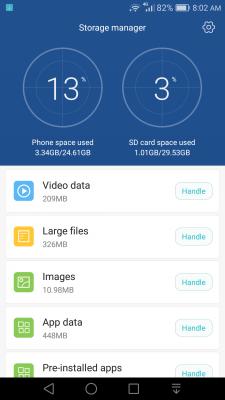
|
|
|
|
|
|
Crystal2
|
Mar 18 2016, 10:38 AM
|
|
|
QUOTE(xperiaDROID @ Mar 18 2016, 10:17 AM) That means it will take like 2+ hours to charge from 0% to 100%? Kinda slow.  Are you using the fast charger? Their brochure states that it will be fully charged from 0% within 2.5 hours. That to me is pretty decent. I heard that extremely fast charging will KO a battery sooner. Frankly I would prefer a longer lasting battery bearing in mind that Mate 8 battery is not replaceable by users. This post has been edited by Crystal2: Mar 18 2016, 10:39 AM |
|
|
|
|
|
Crystal2
|
Mar 18 2016, 09:14 PM
|
|
|
At the bottom of the Lock Screen is an Emergency Call. How do we set up the emergency contacts? Thank you.
|
|
|
|
|
|
Crystal2
|
Mar 20 2016, 02:25 PM
|
|
|
QUOTE(Chisinlouz @ Mar 20 2016, 02:11 PM) +1 I felt this phone have good hardware but software wise need to improve. Some basic stuff still lacking. I think it is a power-saving measure in which it will not wake up from its snooze to download messages if its gyrometer doesn't sense movement. Why waste energy when the owner is also snoozing? I could be wrong, I stand corrected. |
|
|
|
|
|
Crystal2
|
Mar 21 2016, 10:37 AM
|
|
|
QUOTE(xperiaDROID @ Mar 21 2016, 10:18 AM) That means Huawei Malaysia seldom update their phones to the latest software version. Maybe Huawei Malaysia believes in "if it ain't broke, don't fix it" While all consumers and nerds (me included) love frequent updates, early adopters sometimes suffer from bugs which were not detected. |
|
|
|
|
|
Crystal2
|
Mar 23 2016, 10:58 AM
|
|
|
QUOTE(de_moschino @ Mar 22 2016, 05:55 PM) charge from 5% to 100% take 2 and half hour? I noticed that the charging is quite fast at about 1% per minute until the battery is above 90% than it slows down to 1% per 5 minutes. So I am quite happy with this fast charging as at 90% the battery could already easily last more than 1 day. The claim of 2.5 hours to fully charge the battery is fair but I am not sure if it can be called 'fast'. This post has been edited by Crystal2: Mar 23 2016, 11:25 AM Attached thumbnail(s)
|
|
|
|
|
|
Crystal2
|
Mar 24 2016, 09:34 AM
|
|
|
QUOTE(benny888 @ Mar 24 2016, 07:18 AM) I like flipcases n I wonder why some of you hates it!! I always use flipcases on all my phones. I don't find it inconvenient at all using it...anyway that is just me And to any doubters the Mate8 has quite a good camera...is good enough for me. Ofcourse you cannot compare it with camera kings such as S7edge or LG V10 ( both phones I had too) All early reports of poor camera was based on early development build of firmware n one shouldn't be worried about it +1, fully concurred with you. |
|
|
|
|
|
Crystal2
|
Mar 25 2016, 11:50 AM
|
|
|
QUOTE(benny888 @ Mar 24 2016, 08:31 PM) That b170 firmware is Msian specs - just look at the firmware file name . Only last 3 digit is different being 170. There is no warranty issue at all Just extract the firmware till you see dload folder. If you don't see such a folder just copy all files to a folder named dload Copy this folder to ext sdcard Switch off phone. Press volup n voldown n power button simultaneously. Once you see phone bootup letgo power button only. Once you see firmware update than released the vol buttons The phone could reboot twice to complete the update All your data remains after update Benny888, you said above "Copy this folder to ext sdcard" but the video posted by Waqi953 shows 'copy to internal memory'. Is either method OK or you recommend copy to sdcard? Thank you. This post has been edited by Crystal2: Mar 25 2016, 11:51 AM |
|
|
|
|
|
Crystal2
|
Mar 25 2016, 03:46 PM
|
|
|
Dear all (i.e., Noobi3, benny888, waqi953, angel-girl & thankyou), I am so happy to be able to update the firmware to B170. One time download and was very lucky but I would not be so daring to try without all your guidance.
By the way, can I delete the folder dload? I put the dload in the internal memory & not external SDCard. Thanks again.
This post has been edited by Crystal2: Apr 8 2016, 09:07 PM
|
|
|
|
|
|
Crystal2
|
Mar 25 2016, 04:24 PM
|
|
|
QUOTE(angel-girl @ Mar 25 2016, 03:47 PM) great and yes you can delete it.  Thank you QUOTE(angel-girl @ Mar 25 2016, 04:12 PM) yes correct. after updated to B170 i found abit laggy while using whatapps. hang after viewing whatapps image and back to chat.  Yeah, I found the phone laggy too. |
|
|
|
|
|
Crystal2
|
Mar 25 2016, 05:34 PM
|
|
|
I am quite disappointed with B170 firmware, anyway to flash back to B103 firmware?
|
|
|
|
|
|
Crystal2
|
Mar 26 2016, 09:28 PM
|
|
|
QUOTE(benny888 @ Mar 25 2016, 05:36 PM) Just download the b103 firmware n flash it as you did for b170 Thank you, I think I will hold on to B170 for another few days. QUOTE(Jacatez @ Mar 25 2016, 08:47 PM) I encountered the same problem when I firstly updated the firmware. The problem resolved after I disabled the Magnification gesture and High contrast text under the Accessibility. Basically the B170 is smoother than B103. Pls try as below :- Go to Setting>Advance Settings>Accessibility>Turn off the "Magnification gesture" and " High contrast text" To those having the WhatsApp and Wechat notification delay, pls do as below :- Go to Setting>Apps>WhatsApp>Notification>Enable the "Priority display" and "Allow notifications" then choose the Notification method you desired. I don't encounter any delay in notification at all after the changes. Good luck  Better now, thank you. However I found the battery depletes very fast when using Waze. It went down by 65% when I drove for 4 hours. |
|
|
|
|
|
Crystal2
|
Mar 27 2016, 08:39 AM
|
|
|
QUOTE(thankyou @ Mar 27 2016, 02:08 AM) still not used to left 'back' button... You can swap the positions Attached thumbnail(s)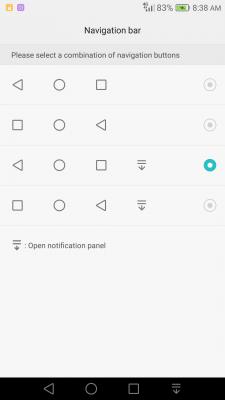
|
|
|
|
|
|
Crystal2
|
Apr 9 2016, 11:21 AM
|
|
|
QUOTE(thankyou @ Apr 7 2016, 07:32 AM) Upload on the way Done - NXT-L29C636B180.zip https://drive.google.com/file/d/0B7xOb77mzB...iew?usp=sharingPlease take note I have rename the zip file. Normally I'll keep the previous file just in case rollback required. Thank you QUOTE(ashx @ Apr 9 2016, 09:48 AM) LGUP? Anyway, flashed B180 on a 3GB. So anyone reading. Flashed no problem. Mine also 3GB RAM & duly updated to B180 without any problem. Like this B180 as the data signal H+/4G now disappeared when connected to WiFi This post has been edited by Crystal2: Apr 9 2016, 12:51 PM |
|
|
|
|
|
Crystal2
|
Apr 9 2016, 10:39 PM
|
|
|
QUOTE(latte36 @ Apr 9 2016, 08:06 PM) Finally had the chance to try out the mate 8, but the 3gb variant. Feels good mang. But i notice i scroll thru photos fast, got some delay. Screen will appear grey before showing the next photo. Guess i need to get the 4gb one. Are your photos stored in SDHC or internal memory? If stored in SDHC, the delay in image rendering could be due to the slow reading speed of your card. |
|
|
|
|
|
Crystal2
|
Apr 15 2016, 09:00 AM
|
|
|
STOLEN? BLOCK IT NOW!
Most people think that they must call up their mobile network to block their SIM card from being used immediately. They are half right. But what if we told you that you can stop your mobile device from being used with any other SIM card, even if it is from another mobile network.
This is now possible! Not only will your device be useless to any other person, but you will also increase the chances of getting your device back!
So register your device(s) with us today and protect your device now!
www.blockmyphone.my/PCBS/promotional
This service is provided FREE by the Malaysian Communications and Multimedia Commission (MCMC) and the Malaysian Government.
|
|
|
|
|



 Quote
Quote

 0.0420sec
 0.34
0.34
 7 queries
 GZIP Disabled