Welcome Guest ( Log In | Register )

23 Pages « < 16 17 18 19 20 > » Bottom

Outline · [ Standard ] · Linear+

Unifi Connect UniFi HyppTV Set Top Box Through WiFi

views
     
imalmighty
post Nov 26 2018, 06:32 PM

mic test
*****
Senior Member
732 posts

Joined: Dec 2017
randomwhitehat let's continue the conversation here.

To those of you successfully get the wireless option to work, how's the performance? The viewing experience? Does it stutter? Howndoes it fare compared to powerline solution?


This post has been edited by imalmighty: Nov 26 2018, 08:01 PM
vivixeon
post Nov 27 2018, 09:24 PM

New Member
*
Junior Member
36 posts

Joined: Oct 2008


Guys, im having problem with hypp tv.. i just got the new STB from unifi.. im using router tplink archer c9.. follow all the step, internet connected but iptv no display.. it keep on showing satellite with x mark on iy
imalmighty
post Nov 27 2018, 11:18 PM

mic test
*****
Senior Member
732 posts

Joined: Dec 2017
QUOTE(vivixeon @ Nov 27 2018, 09:24 PM)
Guys, im having problem with hypp tv.. i just got the new STB from unifi.. im using router tplink archer c9.. follow all the step, internet connected but iptv no display.. it keep on showing satellite with x mark on iy
*
Erm, could u be nore specific? How do u setup?
Max
post Nov 28 2018, 02:43 PM

Regular
******
Senior Member
1,705 posts

Joined: Jan 2003
From: Sepang - Putrajaya - Cyberjaya


QUOTE(vivixeon @ Nov 27 2018, 09:24 PM)
Guys, im having problem with hypp tv.. i just got the new STB from unifi.. im using router tplink archer c9.. follow all the step, internet connected but iptv no display.. it keep on showing satellite with x mark on iy
*
New STB?
U have to call TM to release ur old STB link. (mac address if not mistaken)
Then can login stb with ur account.
randomwhitehat
post Nov 29 2018, 02:49 PM

New Member
*
Newbie
5 posts

Joined: Nov 2011
From: Sungai Long, Kajang Selangor


QUOTE(imalmighty @ Nov 26 2018, 06:32 PM)
randomwhitehat let's continue the conversation here.

To those of you successfully get the wireless option to work, how's the performance? The viewing experience? Does it stutter? Howndoes it fare compared to powerline solution?
*
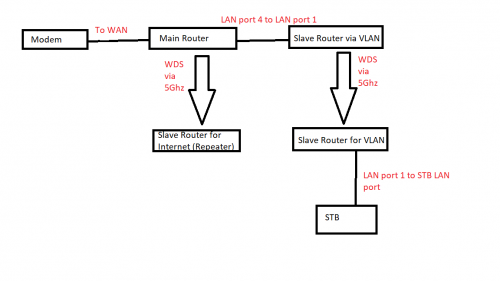
Actually I have this in mind, check the diagram below. Connecting STB directly to the slave router that connects via VLAN port can work but the STB's NIC is shit, only supports 2.4Ghz, plus the slave router needs to be place on second floor so the signal is utterly useless. But if it's gonna work as per the diagram below, it will cost a lot (unless you got a lot of spare router that could support VLAN and WDS), so might as well get a powerline rclxub.gif, you get what I mean? brows.gif

user posted image

This post has been edited by randomwhitehat: Nov 29 2018, 02:54 PM
imalmighty
post Nov 29 2018, 03:54 PM

mic test
*****
Senior Member
732 posts

Joined: Dec 2017
QUOTE(randomwhitehat @ Nov 29 2018, 02:49 PM)
Actually I have this in mind, check the diagram below. Connecting STB directly to the slave router that connects via VLAN port can work but the STB's NIC is shit, only supports 2.4Ghz, plus the slave router needs to be place on second floor so the signal is utterly useless. But if it's gonna work as per the diagram below, it will cost a lot (unless you got a lot of spare router that could support VLAN and WDS), so might as well get a powerline  rclxub.gif, you get what I mean? brows.gif

user posted image
*
Yes, high end routers with wds and vlan feature, preferably router pair of the same brand for wds mode.

Haha, not worth it ofcoz
wongpeter
post Dec 1 2018, 11:11 AM

Enthusiast
*****
Senior Member
973 posts

Joined: Jun 2008
How to change to operator login? Thanks.

QUOTE(xSoONx @ Mar 27 2016, 06:22 PM)
Need help here. I can't get the WAN option at setup tab. I'm using the new unifi router (EC6108V8)
Thanks

Edited: changed to 'operator' login, now i'm able to see the WAN setting.  rclxms.gif
*
westlife
post Dec 1 2018, 11:31 AM

10k Club
********
All Stars
14,244 posts

Joined: Jan 2011
QUOTE(taqu @ Oct 19 2018, 11:17 PM)
It shouldn't degrade internet speed.

In my case, HyppTV via powerline it's unstable. Maybe TP-Link C1200 doesn't like Powerline connected to LAN4, who knows, or due to my home's 3-phase wiring. Now after HyppTV is offloaded from my router, everything is fine.

As a good powerline can cost almost RM200, you might as well buy 2 TP-Link SG105E switch and trunk both VLAN 500 & 600 via your single network cable downstair.
*
Unifi wifi router the 4 network ports allow trunking?
imalmighty
post Dec 1 2018, 02:37 PM

mic test
*****
Senior Member
732 posts

Joined: Dec 2017
QUOTE(wongpeter @ Dec 1 2018, 11:11 AM)
How to change to operator login? Thanks.
*
Your router name? tgr212m/wbr2300/innatech rgx4332, h566UniFi
taqu
post Dec 1 2018, 04:52 PM

Enthusiast
*****
Junior Member
864 posts

Joined: May 2005
QUOTE(westlife @ Dec 1 2018, 11:31 AM)
Unifi wifi router the 4 network ports allow trunking?
*
No.
westlife
post Dec 1 2018, 04:57 PM

10k Club
********
All Stars
14,244 posts

Joined: Jan 2011
QUOTE(taqu @ Oct 16 2018, 09:57 AM)
[attachmentid=10070631]

Router & BTU is in store room, while HyppTV STB is in living room. There's a RJ45 wall socket at living room's wall, connected to store room.

Previously using Powerlines, but it's not stable (lag, disconnect etc). So I have to use cable, losing that wall socket for Internet.

I wonder will the setup above work? Can standard TM-supplied/consumer routers with Unifi VLAN tagging work in AP mode too? Thanks.
*
If without existing network ports, I dun think it is easy to implement the two ports from TM wifi router to another switch then to two different devices at different floors.

This post has been edited by westlife: Dec 1 2018, 04:58 PM
taqu
post Dec 1 2018, 06:55 PM

Enthusiast
*****
Junior Member
864 posts

Joined: May 2005
QUOTE(westlife @ Dec 1 2018, 04:57 PM)
If without existing network ports, I dun think it is easy to implement the two ports from TM wifi router to another switch then to two different devices at different floors.
*
Couldn't do it so ended up using Powerline, but router no longer do VLAN tagging for HyppTV, it's done at my switch. HyppTV still loses signal sometimes, but I only need to restart BTU without restarting the rest of my network.
westlife
post Dec 1 2018, 09:03 PM

10k Club
********
All Stars
14,244 posts

Joined: Jan 2011
QUOTE(taqu @ Dec 1 2018, 06:55 PM)
Couldn't do it so ended up using Powerline, but router no longer do VLAN tagging for HyppTV, it's done at my switch. HyppTV still loses signal sometimes, but I only need to restart BTU without restarting the rest of my network.
*
lucky my unifi tv is next to my wifi router, so no issue about this connectivity. In fact, I dun watch unifi tv at all since I am watching Astro instead.

I bought the TP-link TL-SG108 without 'E' switch to extend the gigabit Ethernet ports from my wifi router. So far so good. Previously my Sony tv I connect using wifi becos not enough ports on the wifi router, when I cast YouTube video to the tv, it always stucks at loading sometimes after a while and always need to off the wifi on the tv and on again to resolve, sometimes even need to repair the tv to my wifi to work. Now problem solved, a lot more stable on Ethernet.

And I have extra ports now to connect many other devices via wired including my MacBook Pro. I can get full internet speed connecting using wire to the newly bought switch.

Never bought the 'E' model becos I did not see it during the IT show when I bought this non 'E'. Now come to think, for home networking, I do not really need vlan tagging also.

So far so good.

taqu
post Dec 1 2018, 11:44 PM

Enthusiast
*****
Junior Member
864 posts

Joined: May 2005
QUOTE(westlife @ Dec 1 2018, 09:03 PM)
lucky my unifi tv is next to my wifi router, so no issue about this connectivity. In fact, I dun watch unifi tv at all since I am watching Astro instead.

I bought the TP-link TL-SG108 without 'E' switch to extend the gigabit Ethernet ports from my wifi router.  So far so good. Previously my Sony tv I connect using wifi becos not enough ports on the wifi router, when I cast YouTube video to the tv, it always stucks at loading sometimes after a while and always need to off the wifi on the tv and on again to resolve, sometimes even need to repair the tv to my wifi to work. Now problem solved, a lot more stable on Ethernet.

And I have extra ports now to connect many other devices via wired including my MacBook Pro. I can get full internet speed connecting using wire to the newly bought switch.

Never bought the 'E' model becos I did not see it during the IT show when I bought this non 'E'. Now come to think, for home networking, I do not really need vlan tagging also.

So far so good.
*
Great that you don't need unifi tv.

One more reason I bought SG108E is it can do port mirroring, connected to a small server monitoring Internet traffic.

westlife
post Dec 2 2018, 10:23 AM

10k Club
********
All Stars
14,244 posts

Joined: Jan 2011
QUOTE(taqu @ Dec 1 2018, 11:44 PM)
Great that you don't need unifi tv.

One more reason I bought SG108E is it can do port mirroring, connected to a small server monitoring Internet traffic.
*
it is worthwhile to buy SG108E certainly since the price difference is very little. tongue.gif

if it was selling at that time, i will buy it also.
too bad it was not.

yes, lucky also i do not need unifi tv and also do not need to do any port mirroring too since I am using my Internet alone. no need to monitor traffic as I am aware of what i use. haha.
wongpeter
post Dec 2 2018, 04:05 PM

Enthusiast
*****
Senior Member
973 posts

Joined: Jun 2008
D-Link DIR-842
The router login screen only asks for password, no input box for username.

QUOTE(imalmighty @ Dec 1 2018, 02:37 PM)
Your router name? tgr212m/wbr2300/innatech rgx4332, h566UniFi
*
This post has been edited by wongpeter: Dec 2 2018, 04:09 PM
marche
post Dec 2 2018, 06:33 PM

Casual
***
Junior Member
392 posts

Joined: Jun 2008
From: BATU PAHAT


QUOTE(wongpeter @ Dec 2 2018, 04:05 PM)
D-Link DIR-842
The router login screen only asks for password, no input box for username.
*
default password is 12345678
wongpeter
post Dec 3 2018, 08:24 AM

Enthusiast
*****
Senior Member
973 posts

Joined: Jun 2008
Will try it out later. Thanks

QUOTE(marche @ Dec 2 2018, 06:33 PM)
default password is 12345678
*
wongpeter
post Dec 3 2018, 02:39 PM

Enthusiast
*****
Senior Member
973 posts

Joined: Jun 2008
Invalid password

QUOTE(marche @ Dec 2 2018, 06:33 PM)
default password is 12345678
*
marche
post Dec 3 2018, 02:58 PM

Casual
***
Junior Member
392 posts

Joined: Jun 2008
From: BATU PAHAT


QUOTE(wongpeter @ Dec 3 2018, 02:39 PM)
Invalid password
*
another one is blank

just press login


23 Pages « < 16 17 18 19 20 > » Top
 

Change to:
| Lo-Fi Version
0.0248sec    0.72    6 queries    GZIP Disabled
Time is now: 2nd December 2025 - 07:33 PM