Welcome Guest ( Log In | Register )

Bump Topic Topic Closed RSS Feed
20 Pages « < 8 9 10 11 12 > » Bottom

Outline · [ Standard ] · Linear+

 ILLEGEAR Z5 & Z7 Discussion Thread V2, ILLEGEAR Z7 is here!

views
     
Prince J
post Jan 20 2016, 06:41 PM

Regular
******
Senior Member
1,272 posts

Joined: May 2010
From: Team ILLEGEAR


QUOTE(justjun @ Jan 20 2016, 06:36 PM)
Hi there, can you upload to dropbox and pm me with the link for the USB 3.0 driver on windows 10 ?

sadly, its not possible since im not in malaysia anymore, can you also upload the latest bios version for me too? thanks alot
*
For BIOS i will upload it, but I can't upload the windows 7 installation media.

Windows 10 doesn't require USB 3.0 driver.
Prince J
post Jan 21 2016, 10:46 AM

Regular
******
Senior Member
1,272 posts

Joined: May 2010
From: Team ILLEGEAR


QUOTE(Viliarde @ Jan 21 2016, 12:08 AM)
hey guys, I just got the Z5 Skylake 970m last week and i notice that the speaker seems crack up if the pitch is a lil high. Anyone experience this?

Additionally, when i play Xcom on high and at 1920 x 1080, the game seems to lag up. I would expect that for this specs, it should perform better than my old laptop which works fine at that settings...
*
QUOTE(Miracle_Fate @ Jan 21 2016, 02:06 AM)
same here, i encounter the same situation with u even i only open at 60% volume but sometime if higher pitch the speaker will crack. i duno is speaker defect or not since i only use integrate speaker. it will solve if reduce the volume but if u think such a high end laptop the speaker quality like this i think this is not at a satisfy level. wink.gif
*
Hi Vilarde and Miracle,

Is that possible we can have your laptops to test out the speaker?

As for the Xcom gameplay, please set "High Performance" in Nvidia control panel.

This post has been edited by Prince J: Jan 21 2016, 10:54 AM
Prince J
post Jan 21 2016, 10:50 AM

Regular
******
Senior Member
1,272 posts

Joined: May 2010
From: Team ILLEGEAR


QUOTE(YangWeiLim85 @ Jan 20 2016, 09:34 PM)
Im using 5ghz, sometime play dota2 also will lagging
*
Hi YangWeiLim85, do you mean your internet has high ping or the gameplay is lagging?
Prince J
post Jan 21 2016, 04:26 PM

Regular
******
Senior Member
1,272 posts

Joined: May 2010
From: Team ILLEGEAR


QUOTE(latworx @ Jan 21 2016, 04:02 PM)
installed the latest one. 10.32. still the same.

do i need to download the 10.30 one?

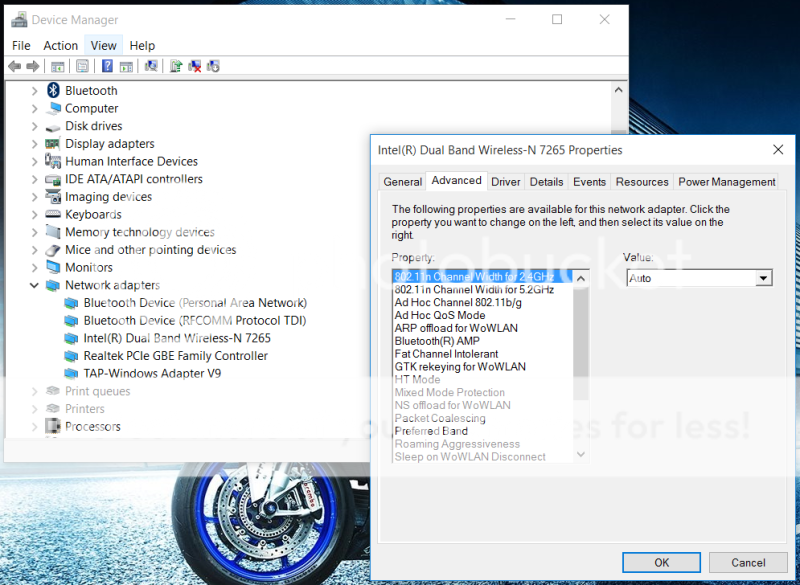
btw, this is what device manager showed.

user posted image
___________________________________________________________________________________________
most of the people who encounter with the same prob as mine, still shows the wireless name as 'IntelĀ® Dual Band Wireless-AC 7265'

but mine still state as IntelĀ® Dual Band Wireless-N 7265. am i getting the wrong wireless card? cry.gif hope not.. no time to wait for replace the card.
*
Can I have your OS edition? Will pm you for the driver link.
Prince J
post Jan 21 2016, 07:00 PM

Regular
******
Senior Member
1,272 posts

Joined: May 2010
From: Team ILLEGEAR


QUOTE(Miracle_Fate @ Jan 21 2016, 06:39 PM)
maybe u solve by this method is because after u solved then your speaker sound become very low, as i mention above when crack sound happen on my speaker then i reduce the sound then it will be fix. it's not happen always, but sometimes. now i dont even dare to open above 80% scare the speaker spoil
*
Hi Miracle,

As mentioned, you can bring in your laptop for us to check, if the speaker is defective we will have it replaced.

This post has been edited by Prince J: Jan 21 2016, 07:16 PM
Prince J
post Jan 22 2016, 02:23 PM

Regular
******
Senior Member
1,272 posts

Joined: May 2010
From: Team ILLEGEAR


*Please pin this*

Latest BIOS for SKYLAKE Z5 960M and 970M, this BIOS fix Shift+7 with Numlock issue.

http://www.illegear.com/downloads/z5skylakebiosupdate.zip

Steps (DOS method):

1. Prepare a USB pendrive and make a bootable USB pendrive with Rufus, download Rufus from https://rufus.akeo.ie/
2. Open Rufus, file system choose "FAT32", create a bootable disc using "MS-DOS", format the pendrive.
3. Extract and transfer the downloaded BIOS files to the bootable USB pendrive.
4. Make sure the AC adapter is connected. Press F2 to enter into BIOS control panel upon boot up, set the pendrive as the highest boot priority, save and restart.
5. Flash BIOS, type "dos.bat", computer will restart by itself, after restart the computer will start flashing BIOS *warning do not remove the USB pendrive and power source during flashing*.
6. Enter F2 BIOS again, click "load default settings", done.
Prince J
post Jan 22 2016, 02:33 PM

Regular
******
Senior Member
1,272 posts

Joined: May 2010
From: Team ILLEGEAR


Hi andrew nik and others,

Sorry for the mistake and confusion.

The factory only approves dual-band 7265NGW NA (7265-N) at the moment and we are trying to make 8260 card compatible with Z5 skylake edition.

Will update you guys for the progress and which 8260 card can be compatible with your current Z5 Skylake. As for upgrading cost, we will waive for the first batch Z5 skylake customer if it's compatible with your current z5.

This post has been edited by Prince J: Jan 22 2016, 02:34 PM
Prince J
post Jan 23 2016, 02:01 PM

Regular
******
Senior Member
1,272 posts

Joined: May 2010
From: Team ILLEGEAR


QUOTE(xVentrusx @ Jan 23 2016, 01:58 PM)
guys do you sometimes get like a small electric shock while playing with z5 while plugged? i keep on getting em mostly from the edges x.x .
*
Hi xVentrusx,

Try using the Z5 on different surface and socket as some sockets have problem with grounding.
Prince J
post Jan 26 2016, 01:28 PM

Regular
******
Senior Member
1,272 posts

Joined: May 2010
From: Team ILLEGEAR


QUOTE(kmc3388 @ Jan 23 2016, 09:09 PM)
As part of the promotion, I remember the listed free RAM is Kingston, rather than RAM from unknown brand.

And WIFI is Dual Band Wireless-N 7265.
*
Hi kmc3388,

The RAM must be mixed up during our busy production schedule, please return your laptop to us and we will have it exchanged to crucial. Sorry about that.

----

As for the 7265-N issue, we apologize for the miscommunication mistake with the factory. We initially ordered Z5 Skylake with 8260-AC adapter since October 2015, about two weeks later, factory responded that they are unable to make the 8260-AC card compatible with Z5 Skylake, and they will use 7265 WLAN card for us. We initially thought that it's an AC card until forumer latworx found out that is actually a N card.

Upon checking with factory, the 7265NGW NA is the only card that's supported in Z5 Skylake, we are trying to discuss with factory and exchange these cards to us, please wait for our update.

This post has been edited by Prince J: Jan 26 2016, 07:34 PM
Prince J
post Jan 26 2016, 01:30 PM

Regular
******
Senior Member
1,272 posts

Joined: May 2010
From: Team ILLEGEAR


QUOTE(aBcD-| @ Jan 23 2016, 10:01 PM)
Actually you are not the only one...
As mistakes are made, now I really curious whether did they apply IC Diamond thermal compound on it. It was crucial that advertised

*
Hi aBcD,

I am pretty sure the IC Diamond is applied, please return your laptop to us and we will exchange with Crucial ram for you.
Prince J
post Jan 26 2016, 03:24 PM

Regular
******
Senior Member
1,272 posts

Joined: May 2010
From: Team ILLEGEAR


QUOTE(syaoranlove @ Jan 23 2016, 10:40 PM)
Hi, I'm using Illegear Z5 Skylake. I play Dragon Nest. When I got it yesterday, I can play it, with all key can use skills. But today I play, my 7 Key cannot use skill... I still can type 7, but in the game, I cannot use the skill on 7. How to fix this, thanks... lol
*
Hi syaoranlove,

Are you using numpad "7" key or top the "7" above english characters?

Try to flash the BIOS to see if the issue still persists.

Latest BIOS for SKYLAKE Z5 960M and 970M, this BIOS fix Shift+7 with Numlock issue.

http://www.illegear.com/downloads/z5skylakebiosupdate.zip

Steps (DOS method):

1. Prepare a USB pendrive and make a bootable USB pendrive with Rufus, download Rufus from https://rufus.akeo.ie/
2. Open Rufus, file system choose "FAT32", create a bootable disc using "MS-DOS", format the pendrive.
3. Extract and transfer the downloaded BIOS files to the bootable USB pendrive.
4. Make sure the AC adapter is connected. Press F2 to enter into BIOS control panel upon boot up, set the pendrive as the highest boot priority, save and restart.
5. Flash BIOS, type "dos.bat", computer will restart by itself, after restart the computer will start flashing BIOS *warning do not remove the USB pendrive and power source during flashing*.
6. Enter F2 BIOS again, click "load default settings", done.
Prince J
post Jan 26 2016, 03:49 PM

Regular
******
Senior Member
1,272 posts

Joined: May 2010
From: Team ILLEGEAR


QUOTE(Miracle_Fate @ Jan 23 2016, 10:52 PM)
i also think that why they dont wan to spend some time to count the stock for all the parts are enough for the order? since we waited for the z5 arrived was at least 1 month if they check the stock and order immediately with the supplier i think they can save a lot of time to inform us are we agree to chg ssd brand and we can get our mx200 as in the order. i think this is the win-win situation right?
*
Hi Miracle,

I completely understand your feeling of getting the laptop asap. We did count back order quantity and order the stock from Crucial the time we got your order details. Crucial ETA to us were postponed three times (every time right before the delivery date). So we have to start to look for alternatives for our customers. Sorry for the inconvenience caused.
Prince J
post Jan 26 2016, 03:57 PM

Regular
******
Senior Member
1,272 posts

Joined: May 2010
From: Team ILLEGEAR


QUOTE(nik_cool @ Jan 24 2016, 12:35 AM)
And for RAM, I already noticed long time ago, several days after put my order, I saw they took off the "kingston" in their description as FOC.
I thought, well since it was free then I couldnt make any complaint.

For network card, I dont know what to say. Even Illegear themselves claimed that they also knew this matter not long ago.
*
Edited: "Checked with nik via whatsapp, he received crucial ram."

This post has been edited by Prince J: Jan 26 2016, 04:16 PM
Prince J
post Jan 26 2016, 04:52 PM

Regular
******
Senior Member
1,272 posts

Joined: May 2010
From: Team ILLEGEAR


QUOTE(mechanicalKB @ Jan 24 2016, 12:45 AM)
don't pick or focus on mine - I'm only giving a tldr commentary but not for the fun of it or for nothing - in the middle of the night yeah I don't have a life?
*
Hi richard,

I recall that your purchasing was done smoothly with all your requests like helping you to install your own SSD, HDD and drivers download link etc. Do not hesitate to pm me if you have something unhappy. smile.gif

This post has been edited by Prince J: Jan 26 2016, 04:54 PM
Prince J
post Jan 26 2016, 04:57 PM

Regular
******
Senior Member
1,272 posts

Joined: May 2010
From: Team ILLEGEAR


QUOTE(nik_cool @ Jan 26 2016, 04:46 PM)
What I mean by above statement is as I remembered at first time when I saw illegear webs it stated "kingston".
But when I made an order it was crucial.
Then a week later I notice that Illegear took down brand name of ram and left it blank, only ram. Since they were free, I thought it was acceptable and did not make any complaint even if later on I got another brand.
Never claim that I got wrong ram tho..
I even explain to some of user whose thinking that micron tech is some kind of unknown brand from china tongue.gif  tongue.gif
*
Yes crucial is using micron chips, and all our Crucial DDR4 ram inventory are using micron chips too. When you take out the ram then you will notice the Crucial sticker is at the back of the ram. (Many ppl have been asking us why they get Micron ram but not crucial ram tongue.gif)

December Z5 order, the website is with Crucial ram, so you don't need to change your ram smile.gif
Prince J
post Jan 26 2016, 05:14 PM

Regular
******
Senior Member
1,272 posts

Joined: May 2010
From: Team ILLEGEAR


QUOTE(nik_cool @ Jan 24 2016, 02:59 AM)
Yeah wise choice. Nowadays, crucial ram is the better option in term of value
*
Yep adata is not that well established comparing to Crucial and Kingston.

But speaking from our experience, we have zero failure rate of their RAM, that's why sometime we choose to use them when that batch is built on "Hynix" chip.
Prince J
post Jan 26 2016, 05:57 PM

Regular
******
Senior Member
1,272 posts

Joined: May 2010
From: Team ILLEGEAR


QUOTE(Miracle_Fate @ Jan 26 2016, 05:54 PM)
Btw why i cant chk my ram info by using cpu-z, the spd tab was empty
*
Press F2 upon bootup to enter into BIOS to check the ram specifications.


Prince J
post Jan 26 2016, 06:01 PM

Regular
******
Senior Member
1,272 posts

Joined: May 2010
From: Team ILLEGEAR


QUOTE(dorayaki95 @ Jan 24 2016, 10:14 AM)
The technician also said i would have to wait if i need to swap into another z5. With them being 'so busy' right now, i doubt they can deliver my new order before CNY because I will be leaving to overseas to study soon.
(Fyi i ordered my z5 on 28 october 2015 and its only 5 January 2016 i got it after more than 10x telephone calls)

For all of you without any issues on the spacebar, congratulations,and please enjoy your purchase happily.

I just dislike the way illegear's unprofessional method of responding to my problem by asking me to 'press dead center' when this is TECHNICALLY their fault ( factory problem or not, this is illegear's responsibility because we bought this laptop from them)

And no, i wont top up another 1000 or so, because the current z5 specs are all i need.
*
QUOTE(nik_cool @ Jan 24 2016, 10:32 AM)
Didn't mean to brag, bro. But a lot of user also face similar issue with you. I dont know of their advice on press dead centre, but it seems it is the answer for the moment, unless you want to exchange 1 to 1, which is as you said nearly impossible.
Maybe you can re-arrange with them when you get back on holiday.

Maybe illegear need a bigger team to handle, since it seems they are too busy recently and MIGHT unintentionally missed some of QC. But I don't know, I won't make presumption without fact.
*
Early to mid january was indeed an extremely busy period for us, the team is working overwhelmingly.

The dorayaki95 user walked into our office and requested for a quick fix for his laptop keyboard spacebar corner pressing issue, his spacebar has chance of missing key registration by pressing the corner.

Dorayaki95 forumer requested us to fix it on the spot because he needs to go oversea for study. We told him that it would be impossible for us to finish on the spot due to spare part inventory availability plus we still have few ongoing servicing case and rush orders.

We offered him few options:
1. 1-to-1 replacement to a new Z5 when the new stock arrives. (Dorayaki95 cannot wait because he is heading to australia)
2. Change to another model (dorayaki95 is unwilling to upgrade to any other model as he got a very good deal for his Z5)
3. Leaving his Z5 here so we can have factory thorough check will probably fix the molding design on the spacebar issue. (Dorayaki95 cannot wait because he is heading to australia)
4. A full refund made to him if he is unsatisfied with his Z5 (dorayaki95 is unwilling to get refund as he can never get a GTX970M laptop outside at such attractive price *according to his FB review post*)

At the end he decided not to send in his laptop / get a full refund, and only proceed for BIOS flashing for his laptop.

This post has been edited by Prince J: Jan 26 2016, 06:02 PM

Prince J
post Jan 26 2016, 06:05 PM

Regular
******
Senior Member
1,272 posts

Joined: May 2010
From: Team ILLEGEAR


QUOTE(aBcD-| @ Jan 24 2016, 01:09 PM)
As it happened, I still curious did they apply IC Diamond thermal compound on processor or not, anyone knows how it looks like or to check?
*
The only way is to disassemble the heatsink. If you noticed the thermal paste is square shape and light blue, then it's factory thermal paste. If it's dark grey with uneven shape, then it's ic diamond thermal paste, which I am pretty sure it's applied on your laptop.
Prince J
post Jan 26 2016, 06:07 PM

Regular
******
Senior Member
1,272 posts

Joined: May 2010
From: Team ILLEGEAR


QUOTE(Miracle_Fate @ Jan 26 2016, 06:01 PM)
Only show like this[attachmentid=5916282]
*
What do you want to check? The ram brand?

20 Pages « < 8 9 10 11 12 > » Top
Topic ClosedOptions
 

Change to:
| Lo-Fi Version
0.0493sec    0.46    7 queries    GZIP Disabled
Time is now: 8th December 2025 - 09:24 AM