Outline ·
[ Standard ] ·
Linear+
Editing Slow Motion Editor
|
TSCrazy.SoT.Gila
|
 Nov 21 2006, 02:45 PM, updated 20y ago Nov 21 2006, 02:45 PM, updated 20y ago
|

|
Hello there, may I know which player supports slow motion playback? Or which software can be used to edit a particular video file to have part of the or the whole video to be in slow motion? Thanks Bleh! I just found out that WMP has the function to play Fast/Normal/Slow  However, are there any other players out there that can let me have more control over it? Say I want something slower than WMP's Slow, or maybe somewhere between Normal and Slow of WMP's  This post has been edited by Crazy.SoT.Gila: Nov 22 2006, 11:48 AM This post has been edited by Crazy.SoT.Gila: Nov 22 2006, 11:48 AM |
|
|
|
|
|
alvin1378
|
Nov 21 2006, 04:35 PM
|
|
|
|
|
|
|
|
|
TSCrazy.SoT.Gila
|
Nov 22 2006, 11:48 AM
|
|
|
Thanks. How about editor? I'm in need of one now. I can't seem to find a slow motion function in Windows Movie Maker.
|
|
|
|
|
|
d3x
|
Nov 22 2006, 03:09 PM
|
|
|
QUOTE(Crazy.SoT.Gila @ Nov 22 2006, 11:48 AM) Thanks. How about editor? I'm in need of one now. I can't seem to find a slow motion function in Windows Movie Maker. I know Vegas does it down to 1/4 speed with no jerking effects. I use it all the time.  |
|
|
|
|
|
TSCrazy.SoT.Gila
|
Nov 22 2006, 03:51 PM
|
|
|
Thanks! I'll check it out |
|
|
|
|
|
TSCrazy.SoT.Gila
|
Nov 22 2006, 05:45 PM
|
|
|
QUOTE(d3x @ Nov 22 2006, 03:09 PM) I know Vegas does it down to 1/4 speed with no jerking effects. I use it all the time. I've just tried it out. I can't seem to find the tool to slow down the audio  Only the video can be slowed down using the Velocity envelope thingy  |
|
|
|
|
|
d3x
|
Nov 22 2006, 10:43 PM
|
|
|
QUOTE(Crazy.SoT.Gila @ Nov 22 2006, 05:45 PM) I've just tried it out. I can't seem to find the tool to slow down the audio Only the video can be slowed down using the Velocity envelope thingy Here's an easy method to do it. First, make sure u can see the ending of the event clip. Hold CTRL key, and move ur mouse to the end of the clip. The cursor will change to a box with an arrow pointing left & right AND a squiggly line underneath them. This means, you're ready change the speed of the clip. Hold left-click on it to resize the event clip until you get your desired speed/duration. Works for both audio and video. Another method is (which you might still need to use if u wanna pitch-shift), right-click on the event, go to properties. Change the time stretch/pitch shift method to Classic and you'll get this: 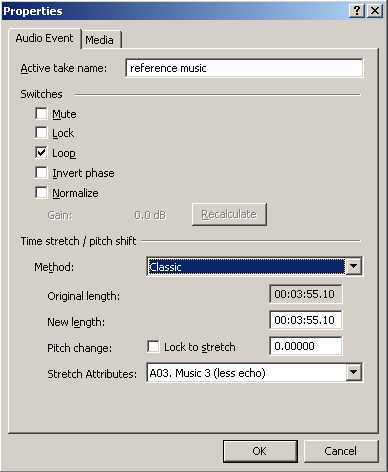 Play around with the settings. Hope that helps.  |
|
|
|
|
|
TSCrazy.SoT.Gila
|
Nov 22 2006, 11:46 PM
|
|
|
|
|
|
|
|



 Quote
Quote


 0.0158sec
 1.85
1.85
 5 queries
 GZIP Disabled